Web Hosting
 Windows HostingBuilt for Windows apps and websites – stability, speed and flexibility
 Reseller HostingLaunch a hosting business without technical skills or expensive infrastructure
 Affiliate ProgramRefer customers and earn commissions from sales across our platform
 Domain SearchFind and secure a domain name in seconds with our quick lookup tool
 CO ZA Domains
 All DomainsExplore domain names from over 324 TLDs globally – all in one place
 Free Whois Lookup Tool South Africa
 VPS
VPS Website Builder
 Online ShopSet up a sleek eCommerce store with zero coding knowledge
 SSLs
SSLs SupportAccess help articles, how-tos, and everything about our services
 Blog
Blog Contact UsReach our team instantly via live chat or drop us an email
Most chatbots stop at answering questions. OpenClaw goes a step further by completing real business tasks directly from WhatsApp or Telegram.
Instead of opening multiple apps, logging into dashboards, or building complex automation workflows, you simply send a message. OpenClaw handles the task in the background and replies when it’s finished.
You can run OpenClaw on your laptop while learning the platform or testing new workflows.
Once it’s supporting day-to-day business operations, though, a VPS becomes the better choice. A production setup should have at least 1 vCPU, 2 GB RAM, and 20 GB SSD storage on Ubuntu 20.04 or later.
If you plan to run multiple agents or local AI models with Ollama, start with 2 vCPU and 4 GB RAM for smoother performance.
These use cases show how businesses are using OpenClaw to automate routine work, save time, and keep operations running around the clock.
You’ll also find practical implementation tips and learn why a dedicated VPS is the foundation for a reliable production deployment.
Table of Contents
OpenClaw Usecases by Business Function
1) Email and Inbox Management
Email can easily consume hours of your day. Reading every message, deciding what needs attention, drafting replies, and forwarding emails to the right people quickly becomes repetitive work.
OpenClaw helps by handling many of those routine tasks through a simple WhatsApp or Telegram conversation.
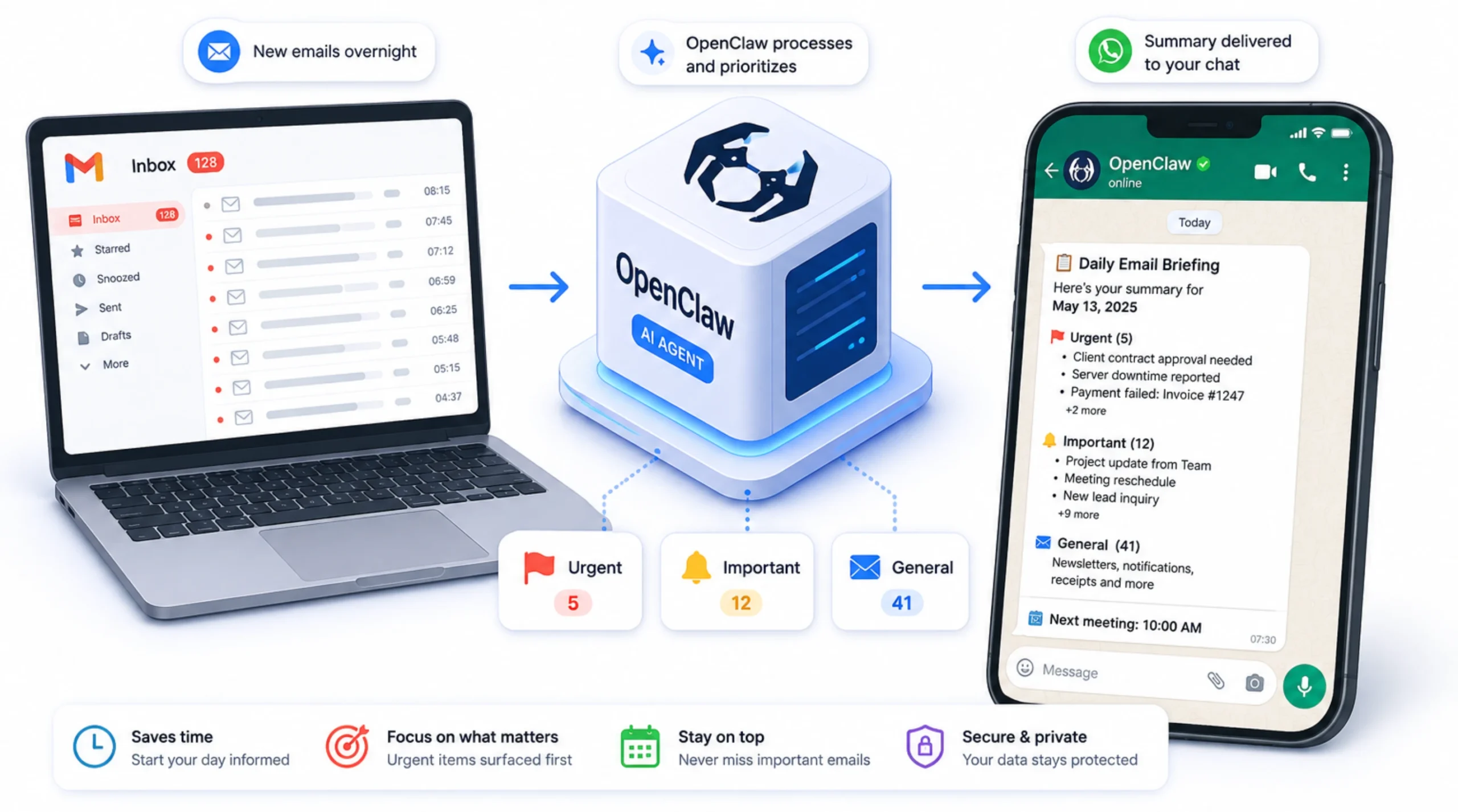
Use Case 1: Daily Email Briefing via Telegram/WhatsApp
Instead of opening your inbox first thing in the morning, OpenClaw can review new emails, identify the ones that need immediate attention, and send you a clear summary in your preferred messaging app.
You can see what deserves your focus without sorting through dozens of messages yourself.
Use Case 2: Auto-Drafting Replies for Routine Inquiries
Many businesses receive the same questions every day, from pricing requests to appointment inquiries and common support questions.
OpenClaw can recognize these recurring patterns and prepare draft replies for your review.
Once you’re confident in the workflow, you can automate approved responses for even faster turnaround.
Use Case 3: Community Channel Monitoring and Response Drafting
If your business manages active communities on platforms such as Discord, Telegram, or WhatsApp, OpenClaw can monitor incoming conversations and prepare draft responses for frequently asked questions.
Your team can review and send these drafts instead of writing the same answers repeatedly.
Where this pays off: Agencies, consultancies, customer support teams, and businesses that manage large email volumes or active online communities can reduce repetitive administrative work while responding more quickly.
2) Automated Bookkeeping and Receipt Capture
Bookkeeping is full of small, repetitive tasks that take time but still have to be done. OpenClaw can automate much of the data collection, helping you keep financial records organized without constantly switching between apps.
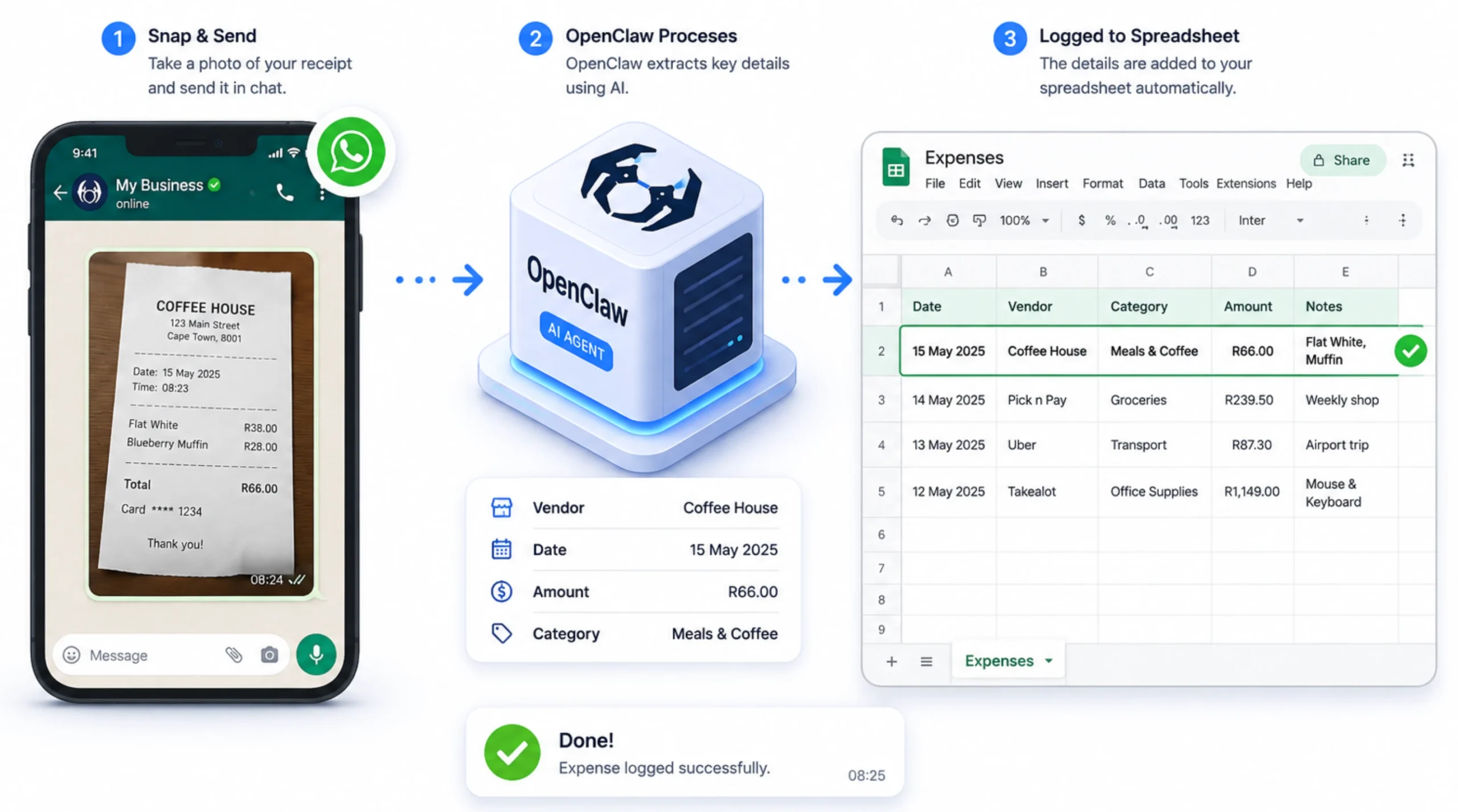
Use Case 4: Receipt Photo to Expense Spreadsheet
Take a photo of a receipt and send it through WhatsApp or Telegram.
OpenClaw extracts key details such as the vendor, transaction date, and amount, then records the information in your spreadsheet.
After processing the receipt, it sends a confirmation message so you can quickly verify that everything was captured correctly.
Use Case 5: Email Receipt to Structured Parts List
When receipts or purchase confirmations arrive by email, OpenClaw can extract the line items and organize them into a structured, categorized list.
This makes it easier to track purchases, review spending, and maintain accurate records.
Use Case 6: Mileage, Invoices, and Petty Cash Logging
The same workflow can be applied to other business expenses.
OpenClaw can capture information from mileage claims, supplier invoices, petty cash expenses, and similar records, then log the details automatically to keep your books up to date.
Where this pays off: freelancers, sole traders, and small businesses without a dedicated bookkeeper who are currently keeping records by hand, or not keeping them at all.
3) Client Onboarding and Business Operations
As you connect OpenClaw to the tools your business already uses, it can automate entire workflows instead of isolated tasks.
A single trigger can start a sequence of actions that would otherwise require multiple manual steps.
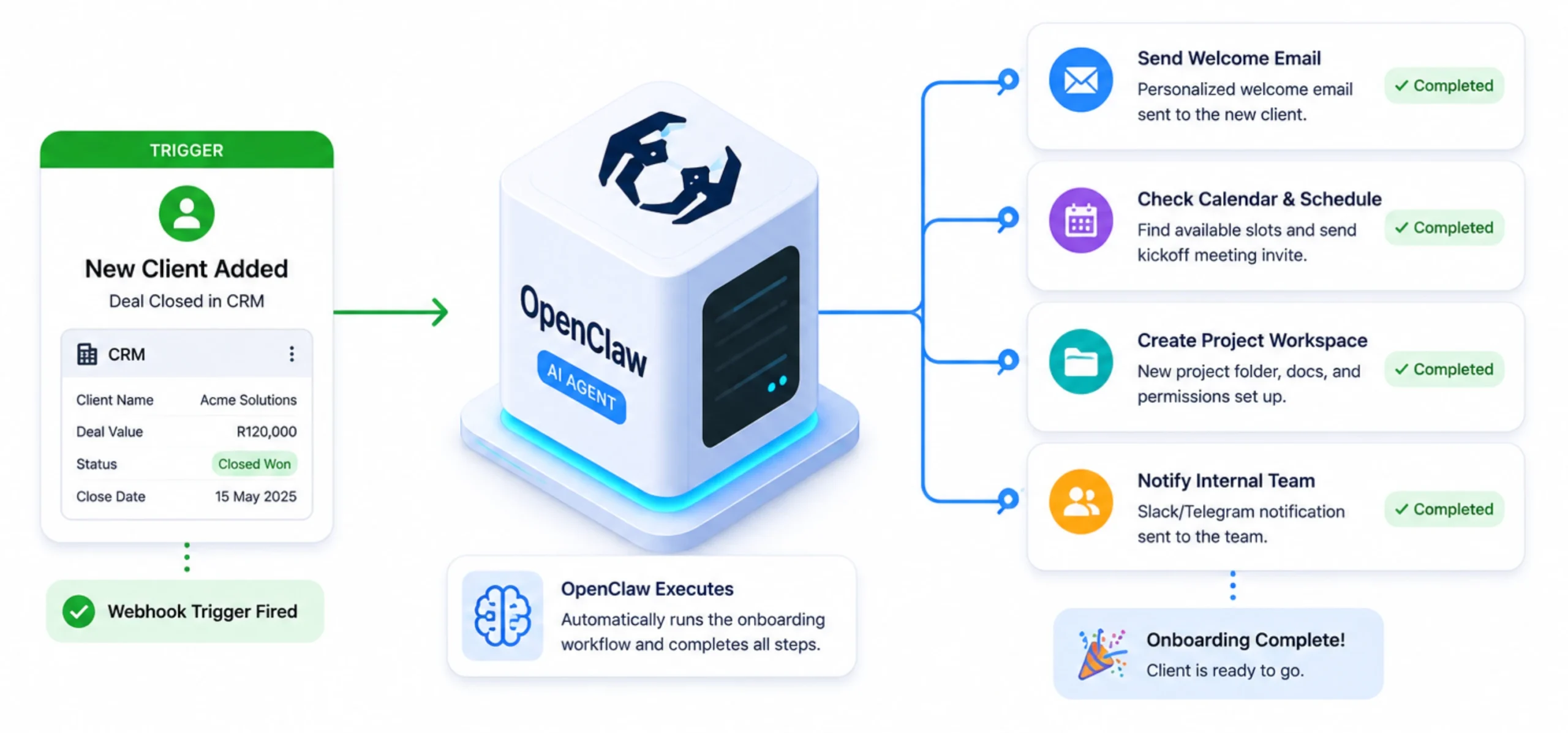
Use Case 7: Automated Client Onboarding Sequence
When a new client is added to your CRM or another connected system, OpenClaw can trigger your onboarding workflow automatically.
Depending on how you’ve configured it, this could include creating user accounts, sending welcome emails, scheduling meetings, updating project management tools, or notifying your team that the client is ready to onboard.
Use Case 8: Multi-Agent Business Operations
Four parallel AI agents, strategy, development, marketing, business, running via Telegram at the same time.
Each one operates in its own isolated workspace, with its own configuration, system prompt, memory context, and assigned tools.
They don’t share context unless explicitly connected, so each agent stays focused on its own domain without the others interfering. The whole setup runs on a single VPS.
Use Case 9: Sales Prospecting and Outreach Sequences
OpenClaw can automate parts of your sales workflow by monitoring defined triggers, collecting lead information from connected systems, updating your CRM, and initiating follow-up actions based on rules you set.
This helps reduce repetitive administrative work while keeping your sales pipeline moving.
Use Case 10: Internal Dashboard Data Retrieval
Instead of signing in to multiple internal dashboards throughout the day, you can ask OpenClaw for the information you need through WhatsApp or Telegram.
It can retrieve data from connected systems and present it in a simple chat response, giving you quick access to business information without switching between applications.
Where this pays off: Businesses that manage recurring client onboarding, teams running multiple operational workflows, and organizations that rely on several connected business applications.
4) KPI Reporting and Performance Snapshots
Checking several dashboards just to answer a simple question can slow down your day.
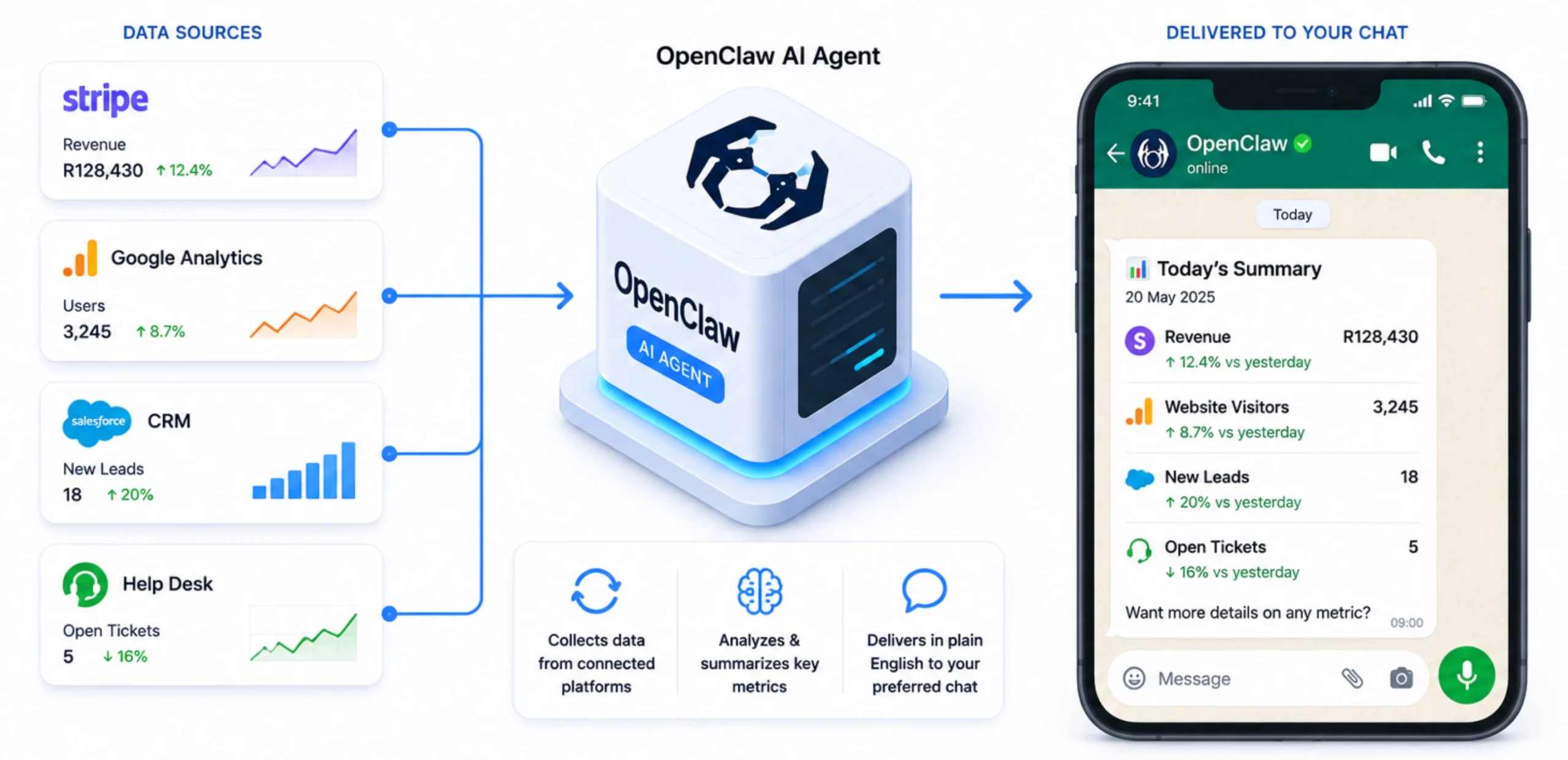
OpenClaw brings important business metrics into one place by collecting data from your connected tools and delivering it through the messaging apps you already use.
Use Case 11: Scheduled Analytics Digest
OpenClaw can retrieve data from platforms such as Stripe, Google Analytics, or other API-connected services and send scheduled performance summaries through email, Slack, Telegram, or WhatsApp.
Instead of logging into multiple dashboards, you receive a concise report with the metrics you care about most.
Use Case 12: Per-Team Performance Reports
Different teams often need different information.
OpenClaw can generate customized reports for each department based on your workflow.
Sales can receive pipeline updates, support teams can review ticket activity, while leadership gets a broader business overview, all generated automatically from connected data sources.
5) Content Creation and Marketing Automation
Creating content consistently takes time.
While OpenClaw doesn’t replace your marketing strategy or creative direction, it can automate many of the repetitive tasks involved in publishing, organizing, and monitoring content.
Use Case 13: Long-Form Content Repurposing
After you publish a blog post, article, or video, OpenClaw can transform that content into formats suitable for different channels.
For example, it can prepare social media posts, newsletter content, or summaries based on rules and prompts you’ve configured.
Use Case 14: Daily YouTube and Content Summarization
OpenClaw can monitor selected content sources on a schedule, summarize new videos or articles, and deliver the key points directly to your preferred chat platform.
This helps you stay informed without manually reviewing every new publication.
Use Case 15: Brand Mention and Competitor Tracking
By connecting OpenClaw to the appropriate monitoring services or search tools, you can receive notifications when your brand, competitors, or selected keywords are mentioned.
The alerts arrive automatically, helping you keep track of important conversations without constant manual searching.
Use Case 16: Weekly Automated SEO Analysis
OpenClaw can collect data from your SEO tools on a scheduled basis and organize it into a single report.
Rankings, traffic trends, and technical issues can be summarized and delivered automatically, making it easier to review your site’s performance each week.
6) DevOps and Server Management
OpenClaw can also serve as a practical assistant for development and infrastructure tasks.
By connecting it to your servers and development tools, you can manage routine operations directly from your preferred chat app instead of logging into multiple systems.
Use Case 17: SSH Command Execution from Chat
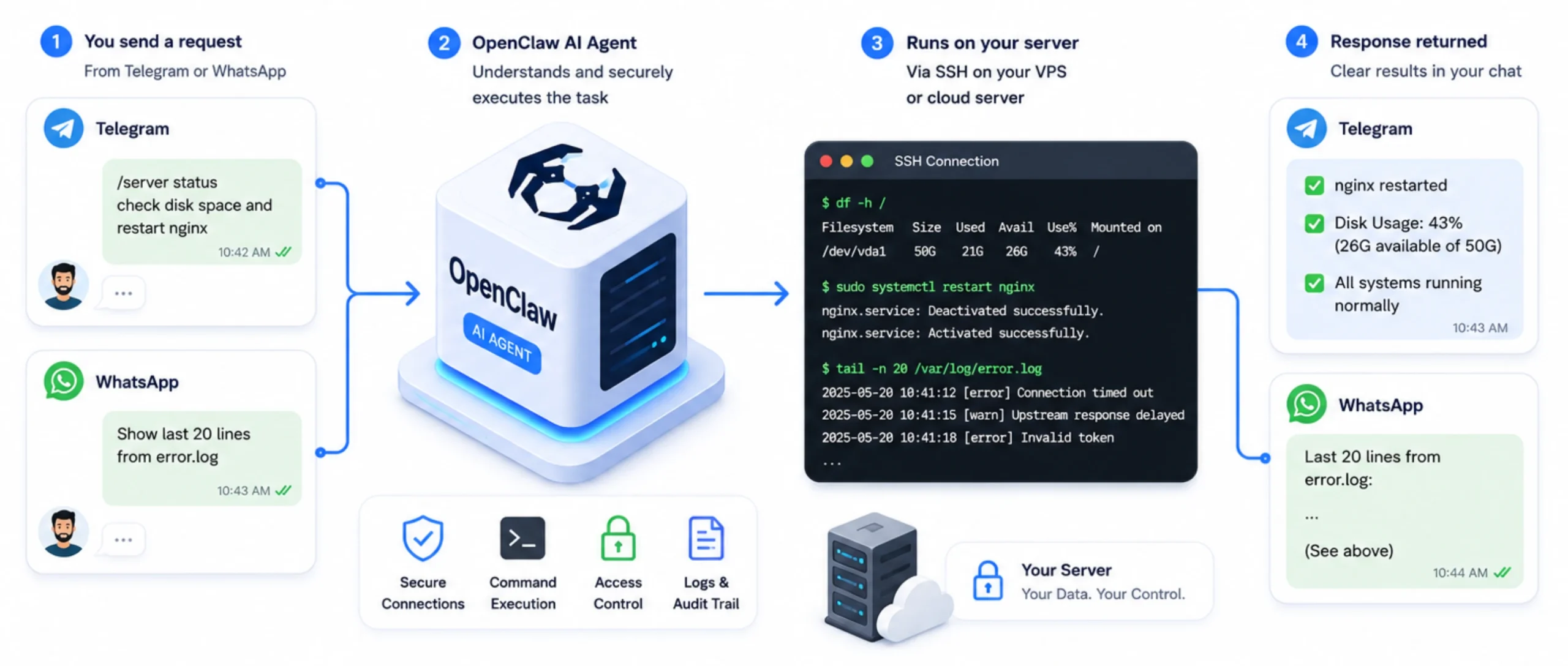
OpenClaw can execute approved SSH commands on connected servers through Telegram or WhatsApp.
You can check disk usage, review logs, restart services, or run maintenance commands, then receive the results in a clear chat response.
Use Case 18: CI/CD Failure Monitoring and Voice-Driven Fixes
When connected to your CI/CD platform, OpenClaw can notify you whenever a build or deployment fails.
Depending on your workflow, it can include useful details such as the failed job, error messages, or deployment status, helping you investigate issues more quickly.
Use Case 19: Pull Request Plain-English Summaries
OpenClaw can monitor your source code repository and generate easy-to-read summaries for new pull requests.
Instead of reviewing every code change immediately, your team gets a concise overview of what changed before starting a detailed review.
Use Case 20: Weekly Dependency and CVE Scanning
On a scheduled basis, OpenClaw can review project dependencies, identify available updates, and report known security vulnerabilities.
Regular reports help development teams stay on top of maintenance tasks before they become larger problems.
Where this pays off: Software teams, DevOps engineers, managed service providers, and developers responsible for maintaining multiple applications or servers.
7) Private AI and Document Automation
For organizations that handle confidential information, keeping AI workloads within their own infrastructure can be an important requirement.
OpenClaw supports self-hosted AI models, giving businesses more control over where their data is processed.
Use Case 21: Local Private Document Assistant
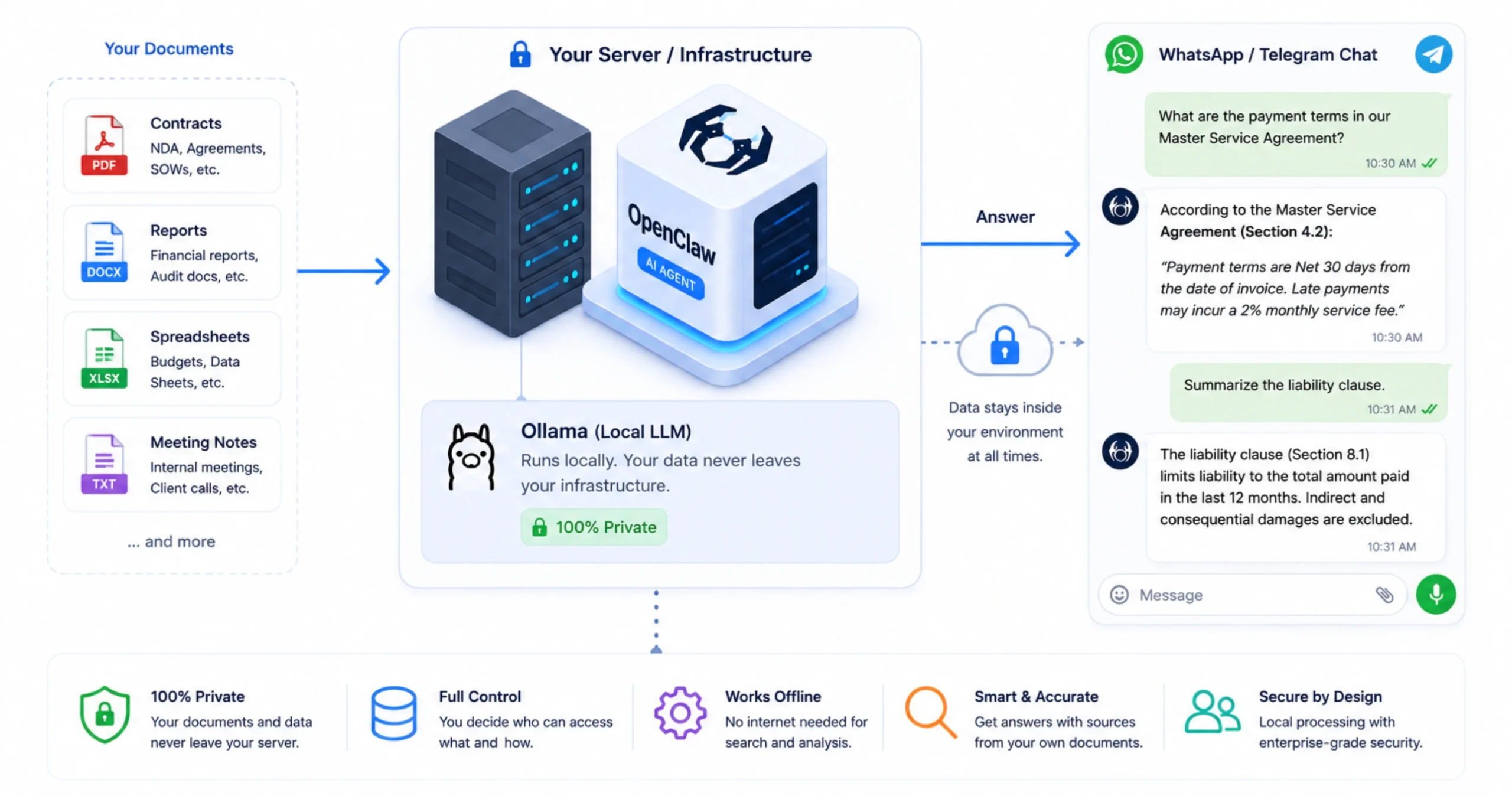
When integrated with Ollama, OpenClaw can use locally hosted AI models to search and analyze internal documents such as contracts, reports, meeting notes, or knowledge bases.
Since the models run on your own server, sensitive business data remains within your infrastructure.
Use Case 22: Browser Automation for Forms, Reports, and Competitor Pricing
OpenClaw can automate browser-based tasks such as completing forms, downloading reports, collecting information from websites, or retrieving data from online systems.
These repetitive processes can be scheduled or triggered through a simple chat message.
Why Your OpenClaw Needs a Reliable VPS
While you can test OpenClaw on your local computer, production deployments are best suited to a VPS that runs continuously. This allows your agents, scheduled jobs, integrations, and automations to stay available even when your laptop is turned off.
Dedicated resources also improve reliability. Background tasks, multiple agents, and local AI models can consume significant CPU and memory, so having a VPS with guaranteed resources helps reduce slowdowns and failed workflows.
Truehost simplifies deployment by providing OpenClaw-ready VPS plans, allowing you to get started without building the server environment from scratch.
| Plan | vCPU | RAM | Storage | Price |
|---|---|---|---|---|
| OpenClaw KVM1 | 1 vCPU | 2 GB | 50 GB NVMe | R285/mo |
| OpenClaw KVM2 | 2 vCPU | 4 GB | 100 GB NVMe | R380/mo |
These plans are priced in South African Rand (ZAR), include local support, and eliminate foreign exchange charges for South African businesses.
Getting Started and Implementation Tips
- Choose a VPS plan that matches your expected workload.
- Connect OpenClaw to your preferred messaging platform and the business tools you want to automate.
- Start with a single workflow, test it thoroughly, then expand as you gain confidence.
- As your deployment grows, review user permissions, monitor your automations, and carefully manage any community skills or plugins you install.