Web Hosting
 Windows HostingBuilt for Windows apps and websites – stability, speed and flexibility
 Reseller HostingLaunch a hosting business without technical skills or expensive infrastructure
 Affiliate ProgramRefer customers and earn commissions from sales across our platform
 Domain SearchFind and secure a domain name in seconds with our quick lookup tool
 CO ZA Domains
 All DomainsExplore domain names from over 324 TLDs globally – all in one place
 Free Whois Lookup Tool South Africa
 VPS
VPS Website Builder
 Online ShopSet up a sleek eCommerce store with zero coding knowledge
 SSLs
SSLs SupportAccess help articles, how-tos, and everything about our services
 Blog
Blog Contact UsReach our team instantly via live chat or drop us an email
Installing OpenClaw is the easy part. The bigger question comes after setup: what should I use it for?
In most cases you’d install Openclaw, run a few prompts, and then leave it doing nothing because you have no concrete picture of what to build with it.
Well, for the assistant to work, you have to make it part of your daily routine by giving it a real job to do.
Instead of sitting idle, OpenClaw can be configured to quietly work in the background as your personal assistant.
It can remind you about important tasks, monitor information, organize your notes, keep track of recurring events, and even perform actions automatically based on schedules or triggers.
Plus, you interact with it through apps you use daily like WhatsApp or Telegram.
The best part is that you decide how much responsibility your assistant takes on. It can be as simple as sending reminders every morning or as advanced as coordinating multiple services, storing long-term context, and responding intelligently to changing situations.
This guide walks you through practical OpenClaw personal assistant ideas you can start using right away.
Each workflow shows how features such as scheduled cron jobs, custom skills, persistent memory, and third-party integrations work together to create an AI assistant that actively helps manage your day instead of simply answering questions.
Most of these automations rely on OpenClaw running continuously.
For the best experience, host it on an always-on VPS such as Truehost OpenClaw VPS Hosting, so your assistant remains available 24/7 and scheduled tasks continue running even when your personal computer is turned off.
Table of Contents
OpenClaw Personal Assistant Ideas List
The real value of OpenClaw comes from giving it jobs that save you time every single day.
Instead of opening five different apps every morning or trying to remember every small task yourself, your assistant can gather information, keep an eye on important events, and send updates specifically when you need them.

Category 1: Daily Life and Home Management
Simple automations that help you stay organized at home, save time, and reduce everyday admin.
1) Autonomous Morning Intelligence Brief
Instead of checking several apps every morning, OpenClaw sends one personalized briefing through WhatsApp or Telegram.
Your update can include calendar events, important emails, weather, industry news, and your local load shedding schedule, giving you everything you need to start the day in one place.
Simple Setup
Schedule a 6:00 AM cron job that combines data from Google Calendar, your preferred weather service, and the EskomSePush API.
You can also personalize the briefing with local information, such as Johannesburg traffic updates or Cape Town wind and fire alerts.
2) Load Shedding Schedule Monitor
OpenClaw is configured to check your municipality’s load shedding schedule, warn you before outages, and even highlight conflicts with meetings or appointments in your calendar.
To Build This
Connect the EskomSePush API and schedule this:
- A morning summary of the day’s load shedding.
- A reminder 30 minutes before each scheduled outage.
If you use Home Assistant, you can also trigger automations for your geyser, inverter, or other smart devices.
3) Family Brain and Shared Grocery List
Instead of relying on scattered family messages, OpenClaw keeps a shared grocery list that updates automatically as people mention items in your household WhatsApp or Telegram group.
It organizes everything into categories, making the weekly shop much easier.
This is how to try it
Connect OpenClaw to your family chat and let it sort grocery items into categories like produce, pantry, protein, and household supplies.
Schedule a Friday afternoon reminder that sends the complete shopping list before the weekend.
4) Smart Home and Power Management
OpenClaw works alongside Home Assistant to automate everyday tasks around your home.
It can prepare your home before load shedding, manage smart devices, and provide quick status updates through a simple chat message.
To try it, do this
Connect OpenClaw to Home Assistant using its REST API.
Start with one automation, such as controlling your geyser, then gradually expand to lighting, security systems, and inverter management.
5) Load-Aware Work Scheduling
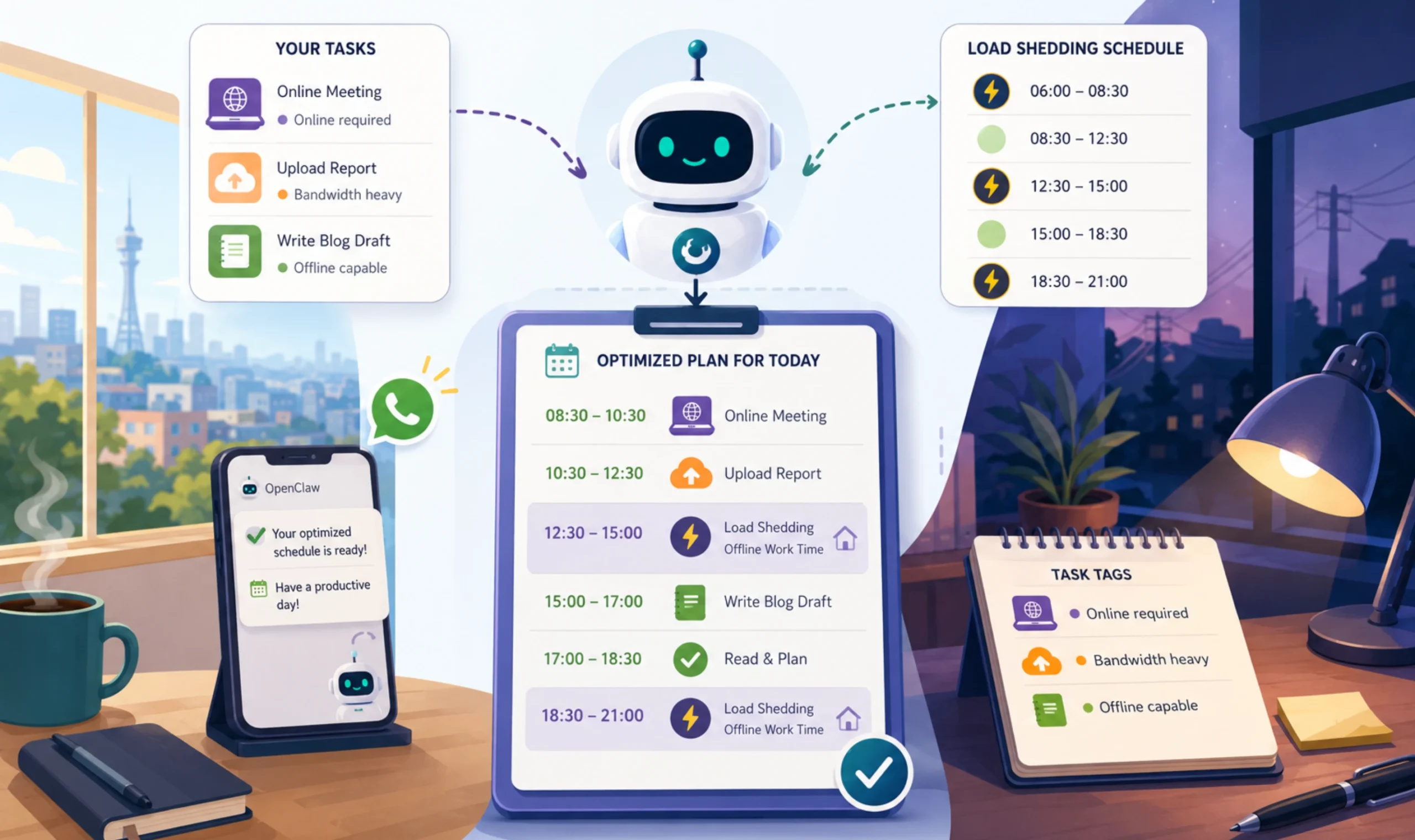
OpenClaw plans your work around the load shedding schedule, placing online tasks when power is available and moving offline work into outage periods.
The result is a daily schedule that makes better use of your available time.
How to Set It Up
Tag your tasks as:
- Online required
- Offline capable
- Bandwidth heavy
Run a morning cron job that compares your task list with the latest load-shedding schedule and sends an optimized plan for the day.
6) Traffic and Commute Optimizer
Instead of using fixed reminders, OpenClaw checks live traffic conditions and tells you when it’s time to leave.
This is especially useful for busy commuter routes around Johannesburg and Cape Town.
How to Try the Idea
Connect a traffic or maps service and let OpenClaw calculate your ideal departure time based on your first calendar event.
Receive a reminder about 20 minutes before it’s time to leave.
7) Recycling and Waste Schedule Reminders
OpenClaw keeps track of your local waste collection schedule and reminds you which bin needs to go out before collection day.
It can also notify you if your municipality changes its collection dates.
Start with This Workflow
Add your collection calendar and schedule an 8:00 PM reminder on the evening before each pickup.
You can also check your municipality’s website weekly for schedule updates.
8) Meal Planning From What You Have
OpenClaw creates meal suggestions using ingredients already in your kitchen, helping reduce food waste while building a shopping list for anything that’s missing.
It also estimates your grocery costs based on your budget.
Begin Here
Send a list of your available ingredients together with your weekly grocery budget.
Every Saturday, OpenClaw generates meal ideas, a shopping list, and an estimated total for your next grocery trip.
9) Health and Habit Logging via Chat
For OpenClaw to track your habits, simply send a quick message whenever something happens. You might log your sleep, water intake, workout, mood, or daily walk in the same way you’d message a friend.
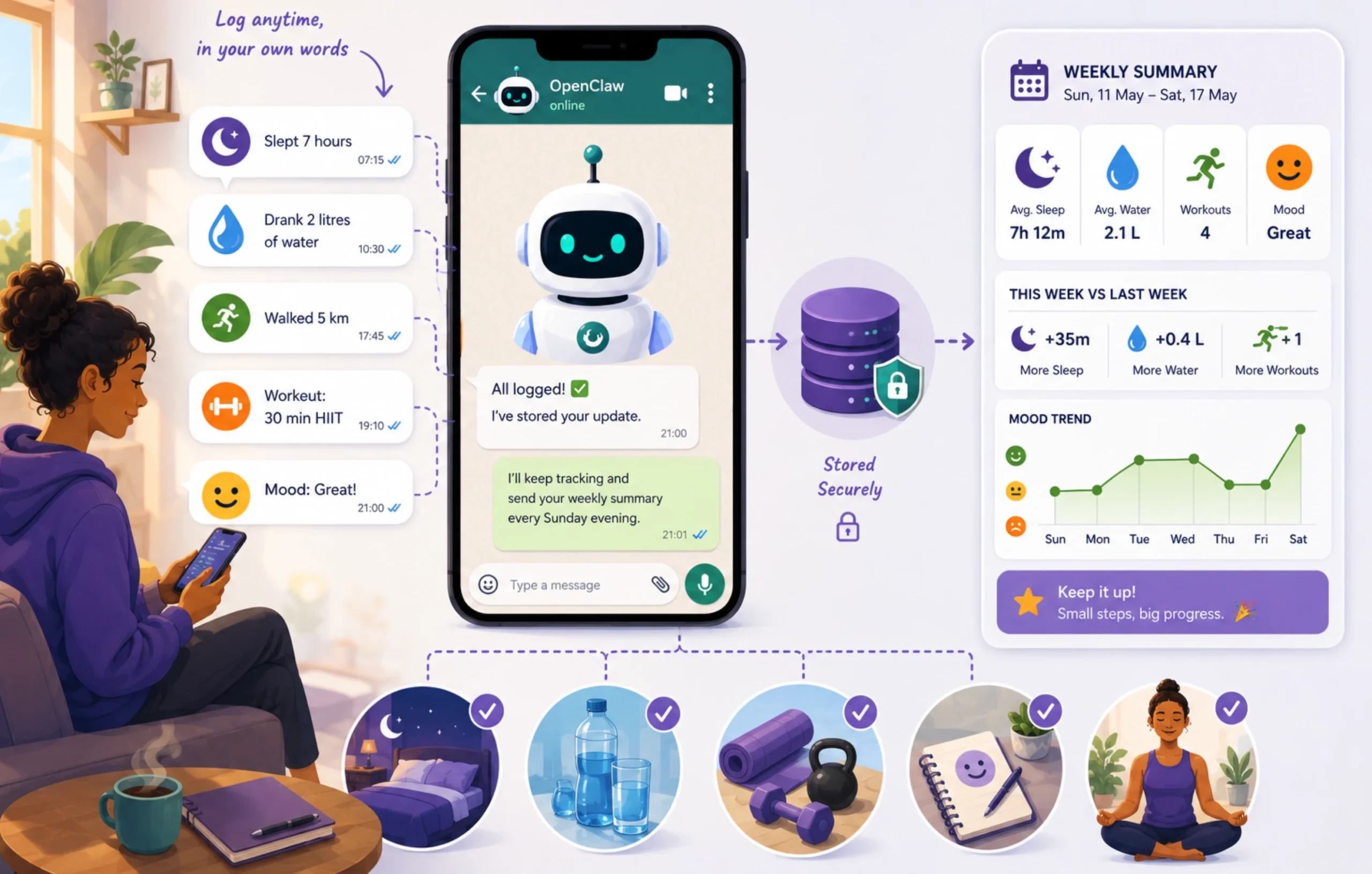
The assistant stores everything, identifies patterns over time, and sends regular summaries that highlight your progress.
Try the idea
Allow OpenClaw to accept freeform messages throughout the day, like “Slept 7 hours” or “Walked 5 km.”
Every Sunday evening, schedule a report showing:
- Weekly averages
- Current streaks
- One useful observation comparing this week with the previous one
10) Event and Travel Planner
OpenClaw helps organize trips and events by bringing accommodation, budgets, travel plans, and group coordination into one place.
It works well for family holidays, long weekends, road trips, and special occasions.
To try it
Share your destination, travel dates, group size, and budget.
OpenClaw creates a travel plan with accommodation options, estimated costs, a packing checklist, and even drafts a WhatsApp message for everyone in your group.
Category 2: Personal Finance and Admin
These workflows make it much easier to stay on top of your money without adding more work to your day.
11) Rand Budget Tracker with USD Awareness
Instead of opening a budgeting app, you can send messages like “Fuel R850,” “Checkers R1,240,” and “Netflix $15.99.”
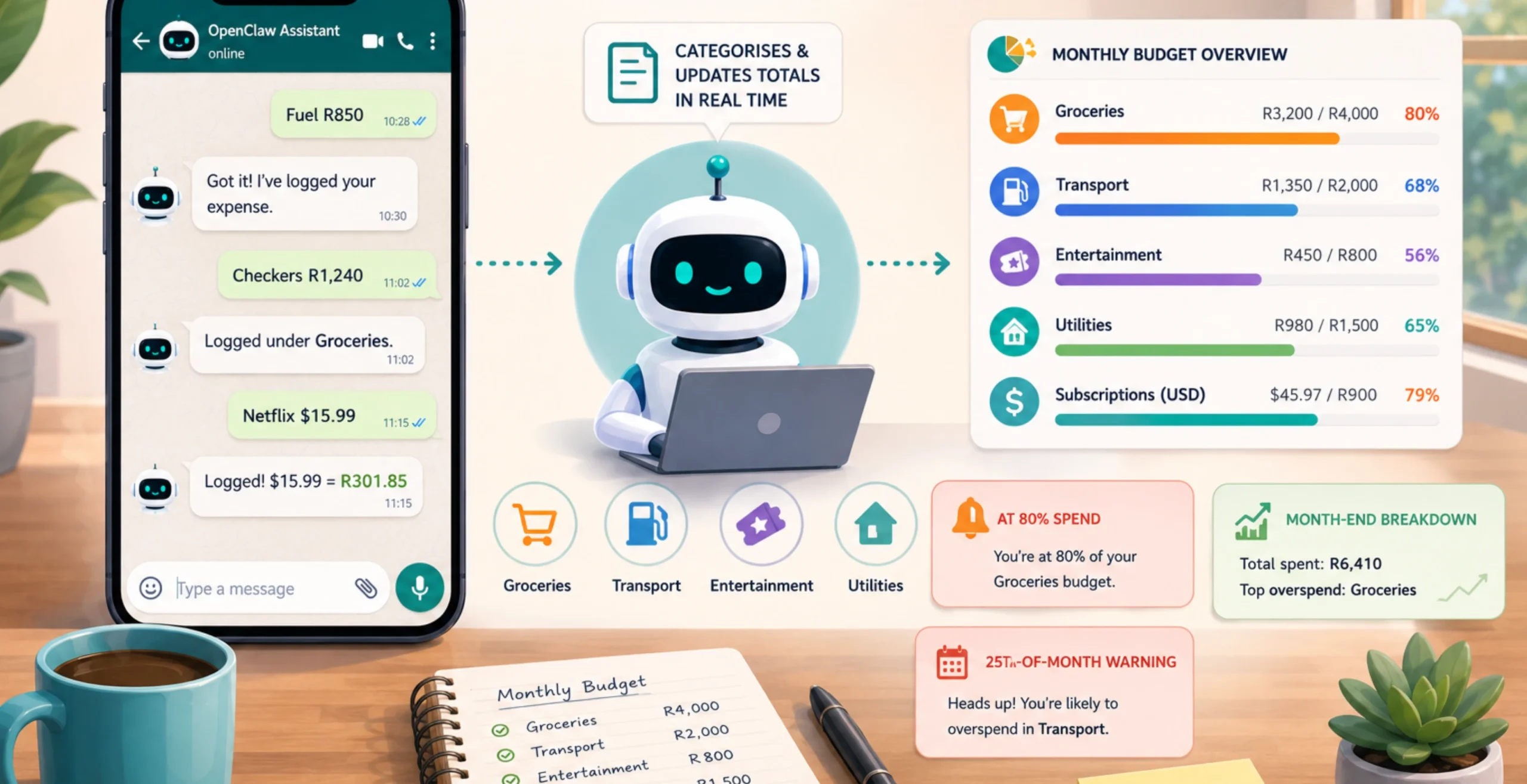
The assistant automatically categorizes each expense, updates your monthly totals, and keeps track of how much remains in every budget category.
If you pay for international services, OpenClaw also displays the current rand equivalent using the latest exchange rate. This gives you a clearer view of how exchange rate movements affect your monthly spending.
Here’s Where to Begin
Set your monthly budgets once for different categories.
From then on, simply send expenses through WhatsApp or Telegram whenever you spend money.
Configure OpenClaw to produce a month-end report showing total spending, category breakdowns, and the area where you overspent the most.
12) Side Hustle and Dual-Income Tracker
If you earn income from more than one source, OpenClaw keeps each stream organized. It tracks income, expenses, and overdue invoices and produces a weekly summary so you always know how each side hustle is performing.
This works well for Takealot sellers, Airbnb hosts, tutors, freelancers, and anyone billing overseas clients. It shows dollar payments alongside their rand equivalent.
Try This
Create labels for your income streams and record income or expenses with simple chat messages.
Every Sunday, OpenClaw sends a summary of each income stream, including both USD and ZAR values where applicable.
13) SARS Tax Season Prep Assistant
Instead of searching through months of emails during tax season, OpenClaw collects your important tax documents throughout the year.
It monitors your inbox for items like IRP5s, medical aid certificates, and retirement annuity statements, keeping an up-to-date checklist ready for tax season.
The Workflow
Schedule a weekly inbox scan starting in March.
OpenClaw records each document’s type, sender, and date received, then prepares a deductible summary when SARS eFiling opens in July, ready for your accountant or your own submission.
14) Invoice Generator
OpenClaw creates professional invoices from a single text message, automatically calculating 15% VAT and generating a PDF that’s ready to send.
To Build It
Set up your invoice template once with your business details. After that, send a text containing the client name, service, and amount.
OpenClaw generates the invoice, remembers repeat client details, and can remind you about invoices that remain unpaid after the agreed payment terms.
15) Subscription and Renewal Watchdog
Recurring subscriptions are easy to forget, especially when payments happen automatically.
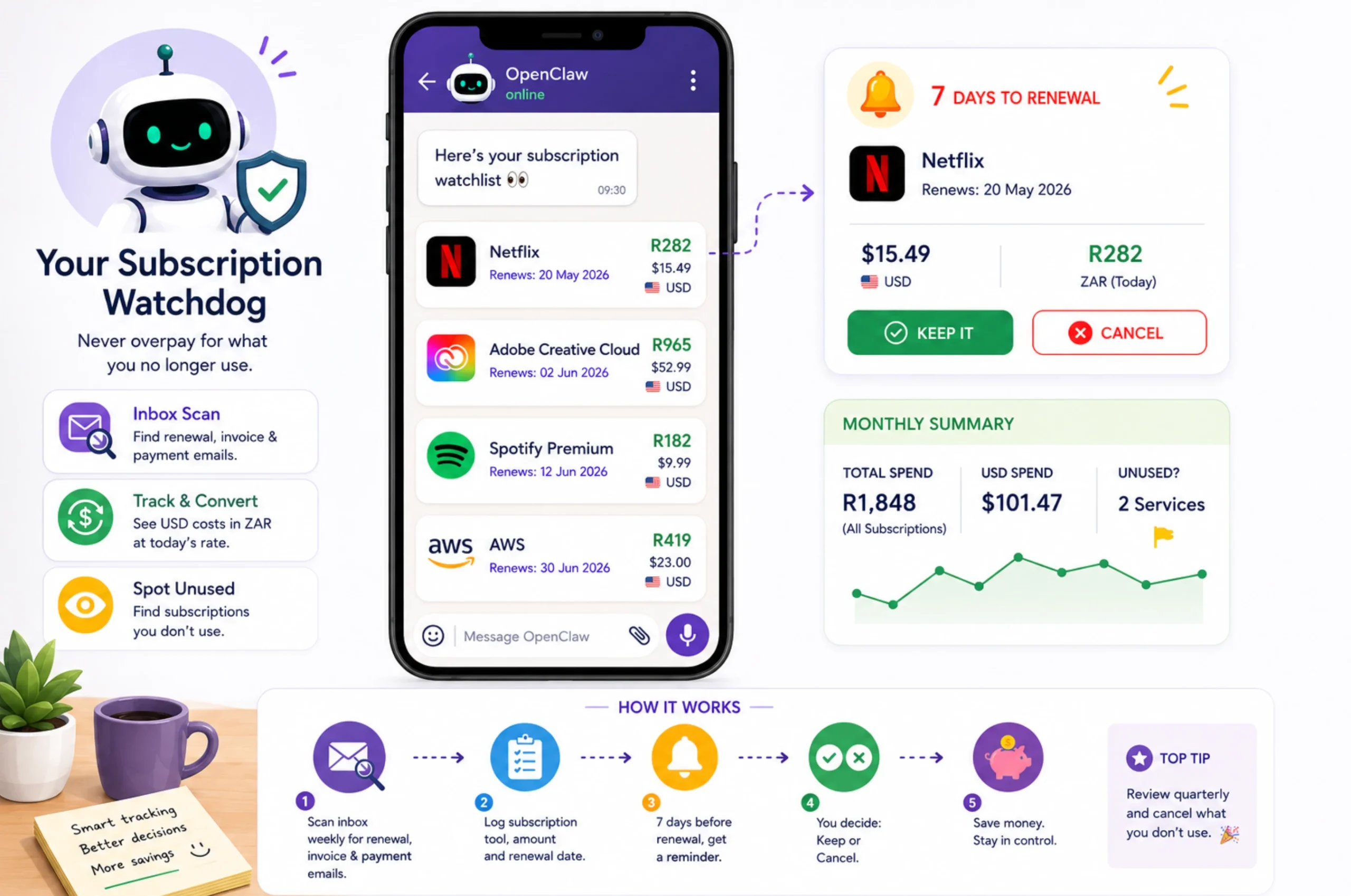
OpenClaw monitors your inbox for renewal notices, tracks upcoming renewals, and converts dollar-priced subscriptions into rand so you can see what they’re costing each month.
Start Here
Schedule a weekly inbox scan for renewal emails.
The assistant records the service name, amount, and renewal date, then sends a reminder seven days before renewal with the option to keep or cancel the subscription.
16) Life Admin and Bill Reminder
Annual renewals and recurring bills can easily slip by when life gets busy.
OpenClaw keeps track of important obligations such as vehicle licenses, municipal rates, insurance renewals, and domain names, sending reminders with enough time to take action.
First Steps
Create a master list of recurring bills and renewal dates, then let OpenClaw monitor them automatically.
For example:
- Vehicle license reminders 30 days before expiry.
- Domain renewals 45 days before expiry.
Simply reply when you’ve completed the task, and the assistant updates its records.
17) Personal CFO for Freelancers
OpenClaw keeps track of your clients, hours worked, invoices, payments, and overall profitability without requiring manual spreadsheets.
It also identifies slow-paying clients and shows both rand earnings and dollar invoices with current exchange-rate context.
How to try it
Log your work after each session using a simple chat message.
At the end of each month, OpenClaw generates a report showing:
- Hours worked
- Amount billed
- Effective hourly rate
- Payment status
- Most profitable clients
- Invoices overdue by more than 30 days
Category 3: Productivity and Knowledge Work
These workflows are especially useful for anyone managing multiple projects or large amounts of information.
18) Smart Inbox Triage
Instead of working through dozens of emails one by one, OpenClaw reviews your inbox, filters out newsletters and low-priority messages, and highlights what needs your attention.
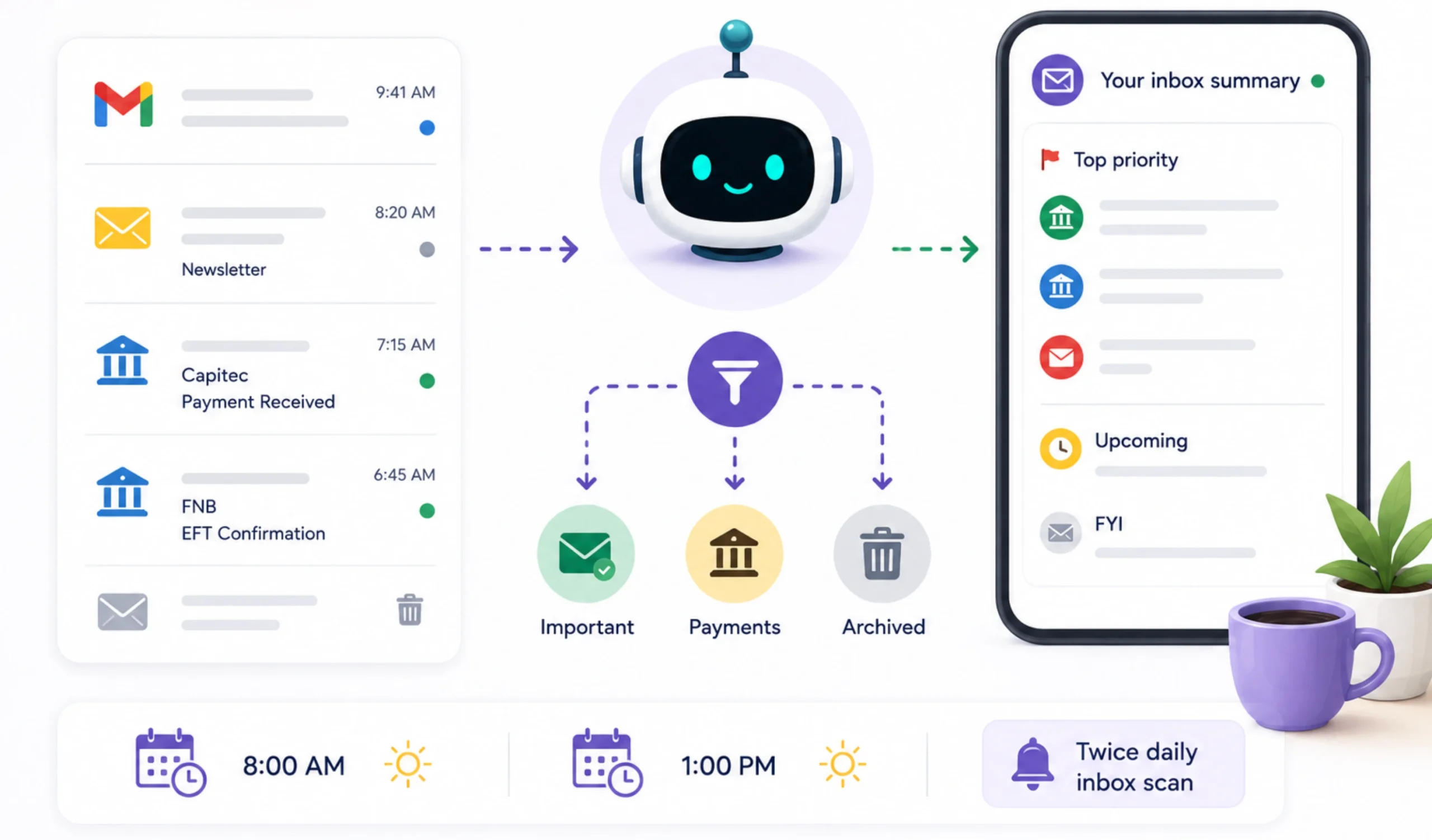
It can also identify payment confirmations, deadlines, and other important notifications, making it easier to spot messages that shouldn’t be missed.
Getting Started
Connect your email account and schedule inbox scans at 8:00 AM and 1:00 PM.
OpenClaw can be configured to automatically archive newsletters, flag payment confirmations from banks like Capitec or FNB, and send a short summary of your highest-priority emails.
19) Proactive Task and Deadline Nudges
OpenClaw checks your task list every morning and reminds you about overdue work, upcoming deadlines, and scheduling conflicts before they become a problem.
Instead of reviewing several apps, you receive one clear action list to start the day.
Quick Setup
Connect your preferred task manager, such as Notion, Todoist, or a Markdown task file.
Schedule a 7:00 AM cron job that groups tasks into the following:
- Overdue
- Due within 48 hours
- Calendar conflicts
The summary stays short enough to read in less than a minute.
20) Calendar, Scheduling and Natural Language Booking
OpenClaw checks your calendar, finds available time, creates events, sends invitations, and follows your preferred meeting schedule automatically.
Start Here
Connect Google Calendar and set your preferences once, including:
- Working hours
- Meeting buffers
- No-meeting days
From then on, OpenClaw applies those rules whenever you ask it to schedule a meeting.
21) Meeting Intelligence and Auto-Notes
After every meeting, OpenClaw turns your notes or voice recording into a structured summary with action items and a ready-to-send follow-up email.
It also keeps a running history for recurring meetings, making it easy to review previous discussions.
Build This Workflow
After each meeting, send a voice note or a few bullet points.
OpenClaw returns:
- A short meeting summary
- A numbered action list with owners and deadlines
- A follow-up email draft
It can also warn you about back-to-back meetings with little or no break in between.
22) Voice Note Journaling Pipeline
Ideas often arrive while you’re driving, commuting, or away from your desk.
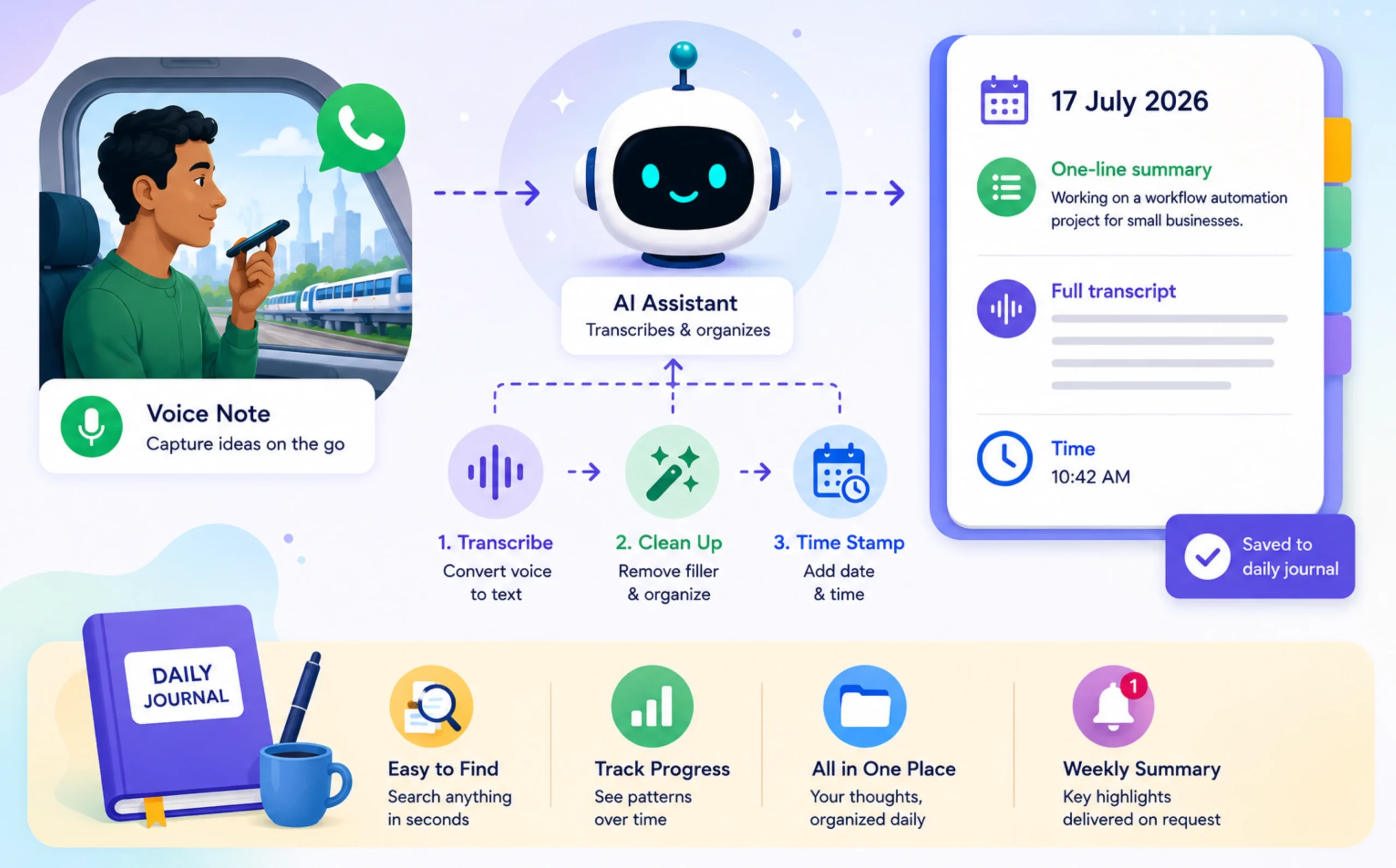
OpenClaw transcribes your voice notes, removes filler words, and organizes everything into a searchable daily journal.
It’s an easy way to capture ideas without stopping what you’re doing.
Try This
Connect a transcription service to WhatsApp or Telegram. Each voice note is saved with date and time, a one-line summary, and a full transcript.
At the end of the day, everything is combined into a single Markdown journal that you can search later.
23) Personal Second Brain Search
Finding information across years of notes can take longer than writing the notes themselves.
OpenClaw orchestrates intelligent searches across your connected knowledge base, helping you find information stored in tools like Obsidian, Notion, or Markdown files.
Semantic search is normally powered by embeddings, vector storage, and retrieval, while OpenClaw coordinates the workflow rather than acting as the retrieval engine itself.
Automation Setup
Connect OpenClaw to your notes repository and configure your retrieval pipeline.
Start by asking simple questions such as:
- “What did I write about client onboarding?”
- “Show my notes on Docker.”
As your knowledge base grows, your assistant becomes much faster at finding information than manual searching.
24) Deep Research on Demand
OpenClaw gathers information from multiple sources, summarizes the findings, and includes citations depending on the configured search provider, so you can verify the results yourself.
It’s especially useful when comparing products, researching regulations, or evaluating business decisions.
Getting Started
Enable a supported web search provider and ask a specific question instead of a broad topic.
For example:
- Current SARS VAT thresholds
- CIPC registration requirements
- Solar installation options in Gauteng
- South African bank fee comparisons
OpenClaw returns a concise research brief with source links for further reading.
25) Learning Companion for Skills and Courses
OpenClaw can be configured to organize your study schedule, summarize course material, quiz you on recent topics, and spend more time on areas where you need additional practice.
Quick Setup
Upload your course notes or syllabus and tell OpenClaw how much time you have available each week.
It can then build a study timetable, deliver a short quiz after each session, introduce the next topic automatically, and send a Friday progress report showing completed topics, quiz scores, and recommended revision areas.
Category 4: Content Creation and Marketing
OpenClaw can be configured to handle social media updates, newsletters, client reports, and performance tracking after publishing, giving you more time to focus on creating instead of managing content.
26) Content Repurposing Pipeline
One piece of content can become several others with very little extra effort. OpenClaw takes your blog post, podcast, or LinkedIn article and creates platform-specific versions while keeping your tone and messaging consistent.
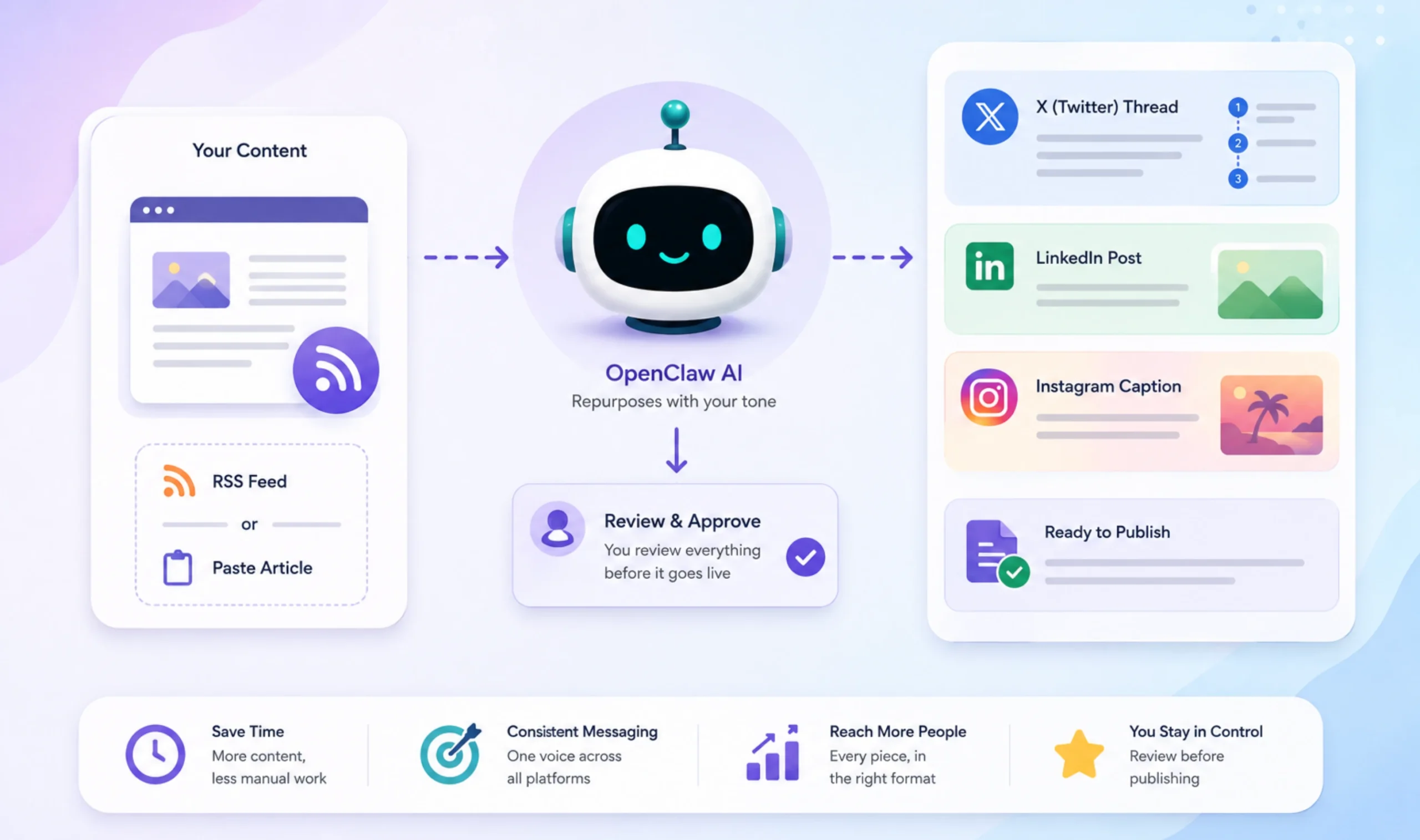
Nothing is published automatically, giving you a chance to review everything before it goes live.
Start Here
Paste an article or connect your RSS feed, then tell OpenClaw which platforms you’d like to publish on.
For every new piece of content, it can prepare an X (Twitter) thread, LinkedIn post, and Instagram caption.
Everything is delivered in a single review document, ready for editing and approval.
27) Podcast and Content Production Pipeline
Editing a podcast is only half the job. You still need show notes, social posts, video descriptions, and promotional content.
OpenClaw creates these assets from a transcript or simple episode outline, helping you prepare everything from one source.
Build This Workflow
After recording, upload your transcript or episode notes.
OpenClaw generates:
- Show notes
- YouTube description
- Social media posts
- Short teaser script
Once you’ve created a preferred format, it can reuse the same template for every future episode.
28) Automated Client Reporting
Preparing client reports often involves collecting data from several platforms before turning it into something easy to read.
OpenClaw automates much of that process by gathering performance metrics and presenting them in a clean, structured report that’s ready for review or client delivery.
Getting Started
Connect Google Search Console first and schedule a monthly report.
The summary can include:
- Traffic trends
- Top-performing pages
- Keyword movement
Once you’re happy with the workflow, add other platforms such as Google Ads or Shopify.
29) Competitor and Market Monitoring
Instead of checking multiple sources every week, OpenClaw can monitor competitor websites, RSS feeds, public announcements, APIs, or change-detection tools for new products, pricing updates, marketing campaigns, and industry trends, then report only what’s changed.
Quick Setup
Provide:
- Three to five competitor websites
- Two or three brand or industry keywords
Schedule a Monday morning scan, and OpenClaw sends a short update highlighting new developments through Telegram or email.
Category 5: Business Operations and Customer Management
These workflows are useful for businesses and professionals who communicate with customers every day.
30) WhatsApp Business Reply Drafting
OpenClaw drafts replies that match your writing style, answers common customer questions, and prepares responses for quick approval.
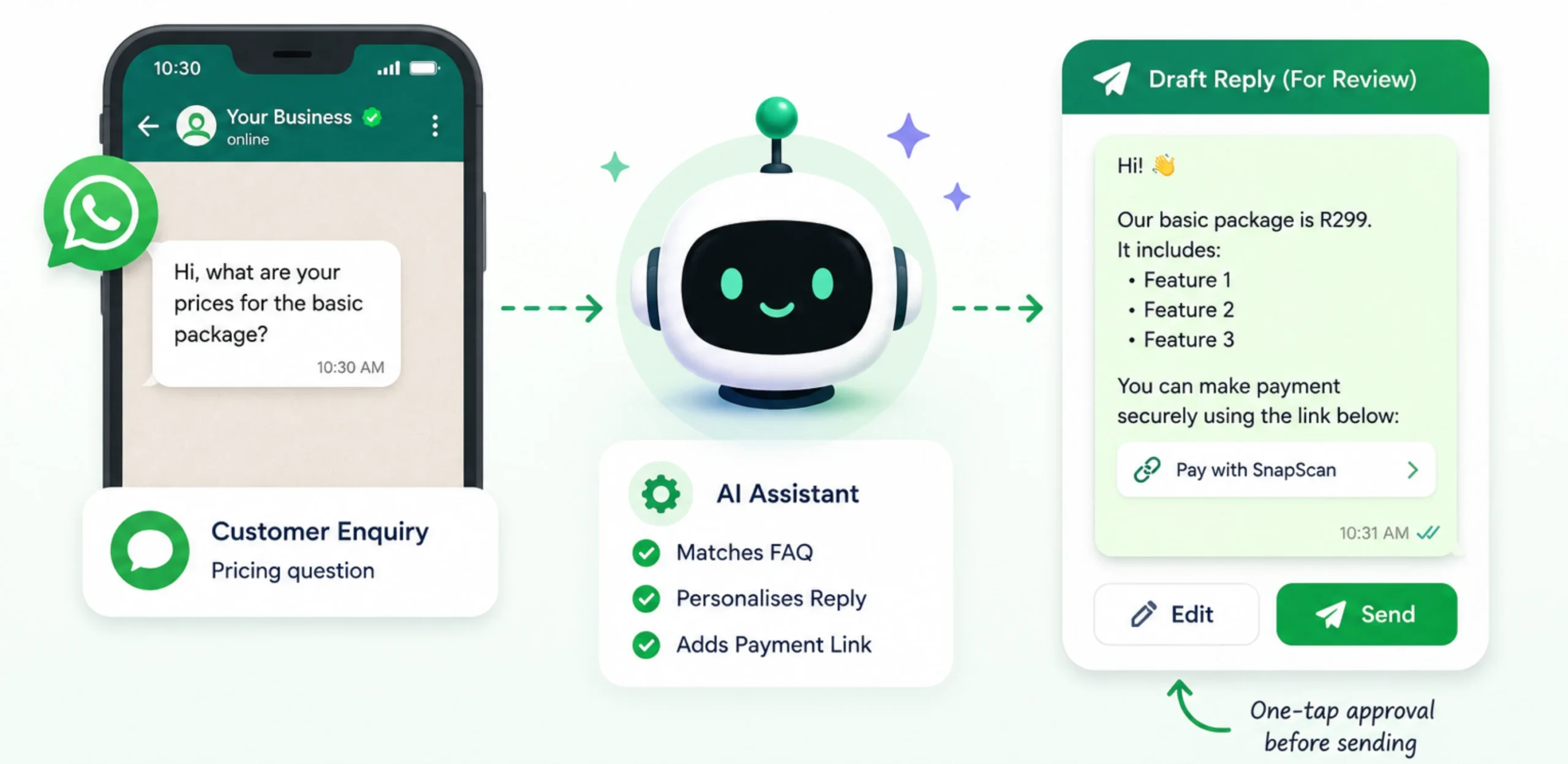
It can also include payment links automatically when customers ask about pricing or bookings.
Try This
Create a list of your 10 most common customer questions.
OpenClaw matches incoming inquiries to those responses, personalizes the reply, and places it in an approval queue before sending.
31) Multi-Channel Customer and Support Agent
OpenClaw brings together inquiries from different platforms, helping you manage everything from one place.
It can answer common questions automatically, qualify new leads, and prepare responses for review when needed.
Automation Setup
Start by connecting WhatsApp Business.
Create response templates for your five most common inquiry types, then allow OpenClaw to match and personalize replies before placing them in your review queue.
Once everything is running smoothly, connect your other communication channels.
32) Multi-Language Customer Communication
OpenClaw identifies the language of each incoming message, translates it for your team, and drafts a reply in the customer’s preferred language.
Getting Started
Configure OpenClaw to detect the customer’s language before processing each message.
Begin with your two most common non-English languages, then review the translated reply before sending it.
As your business grows, you can continue adding additional languages without changing your overall workflow.
Category 6: Development and Technical Workflows
OpenClaw helps by keeping project context organized, assisting with troubleshooting, and monitoring technical systems in the background.
33) Development and Code Workflow Assistant
OpenClaw keeps a running record of key decisions, summarizes project context, and helps you troubleshoot build failures or review code changes.
How to Try it
Share your project brief and repository structure at the start of a project.
OpenClaw keeps a decision log as you work, provides quick project summaries on request, and can suggest fixes when you paste build errors or log files.
34) Solar and Off-Grid System Monitor
If your home or business runs on solar, OpenClaw can be configured to monitor your inverter, battery, and energy production throughout the day.
It also alerts you to unusual activity and recommends the best times to run high-power appliances.
Quick Setup
Connect your inverter using its local API or Modbus connection.
Schedule a daily report showing:
- Solar generation
- Battery level
- Estimated savings
- System alerts
You can also receive a notification whenever the battery drops below 20%.
Category 7: Language and Communication
OpenClaw makes regular language practice easier by turning everyday conversations into learning sessions.
35) Language Practice Partner
OpenClaw chats with you in your chosen language, corrects mistakes naturally, introduces new vocabulary, and gradually increases the difficulty as your confidence grows.
Getting Started
Choose your target language, current level, and preferred correction style.
Then schedule a 10-minute daily practice session or simply chat whenever you have time.
Why All of These Need an Always-On Server
Every workflow in this guide depends on OpenClaw being available when you aren’t.
If your computer is turned off, scheduled jobs stop running, reminders aren’t sent, and background automations pause until the machine comes back online.
An always-on VPS keeps your assistant working 24/7, so cron jobs, monitoring, reminders, and messaging continue without interruption.
Our Truehost OpenClaw VPS Hosting provides local support, pricing in rand, and the flexibility of running OpenClaw on your own infrastructure.
A good place to start is with two or three simple automations, such as:
- Morning intelligence brief
- Smart inbox triage
- Budget tracker
Once you’re happy with those, moving OpenClaw to a VPS gives you the reliability needed for fully autonomous workflows.
If you’re ready to keep your AI assistant running around the clock, get started with our hosting.