Web Hosting
 Windows HostingBuilt for Windows apps and websites – stability, speed and flexibility
 Reseller HostingLaunch a hosting business without technical skills or expensive infrastructure
 Affiliate ProgramRefer customers and earn commissions from sales across our platform
 Domain SearchFind and secure a domain name in seconds with our quick lookup tool
 CO ZA Domains
 All DomainsExplore domain names from over 324 TLDs globally – all in one place
 Free Whois Lookup Tool South Africa
 VPS
VPS Website Builder
 Online ShopSet up a sleek eCommerce store with zero coding knowledge
 SSLs
SSLs SupportAccess help articles, how-tos, and everything about our services
 Blog
Blog Contact UsReach our team instantly via live chat or drop us an email
Root access gives you full administrative control over a VPS. It works like the superuser account on a Linux system.
Root access is the same as having a master key to every room in a building. Every file, setting, and process on the server answers to the root user.
Most unmanaged VPS plans include root access by default. Managed hosting and shared hosting plans often restrict or remove it entirely.
A regular user account can only touch files inside its own space. The root user can read, edit, or delete almost anything on the server.
That difference is what separates a basic hosting account from full server control.
Table of Contents
Root Access vs Admin Access
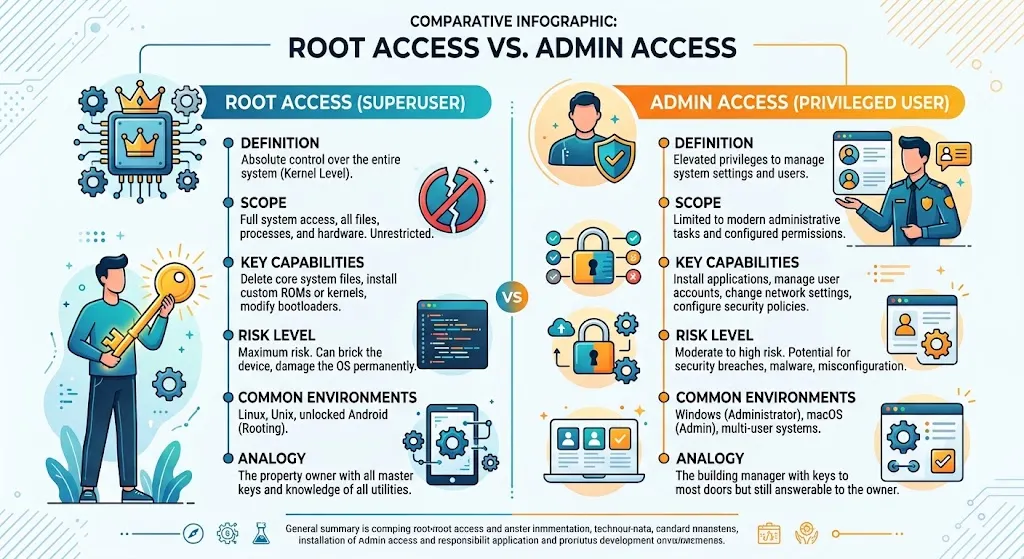
People sometimes confuse root access with the admin rights found on Windows machines.
Windows admin accounts still operate inside guardrails set by the operating system. Root access on Linux removes nearly all of those guardrails.
There is also a middle option called sudo access. A sudo user can run specific commands with root privileges without staying logged in as root.
That setup gives more control than a standard account, but with fewer risks than full-time root use.
What You Can Actually Do With Root Access
Root access opens up a long list of server tasks that regular accounts can’t touch. Here’s what that control looks like once you’re using it.
Customization and Flexibility
This is the biggest draw of root access. You are no longer stuck with the software choices your hosting provider made for you.
1) Build the exact software stack your project needs
Maybe your app needs a specific version of PHP, Python, or Ruby that your old host didn’t offer. Maybe you want Nginx instead of Apache, or PostgreSQL instead of MySQL.
Root access lets you install and configure any stack that fits your project. You can even mix tools that wouldn’t normally sit on the same server.
2)Tune performance settings to match your workload
You can adjust memory limits, CPU allocation, and network settings at the system level. Adding Redis or Memcached speeds up data retrieval for apps that lean on repeated database queries.
A reverse proxy in front of your app can also cut load times for specific content.
3) Set up configurations a control panel can’t offer
Some projects call for a custom set of security modules or a reverse proxy for load balancing. Root access gives you the control to build these setups yourself.
You can write custom firewall rules, run a VPN, or design a network layout built around your specific traffic patterns.
Security Control
Root access carries real risk, but it also gives you the tools to reduce that risk yourself.
4) Write your own firewall rules
Tools like iptables and UFW let you control exactly which traffic reaches your server. You decide which ports stay open, which IP addresses get through, and what kind of traffic is allowed at all.
5) Add automated intrusion protection
Fail2Ban watches your logs for failed login attempts and bans the source IP after a set number of tries.
It works well against brute-force attacks on SSH and other exposed services. Snort takes this further, watching network traffic for patterns tied to known attacks.
6) Run your own security checks
With root, you can install auditing tools that scan for outdated software, weak configurations, and open vulnerabilities.
Scheduling these scans on a regular basis catches problems before they turn into real incidents.
7) Harden the operating system itself
This includes disabling services you don’t use, adjusting kernel parameters, and enforcing stronger password rules. None of these changes are available on a standard shared hosting account.
How to Access Root on Your VPS
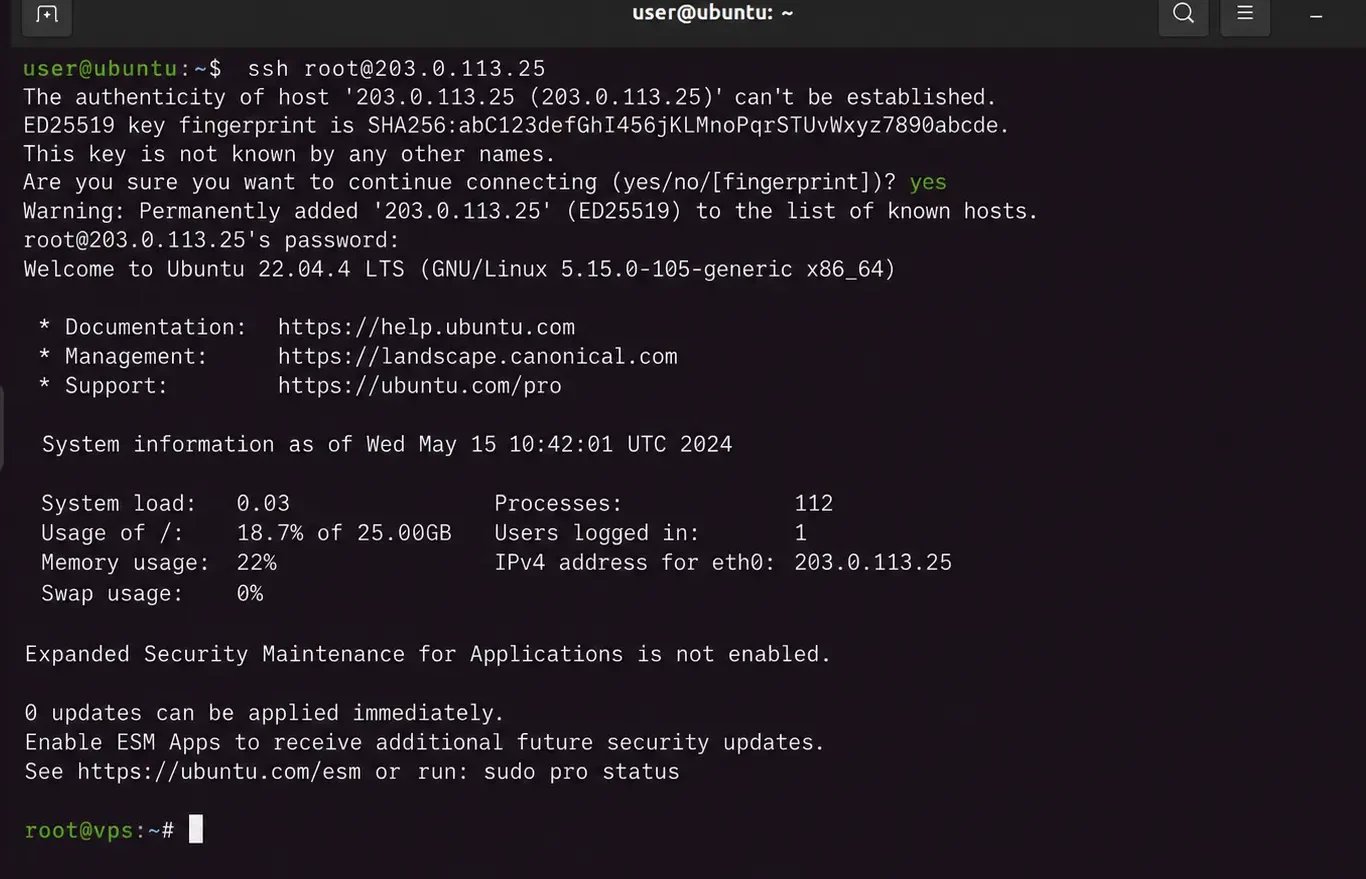
Getting to root access starts with an SSH connection to your server. Most hosting providers send login credentials by email once the VPS is set up. You can also find these credentials inside your hosting dashboard.
A simple login sequence looks like this:
ssh [email protected]

whoami

sudo su
The first command connects you to the server. The second confirms which user account you’re logged in as.
The third switches you into the root user if your account has that permission. From there, you have full access to the server’s files and settings.
Root Access Security Risks and How to Manage Them
Staying logged in as root for every task is a common habit, but it’s a risky one. A single typo in a root session can break a working server. That’s why experienced admins treat root access with real caution, not casual use.
A few practices lower the risk without slowing your work down:
- Create a separate sudo user for daily tasks, and save root login for larger changes
- Turn off direct root login over SSH, and switch to key-based authentication instead
- Take regular backups before any system-level change, so mistakes are easy to undo
- Add basic intrusion protection, like fail2ban, to guard an exposed root account
None of these steps takes long to set up. All of them make a real difference if something goes wrong later.
Troubleshooting Common Root Access Issues
1) SSH “Permission Denied” Errors
This error means the server received your connection request and then rejected it. That’s different from a timeout, where the server never responds at all.
A few things usually cause this: an expired SSH key, wrong file permissions, or a recent SSH configuration change.
Installing new packages or editing SSH settings can quietly break authentication without warning.
The fix often comes down to file permissions. Set your private key to600, your public key to 644, and the SSH directory to700.
If the error still shows up, run your SSH connection in verbose mode. That shows exactly which authentication method failed, and why.
2) Root Login Disabled by the Server
Some providers turn off direct root login by default, as a security step. That can look like a broken server, but it’s really just a setting.
If this happens, use the browser-based terminal in your hosting dashboard instead of SSH.
From there, you can check the SSH configuration and turn root login back on, if needed.
3) “Access Denied” After Password or Key Changes
A password reset or key rotation doesn’t always take effect right away. Old credentials get rejected, and new ones aren’t recognized yet either.
If SSH stops working after a change like this, fall back on the control panel terminal. It gives you a way in while the new credentials settle.
4) File and Directory Permission Conflicts
Permission errors show up in more places than login screens. They also appear when scripts or services can’t read or write specific files.
This can happen even under an account close to root. The fix is to check file ownership against the user or process trying to reach that file.
Then correct it with chown and chmod, rather than guessing at broader permission changes.
5) When to Use Rescue Mode
If SSH and the browser terminal both fail, most VPS providers offer a rescue mode. It boots the server into a minimal environment built for repairs.
From there, you can fix file permissions, update SSH settings, or reset root credentials directly. Treat rescue mode as a last resort, but it helps to know it exists before you actually need it.
Do You Need Root Access?
Root access isn’t necessary for every website or project. A few signs point toward needing it:
- You run containerized applications that need custom server settings
- Your project depends on software that isn’t available through a standard control panel
- You’re planning a high-traffic launch that needs manual performance tuning
- Your setup has compliance requirements that call for specific server configurations
If none of these apply, managed hosting or shared hosting will likely cover your needs. Root access adds flexibility, but it also adds responsibility. Weigh both sides before you commit to it.
FAQs
Is root access the same as admin access?
Not quite. Root access on Linux removes almost every restriction on the system. Admin access on Windows still works inside built-in guardrails, even with elevated permissions.
What happens if I lose root access?
Most hosting providers offer a recovery path, such as a browser terminal or rescue mode. These let you regain access without losing your data.
Can shared hosting have root access?
No. Shared hosting plans put multiple accounts on one server, so root access isn’t offered for security reasons.
Should beginners avoid root access?
Not necessarily, but caution helps. New users should start with a sudo account and learn safe practices before working directly as root.
Get Started With Root Access
Root access gives you real control over a VPS, but that control comes with responsibility.
It suits developers, admins, and businesses with specific technical needs. If your project doesn’t need that level of control, a managed VPS plan works as a simpler, safer start.
Once you’re ready for full server control, look for a VPS plan that includes root access by default. That way, you can start building without extra setup steps.