Web Hosting
 Windows HostingBuilt for Windows apps and websites – stability, speed and flexibility
 Reseller HostingLaunch a hosting business without technical skills or expensive infrastructure
 Affiliate ProgramRefer customers and earn commissions from sales across our platform
 Domain SearchFind and secure a domain name in seconds with our quick lookup tool
 CO ZA Domains
 All DomainsExplore domain names from over 324 TLDs globally – all in one place
 Free Whois Lookup Tool South Africa
 VPS
VPS Website Builder
 Online ShopSet up a sleek eCommerce store with zero coding knowledge
 SSLs
SSLs SupportAccess help articles, how-tos, and everything about our services
 Blog
Blog Contact UsReach our team instantly via live chat or drop us an email
R1,040 a month buys a lot of hardware. The Truehost H1 plan gives you 4 cores, 8 threads, 32 GB of RAM, and 480 GB of SSD.
Here is our verdict. Truehost offers strong hardware for the Rand, but it suits a narrow set of workloads. If your users sit in Europe or your jobs run in the background, look at H1 and H3.
This review covers pricing, hardware, location, uptime, security, support, and fit. Prices and specs come from Truehost’s dedicated server page. Latency figures come from third-party network data.
Table of Contents
Truehost Dedicated Server Verdict at a Glance
| Criterion | Rating | Short take |
|---|---|---|
| Price | Strong | Low cost per GB of RAM, but the best rate needs a 3-year term. |
| Hardware | Strong on paper | Good specs, but no CPU model, bandwidth, or RAID details. |
| Uptime | Strong | Truehost offers 99.97% uptime guarantee with SLA terms shown. |
| Control | Strong | Root access and several Linux distributions. |
Best for:
- Developers who need cheap, high-RAM servers for staging, builds, or backups.
- Agencies and businesses whose audience sits mostly in Europe.
- Teams that can run a Linux server without vendor help.
Skip it if:
- You are legally required to keep your data inside the country.
The best rate also needs a 3-year commitment. Weigh that before you click Select.
Truehost Dedicated Server Plans and Pricing: H1, H2 and H3 Compared
Truehost sells three dedicated plans in South Africa. The page quotes prices in Rand. The best rate needs a 3-year term, and the Select button sends you to the cart.
| Plan | CPU | RAM | Storage | List price/month | 3-year price/month | 36-month total |
|---|---|---|---|---|---|---|
| H1 | 4 cores / 8 threads, 3.5 GHz | 32 GB | 2 x 240 GB SSD | R1,300 | R1,040 | R37,440 |
| H2 | 4 cores / 8 threads, 3.5 GHz | 32 GB | 2 x 512 GB SSD | R1,600 | R1,600 | R57,600 |
| H3 | 6 cores / 12 threads, 3.5 GHz | 64 GB | 2 x 2 TB SSD | R2,400 | R1,920 | R69,120 |
All three plans run Linux by default. Each includes one IPv4 address and sits in Germany.
What Every Plan Includes
Truehost applies one feature list to all three plans. According to the page, you get:
- Full root or admin access.
- 100% SSD storage.
- One free dedicated IP address.
- A free firewall and basic DDoS protection.
- Instant provisioning.
- Free migration help from your old provider.
- English support, 24/7.
- Upgrades to RAM, CPU, or storage on demand.
- A 99.97% uptime claim.
The plans differ only in CPU, RAM, storage, and price. Support, security, and control stay identical across all three.
H1 Plan: The Lowest Entry Price
H1 costs R1,040 a month on a 3-year term. That sits 20% below the R1,300 list price. Over 36 months, you commit R37,440.
The page says “billed triennially.” That wording suggests you pay the full amount upfront. Confirm this at checkout.
- Spec: 4 cores, 8 threads at 3.5 GHz, 32 GB of RAM, and two 240 GB SSDs.
- Best for: staging servers, build pipelines, mid-size databases, and backup targets. A single busy store for European shoppers should also fit.
- Watch out for: storage. Two 240 GB drives give 480 GB raw. If they mirror each other, usable space drops to about 240 GB.
H2 Plan: The Weakest Value
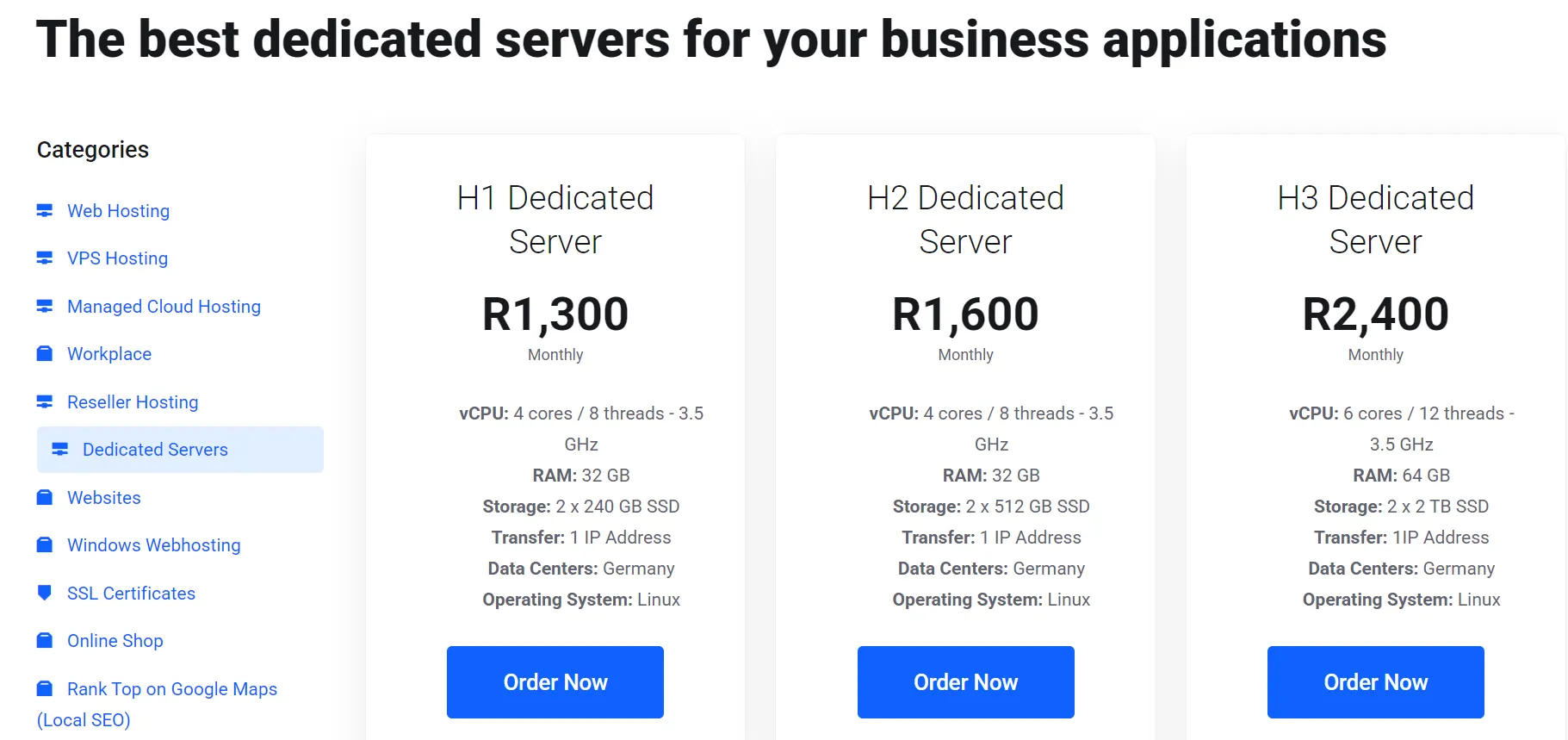
H2 uses the same CPU and 32 GB of RAM as H1. It adds 544 GB of raw storage. It also shows 0% savings, so you pay the full R1,600.
The extra R560 a month works out to about R1 per added gigabyte. Pick H2 only if you need the disk.
- Spec: 4 cores, 8 threads at 3.5 GHz, 32 GB of RAM, and two 512 GB SSDs.
- Best for: file hosting, media libraries, and databases that need more disk than H1 but no extra memory.
- Watch out for: price. H3 costs only R320 more each month and doubles the RAM.
H3 Plan: The Best Rate per Gigabyte
H3 steps up to 6 cores, 12 threads, 64 GB of RAM, and two 2 TB SSDs. At R1,920 a month, RAM costs R30 per GB. H1 costs R32.50 per GB.
So H3 gives you double the memory for about 85% more money. For memory-hungry databases, that trade works well.
- Spec: 6 cores, 12 threads at 3.5 GHz, 64 GB of RAM, and two 2 TB SSDs.
- Best for: large databases, virtual machine hosts, and bulk data storage. Busy ecommerce backends for European shoppers also fit.
- Watch out for: commitment size. The R69,120 total is the largest, so a bad fit on location costs the most here.
Cost per Unit Compared
Raw numbers hide the real value. This table divides each 3-year monthly price by what you receive.
| Metric | H1 | H2 | H3 |
|---|---|---|---|
| Price per GB of RAM | R32.50 | R50.00 | R30.00 |
| Price per CPU thread | R130 | R200 | R160 |
| Price per TB of raw storage | R2,167 | R1,563 | R480 |
H3 wins on RAM and storage. H1 wins on threads. H2 loses on RAM and threads, and only beats H1 on storage.
Raw storage adds both drives together. Usable space depends on the RAID setup, which the page doesn’t state.
Moving Between Plans: The Upgrade Math
| Move | Extra cost/month | What you gain |
|---|---|---|
| H1 to H2 | R560 | 544 GB more raw storage |
| H2 to H3 | R320 | 32 GB more RAM, 2 more cores, and nearly 3 TB more storage |
| H1 to H3 | R880 | 32 GB more RAM, 2 more cores, and about 3.5 TB more storage |
The H2 to H3 step is the best deal on the page. For R320, you double the RAM and add far more disk. So if you outgrow H1, skip H2.
3-Year vs Monthly: What You Save
| Plan | Monthly rate | 3-year rate | Saving over 36 months |
|---|---|---|---|
| H1 | R1,300 | R1,040 | R9,360 |
| H2 | R1,600 | R1,600 | R0 |
| H3 | R2,400 (page list price) | R1,920 | R17,280 |
The long term saves the most on H3. It saves nothing on H2. Locking in also ties you to a German server for three years.
Ask support whether you can test on a monthly term first. Then ask if you can convert to the 3-year rate later.
What the Plans Don’t List
The page leaves out several details that affect real cost and risk. Ask about each one before you order:
- The CPU model.
- Bandwidth and port speed.
- The RAID setup.
Which Plan Should You Pick?

| If you need… | Pick |
|---|---|
| The lowest entry cost for light to mid-size workloads | H1 |
| More disk than H1 with the same CPU and RAM | H2, but only if H3 stretches your budget |
| The most RAM and storage per Rand | H3 |
| A large database or several virtual machines | H3 |
| To test before committing to three years | H1, once support confirms the monthly billing |
Hardware and Specs: What You Get
Truehost lists core count, clock speed, RAM, and storage for each plan. It leaves out the CPU model. It also leaves out bandwidth and port speed.
The “Transfer” line on each plan shows only one IP address. You can buy more dedicated IP addresses on checkout.
Each plan uses two SSDs. The page doesn’t say whether they run in RAID. That detail decides what a drive failure costs you.
Ask for support for four answers before you pay:
- The exact CPU model.
- The port speed and monthly data allowance.
- The RAID setup, if any.
Server Location and Latency: The Germany Question
Truehost markets these plans to South African businesses. The servers sit in Germany. The page FAQ tells buyers to ask about South African choices.
Distance sets a hard floor on speed. Backbone measurements put Frankfurt to Johannesburg at roughly 166 to 189 milliseconds round-trip, depending on direction. Berlin to Johannesburg takes around 172 milliseconds.
Data Residency and POPIA
South Africa’s POPIA sets rules for moving personal information out of the country. Hosting customer records in Germany may trigger those rules. Check the transfer requirements with a lawyer before you store personal data there.
Security and DDoS Protection
Truehost includes a free dedicated IP, a firewall, and what it calls free basic DDoS protection.
Ask what happens when an attack exceeds the free protection. Get the answer in writing.
You still own the rest of the security work. That covers SSH keys, patching, firewall rules, and backups. The page doesn’t mention backups for dedicated plans, so plan your own.
Management and Control: Root Access, OS and Setup
Truehost gives you full root or admin access. You decide what runs on the machine.
- Operating systems: Ubuntu, AlmaLinux, Debian, Rocky Linux, and Oracle Linux. Windows Server is available on request.
- Provisioning: The page promises instant setup.
- Migration: Truehost offers free help moving sites and data from your old provider. Ask about limits on sites, databases, and control panels.
- Management level: The dedicated server plans are self-managed.
Truehost Dedicated Server Support: What Users Report
Truehost lists 24/7 English support and a Johannesburg office in Bryanston. The real test is how that support performs under stress.
Reviews split sharply. Trustpilot gives truehost.co.za a 3.2 out of 5. Happy customers praise patient help with SSL and hosting problems, plus an easy start. Unhappy customers describe domain disputes, account suspensions, and slow fixes.
Most complaints involve domains and accounts, not dedicated servers. They still show how the company handles disputes.
Truehost replies to many reviews and offers to escalate problem cases. WHTop’s editors describe support staff as responsive.
Truehost vs South African Dedicated Server Providers
| Factor | Truehost H1 | HostAfrica (entry dedicated) |
|---|---|---|
| Starting price | R1,040 / month (3-year term), R1,300 monthly | From R2,340 / month |
| Claimed uptime | 99.97% | 99.9% |
| Access | Root access | Root, IPMI, and RMM access |
| Support | 24/7 | 24/7 |
H1’s 3-year price sits about 56% below HostAfrica’s entry price. The specs may differ, so compare hardware line by line. Truehost wins on cost per gigabyte of RAM.
Who Should Buy a Truehost Dedicated Server (and Who Should Skip)
The developer or agency with staging and build needs. Buy H1. You get a lot of RAM for little money, and latency barely affects your work.
The business is with a European or global audience. Consider H3. The 64 GB of RAM suits databases and busy applications, and Germany sits close to your visitors.
The South African store, SaaS, or game host. Skip it, or put a CDN in front and test hard. Your users will feel the distance.
FAQs
Is Truehost legit and safe?
Yes, Truehost is a real company with a Johannesburg address and years of operation. Reviews are mixed, though. Read recent ones and test support before you commit.
Can I run Windows Server on a Truehost dedicated server?
Truehost lists Windows Server as available on request. Ask about licensing costs before you order.
Can I host a game server like Minecraft?
Yes, Truehost says the servers are suitable for gaming. The latency to South African players is high, so this works best for European players.
Can I upgrade or downgrade my plan mid-term?
Truehost advertises flexible billing and on-demand upgrades. The 3-year price may complicate this. Ask how a mid-term change affects your rate.
What is the refund policy on dedicated servers?
Truehost publishes a refund policy page. Read it for dedicated servers before you pay for three years. Verify the current terms before you publish this answer.
Is a Truehost Dedicated Server Worth It?
Truehost gives you plenty of hardware for little money. The catch is the location. Every plan sits in Germany, so one fact decides the purchase: where your users are.
If they sit in Europe, or you run background jobs, Truehost offers strong value. If they sit in South Africa, a local host will serve them better.
Before you spend R37,440, run a 5-minute test. Ask Truehost support for a test IP in its German data center. Ping it from your own location.
If the delay suits your workload, choose your plan on the Truehost dedicated servers page. Start with H1 for the lowest price, or H3 for the best rate per gigabyte of RAM.