Web Hosting
 Windows HostingBuilt for Windows apps and websites – stability, speed and flexibility
 Reseller HostingLaunch a hosting business without technical skills or expensive infrastructure
 Affiliate ProgramRefer customers and earn commissions from sales across our platform
 Domain SearchFind and secure a domain name in seconds with our quick lookup tool
 CO ZA Domains
 All DomainsExplore domain names from over 324 TLDs globally – all in one place
 Free Whois Lookup Tool South Africa
 VPS
VPS Website Builder
 Online ShopSet up a sleek eCommerce store with zero coding knowledge
 SSLs
SSLs SupportAccess help articles, how-tos, and everything about our services
 Blog
Blog Contact UsReach our team instantly via live chat or drop us an email
Your admin panel takes longer to load than it used to. You got a CPU usage warning from your host last week, and you brushed it off.
Then, a client mentions that the checkout page froze for a few seconds during a sale.
None of these on their own means much. Together, they raise a question: Is your VPS still doing its job, or has your business quietly outgrown it?
Dedicated servers cost more than VPS plans, often by a wide margin. So the real question isn’t whether a dedicated server is more powerful. It almost always is.
The question is whether that extra power solves a problem you actually have.
This guide walks through the signals that point to a real upgrade, the fixes worth trying first, and what the move looks like for a business running in South Africa.
Table of Contents
9 Signs Your VPS Has Hit Its Ceiling
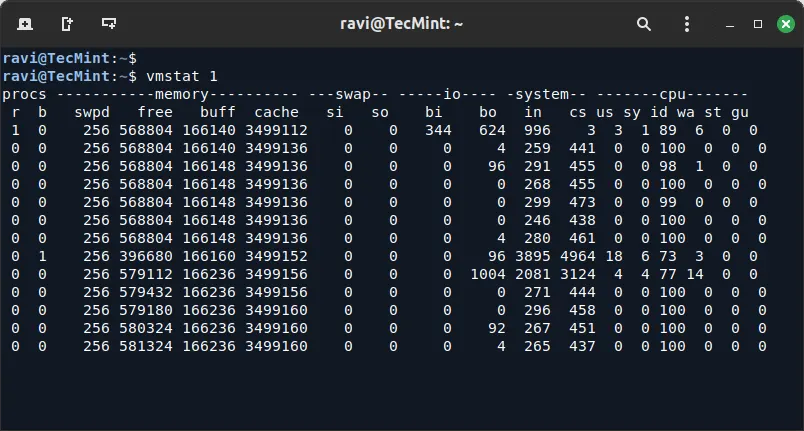
Look at your usage data from the last 30 to 90 days before you decide anything.
A single bad day, like a traffic spike from a press mention, doesn’t count as a pattern. A sustained trend does.
Most of these signs can be checked with a few simple commands. Run htop or top for a live view of CPU and memory.
Run vmstat 1 10 for a snapshot of memory, swap, and CPU steal time together. These take a couple of minutes and give you real numbers instead of guesswork.
1) Sustained CPU Usage Above 80%
Occasional spikes are normal. A quick surge during a marketing push or a viral post doesn’t mean your server is failing you.
The real warning sign is a CPU that sits above 80% for days in a row, not just during your busiest hour of the week.
Run sar -u 1 60 to sample usage over a full minute. Then run sar -u 1 60 | tail -5 a few times across different days to compare.
If the average keeps landing above 80% regardless of the time you check, your current plan no longer fits the workload you’re running on it.
This differs from a short spike in one key way. A spike recovers within minutes once the surge passes.
Sustained saturation never recovers on its own, and it tends to get worse as traffic grows over the following months.
2) High CPU Steal Time
Steal time is a metric unique to virtualized hosting, and it has no equivalent on a dedicated server.
It shows up as the %st column at the top of vmstat, and it measures how much CPU time your VPS wants but doesn’t get.
Here’s why it happens. Your VPS shares a physical host with other virtual machines. A hypervisor decides how CPU cycles get split between all of them.
When another tenant on that host needs more processing power, the hypervisor can pull cycles away from your VPS temporarily to serve them.
Brief steal time during a reboot or a snapshot backup is expected and harmless.
Sustained steal time above 5%, showing up consistently across different hours of the day, tells a different story.
Your VPS is competing for CPU against neighbors you can’t see or control, and no code change on your end fixes that.
This is one of the clearest technical signs that a VPS has genuinely outgrown shared infrastructure.
A dedicated server removes the hypervisor layer entirely, so this problem cannot happen on one.
3) Memory Pressure That Won’t Go Away
Memory pressure is easy to confuse with a coding problem, so it’s worth ruling out first.
If your server keeps swapping memory to disk even after you’ve optimized queries and trimmed unused processes, the RAM allocation itself is the real constraint.
Run free -m and watch two numbers over a few hours: available memory and swap usage. Healthy servers show swap sitting near zero most of the time.
A swap value that climbs to 70% or higher, and stays there, means your working data no longer fits inside RAM.
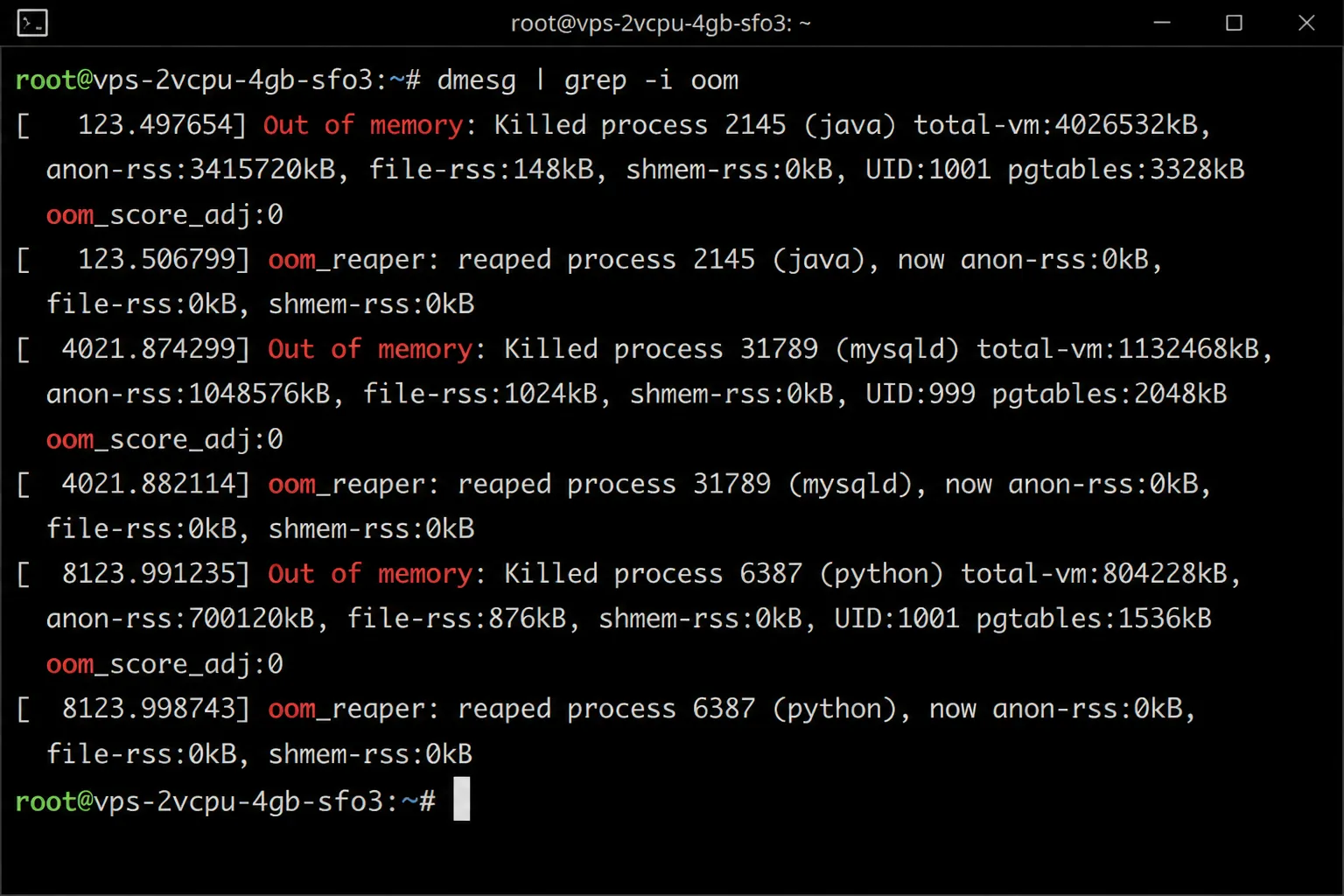
Then check for the more serious version of this problem. Run dmesg | grep -i oom on your server.
If that command returns any output, the kernel has already killed processes to free up memory and keep the system running.
That’s not a warning anymore. That’s evidence that outages tied to memory exhaustion have already happened, whether or not anyone noticed at the time.
A larger RAM allocation, whether on a bigger VPS plan or a dedicated server, is the fix at that point.
4) Rising Disk I/O Wait Times
Disk I/O wait measures how long your CPU sits idle while waiting for storage to respond to a request.
A small amount of wait time is normal on any server, even a well-configured one.
The problem starts when read and write requests begin queuing up during ordinary traffic, not just during your busiest hour.
Run iostat -x 1 5 and check the wait column across the sample. Rising numbers there point to storage that can no longer keep pace with demand.
In practice, this shows up as symptoms your team will notice before anyone checks a command line. Database queries that used to return instantly start taking seconds.
Backups that once finished quietly now slow down the entire site while they run. Pages feel sluggish even when CPU and memory both look fine.
Shared storage on a VPS often serves several tenants at once, which limits how much I/O capacity any single customer actually gets.
A dedicated server gives you exclusive access to its drives, which removes that contention completely.
5) Load Average That Outpaces Your Cores
Load average is one of the fastest checks available, and it takes seconds to read.
Run uptime and look at the three numbers it returns, which represent the 1, 5, and 15 minute averages.
Compare that number against your actual core count. A one-core VPS with a load average above 1.0 is already running at full capacity.
A four-core VPS crossing 4.0 means every core is busy at once, with no room left for new requests.
When the load average stays above your core count for an extended stretch, requests start queuing behind each other instead of processing right away.
That queuing is often what a visitor experiences as a page that loads slowly, even for a request that should be simple.
Checked alongside CPU usage and steal time, load average gives a fuller picture of whether your server is keeping up or falling behind.
6) Performance That Swings at Random Hours
Not every performance problem comes from your own traffic. If your site slows down at times that have nothing to do with your visitors, another tenant on the same physical host may be consuming shared resources at that moment.
This pattern is sometimes called a noisy neighbor problem, and it’s one of the harder issues to diagnose from your side.
Your own monitoring may show light traffic and low resource use, yet the site still feels slow to visitors during those windows.
A useful test is comparing performance at different times of day over a week or two.
If slowdowns follow a pattern unrelated to your own usage, and nothing in your application has changed, the host itself is likely the source.
No amount of application tuning solves a problem that originates outside your own server.
7) Traffic Past Six Figures a Month
Traffic volume alone doesn’t force an upgrade, but it changes what consistency is worth to your business.
Once a site passes roughly 500,000 monthly visitors, small performance dips start affecting a much larger number of people at once.
Shared VPS resources tend to fluctuate more at that scale, even on plans that look sufficient on paper.
A dedicated server holds steady because nothing else on the machine competes for its capacity during a traffic surge.
This sign matters most when it appears alongside others on this list.
High traffic paired with sustained CPU usage or rising I/O wait is a stronger signal than high traffic on its own, since the two together confirm the hardware is genuinely stretched.
8) Running Three or More VPS Instances for One Project
Splitting a project across several VPS instances often starts as a reasonable way to isolate services.
A separate database server, a separate web server, and a separate job queue each get their own plan.
The cost of that setup adds up in two ways. Each instance carries its own monthly fee, and network traffic between instances adds latency that a single machine wouldn’t have.
Requests bouncing between three or four separate VPS plans take longer than the same requests handled on one machine.
Consolidating those instances onto a single dedicated server often costs less overall once you add up every separate VPS bill.
It also removes the network latency between services, since everything communicates locally instead of over the network.
9) Your VPS Bill Rivals Dedicated Pricing
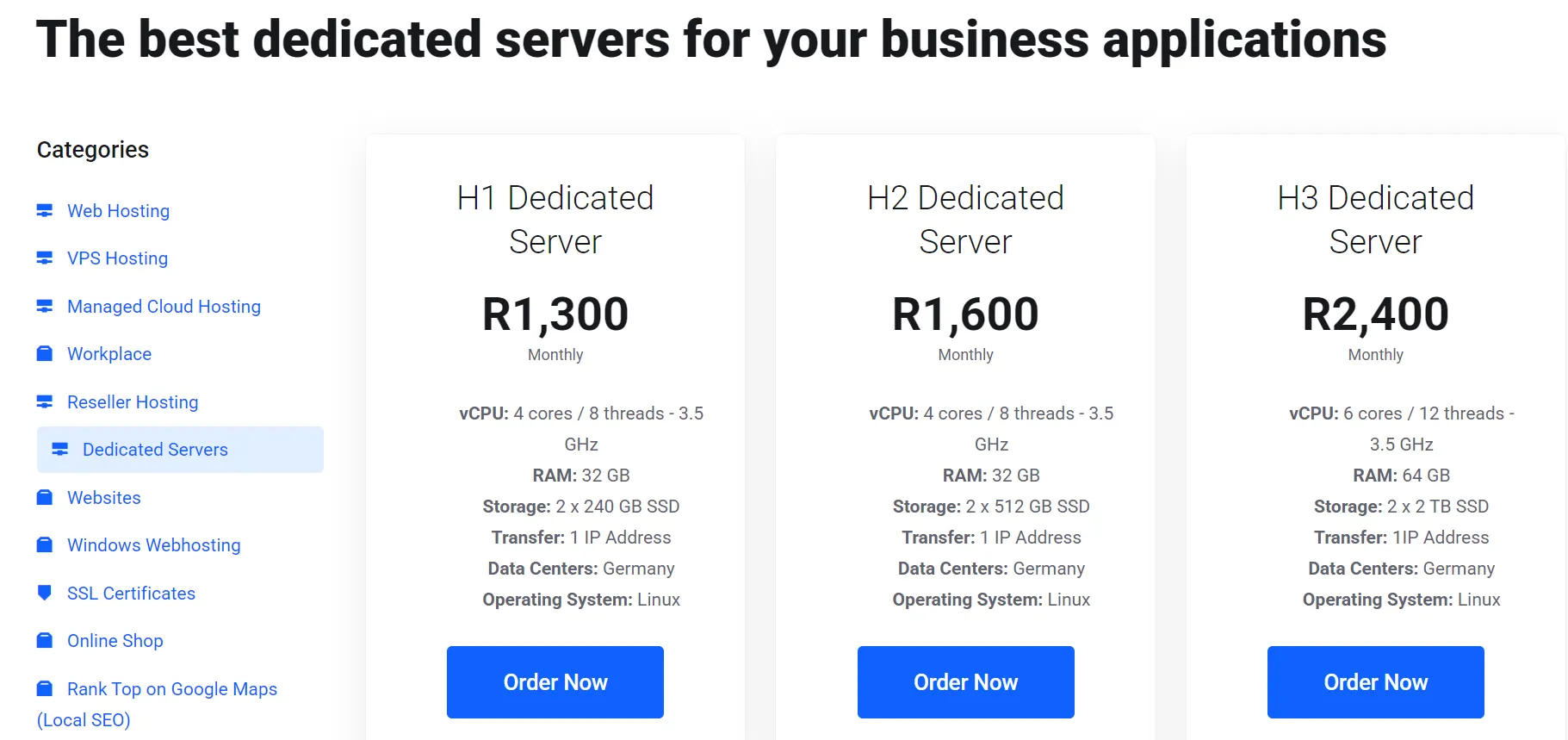
Pricing crossover is one of the simplest signs to check, since it only requires comparing two numbers side by side.
Look at what a larger VPS plan costs against an entry-level dedicated server from the same provider.
When those two numbers land close together, the VPS plan usually loses value.
A dedicated server at a similar price point typically includes more CPU cores, more RAM, and full physical resources with nothing shared.
This crossover point moves depending on the provider and the region, so it’s worth checking current pricing rather than relying on general assumptions.
In South Africa, ZAR pricing on dedicated plans can land closer to a larger VPS plan than many businesses expect.
Try This Before You Upgrade
A dedicated server solves hardware constraints. It won’t fix a slow database query or an unoptimized image library. Rule out the cheaper fixes first.
- Optimize the application. Caching, query tuning, and proper indexing often deliver a two to ten times improvement without touching your hosting plan at all.
- Upsize your current VPS. Doubling your RAM or CPU allocation is faster to set up and far cheaper than a full server migration.
- Split workloads across two VPS instances. Separating your database from your web server can solve isolation problems without the cost of dedicated hardware.
- Move to a dedicated space only after these steps. If the constraint remains after optimizing, upsizing, and splitting workloads, a dedicated server is the next honest step.
When a Dedicated Server Is the Right Call for South African Businesses
I) POPIA and Data Residency
If your business handles payment data, health records, or other personal information, POPIA sets clear rules on how that data gets collected, stored, and processed.
Hosting on a dedicated server inside a certified South African data center, such as Teraco in Johannesburg, gives your compliance team a straightforward answer during an audit.
Routing that same data through servers in Europe or the US adds legal exposure that local hosting avoids.
II) Predictable ZAR Pricing
VPS providers billing in USD or EUR expose you to exchange rate swings that make budgeting harder.
A dedicated server billed in ZAR keeps your hosting cost stable, regardless of what the rand does against other currencies.
III) Lower Latency to Local Banks and Gateways
Fintech platforms and ecommerce stores that process payments benefit from servers physically close to South African banking infrastructure.
That proximity lowers latency during payment authorization, which matters at checkout.
IV) High-Traffic Local Events
Black Friday, mobile money peak periods, and other South African shopping events push traffic well past normal levels.
A dedicated server holds steady, where a VPS plan may buckle under a shared resource ceiling.
Cost Comparison: VPS vs Dedicated Server in South Africa
Entry-level VPS plans in South Africa typically run a few hundred rand a month.
Entry-level dedicated servers start higher, often in the low thousands, and scale up from there based on hardware and support level.
The monthly bill isn’t the full cost picture, though. Migration time, ongoing management, and whether you need a managed support plan all add to what you’ll actually spend.
Watch for the crossover point. Once a bigger VPS plan costs nearly as much as a base dedicated server, the dedicated option usually delivers more value for similar money.
FAQs
What is the main difference between a VPS and a dedicated server?
A VPS shares one physical server’s hardware across several virtual machines. A dedicated server gives you the entire physical machine, with no other tenants on it.
Is a dedicated server worth the extra cost?
It depends on whether your VPS has hit a genuine resource ceiling. If sustained CPU, RAM, or I/O pressure remains after optimizing and upsizing, the extra cost buys real performance and stability.
Is dedicated hosting better for gaming servers?
For small to mid-sized communities, a VPS usually handles the load fine. Once you’re supporting 100 or more concurrent players, or running competitive or esports traffic, dedicated hardware reduces lag and keeps latency predictable.
How long does migration from a VPS to a dedicated server take?
A standard web application typically migrates in two to four hours once the new server is provisioned. Larger, more complex setups can take longer, so plan the switch during low-traffic hours.
Does a dedicated server guarantee better uptime than a VPS?
Not automatically. A dedicated server removes shared-hardware risk, but it also puts your entire workload on one physical machine. High availability still depends on redundancy, backups, and a solid uptime agreement with your provider.
Making the Call
The decision comes down to three things. Sustained resource pressure over weeks, not days.
Compliance requirements that demand physical isolation. And whether the cheaper fixes, like optimizing your code or upsizing your VPS, have already been tried.
If your VPS still has room to grow, a bigger plan or a split workload probably solves your problem for less money.
If the ceiling is real and it keeps showing up in your usage data, a dedicated server is the honest next step.
Before you commit to a migration, get a clear read on your current usage numbers.
Truehost can review your VPS resource data with you and tell you plainly whether an upgrade is justified right now, or whether a smaller change gets you there instead.