Web Hosting
 Windows HostingBuilt for Windows apps and websites – stability, speed and flexibility
 Reseller HostingLaunch a hosting business without technical skills or expensive infrastructure
 Affiliate ProgramRefer customers and earn commissions from sales across our platform
 Domain SearchFind and secure a domain name in seconds with our quick lookup tool
 CO ZA Domains
 All DomainsExplore domain names from over 324 TLDs globally – all in one place
 Free Whois Lookup Tool South Africa
 VPS
VPS Website Builder
 Online ShopSet up a sleek eCommerce store with zero coding knowledge
 SSLs
SSLs SupportAccess help articles, how-tos, and everything about our services
 Blog
Blog Contact UsReach our team instantly via live chat or drop us an email
Most VPS owners in South Africa are paying for a server that spends a good part of its day sitting idle.
At the same time, they’re spending hours on repetitive work like checking payment dashboards, replying to common customer questions, copying invoice details, and updating records.
If that sounds like you or your business, then you need to change strategy.
You could self-host n8n on that same VPS and turn it into a 24/7 automation engine that keeps those jobs running in the background while you focus on work that actually needs your attention.
n8n-on-VPS can also solves three problems that most automation guides never touch, because they’re not written with South Africa in mind:
- Load shedding killing webhook reliability
- ZAR-denominated payment platforms cloud tools don’t natively support well
- Execution caps that make AI-heavy workflows expensive
Also, running n8n on your own VPS gives you far more control:
- Your workflows have no execution limit and aren’t limited by per-task charges
- Your AI and customer data stay on infrastructure you control (which counts for something under POPIA)
- Your uptime is in your hands rather than a third-party platform
- the whole setup costs a fraction of what you’d pay per month elsewhere (which, in this economy, counts for a lot)
Let’s look at these 13 practical n8n automation ideas, grouped by the business problems they solve, so you can get more value from the VPS you’re already paying for.
Table of Contents
13 n8n Automation Ideas for Your VPS
Load Shedding and Uptime Resilience
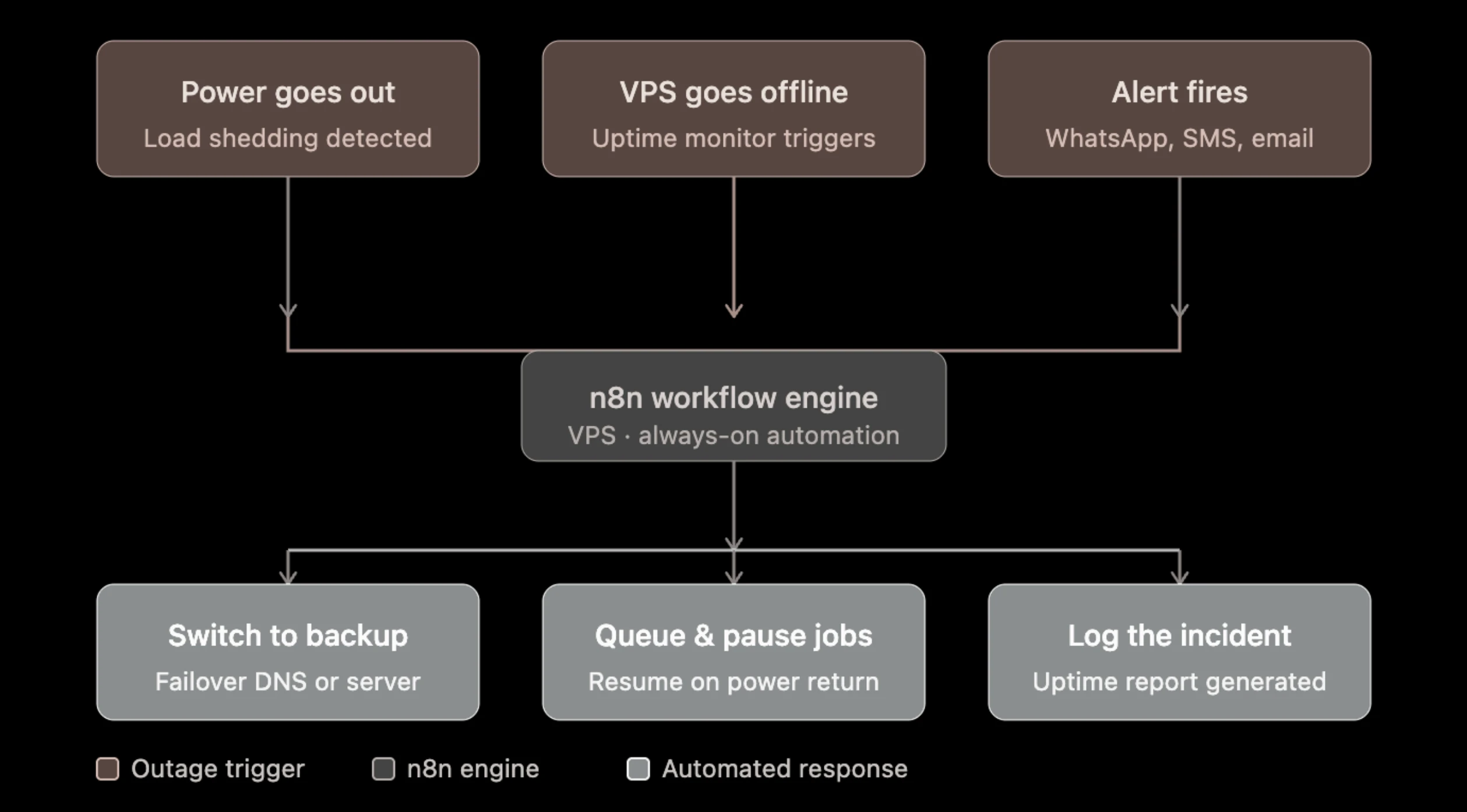
1) Power-aware workflow pausing and resume
Connect n8n to the tools you already use to monitor power, such as a UPS, a ping check, or a service like Uptime Kuma.
The moment an outage hits, n8n can pause non-critical workflows and safely queue pending tasks instead of letting them fail halfway through.
As soon as power returns, everything resumes automatically, so you don’t have to restart jobs or clean up incomplete processes.
2) Automated customer delay notifications
Customers are usually more accepting of delays when they’re informed early.
With n8n, you can monitor load shedding schedules or an Eskom status feed and automatically notify affected customers through WhatsApp or email before delays happen.
A quick update keeps everyone informed, reduces support requests, and helps maintain trust even when power interruptions are outside your control.
Local Payments and E-commerce Operations
3) POPIA consent audit trail automation
Every consent you collect needs a paper trail, and keeping that trail by hand is where things slip.
With n8n, every form submission can be logged automatically with a timestamp, a PDF consent receipt can be generated and emailed to the customer, and contacts without valid consent can be flagged in your CRM.
You can also schedule weekly compliance reports, so your records are always ready when you need them.
4) Multi-gateway payment reconciliation
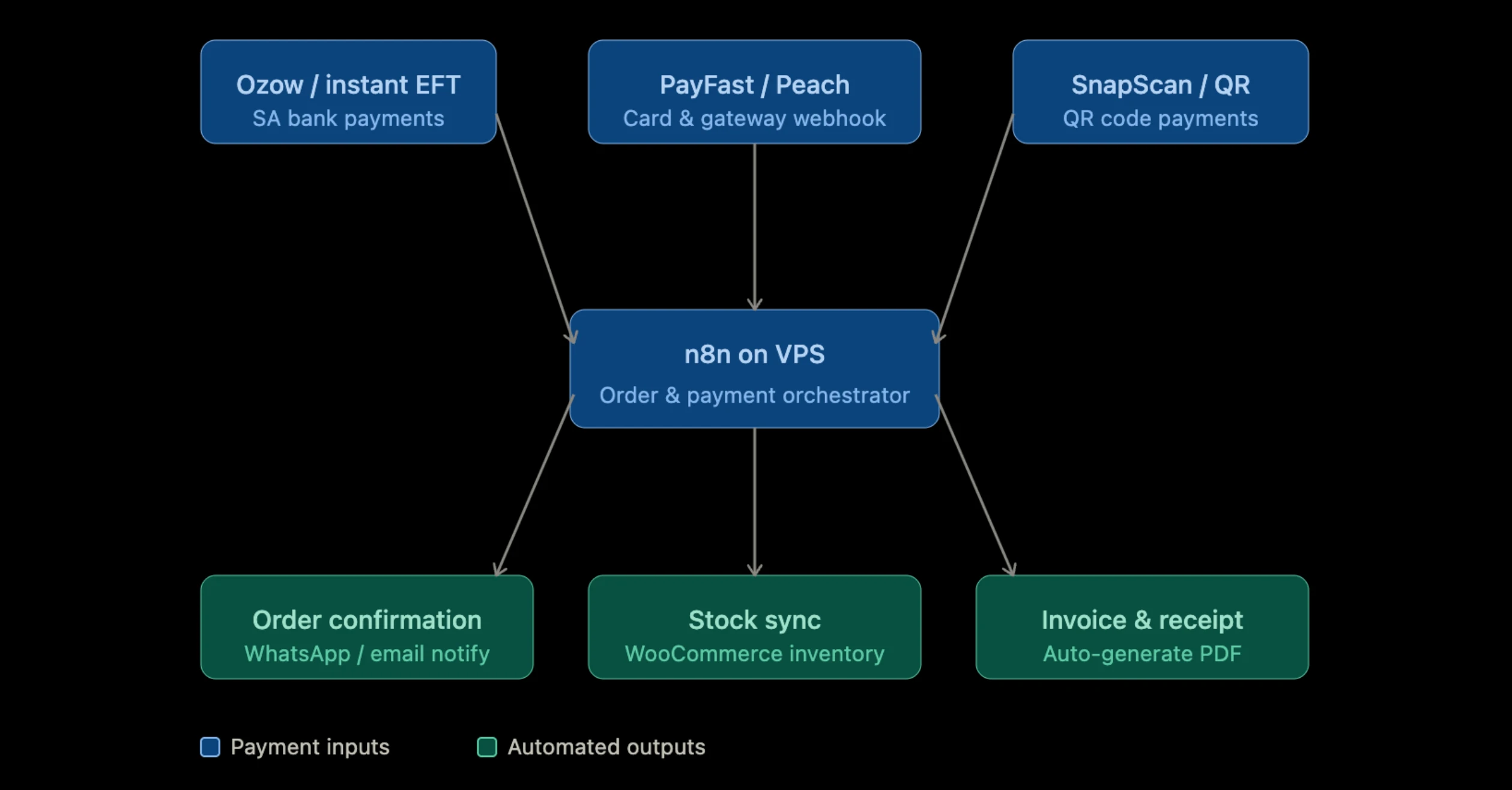
If you take payments through PayFast, Ozow, SnapScan, and Yoco, you already know what it’s like checking four dashboards to confirm what’s actually landed.
n8n can pull webhooks from all four into a single ledger, like a Google Sheet, Airtable, or your own database, and flag anything that doesn’t match an expected order.
One view instead of four browser tabs.
5) EFT proof-of-payment matching
EFT is still enormous in South Africa, which means plenty of businesses spend part of every morning scanning their inbox for bank confirmation emails or screenshots.
n8n can monitor your inbox, use AI to extract payment details from emails or attached PDFs, match them to pending orders, and confirm successful payments automatically.
Orders move forward as soon as the payment arrives, without anyone checking the inbox.
6) ZAR automated invoice and expense generator
After a payment is received through Stripe or Paystack, n8n can generate a VAT-ready invoice in ZAR, save it as a PDF, and sync it with your accounting software.
The same workflow can capture incoming expenses, categorize them, and keep your financial records up to date throughout the month.
Hosting n8n on your own VPS also keeps invoices and financial documents on infrastructure you control.
7) Dynamic e-commerce inventory sync
If you sell through Shopify or WooCommerce, n8n keeps your stock counts synced with a local database or warehouse system in real time.
The moment something sells, every other system updates with it, so you stop promising stock that’s already gone, and your logistics stay accurate even when they’re entirely local.
AI Agents and Customer Engagement
8) Self-hosted AI support agent fed on local business docs
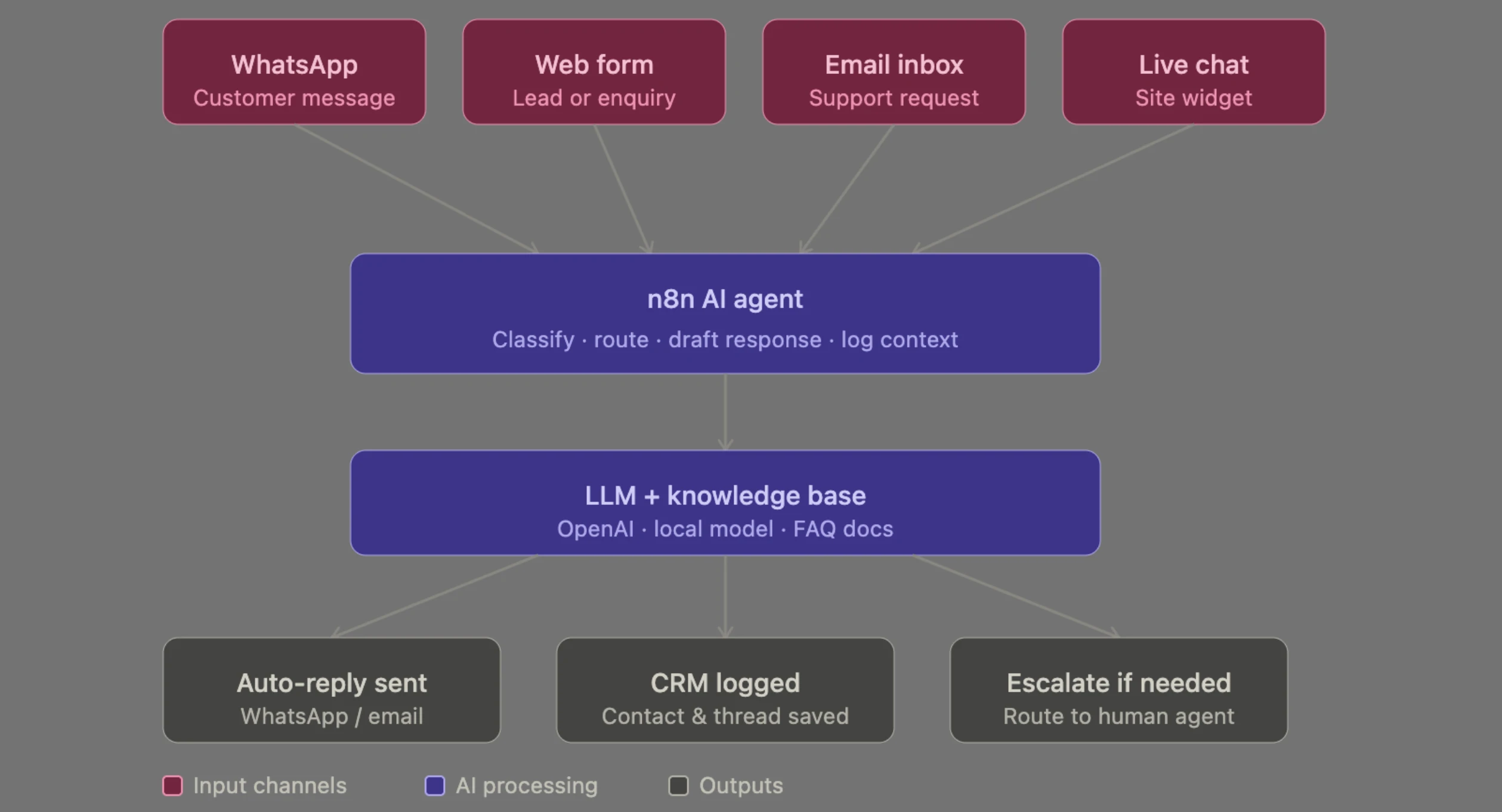
Your product guides, FAQs, and company policies already contain answers to many customer questions.
With n8n, you can connect those documents to an AI model that responds to routine enquiries automatically. If the AI isn’t confident about an answer, the conversation is passed to a support agent with the full chat history included.
Running the workflow on your own VPS also keeps customer data and AI processing on infrastructure you control, helping support POPIA compliance.
9) AI customer support triage
This one goes a step further than a basic FAQ bot. Instead of sending every support request into the same queue, let AI sort them first.
n8n can classify incoming messages, search your knowledge base, and route each request to the right team or workflow.
Straightforward questions receive an automatic response, while more complex cases go directly to a human agent, reducing response times without sacrificing accuracy.
10) Smart lead scraping and enrichment
Building a prospect list manually takes time. n8n can collect business listings from Google Maps or local directories, enrich them with AI to fill in missing contact details, and send the cleaned data straight to your CRM.
The result is a sales-ready contact list with far less manual work, while self-hosting keeps your lead data private.
Content, Inbox and Server Monitoring
11) Auto-publishing blog and social media machine
Publishing content is only the first step.
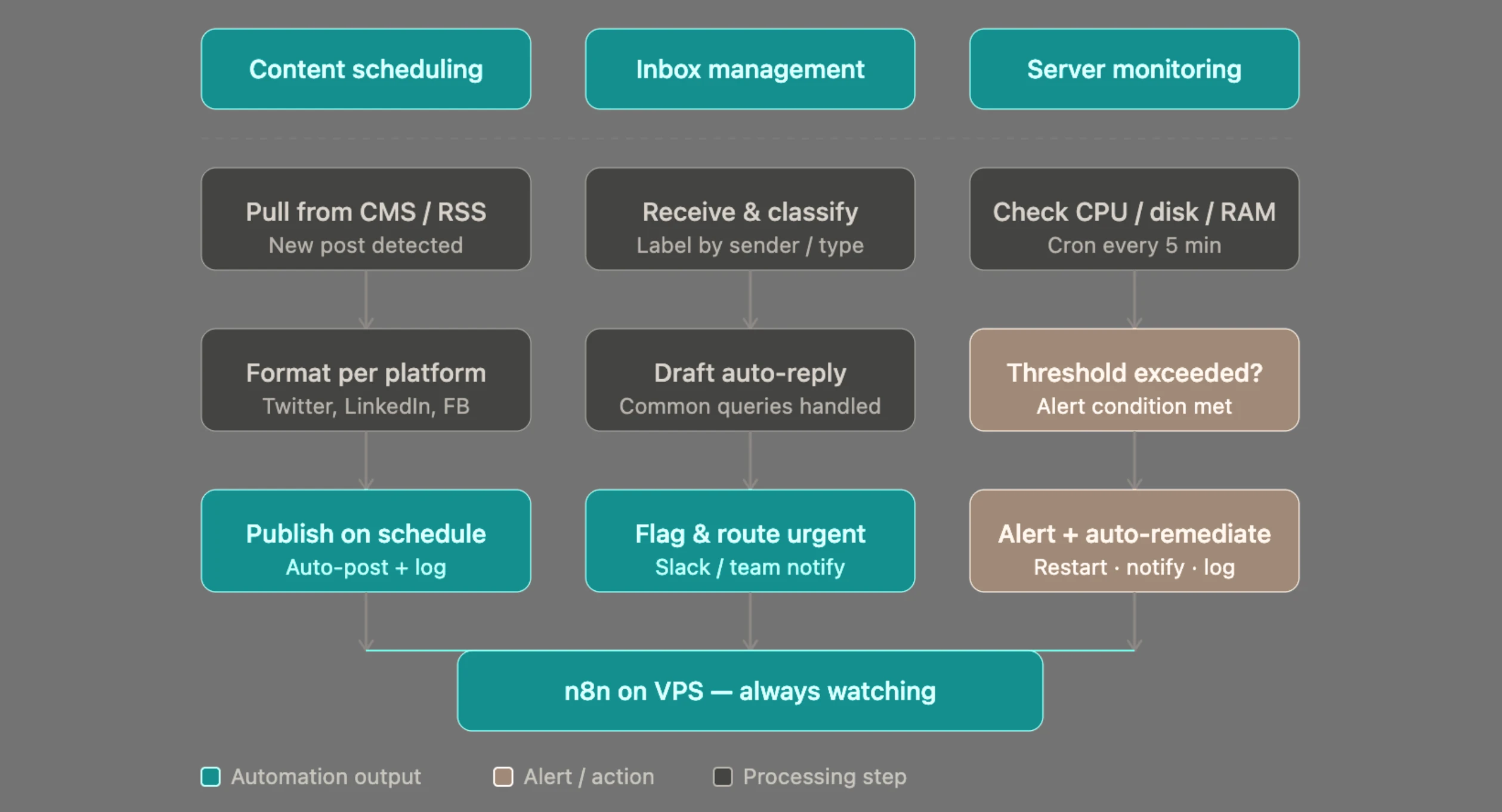
n8n can detect when a new blog post or video goes live, pull the title and metadata, generate localized social media posts in languages such as English, Afrikaans, and Zulu, then publish them across X, LinkedIn, and Facebook from a single workflow.
This works especially well when combined with AI content generation, and hosting it on your own VPS gives you the flexibility to automate frequent publishing without relying on restrictive cloud automation limits.
12) AI email triaging and auto-replies
A busy inbox can slow your team down.
Connect Gmail or Outlook to n8n and let AI review every incoming email, identify its tone and priority, draft a reply, apply the correct label, and forward complex requests to the right person.
Instead of starting every response from scratch, your team reviews AI-generated drafts and focuses on emails that need personal attention.
Self-hosting also lets you process large volumes of email without worrying about workflow limits.
13) HelloPeter and Google review sentiment router
Customer reviews deserve quick responses, especially when they highlight a problem.
n8n can regularly check new reviews from HelloPeter, Google Business, and Facebook, analyse their sentiment with AI, and draft replies for positive feedback automatically.
Reviews that need immediate attention are sent to Slack with the full context, while every interaction is logged for tracking and reporting.
Bringing these platforms into a single workflow makes it much easier to stay on top of your online reputation, especially for businesses serving the South African market.
n8n Automation Ideas FAQs
Is n8n free to use on a VPS?
Yes. The n8n Community Edition is free to self-host, with no limits on the number of workflows or executions. Your only ongoing cost is the VPS that runs it.
Do I need coding skills to build these automations?
No. Most workflows can be built entirely with n8n’s visual workflow editor. Basic JavaScript is useful for advanced customization, but every automation covered here can be created without writing code.
Does n8n work with PayFast, Ozow, SnapScan, and Yoco?
Yes. These payment platforms support webhooks, and n8n can connect to them using its HTTP Request and Webhook nodes, either through available integrations or custom webhook endpoints.
Is a self-hosted AI agent safe for customer data under POPIA?
Self-hosting keeps your customer data on infrastructure you control instead of sending it through a third-party automation platform, making it a stronger foundation for POPIA compliance. You’ll still need to follow good security practices, including proper access controls, encryption, and secure data storage.
Can I run all 13 of these automations at the same time?
Yes, provided your VPS has enough resources. It’s still best to begin with a few high-impact workflows, confirm they’re stable, and add more over time. If you plan to run several AI-powered automations together, monitor your server’s CPU, memory, and storage usage so you can scale when needed.
Getting Started: What Your VPS Needs to Run These Automations
You don’t need a powerful server to get started with n8n. A VPS with 1–2 vCPUs and 2–4GB of RAM is enough for most of the workflows in this guide.
As your automation grows, you can upgrade your server to handle AI-powered tasks, larger webhook volumes, or more complex workflows running at the same time.
Setting up n8n is simple and direct with Docker. Once you’re running multiple workflows, it’s worth enabling queue mode, which uses Redis to process background jobs and incoming webhooks more efficiently.
This is especially useful for payment automations, where every webhook needs to be processed reliably.
If you’re using Truehost’s n8n KVM VPS plans, queue mode and the recommended server configuration are already in place, so you can focus on building workflows instead of configuring infrastructure.
Plus, there’s no need to automate everything at once. Start with two or three workflows that solve your biggest daily bottlenecks, test them thoroughly, add proper error handling, and secure your instance.
Once those are running smoothly, you can expand your automation stack as your business grows.