Web Hosting
 Windows HostingBuilt for Windows apps and websites – stability, speed and flexibility
 Reseller HostingLaunch a hosting business without technical skills or expensive infrastructure
 Affiliate ProgramRefer customers and earn commissions from sales across our platform
 Domain SearchFind and secure a domain name in seconds with our quick lookup tool
 CO ZA Domains
 All DomainsExplore domain names from over 324 TLDs globally – all in one place
 Free Whois Lookup Tool South Africa
 VPS
VPS Website Builder
 Online ShopSet up a sleek eCommerce store with zero coding knowledge
 SSLs
SSLs SupportAccess help articles, how-tos, and everything about our services
 Blog
Blog Contact UsReach our team instantly via live chat or drop us an email
Running out of storage rarely happens at a convenient time. Backups stall, a client database grows too fast, or website assets pile up faster than expected.
If your business runs on a VPS, the fix is not always more CPU or RAM. Often, it just needs more room to store data.
Storage VPS plans usually run on one of three drive types. NVMe drives are the fastest option on the market today.
SSD drives are still fast and cost less than NVMe drives. HDD SAN storage is the slowest, but it holds the most data per Rand.
The drive type changes how fast your site loads and how quickly backups complete. A media-heavy business or a busy online store should lean toward NVMe or SSD.
A business storing large archives with light daily access can save money on HDD instead.
This guide breaks down eight storage VPS plans built for South African small businesses. Every price is listed in rand, so there is no need to guess at exchange rates.
We compared storage type, price, RAM, and management style side by side. Then we checked each provider’s official pricing page to confirm the numbers still hold.
Table of Contents
Storage VPS Plan Comparison for South African SMEs
| Provider | Entry Plan | Price (ZAR/month) | Storage | Storage Type | RAM | Managed or Unmanaged |
|---|---|---|---|---|---|---|
| Truehost | Cloud VPS 2 | R140 | 100GB | SSD | 4GB | Self-Managed |
| HostAfrica | Linux Cloud Server (C1) | R130 | 20GB | NVMe SSD | 1GB | Self-managed |
| Afrihost | Bronze VPS | R460 | 100GB | HDD (SAN) | 2GB | Self-managed |
| Domains.co.za | Linux Epyc VPS 1 | R209 | 50GB | NVMe SSD | 2GB | Self-managed |
| Absolute Hosting | Epic Turin VPS Silver | R229 | 500GB | NVMe SSD | 4GB | Self-managed |
| Hostcow ZA | Basic Linux VPS Hosting | R389 | 100GB | SSD | 3GB | Self-managed |
| Hostking | AMD-Cloud-CPX22 | R249 | 80GB | NVMe | 4GB | Self-managed |
| Elitehost | VM2 | R259 | 50GB | NVMe | 4GB | Self-managed |
A quick note before you pick a plan. Entry prices often shift as providers update hardware or currency rates change. Check each provider’s live pricing page before you sign up, so next month’s invoice doesn’t catch you by surprise.
1) Truehost
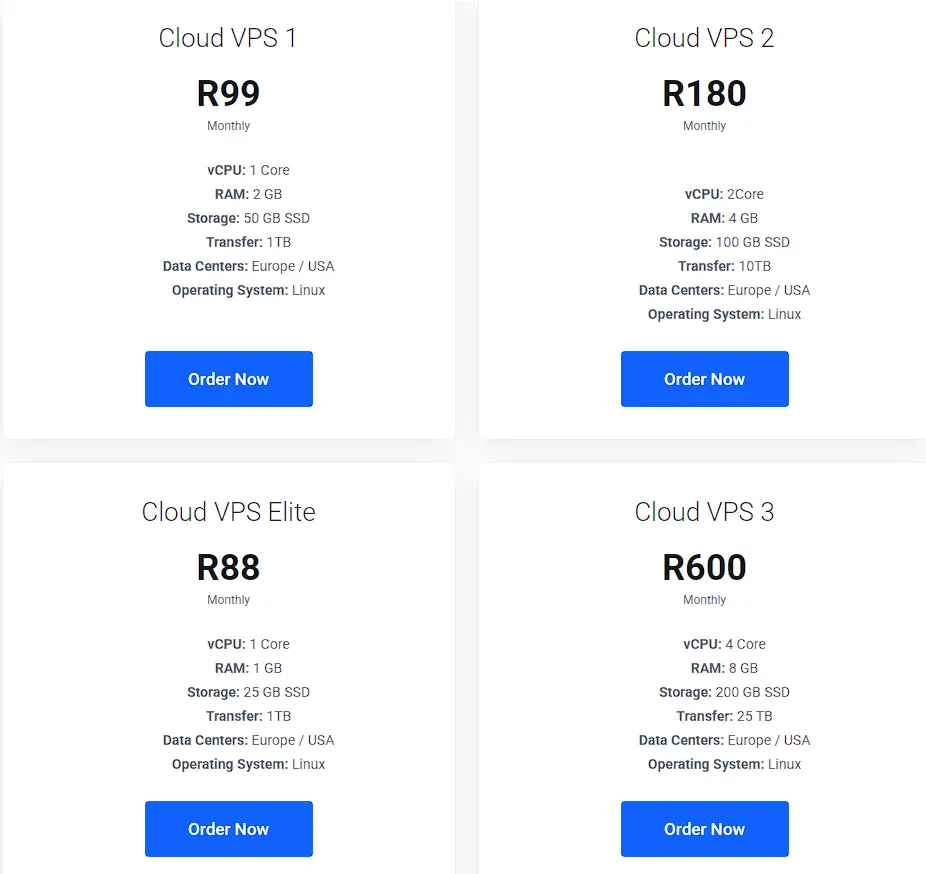
Truehost’s Cloud VPS 2 plan gives you 100GB of SSD storage for R140 a month when billed triennially. That works out to a low storage cost per rand compared to all other plans on this list. The 4GB RAM allocation also holds up well for a small store or business site.
The plan includes 2 vCPU cores and 10 TB of monthly transfer, which covers most small-business traffic loads.
This plan suits a small business that wants solid storage without paying for CPU capacity it does not need yet. Truehost also offers triennial billing, which further reduces the effective monthly rate.
2) HostAfrica
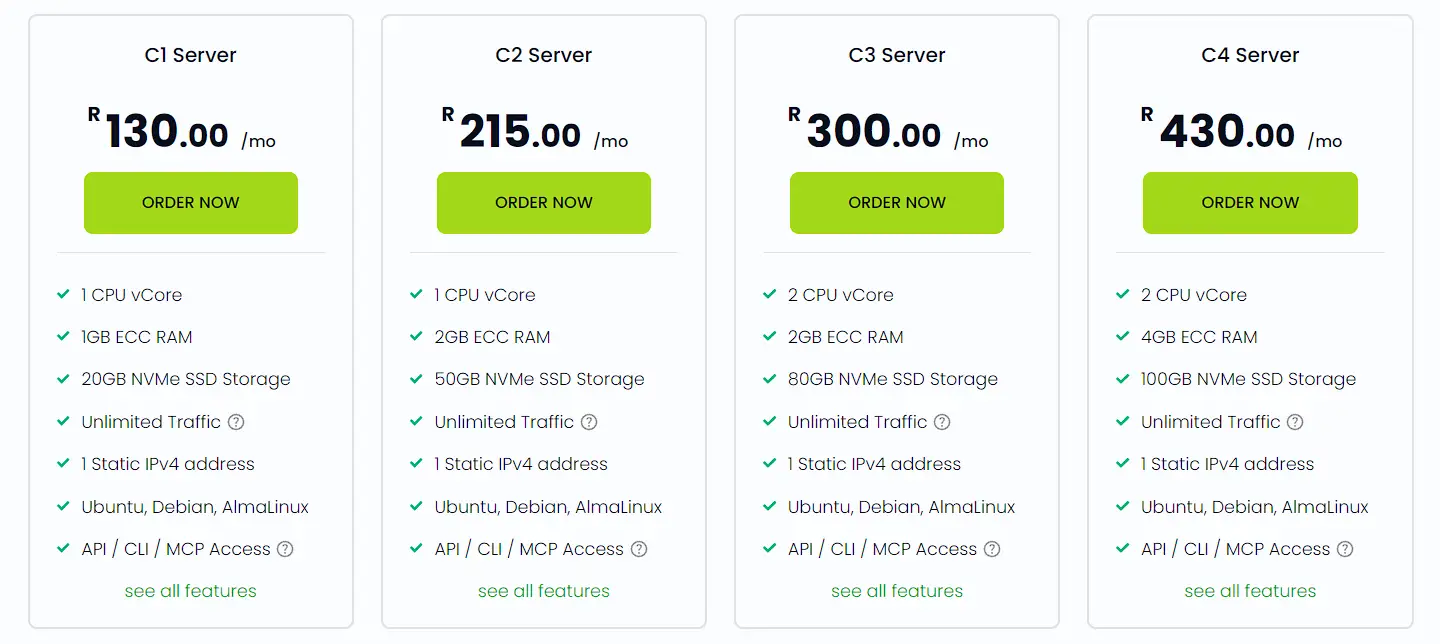
HostAfrica’s entry-level C1 server starts at R130 a month with 20GB of NVMe SSD storage. That is the smallest storage allocation on this list, though the drive speed is fast. This plan fits a lean business site with light storage needs.
Every plan includes automatic weekly backups and RAID 6 storage redundancy as standard. That backup policy is worth noting, since several competitors charge extra for it.
A growing online store would likely outgrow the 20GB tier within the first year. HostAfrica allows you to upgrade RAM, CPU, and storage without downtime. Confirm the per-gigabyte upgrade cost before you commit, since storage needs can grow sooner than planned.
3) Afrihost
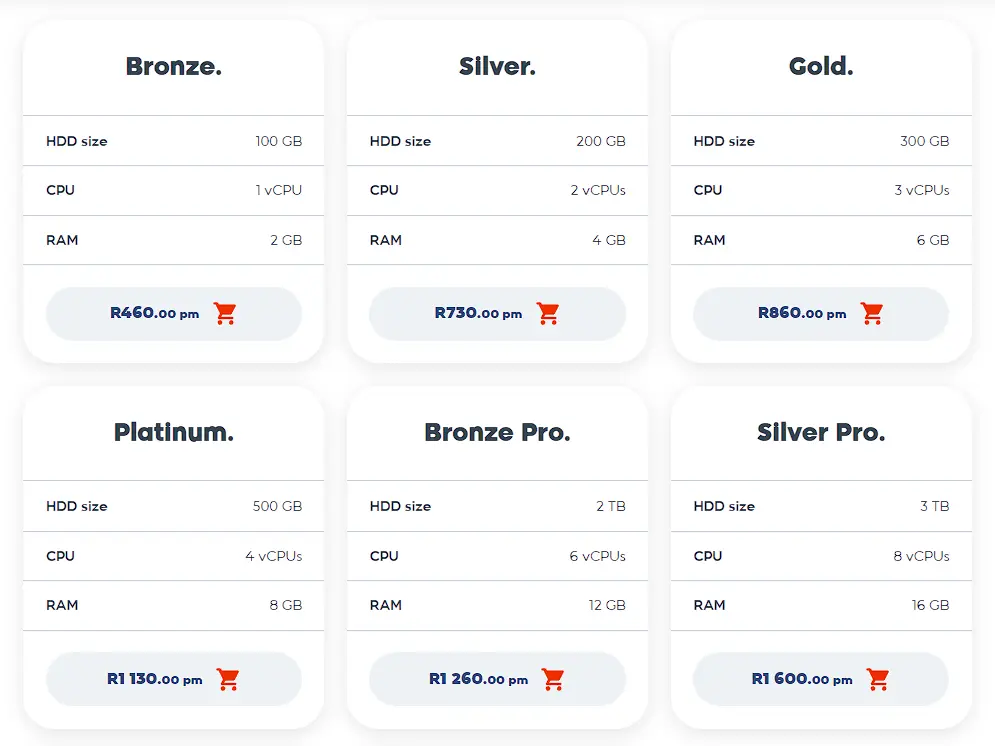
Afrihost’s Bronze VPS plan offers 100GB of storage on HDD SAN, priced at R460 a month as of mid-2026. That price sits higher than most plans on this list, though the storage type trades speed for capacity. A business storing large files with light daily access may still find this workable.
The brand has a long track record in the local market, which reassures business owners who value an established name. Support is available through phone, WhatsApp, and ticket channels around the clock.
Businesses that need fast read and write speeds, like an active online store, should weigh this trade-off carefully. HDD and SAN storage load more slowly than SSD or NVMe under heavy use.
If speed matters more than raw capacity, an NVMe plan from another provider on this list may serve you better.
4) Domains.co.za
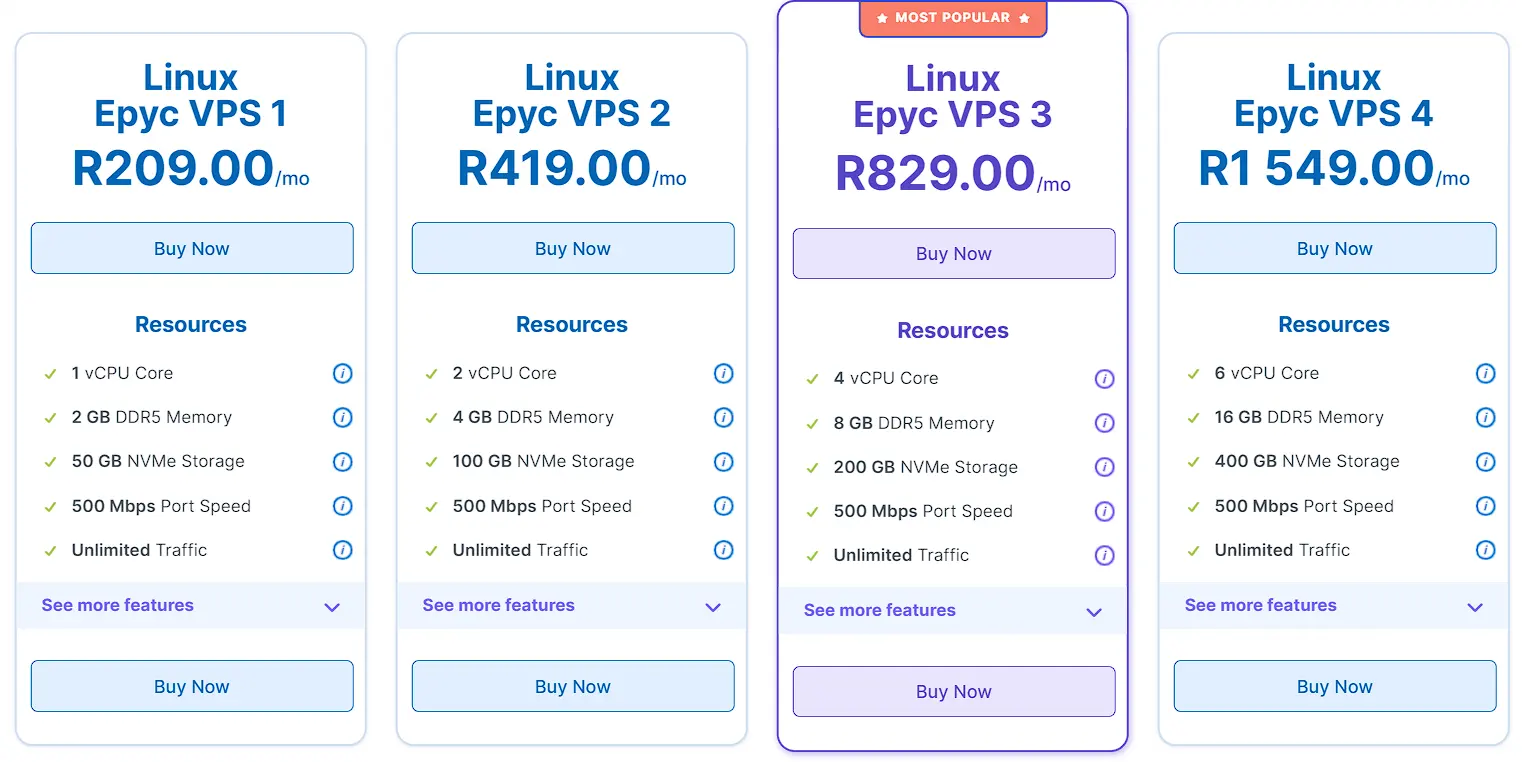
Domains.co.za runs its Linux Epyc VPS 1 plan on AMD EPYC hardware, with 50GB of NVMe SSD storage. It costs R209 a month, and the EPYC line performs well under steady workloads.
Every VPS from Domains.co.za includes full root access, KVM virtualization, and a 30-day money-back guarantee. Free monthly snapshot backups come standard, with weekly backups available as an add-on.
This plan works well for a small business that wants NVMe speed without paying for a large storage tier.
One thing to note: storage on this platform cannot be downgraded once selected, so choosing the right base plan matters. Confirm the next tier’s cost before you commit, in case your storage needs grow quickly.
5) Absolute Hosting
Absolute Hosting’s Epic Turin VPS Silver plan is easy to justify for one clear reason. It includes 500GB of NVMe SSD storage at R229 a month, the largest allocation on this list.
The provider runs newer AMD EPYC Turin processors paired with PCIe 5.0 NVMe drives and DDR5 ECC memory. Absolute Hosting also lets customers build a custom VPS configuration rather than picking from fixed tiers only.
This plan suits a business that stores large media files, requires frequent backups, or has a growing product catalog. The price per gigabyte here is hard to beat among the plans compared. Confirm support response times and renewal pricing directly with the provider before signing up.
6) HostCow
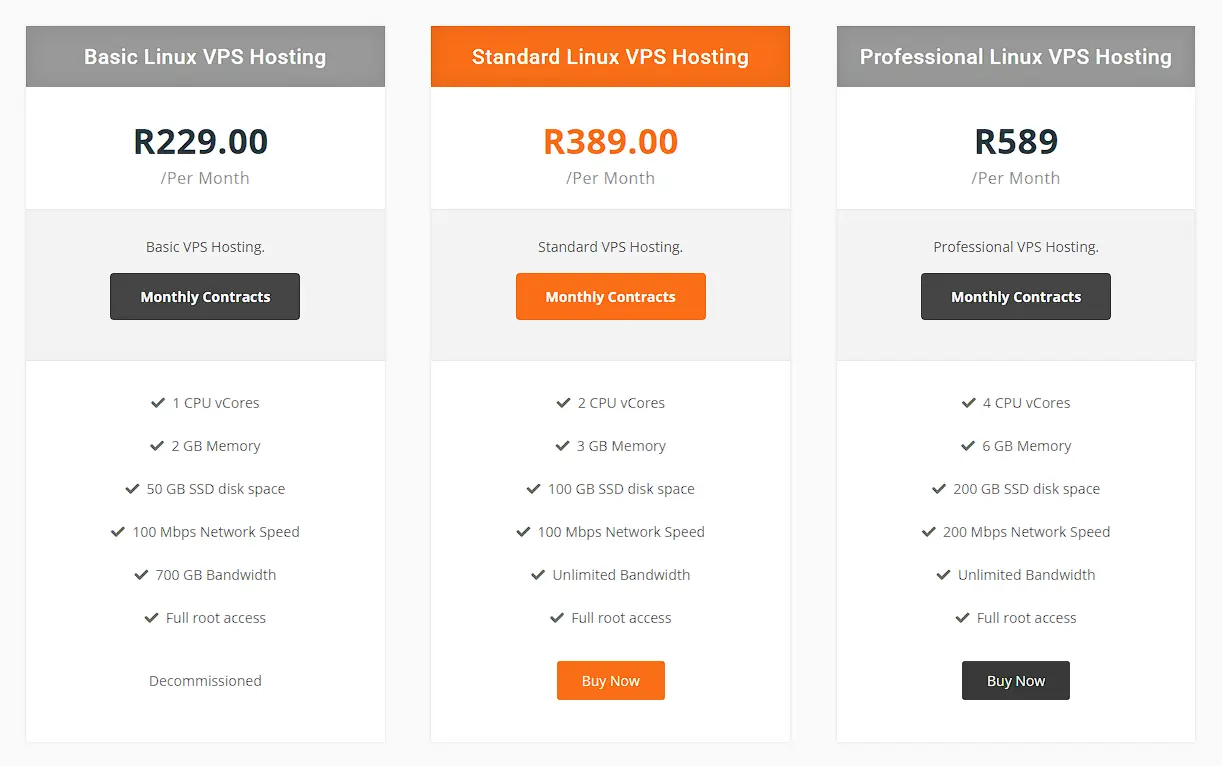
Hostcow’s entry-level Standard Linux VPS plan offers 100GB of SSD storage for R389 a month. That price sits above most plans on this list, though the storage size matches Truehost and Domains.co.za.
The plan includes 2 vCPU cores and 3GB of RAM, which suits a small business site with moderate traffic.
Every plan includes free weekly backups and full root access at no extra cost. Bandwidth is unlimited on this tier, so traffic spikes will not trigger overage charges.
Worth noting: Hostcow’s cheapest plan, the Basic Linux VPS at R229 a month, has been decommissioned. That leaves the Standard plan as the actual entry point for new customers today.
If your business only needs 50GB and light resources, that gap in the lineup may push the effective starting price higher than it first appears.
Businesses that need more room can step up to the Professional tier at R589 a month for 200GB and 6GB RAM.
This plan may suit a business that values local hosting and a straightforward backup policy over the lowest possible price.
7) Hostking
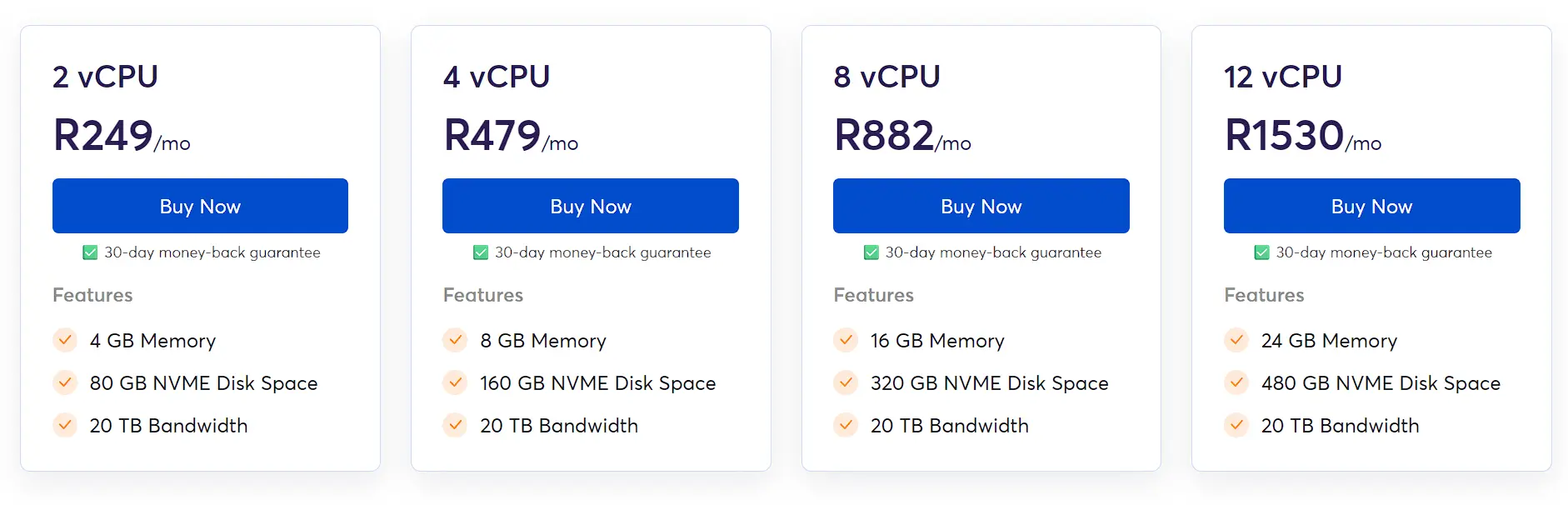
Hostking’s AMD-Cloud-CPX22 plan runs on NVMe storage, offering 80GB for R249 a month. The plan includes 2 vCPU cores, 4GB RAM, and 20TB of monthly bandwidth.
Hostking is known locally for pairing generous bandwidth allowances with NVMe speed at a mid-range price. Servers run on KVM virtualization with full root access, and both cPanel and Plesk licenses can be added on.
Note that Hostking currently only allows upgrades within the same storage type, so moving from SSD to NVMe later will require a new order.
This plan sits mid-range on price, with solid storage and RAM for a growing small business. Confirm the specific data center location and support hours before you commit to a longer contract.
8) Elitehost
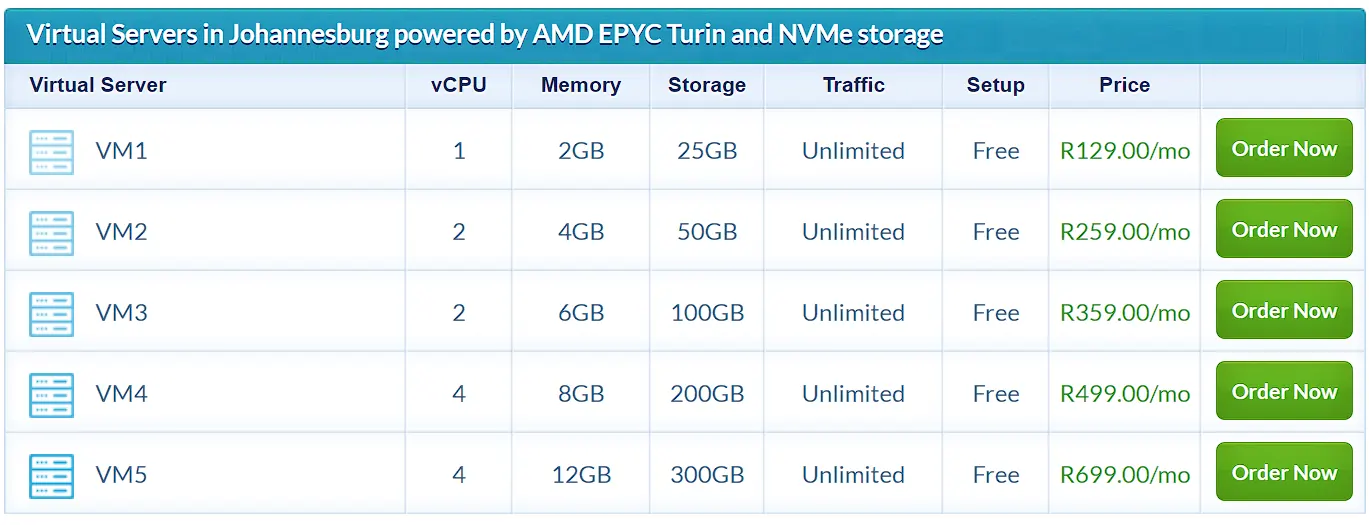
Elitehost’s VM2 plan includes 50GB of NVMe storage at R259 a month. That price sits on the higher end for this storage size compared to others on this list.
Elitehost runs its servers on Supermicro hardware with AMD EPYC Turin processors and PCIe 5.0 NVMe storage. Every plan includes full root access, unlimited traffic, and a redundant network for added reliability.
A managed cPanel add-on is available from R449 a month for businesses that want hands-off server management.
This plan may suit a business already using Elitehost for other services, where bundling makes sense.
How to Pick the Best Storage VPS Plan
Choosing the right plan comes down to a handful of practical questions. Answer these before you compare prices, and the right plan becomes much easier to spot.
I) Start with how much storage you actually need. Most small businesses underestimate their storage needs early on. A basic business website with a handful of pages rarely needs more than 20GB. Add product images, video, or a growing blog, and that number climbs fast.
An online store selling physical products needs room for a growing database, product photos, and order history. A service business that runs email hosting also needs reliable storage for years of messages and attachments.
Daily or weekly backups add additional demand, since each backup requires its own storage space.
A shared hosting plan often caps storage low and splits server resources between many accounts.
A VPS gives your business a private slice of storage that only your site uses. That difference alone can prevent the slowdowns many small businesses face as they grow.
II) Match the storage type to how your site behaves. A media-heavy site or busy online store benefits most from NVMe or SSD speed. A site storing large archives with light daily access can save money on HDD instead.
III) Weigh RAM alongside storage, not after it. A large storage allocation paired with thin RAM can still slow your site during traffic spikes. Look for a plan where RAM scales with storage rather than lagging behind it.
IV) Decide how much server management you want to handle yourself. Managed plans cost more but suit businesses without in-house technical staff. Unmanaged plans cost less, though your team handles updates, patches, and monitoring directly.
V) Check where the servers are physically located. A provider hosting locally in South Africa usually delivers faster load times for South African visitors. It can also speed up daily backup transfers for your team.
VI) Confirm what backup policy comes standard. Some providers include automatic backups at no extra cost, while others charge per gigabyte for the service. Knowing this upfront avoids a surprise line item later.
VII) Look past the entry price to the renewal rate. Promotional pricing often rises once the first term ends. Check each provider’s renewal cost before you commit to any plan.
FAQs
Which is better, a managed or an unmanaged storage VPS?
A managed plan works well if your business has no in-house technical staff. Someone else handles updates, security patches, and server monitoring for you. An unmanaged plan costs less, but you or your team handle those tasks yourselves.
What type of VPS storage should backup-heavy or media-focused businesses prioritise?
NVMe or SSD storage is the better choice for backup-heavy or media-focused businesses. Faster read and write speeds mean backups complete more quickly and media loads without delay. HDD storage still works, though it slows down under frequent, heavy use.
Can I upgrade VPS storage later without downtime?
Many providers allow storage upgrades with little to no downtime, though this varies by provider. Some require a short reboot to apply the change. Always confirm the upgrade process directly with your provider before you need it.
What is the difference between VPS and storage VPS?
A standard VPS balances CPU, RAM, and storage for general use. A storage VPS shifts the balance toward more disk space, often with less CPU or RAM. Storage VPS plans suit businesses with heavy data needs rather than heavy processing needs.
Does storage VPS location matter?
Yes, server location affects both loading speed and backup transfer speed. A server based closer to your customers in South Africa often loads faster for them. It can also speed up your team’s daily backup jobs.
How much does VPS hosting cost in South Africa?
Based on the plans compared here, entry-level storage VPS pricing in South Africa runs from R130 to R460 a month. Storage size, storage type, and RAM all affect where a plan lands in that range.
Is managed VPS hosting worth paying extra for as a small business?
For a business without technical staff, managed hosting often saves time and reduces risk. The extra monthly cost covers ongoing maintenance, security updates, and faster support during issues. A technical team may prefer the lower cost of unmanaged hosting instead.
What happens if my VPS storage runs out?
Running out of storage can cause backups to fail and websites to slow down or crash. Some providers send warnings before you hit your limit, though not all do. Upgrading to a larger storage tier in advance avoids this problem entirely.
Get The Best Storage VPS Today
Storage needs grow quietly until a business hits a wall it did not see coming. Picking the right plan now saves time, money, and stress down the line.
Among the plans compared here, Truehost pairs solid SSD storage with a competitive entry price for its tier. At R140 a month for 100GB, it gives small businesses room to grow without a steep upfront cost.
If your business is outgrowing its current hosting plan, compare your storage needs with the table above. Then head to Truehost to find a plan sized right for where your business is headed.