Web Hosting
 Windows HostingBuilt for Windows apps and websites – stability, speed and flexibility
 Reseller HostingLaunch a hosting business without technical skills or expensive infrastructure
 Affiliate ProgramRefer customers and earn commissions from sales across our platform
 Domain SearchFind and secure a domain name in seconds with our quick lookup tool
 CO ZA Domains
 All DomainsExplore domain names from over 324 TLDs globally – all in one place
 Free Whois Lookup Tool South Africa
 VPS
VPS Website Builder
 Online ShopSet up a sleek eCommerce store with zero coding knowledge
 SSLs
SSLs SupportAccess help articles, how-tos, and everything about our services
 Blog
Blog Contact UsReach our team instantly via live chat or drop us an email
Sending a proposal from a Gmail address in 2026 costs you trust before the conversation even starts. Clients notice the email address behind the message, and it signals that your business is either very new, not serious, or both.
First impressions in competitive markets are hard to recover from.
So, you’d be better using a professional email instead. Why? A branded business email often creates more confidence than a free Gmail account. It helps build credibility every time you send a proposal, invoice, quote, or customer support response.
To add to that, the best email hosting provider in SA should do more than give you a branded email address. It should support the way your business works every day.
That includes having enough storage for your inbox, strong security to protect sensitive information, collaboration tools that keep your team productive, reliable uptime, and pricing that fits your budget in rand instead of dollars.
The right choice today should also make it easy to add new users and features as your business grows.
Now, this is a practical checklist you can use right away. Work through it and you will know exactly which tier or provider fits your situation, without having to read seventeen comparison articles to get there.
Table of Contents
The 7 Criteria That Separate a Good Provider from a Bad One
Choosing an email hosting provider is easy if you only look at the price. Choosing one you’ll still be happy with a year from now takes a closer look.
1) Price
Pricing should be honest. That means no hidden setup fees, no mandatory annual payment buried three screens into checkout, and no US dollar billing that quietly expands your costs every time the rand weakens.
Here is how four established South African providers compare at the entry level:
| Provider | Starting Price | Mailboxes | Storage | Security |
|---|---|---|---|---|
| Truehost | R8/mo | 1 | 3GB per mailbox | 2FA, antivirus, advanced anti-spam |
| HOSTAFRICA | R36/mo | — | 10GB total | Anti-spam, antivirus |
| Axxess | R45/mo | 10 | 500MB | Anti-spam, auto SSL |
| Afrihost | R64/mo | 10 | 1GB per mailbox | Spam filters, antivirus |
Before signing up, take a few minutes to read the plan details. “Starting from” pricing often comes with conditions, such as long-term billing commitments or feature limitations that are easy to miss during checkout.
2) Uptime Guarantee
Your business email should be available whenever your customers need to reach you. That is why uptime is one of the first things to check before choosing a provider.
A 99.9% uptime guarantee allows for roughly 8.7 hours of downtime per year.
A provider offering only 99% uptime could be unavailable for more than 87 hours annually, that’s over three and a half days of missed emails, delayed responses, and lost business opportunities.
For many businesses, email is the main channel for sales enquiries, customer support, invoices, and project updates. Every hour your inbox is offline is an hour you could be missing valuable conversations.
Red flag: A provider that does not publish a Service Level Agreement (SLA). If there is no written commitment to uptime, there is no clear standard for the service you can expect.
3) Storage Per Mailbox
Storage is another feature that often looks better in the headline than it does in practice.
The key question is simple: Is the storage allocated to each mailbox or shared across your entire account?
For example, a plan advertising 50GB of storage may sound generous until you discover it is shared among everyone on your team. With five users, each effectively has 10GB. Add five more employees, and that drops to just 5GB each without anyone’s email habits changing.
Plans that provide storage per mailbox are much easier to manage because every user receives their own dedicated space.
Around 3GB per mailbox is enough for most businesses that mainly exchange emails and documents. Teams that regularly send large PDFs, presentations, design files, or client documents will usually be more comfortable with 5GB to 10GB per mailbox.
Red flag: Shared storage that shrinks as you add more users. It often forces you to upgrade to a more expensive plan long before your business actually needs the extra capacity.
4) Security Stack
Business email is one of the most common targets for cybercriminals.
In South Africa, phishing emails pretending to be from SARS, major banks, courier companies, or trusted suppliers have become increasingly sophisticated. Many look genuine enough to fool even experienced users, which is why basic spam filters are no longer enough.
A reliable email hosting plan should include several layers of protection working together. Before choosing a provider, make sure your plan includes:
- SSL/TLS encryption to protect emails while they are being transmitted.
- Antivirus scanning for both incoming and outgoing email.
- Advanced spam filtering that analyses suspicious behaviour instead of relying only on keywords.
- Two-factor authentication (2FA) to add an extra layer of security when signing in to webmail.
Red flag: No mention of 2FA or spam protection in the plan details. If these security features are not clearly listed, it is safer to assume they are not included.
5) Server Location and POPIA Alignment
The physical location of your email servers has a bigger impact than many businesses realise. If your organisation handles customer or employee information, data protection should be part of your decision from the start.
The Protection of Personal Information Act (POPIA) requires businesses to process personal information responsibly.
While hosting your email on servers in Johannesburg or Cape Town does not automatically make you POPIA compliant, it can simplify compliance compared to storing business data in overseas data centres.
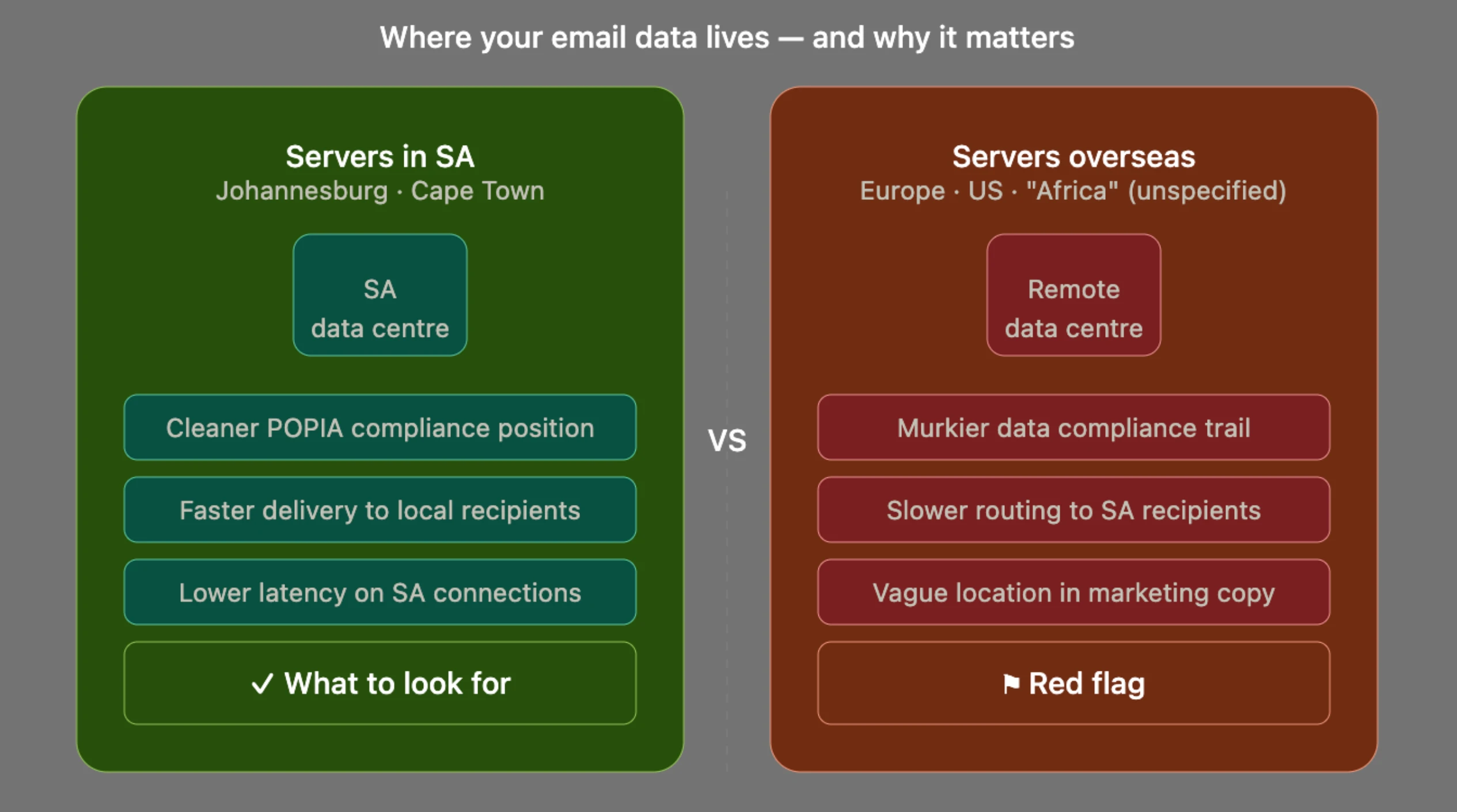
It has also a performance advantage.
Emails exchanged between South African servers generally reach local recipients faster and with lower latency than messages routed through data centres on other continents.
Don’t rely on marketing pages alone. Check the provider’s data centre information or ask their support team directly: “Where are your servers physically located?”
Red flag: Vague answers such as “our servers are in Africa.” That is very different from confirming that your email is hosted in South Africa.
6) Scalability Without Migration Issues
Many businesses begin with a single mailbox, and that’s perfectly fine.
The real test comes when your team starts growing and you need to add more users quickly.
A good email hosting provider lets you create additional mailboxes without forcing you to move to a completely different product or reconfigure your entire email setup.
If upgrading requires changing MX records, updating DNS settings, or migrating existing mailboxes, a simple expansion can quickly turn into hours of unnecessary work.
Before you sign up, check the answers to these questions:
- Can you add mailboxes without switching to a different hosting plan?
- Is the upgrade path clearly explained on the pricing page?
- Are additional mailboxes priced in rand at a predictable rate?
The best email hosting provider in SA makes growth easy. Adding new users should be a simple account upgrade, not a technical project.
Red flag: No visible upgrade path on the pricing page. If the process is difficult to find before you become a customer, there’s a good chance it won’t become easier afterwards.
7) Support
Even the best email hosting plan can become frustrating if you cannot get help when you need it.
Setting up a business email usually involves configuring DNS records, MX records, IMAP on different devices, and sometimes SPF and DKIM records to improve email delivery.
A small mistake in any of these settings can prevent emails from arriving or send them straight to the spam folder.
That’s why responsive support is just as important as the features included in your plan. A good support team should help you get everything working properly instead of simply sending you a link to a help article.
When comparing providers, look for:
- Live chat or phone support during South African business hours.
- 24/7 ticket support for urgent issues outside business hours.
- Setup assistance for DNS, MX records, and IMAP configuration on devices such as Outlook and Android.
Red flag: Email-only support with no published response time. This is one of the most common frustrations mentioned in South African hosting reviews.
Match Your Situation to a Tier
The right email hosting plan depends on the size of your business and how your team works. Here is a simple way to narrow down your options.
a) Solo Freelancer or 1–2 Person Startup
You’ll need one mailbox, at least 3GB of storage, reliable spam protection, and a professional @yourdomain.co.za email address.
Look for an entry-level plan under R30 per month that includes IMAP support and webmail access at no extra cost.
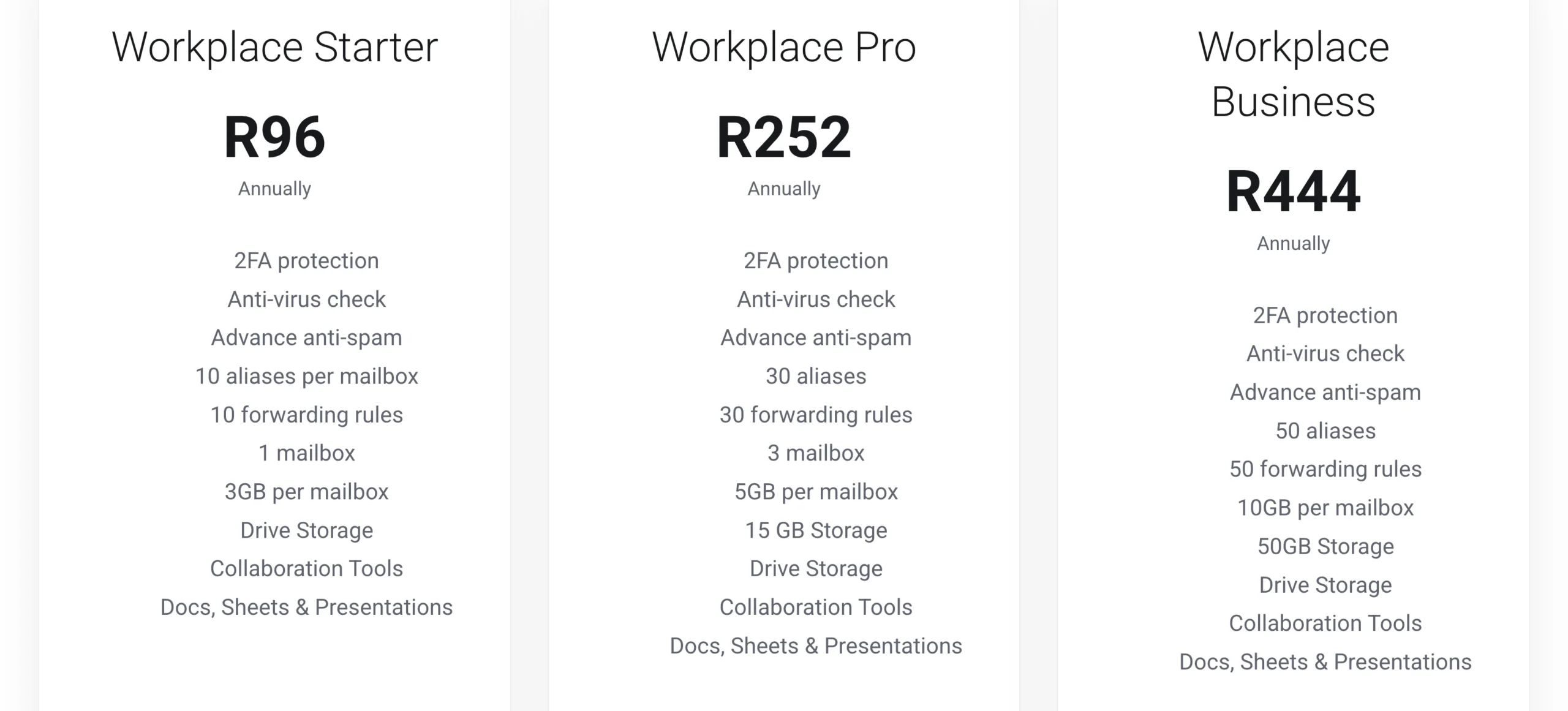
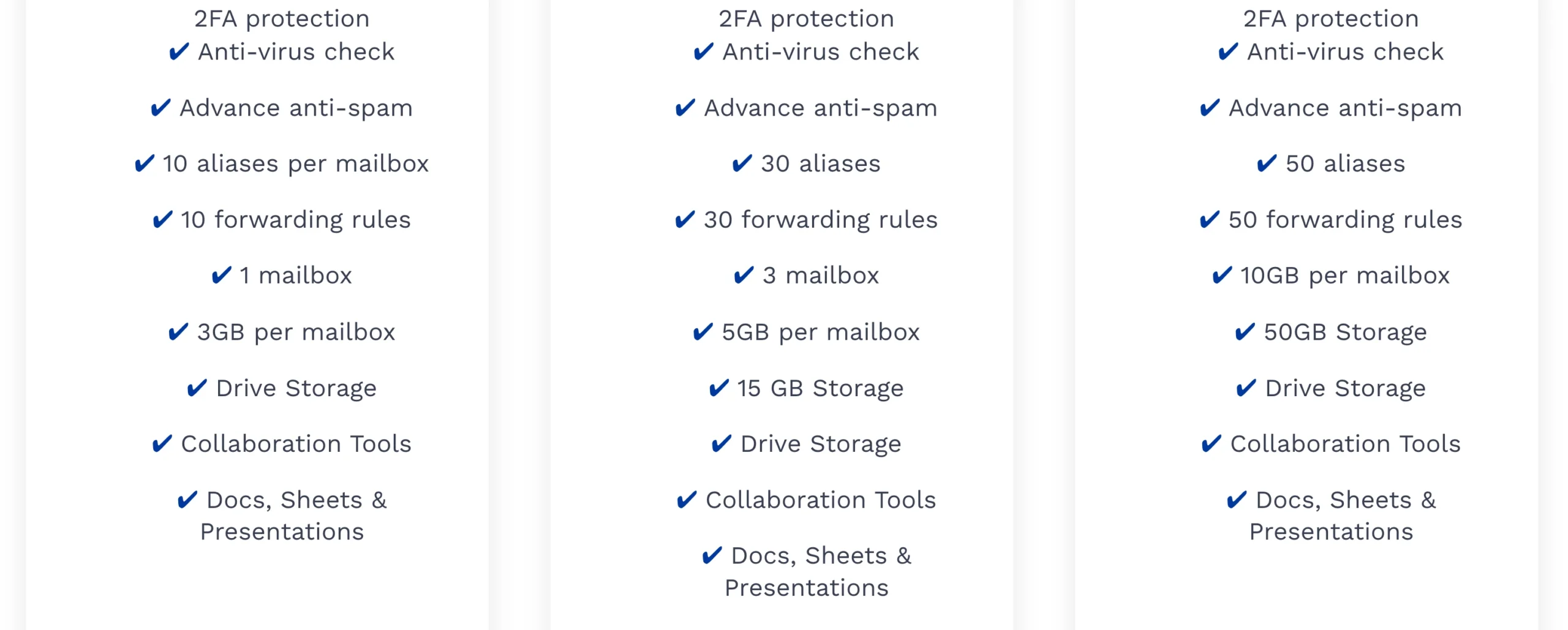
Our Truehost Workplace Starter plan costs R8/month and includes one mailbox with 3GB of storage, antivirus protection, advanced spam filtering, 2FA, and built-in collaboration tools like Docs, Sheets, and Presentations. Everything you need is included from the start.
b) Small Team of 3–10 People
Here you’ll need multiple mailboxes, shared calendars, 5GB to 10GB of storage per mailbox, and collaboration tools that help your team stay organised.
Look for a plan that allocates storage per mailbox, includes productivity tools, and lets you add more users as your team grows.
Our Workplace Pro plan includes three mailboxes with 5GB each for R21/month. If your team needs more space, Workplace Business provides 10GB per mailbox with 50GB total storage for R37/month. Both plans include our full security suite and collaboration tools.
c) Growing SME with 10 – 50 Staff
You need support for multiple domains, generous mailbox storage, priority support, and an upgrade path that lets your business expand without rebuilding your email infrastructure.
Select a provider with published uptime guarantees, dependable support, and plans designed to scale as your business grows.
Our full Workplace range is built to support growing businesses. If your organisation has more complex requirements, our team can help you choose and configure the right solution.
How to Choose and Get Started
Once you have shortlisted a few providers, the final decision becomes much easier.
Step 1: Define your requirements.
Start with the basics. How many mailboxes do you need today? How much storage should each user have? Do you need shared calendars or collaboration tools for your team?
Step 2: Compare every provider using the six criteria above.
Review their uptime guarantee, storage allocation, security features, server location, scalability, and support. If a provider cannot clearly explain any of these, it may not be the right choice for your business.
Step 3: Test their support before you buy.
Send a question through live chat or another support channel. The speed and quality of the response will give you a good idea of the experience you can expect after becoming a customer.
Step 4: Migrate your existing email.
Many reputable providers will help move your existing emails, update your MX records, and complete the migration with minimal disruption to your business.
The best email hosting provider in SA is one that checks every box on your checklist, suits your current team, and can continue supporting your business as it grows.
At Truehost, we designed our Workplace plans with South African businesses in mind. Every plan is priced in rand and includes 24/7 support, two-factor authentication, antivirus protection, advanced spam filtering, and collaboration tools from just R8 per month.
Get started with Truehost Workplace today and send every email from an address that reflects the professionalism of your business.