Web Hosting
 Windows HostingBuilt for Windows apps and websites – stability, speed and flexibility
 Reseller HostingLaunch a hosting business without technical skills or expensive infrastructure
 Affiliate ProgramRefer customers and earn commissions from sales across our platform
 Domain SearchFind and secure a domain name in seconds with our quick lookup tool
 CO ZA Domains
 All DomainsExplore domain names from over 324 TLDs globally – all in one place
 Free Whois Lookup Tool South Africa
 VPS
VPS Website Builder
 Online ShopSet up a sleek eCommerce store with zero coding knowledge
 SSLs
SSLs SupportAccess help articles, how-tos, and everything about our services
 Blog
Blog Contact UsReach our team instantly via live chat or drop us an email
A DNS server is a computer that turns a domain name into an IP address. Your device needs that address to reach the website. In other words, the server works like the internet’s address book.
You look up a name, and it hands back the number. Without it, you would type long strings of digits for every site.
This article follows one real lookup from start to finish. By the end, a DNS error message will make sense to you.
Table of Contents
What Is a DNS Server?
A DNS server stores or retrieves the records that link domain names to IP addresses. A domain name is the word-based address people remember, such as example.com.
An IP address is a numeric address that computers use, such as 203.0.113.10. Computers route traffic with numbers. People, however, remember words. DNS exists to connect the two.
DNS vs. a DNS Server
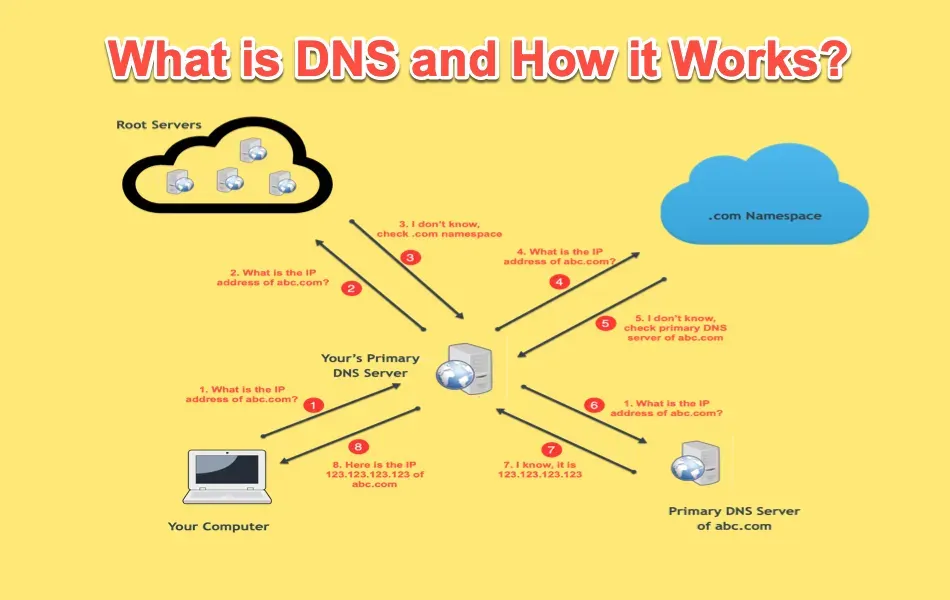
People often mix up these two terms. DNS, short for Domain Name System, is the overall system and set of rules that govern how domain names are resolved.
A DNS server is one of the machines that runs it. So DNS is the method, and the server is the hardware doing the work.
DNS Server vs. Name Server
You will also see the term name server. In most articles, it means the same thing as a DNS server.
Technically, a name server stores records for a domain, while a resolver looks them up for you. Both count as DNS servers, so the labels overlap.
What Does a DNS Server Do When You Type a Web Address?
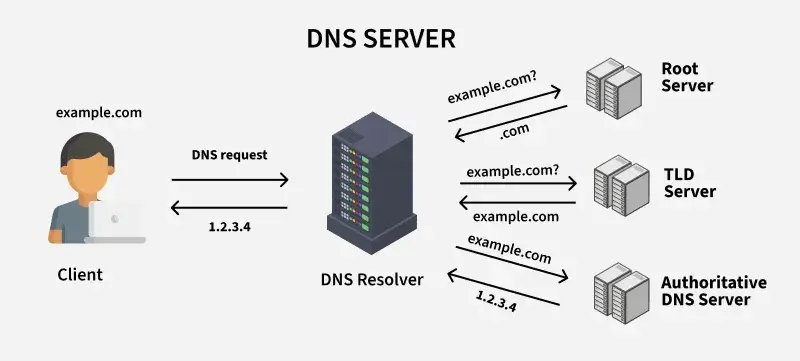
Every time you enter a web address, your device sends a query. The query asks one simple thing: what is the IP address for this domain?
A DNS server does three jobs in response:
- It receives the query from your device.
- It finds the answer, either from memory or by asking other servers.
- It returns the IP address so your browser can connect to the site’s web server.
Once your browser has the address, it contacts the web server and loads the page. The whole exchange usually takes tens of milliseconds.
As a result, you rarely notice it happening. You only notice when it fails, and the page refuses to load.
How Does a DNS Server Work? A Step-by-Step Lookup
The easiest way to see this is to follow one DNS lookup. Say you type example.com into your browser. Here is what happens, in order.
Browser → Recursive resolver → Root server → TLD server → Authoritative server → Answer back to browser.
- Your browser and device check their caches. Your browser first looks in its own memory. Your operating system keeps a similar cache. If you visited the site recently, the answer is already there. In that case, the lookup ends immediately.
- The query goes to a recursive resolver. If no cached answer exists, your device asks a recursive resolver. Your internet provider usually runs this server. However, you can also point your device to a public resolver. The resolver checks its own cache first. If it comes up empty, it does the legwork for you and asks other servers until it finds the answer.
- The resolver asks a root server. The root server doesn’t know the IP address. Instead, it points the resolver to the correct top-level domain server based on the domain’s suffix. For a domain like example.com, the ending is .com. The root system has 13 named addresses, and many machines back each one.
- The TLD server points to the authoritative server. The top-level domain (TLD) server handles one ending, such as .com or .org. It doesn’t hold the site’s IP address either. What it does know is which server is responsible for example.com. It sends the resolver there.
- The authoritative server returns the IP address. This server holds the real records for the domain. It checks its records and replies with the IP address, such as 203.0.113.10. At last, the resolver has what it came for.
- The resolver answers your browser. The resolver saves a copy of the answer and passes it to your device. Your browser then connects to the web server at that address. The page loads a moment later.
This chain sounds long. In practice, it usually finishes in tens of milliseconds. Caching, covered below, shortens most lookups.
Types of DNS Servers
Four types of DNS servers take part in a lookup. Each has a different job.
| Type | What it does | Who runs it |
|---|---|---|
| Recursive resolver | Takes your query and hunts for the answer on your behalf | Your internet provider or a public provider |
| Root name server | Points to the correct TLD server and holds no site records | Organizations that operate the root system |
| TLD name server | Handles one domain ending, such as .com, and points onward | Registry operators |
| Authoritative name server | Holds the actual records and gives the final answer | Your host, registrar, or DNS provider |
The recursive resolver is the only one your device talks to directly. The other three work behind the scenes, answering the resolver.
The simplest way to tell the two apart is by job. A recursive resolver looks things up. An authoritative server holds the records.
Resolvers also come in public and private versions. Public ones, like Google’s 8.8.8.8 or Cloudflare’s 1.1.1.1, are open to anyone. Private ones serve a single network, such as a company or an internet provider.
How DNS Caching Makes Lookups Quicker
Caching means a server keeps a recent answer instead of asking again. Most lookups rely on it. As a result, the full chain above runs far less often than you might expect.
Answers get cached in three places:
- Your browser
- Your device’s operating system
- The recursive resolver
The resolver cache helps the most. Many users share it, so popular sites are usually already cached.
Each cached answer carries a timer called TTL, short for time to live. The domain owner sets it, anywhere from a few minutes to a day. When the timer runs out, the server discards the answer and asks again.
This timer explains a familiar frustration. After a site moves to a new server, some visitors still see the old one. Their resolvers simply haven’t discarded the old answer yet. People call this delay propagation, and it ends once every cache expires.
FAQs
Does changing your DNS server change your IP address?
No. Your IP address comes from your internet provider. A new DNS server only changes who answers your lookups. Your address stays the same.
How do I find out which DNS server I’m using?
On Windows, run ipconfig /all in Command Prompt and read the DNS Servers line. On a Mac, check the DNS tab under your network’s Details. Your router’s admin page also lists the DNS servers it uses.
Why would someone change their DNS server?
Usually, the reason is speed or reliability. A slow or unreliable resolver delays every page you load. Some people also switch to built-in filtering or privacy features.
What happens when a DNS server goes down?
When it fails, your browser can’t find a site’s address, so pages stop loading. You may see messages like DNS_PROBE_FINISHED_NXDOMAIN or “server IP address could not be found.” The site itself is usually still online. Restarting your router, switching resolvers, or flushing your cache often fixes the problem.
Start With Your Own Domain
You can now follow a lookup from keystroke to loaded page. The browser asks, the resolver hunts, and the authoritative server finally answers.
If you run a website, you depend on this system every day. Your domain needs correct DNS records, or visitors can’t reach you.
Ready to put this into practice? Register your domain with Truehost and set up its DNS records today.
/