Web Hosting
 Windows HostingBuilt for Windows apps and websites – stability, speed and flexibility
 Reseller HostingLaunch a hosting business without technical skills or expensive infrastructure
 Affiliate ProgramRefer customers and earn commissions from sales across our platform
 Domain SearchFind and secure a domain name in seconds with our quick lookup tool
 CO ZA Domains
 All DomainsExplore domain names from over 324 TLDs globally – all in one place
 Free Whois Lookup Tool South Africa
 VPS
VPS Website Builder
 Online ShopSet up a sleek eCommerce store with zero coding knowledge
 SSLs
SSLs SupportAccess help articles, how-tos, and everything about our services
 Blog
Blog Contact UsReach our team instantly via live chat or drop us an email
Torn between OpenClaw VPS vs local for your OpenClaw deployment?
I’ll lay down the basics for you.
An OpenClaw VPS is simply a rented server in a professional data center. You get a virtual machine that stays on around the clock, complete with a fixed IP address, high-grade internet, and backup power in case of outages.
At Truehost, we take it a step further; our OpenClaw plans come pre-configured. That means you avoid the headache of setting everything up from scratch.
On the other hand, running OpenClaw locally means you’re using hardware you already own.
It could be a desktop PC you leave running overnight, a Raspberry Pi, a Mac Mini, or even an old laptop you’ve given a second life.
Your OpenClaw agent stays on your home or office network, and all the data it generates never leaves your physical space.
So, which route should you take?
Well, what do you value more?
Predictable monthly costs, strong data privacy, hands-on control, or minimal maintenance?
Your choice directly shapes what you pay, how secure your agent is, and how much time you’ll spend tweaking.
Before you decide, have a quick look at the differences:
| Feature | VPS | Local |
| Uptime | 99.9% data center reliability | Tied to your home power and internet |
| Monthly Cost | From R285/month (Truehost) | R0/month (but upfront hardware costs) |
| Data Privacy | Data leaves your premises | Full data sovereignty |
| Security Burden | Provider handles infrastructure; you secure application | You own every layer of security |
| Set Up Compexity | Moderate (SSH, Docker) | Moderate to Hard (port forwarding, dynamic IP) |
| Scalability | Effortless; upgrade in minutes | Limited by physical hardware |
Table of Contents
Openclaw VPS vs Local: 7 Key Differences
Now let’s see the key differences in detail.
a) Performance
Can your agent do what you need it to do at the required time?
With a VPS, you’re getting dedicated resources from a data center. Your virtual CPU cores, RAM, and NVMe storage are provisioned for you. There’s no competition from other applications running on the same machine.
When you need more power, say you’re adding multiple agents or heavier browser automation, you upgrade your plan and get it instantly.
On a local machine, your OpenClaw agent is sharing resources with everything else on that computer.
If you’re running it on your daily-use laptop, your agent might slow down when you open multiple browser tabs or run other applications.
And if you’re using a lightweight device like a Raspberry Pi, you’ll hit a hard ceiling on what you can do.
For OpenClaw VPS, the resources are dedicated and predictable.
For Local, performance depends entirely on what hardware you throw at it. A high-end desktop with 32GB of RAM and a good GPU will outperform a basic VPS.
But a budget laptop or a Raspberry Pi will struggle with anything beyond basic tasks.
b) Pricing
OpenClaw VPS Pricing
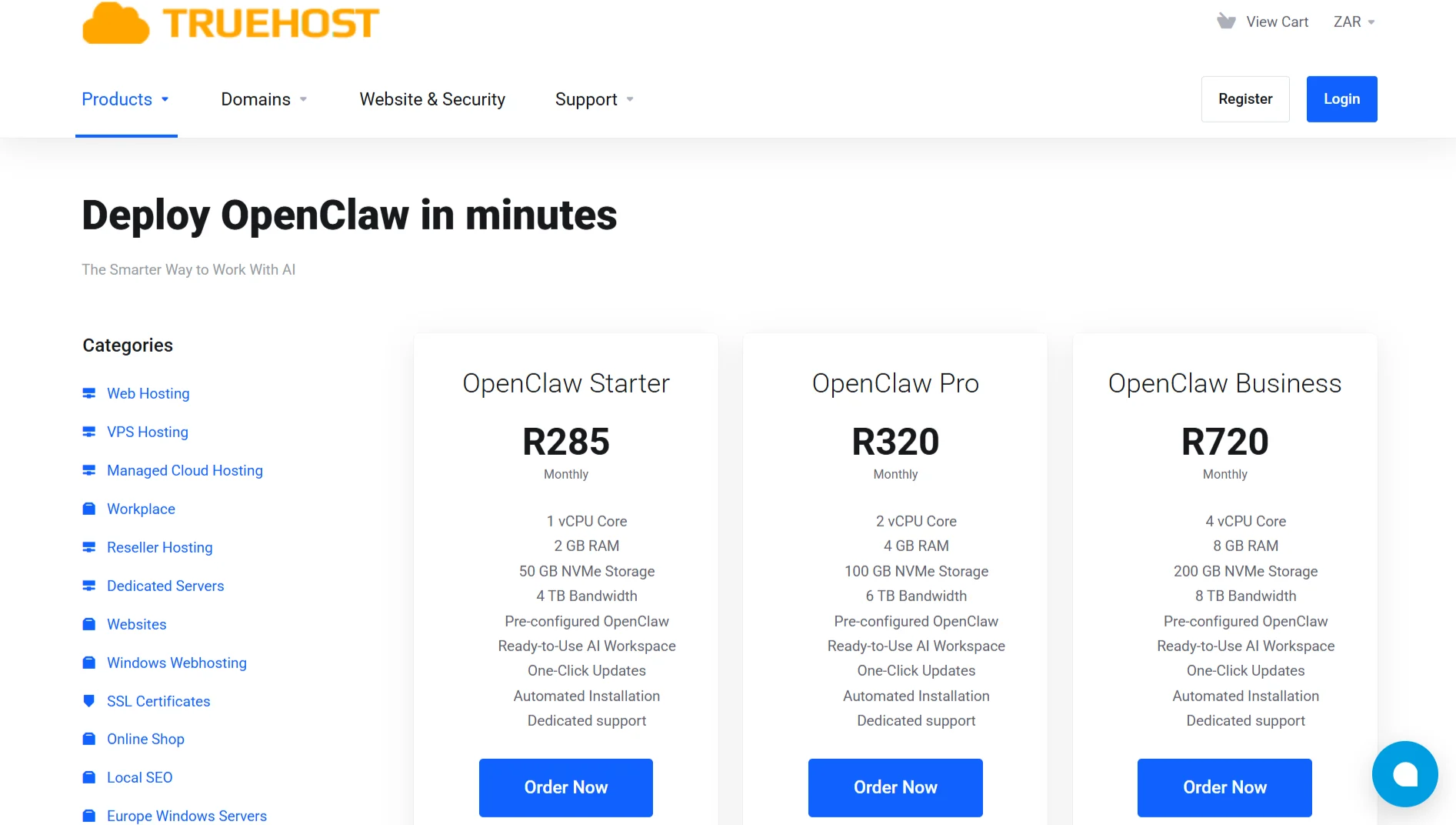
We offer OpenClaw VPS plans starting at R285 per month. Here’s what’s available:
OpenClaw Starter, R285 Monthly:
- 1 vCPU Core
- 2 GB RAM
- 50 GB NVMe Storage
- 4 TB Bandwidth
OpenClaw Pro, R320 Monthly:
- 2 vCPU Core
- 4 GB RAM
- 100 GB NVMe Storage
- 6 TB Bandwidth
OpenClaw Business, R720 Monthly:
- 4 vCPU Core
- 8 GB RAM
- 200 GB NVMe Storage
- 8 TB Bandwidth
All plans come with: Pre-configured OpenClaw, ready-to-use AI Workspace, one-Click Updates, automated Installation, and dedicated support
With a VPS, you pay a predictable monthly fee, no hardware to buy, no depreciation to worry about, you can cancel anytime, and if your needs grow, upgrading takes a few clicks from your dashboard.
Local Pricing
Going local means upfront hardware costs. A Raspberry Pi 5 will set you back around R2,200 to R3,300. A Mac Mini costs significantly more.
And because power outages are a real risk, you’ll almost certainly need an uninterruptible power supply, which adds another cost.
Once the hardware is paid off, your monthly cost drops to near zero. That’s the genuine appeal of local, no recurring bills.
But this only works if your hardware survives, the power doesn’t surge, and you never need to scale beyond your original specs.
c) Security
Security for a self-hosted AI agent has two layers. First, there’s the infrastructure: the physical server, the network, the data center. Second, there’s the application layer, your OS, firewall, and access controls.
With a VPS, the infrastructure layer is handled by your provider. At Truehost, we handle physical security, DDoS protection, network filtering, and hardware redundancy.
You’re responsible for the application layer: keeping the OS up to date, configuring your firewall, managing SSH access, and monitoring for intrusions.
With local hosting, you own everything. The server, the home network, the router, and the firewall. Every port forwarding rule that connects your machine to the internet is your responsibility.
One misconfigured port can expose your API keys. One missed router firmware update can become an entry point.
For users who aren’t network administrators, which is most people, this is a meaningful, ongoing responsibility that never fully goes away.
d) Set Up
Getting OpenClaw running is one thing, but getting it reliably accessible from the internet is another.
With a VPS, picking your plan, paying, and getting your environment live takes minutes. SSH in, run your deployment commands, and your agent is up on a stable, static public IP. No routing configuration needed.
The environment comes ready for Linux tooling, Docker, and standard OpenClaw deployment.
Local setup requires more than just installing OpenClaw. You need to expose your agent to the internet via port forwarding.
That breaks the moment your ISP rotates your IP address, which happens regularly on home plans.
CGNAT (Carrier-Grade NAT) adds another layer of complexity where your ISP performs NAT at the carrier level, making standard port forwarding often ineffective for inbound connections.
Getting around it typically requires Tailscale, a tunnel service, or a paid static IP add-on. All viable, but none simple
e) Privacy
Every time OpenClaw runs a task, it generates data. Message logs, automation history, tool execution traces, API call records- so where this data lives is crucial.
On a VPS, your data lives on physical hardware in a data center you don’t own. At Truehost, we encrypt data and follow strong security practices.
But the server is still off-premises. For most everyday business automation, customer support bots, scheduling agents, and sales workflows, this trade-off is completely acceptable.
With local hosting, nothing leaves your network. Message content, workflow history, tool outputs- it all stays on your machine.
For legal firms, healthcare providers, and financial services, this isn’t a preference; it’s a requirement.
Any workflow handling personally identifiable information at scale needs full data sovereignty
f) Technical Skills Needed
While both paths require some technical knowledge, the skill sets differ.
For a VPS, you need basic Linux administration: SSH, basic command-line skills, and the ability to install and configure software.
If you can follow a tutorial and use the terminal, you’re good to go. Our pre-configured plans significantly reduce the skill barrier.
For local, you need all of that plus networking knowledge. You need to understand port forwarding, dynamic DNS, CGNAT, firewall configuration, and potentially VPN setup.
You also need to maintain the physical hardware and troubleshoot when things go wrong
g) Uptime and Reliability
Uptime is simply the percentage of time your OpenClaw agent is available and running.
A VPS runs in a professional data center with redundant power systems, enterprise-grade internet connections, and backup generators.
Your agent stays alive through blackouts, ISP maintenance windows, and everything in between. That’s 99.9% uptime, roughly 8.7 hours of total downtime per year, maximum.
Local depends on two things you don’t control: your power supply and your internet connection.
Add routine ISP fluctuations, and your agent is running on a foundation that can drop without warning
Which One Wins?
Openclaw VPS Is Best For:
- You need 24/7 reliability for business automation, customer-facing agents, or scheduled workflows
- You want a low monthly cost with no upfront hardware investment
- Your messaging platforms are WhatsApp, Telegram, or Slack (all VPS-compatible)
- You prefer a clean Linux environment with standard tooling
- You anticipate needing to scale, more agents, heavier workloads, and browser automation
- You’re dealing with regular power and internet instability
Local Is Best For:
- Data privacy is a hard legal or regulatory requirement
- You need iMessage integration (only possible on macOS hardware)
- You want zero monthly fees after the initial hardware investment
- You have reliable power and internet at your location
- You’re comfortable managing networking, security, and hardware maintenance
OpenClaw VPS vs Local FAQs
What is the difference between managed OpenClaw and OpenClaw on VPS?
Managed OpenClaw means the provider handles the entire setup, updates, and maintenance for you. On a VPS, you get a pre-configured environment but manage the application yourself, though our plans include dedicated support to help you along the way.
Is it safe to run OpenClaw in a virtual machine?
Yes. In fact, security experts recommend using a VM or container for OpenClaw to isolate it from your host system. This prevents a compromised agent from accessing your personal files.
Can you run OpenClaw for free?
You can run OpenClaw locally on hardware you already own with no monthly fees. Some cloud providers also offer free tiers, but a proper VPS requires a monthly payment.
How much RAM do I need to run OpenClaw?
If you’re using cloud APIs (Claude, DeepSeek, etc.), 2GB RAM is the absolute minimum; our Starter plan covers this. For local models, you need 24-32GB of VRAM or unified memory to run capable agent models, which is high-end hardware.
Does OpenClaw use your GPU?
Only if you’re running local LLM models; if you’re using hosted APIs (like OpenAI, Claude, or DeepSeek), your GPU isn’t important; the AI runs on the provider’s servers.
What is the best computer for OpenClaw?
For a VPS approach, any modern Linux server with adequate RAM will work. For local models, Mac M-series chips perform exceptionally well with unified memory. For fully local AI without cloud APIs, aim for high-end GPUs with 24GB+ VRAM or Mac Studio-level hardware.
Run on Openclaw Truehost VPS
We offer OpenClaw VPS plans that are pre-configured and ready to deploy. No one-click purchases? Actually, yes, one-click from our marketplace.
OpenClaw Starter at R285 gives you 1 vCPU, 2GB RAM, 50GB NVMe storage, and 4TB bandwidth. It’s the absolute baseline for a functional OpenClaw environment that runs 24/7.
OpenClaw Pro at R320 offers 2 vCPUs, 4GB RAM, 100GB NVMe storage, and 6 TB bandwidth, making it ideal for multi-agent setups.
OpenClaw Business at R720 gives you 4 vCPUs, 8GB RAM, 200GB NVMe storage, and 8TB bandwidth for heavy workloads and complex automation.
All plans include pre-configured OpenClaw, a ready-to-use AI workspace, one-click updates, automated installation, and dedicated support.
Don’t spend your weekend debugging port forwarding. Get an OpenClaw VPS that works.