 Web Hosting
 Windows HostingBuilt for Windows apps and websites – stability, speed and flexibility
 Reseller HostingLaunch a hosting business without technical skills or expensive infrastructure
 Affiliate ProgramRefer customers and earn commissions from sales across our platform
 Domain SearchFind and secure a domain name in seconds with our quick lookup tool
 CO ZA Domains
 All DomainsExplore domain names from over 324 TLDs globally – all in one place
 Free Whois Lookup Tool South Africa
 VPS
 Website Builder
 Online ShopSet up a sleek eCommerce store with zero coding knowledge
 SSLs
 SupportAccess help articles, how-tos, and everything about our services
 Blog
 Contact UsReach our team instantly via live chat or drop us an email

How much does WordPress cost? There’s no single answer.
The price depends on which WordPress you choose and which services you need around it.
Some people pay nothing for a basic site. Others pay a monthly subscription. Most self-hosted sites land somewhere in between.
The confusion comes from the name. WordPress.com is a hosted service that sells subscription plans.
WordPress.org is different. It gives you free software that you install on your own hosting account.
One bundles everything into a plan. The other lets you buy each piece separately.
This guide compares WordPress pricing first.
Then it explores the free self-hosted option and the extra costs that come with it.
Don’t assume every WordPress website needs an expensive subscription.
Plenty run for the price of hosting and a domain, and some cost very little.
Before you pick a route, it helps to know what each one includes, what it leaves out and what you’d have to add yourself.
Table of Contents
How Much Does WordPress Cost?
Start with the overview. This table shows both routes at a glance.
| WordPress option | Starting cost | What you pay for |
| WordPress.com Free | $0 | Hosted website with a WordPress.com subdomain |
| WordPress.com Personal | From $4/month | Paid hosted website with a custom domain connection |
| WordPress.com Premium | From $8/month | Additional design, analytics and publishing features |
| WordPress.com Business | From $25/month | Higher-level website management and developer features |
| WordPress.com Commerce | From $45/month | Hosted eCommerce features |
| WordPress.org | Free software | Separate hosting, domain and optional paid tools |
The WordPress.com prices use annual-billing rates. They’re in US dollars, exclude taxes and can change. Monthly billing costs more, and longer terms can cost less per month. Check the pricing page before you buy.
To give you a rough yearly picture, the annual rates work out to about $48 a year for Personal, $96 for Premium, $300 for Business and $540 for Commerce.
A simple self-hosted site can cost much less.
Truehost’s Starter hosting is listed at R 400.00 a year on annual billing, and annual plans can include a free .co.za domain for the first year.
The two routes aren’t identical, so compare what you get, not just the price.
Here’s the main difference. WordPress.com bundles hosting and the WordPress platform into one subscription.
WordPress.org software is free, but you pay separately for hosting, and for a domain if you want a custom website address.
Paid themes, plugins, development work and maintenance can add costs to either route.
Neither route is automatically cheaper. WordPress.com can save you time, because it handles hosting, security and updates.
Self-hosting can save you money, because you buy only what you need.
The better choice depends on your skills, your budget and how much control you want.
WordPress Pricing: How Much Does Each Plan Cost?
WordPress.com offers a free plan and several paid plans.
The paid plans bundle hosting with different levels of functionality and support. Here’s what each one gives you.
Billing terms change the math.
Monthly billing is the most expensive, at $9, $18, $40 and $70 per month for Personal, Premium, Business and Commerce.
Annual billing brings those down to $4, $8, $25 and $45.
Longer terms can cut the monthly equivalent further, with Personal listed at $2.75 a month on a three-year term.
Those plans are billed upfront, and renewal rates can differ from the introductory rate, so read the renewal terms.
a) WordPress.com Free Plan: $0
The Free plan gives you a hosted website on a WordPress.com subdomain, so your address looks like yoursite.wordpress.com.
You can create and publish pages and posts with the basic tools.
There are limits. Storage is small, at about 1 GB.
WordPress.com branding and advertisements may appear on your site.
You can’t use a custom domain as your main address, and the functionality is limited compared with paid plans.
It suits people testing WordPress, personal bloggers and anyone who doesn’t need a custom domain or advanced features.
If you’re running a business, you’ll probably outgrow it quickly. Think of it as a trial.
You can move to a paid plan later and keep your content.
Just remember that a site that grows on a free subdomain eventually needs a new address, and moving can cost you visitors unless you set up redirects.
b) WordPress.com Personal: From $4 per Month
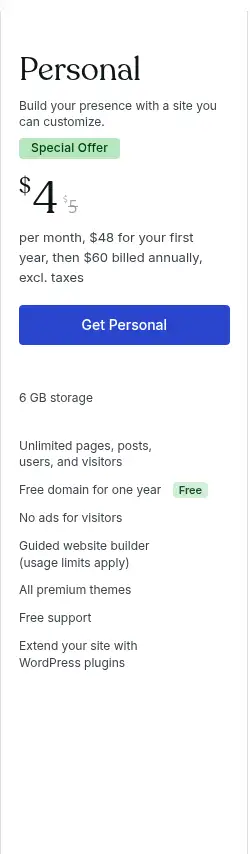
Personal is the first paid plan. At the annual rate of $4 per month, it costs $48 for the year.
Monthly billing is higher, and longer terms bring the monthly equivalent down further.
It adds a custom domain connection, and eligible annual subscriptions include a free domain for the first year.
It also removes advertisements, adds premium themes, gives you 6 GB of storage, and includes plugin installation and support.
Personal suits individuals, portfolios and basic websites that need their own domain without advanced business requirements.
Plan features change over time, so check which features each plan includes before you pay. Watch the renewal too.
The plan and the domain both come up for renewal, and the three-year option lists $2.75 per month billed upfront, which suits people who are sure they’ll stay.
c) WordPress.com Premium: From $8 per Month
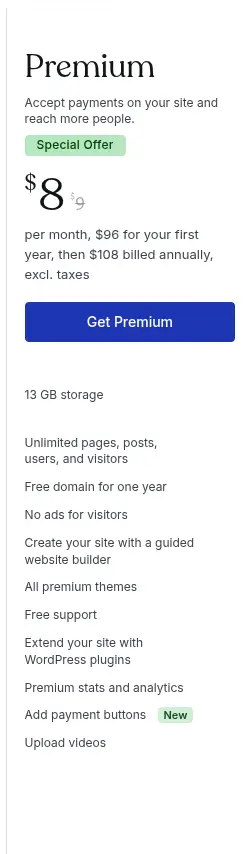
Premium costs $8 per month on annual billing, or $96 a year. It includes everything in Personal and raises storage to 13 GB.
You also get premium statistics and analytics, payment buttons, video uploads and extra design and customization options.
Payment buttons let you accept simple payments without building a full store.
Premium may suit creators, freelancers and small businesses that want more publishing and design control.
It also appeals to people who want to earn from ads on their site.
If you sell a few items or services and want more polish than Personal offers, this tier is worth a look.
WordPress.com labels it as its most popular plan.
Before you choose it, ask whether you’ll use the analytics, video and payment buttons. If not, Personal does the job for half the price.
d) WordPress.com Business: Check Current Pricing
Business is where WordPress.com acts more like a managed host for professionals.
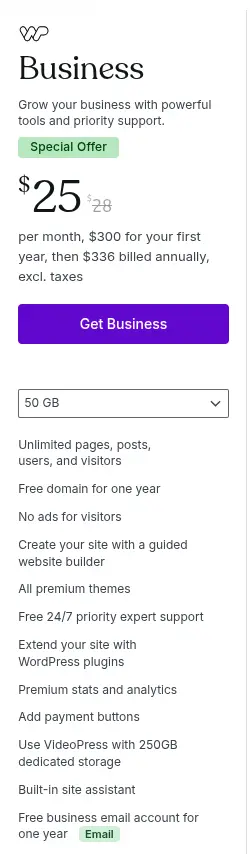
We found it listed at $25 per month on annual billing, or $300 a year.
It’s the plan with the most price variation across sources, so confirm the current figure on the pricing page.
It adds more advanced website management and developer tools such as SFTP, SSH and WP-CLI.
Storage rises to 50 GB, and staging capabilities are included where the plan offers them.
You also get priority support, plus broad access to plugins and customization.
Business suits agencies, developers and growing companies that want developer access without running their own hosting.
At $300 a year, it costs more than six times Personal. Compare it with self-hosted WordPress on a good shared plan.
For some owners, self-hosting is far cheaper. For others, the managed convenience is worth the difference.
e) WordPress.com Commerce: From $45 per Month
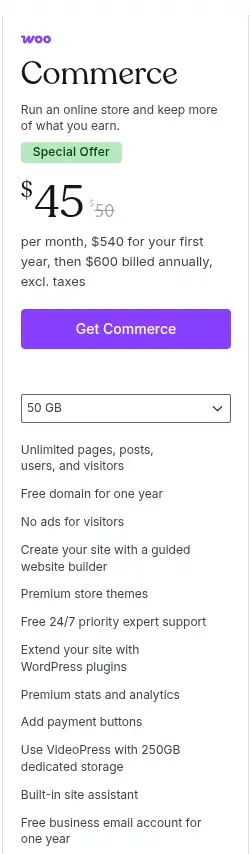
Commerce costs $45 per month on annual billing, which is $540 a year. Monthly billing is $70, so annual billing saves a lot if you’re sure you’ll stay.
It’s built for online stores.
You get eCommerce functionality, WooCommerce integration, store tools, product and inventory management, and abandoned cart features.
It also includes payment and checkout features and access to store extensions.
This plan is aimed at businesses building online stores, not people who only need a blog or a basic business website.
If you don’t sell products, the extra cost isn’t worth it. Remember that store costs go beyond the plan.
Payment processing fees, extensions, shipping tools and taxes all add up, so budget for them separately.
Pick a plan by feature, not by name. If you only need a custom domain and no ads, Personal does the job.
If you want analytics, video or payment buttons, step up to Premium. If you need developer tools and deeper plugin control, look at Business.
If you sell products, look at Commerce. Don’t pay for a higher tier just in case. You can upgrade when you need to.
What Is Included in WordPress Pricing?
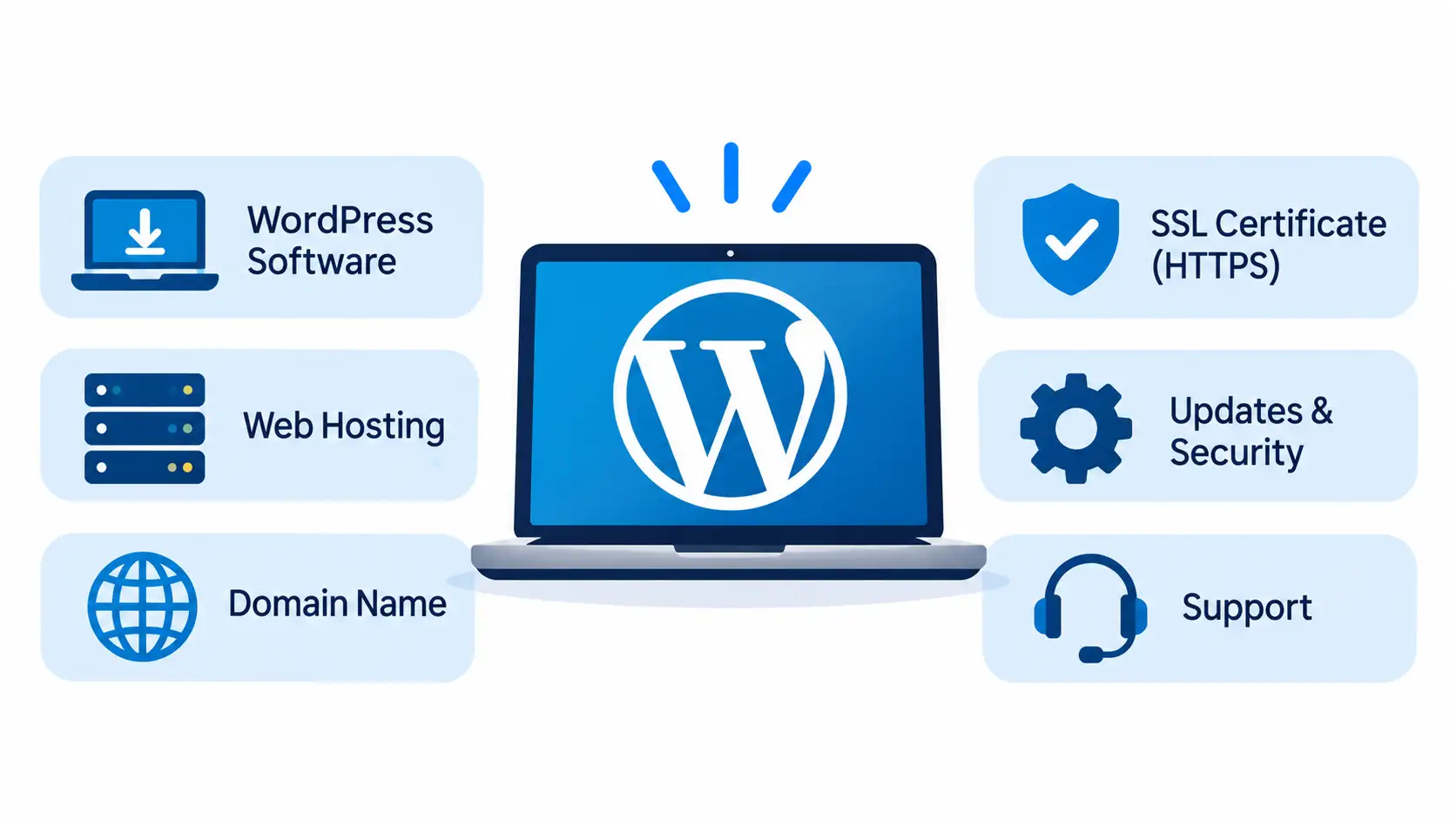
When you subscribe to WordPress.com, you’re paying for a bundle. Here’s what’s in it.
a) Website Hosting
Hosting is included in the subscription.
You don’t buy a separate hosting account, and WordPress.com manages the hosting infrastructure.
That means no server to set up, and no software to install.
You also don’t have to compare hosting providers, which saves time if you’re new.
b) Domain Name
The free plan uses a WordPress.com subdomain. Eligible annual paid plans include a free custom domain for the first year.
After that, domain renewals are charged separately at the standard rate.
Add that to your budget for year two. If you want to keep the domain, set a reminder so you don’t lose it by accident.
c) Security and Backups
WordPress.com includes security protections and managed WordPress updates.
Backup availability and restoration features differ by plan.
Check the backup terms instead of assuming every plan has identical recovery features.
A higher plan may keep more restore points or offer faster recovery than an entry plan.
Ask support what’s included before you rely on it.
d) Themes, Plugins and Customization
Free themes cover the basics, and premium themes add more design choices.
Which plugins you can use depends on your plan, so confirm what your tier allows.
You may still buy premium themes, plugins or custom development separately.
A subscription doesn’t cover everything you might want.
A designer, a developer or a specialist plugin all sit outside the plan price.
Is WordPress.org Really Free?
Yes, with a catch. WordPress.org provides free, open-source WordPress software.
You can download it and install it on a hosting account you control. The software itself doesn’t need a subscription.
Here’s what that means in practice:
- There’s no WordPress software licence fee.
- You can install the themes and plugins you like.
- You control the website files and the database.
- You choose your hosting provider, and you can move later.
- You’re responsible for hosting, updates, backups, security and maintenance.
That last point is the trade. You get freedom and control, and you take on the work. Your time has a cost too.
If you’d spend several hours a month on updates and fixes, factor that in when you compare the price with a managed plan.
Free software doesn’t mean the whole website costs nothing. People often trip over year two.
Domain and hosting renewals come around every year, so a free start doesn’t mean a free site.
A custom domain and a hosting account generally cost money. The next section shows where the money goes.
How Much Does It Cost to Run WordPress.org on Your Own Hosting?
Self-hosted WordPress has separate costs. Some are small, and some are optional.
a) Web Hosting
Hosting stores your WordPress files, database and content.
The price depends on the hosting type, the resources and the billing period.
Shared hosting is usually enough for a new blog, portfolio or small business website.
VPS hosting may suit a site that needs more resources or server control.
Start small and upgrade when your traffic calls for it.
Truehost’s shared Starter plan is listed from R 33.33 per month on a three-year term, and longer terms cost less per month than shorter ones.
Compare the total upfront payment and the renewal price, not only the monthly figure.
Read the renewal terms carefully before you pay, and keep a note of renewal dates.
b) Domain Registration
A domain gives your website a custom address.
Prices vary by extension and registrar, so .com, .org and .co.za don’t all cost the same.
Registration and renewal prices can differ too.
A low first-year price can rise at renewal, so look at both before you buy.
Truehost’s pages put a .co.za renewal at around R 85.00 a year, and annual hosting plans can include a free .co.za for the first year.
c) WordPress Themes
Many WordPress themes are free. A free theme is enough for many blogs and simple business sites.
Premium themes may need a one-time purchase or a recurring subscription.
They can be worth it when you want extra layouts, built-in features or dedicated support.
Try a free theme first. Upgrade only when you find a gap that costs you time or sales.
d) WordPress Plugins
Thousands of free plugins are available. Some also offer premium versions with extra functionality.
Common categories include SEO, backups, security, forms, caching and eCommerce.
Check whether a plugin’s free version meets your needs before you pay for an upgrade.
Don’t install more than you need either, because every plugin adds something to maintain.
e) Website Design and Development
You can build a website yourself using themes and page builders. Hiring a developer or designer adds a separate cost.
Custom functionality, integrations and advanced design work can raise the budget.
A template site you set up yourself can cost nothing beyond your time, while custom work is usually priced per project or per hour.
f) Maintenance and Security
WordPress updates, backups and security monitoring need ongoing attention.
You can handle some of that with free plugins and hosting features.
Outsourced maintenance and premium security services add to the total.
Some hosts include helpful extras. Truehost, for example, lists daily backups on its shared plans.
Here’s a simple budget example, assuming prices stay as listed.
A basic self-hosted site on Truehost Starter with annual billing costs R 400.00 for the first year, and the .co.za domain is free for that year.
A free theme and free plugins add nothing. In year two, hosting stays at R396 and the domain renewal adds about R89, which comes to about R485.
Add a premium theme or a developer, and the total rises from there.
Add it all up before you start.
List hosting, the domain, a theme, plugins, design and maintenance, then mark each one as essential or optional.
Your essential costs are usually hosting and a domain. Everything else can wait until the site earns its place.
Get Started With WordPress Hosting From Truehost South Africa
WordPress software is free, and it doesn’t need a separate licence subscription.
To make a self-hosted WordPress website visible online, you need hosting. For a custom web address, you also need a domain.
Truehost offers WordPress-ready hosting with cPanel and a one-click installer.
According to Truehost, its shared hosting includes free SSL, daily backups and unlimited email accounts.
Annual plans can include a free .co.za domain for the first year. Starter is listed from R33 per month on a three-year term.
Because you install WordPress yourself, you keep control of your themes, plugins and files, and you can move to another host later.
Check each plan’s website limit and resources before you choose, and pick the one that fits your site today with room to grow.
Whichever route you pick, write down your full yearly cost, including renewals, before you commit.
Compare Truehost’s WordPress hosting plans, choose a package that fits your website and install WordPress without paying for the software itself.