Web Hosting
 Windows HostingBuilt for Windows apps and websites – stability, speed and flexibility
 Reseller HostingLaunch a hosting business without technical skills or expensive infrastructure
 Affiliate ProgramRefer customers and earn commissions from sales across our platform
 Domain SearchFind and secure a domain name in seconds with our quick lookup tool
 CO ZA Domains
 All DomainsExplore domain names from over 324 TLDs globally – all in one place
 Free Whois Lookup Tool South Africa
 VPS
VPS Website Builder
 Online ShopSet up a sleek eCommerce store with zero coding knowledge
 SSLs
SSLs SupportAccess help articles, how-tos, and everything about our services
 Blog
Blog Contact UsReach our team instantly via live chat or drop us an email
You set a launch date. You start a domain transfer. Then your email goes quiet and your storefront stalls with no clear end date in sight.
That gap between “I hit transfer” and “everything works again” catches many South African site owners off guard. co.za and .com domains run on different clocks.
Treat them the same way, and you can lose a full week of missed messages and a broken checkout page.
This guide lays out the actual timelines for each extension side-by-side. You can plan a move without guessing.
Table of Contents
How Long Does a Domain Transfer Actually Take
Here are the two numbers that matter most. A co.za transfer usually wraps up within 5 to 7 working days.
A .com transfer follows ICANN’s standard timeline, which is 5 to 7 calendar days from the moment you authorize it.
The biggest swing factor for both extensions is the same. Does your current registrar approve the move by hand or leave it to the automatic release window?
Manual approval can shrink a week-long wait to a few hours. A silent registrar means you wait out the full clock.
| co.za | .com | |
|---|---|---|
| Typical speed | 5 to 7 working days | 5 to 7 calendar days |
| Approval method | Email vote among domain contacts | Registrar release, manual or automatic |
| Cost | Free for local .za-to-.za moves | Usually, a fee plus a year of registration |
| New-registration lock | 60 days | 60 days |
The co.za Domain Transfer Timeline: How ZADNA’s Email Voting System Works
A co.za transfer does not run on a simple auth code alone. ZADNA manages the .za namespace. It sends a vote request by email to your Owner, Admin, Tech, and Billing contacts. At least one of them has to click APPROVE for the domain to move.
This setup causes more stuck transfers than any other step. If none of your contacts vote within 5 days, the transfer fails outright, and you have to start over.
A DENY vote from a single contact kills it just as fast. Keep your contact emails current. Otherwise, a transfer that looked fine can quietly die in an inbox nobody checks.
There is also a split worth knowing about. Legacy .co.za domains can take up to 24 hours to move once approved. Domains already running on the EPP platform can finish in minutes after that same approval lands.
co.za Transfer Requirements and Lockouts
A handful of rules can stop a co.za transfer before it starts. A domain registered in the last 60 days cannot move yet, in line with the standard change-of-registrant lock.
Outstanding debt with your current provider can also block the release of your authorization details.
Cost works in your favor here. Moving a co.za domain from one South African registrar to another is typically free. Bringing in a .com from an international registrar into a South African account usually adds a small fee.
One more trap catches people off guard. A WHOIS contact update can lock the domain at the registry for up to 7 days. If you plan a transfer, update your contact details well before you start, not during.
ZARC 2025 Policy Changes
South Africa added a new layer to this picture in 2025. It followed a policy update from ZARC, the .za registry, announced on March 31, 2025.
The change covers .co.za, .org.za, .web.za, and .net.za domains. It brings South African transfer locking closer to how international domains like .com and .net already work.
Before this update, many .co.za transfers skipped the EPP code step entirely. That older behavior still shows up in plenty of guides today. So, check first whether your domain is now locked under this newer policy.
The .com Domain Transfer Timeline

A .com transfer runs under ICANN policy rather than a registry-specific vote. Once the domain lock is off, your contact email checks out, and the authorization code is in, the countdown starts. Your current registrar then has up to 5 calendar days to act.
If your registrar stays silent past that window, the transfer proceeds automatically. In practice, most .com, .net, and .org moves take 5-7 days from start to finish.
The spread across top-level domains is worth noting as well. Some ccTLDs, like .uk, can be moved in minutes. Others, such as .fr, can stretch out to 20 days depending on registry rules. A .com sits in the middle of that range.
EPP Codes, Domain Locks, and the 60-Day Rule
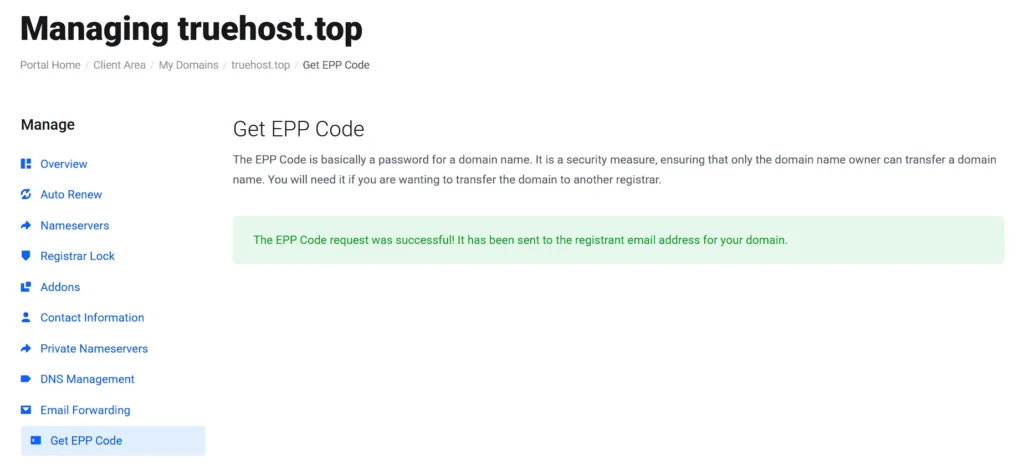
Every gaining registrar needs an EPP code, also called an auth code. It works like a password that proves you own the domain and want it moved.
Check your domain’s status before requesting that code. The clientTransferProhibited flag indicates that the domain is locked.
Remove that lock at your current registrar first. Most panels let you toggle this yourself within minutes.
The 60-day rule applies here just as it does with co.za. You cannot transfer a domain within 60 days of registering it, transferring it, or changing the registrant contact on file. First-time movers trip over this rule more often than any other.
co.za vs .com Transfer: Side-by-Side Comparison
Put the two processes next to each other, and a clear structural difference emerges. A .co.za transfer depends on a registry-run vote among your listed contacts.
A .com transfer depends on registrar-to-registrar release under ICANN’s global rulebook.
| co.za | .com | |
|---|---|---|
| Who approves | Domain contacts, via ZADNA vote | Losing registrar, manual, or auto |
| Quickest path | EPP-based domain, quick vote | Manual approval from the old registrar |
| Slowest path | No votes cast, transfer fails at day 5 | Silent registrar, full 5 to 7 day wait |
| Failure risk | Missed or denied vote | Locked domain, expired auth code |
Here is the short version. A co.za transfer hinges on getting a human to click a button in an email.
A .com transfer hinges on getting a registrar’s system to release the domain on time. Plan around whichever bottleneck applies to your move.
How to Avoid Downtime During a Domain Transfer
A few habits keep a transfer from turning into a week of dropped emails and a dead website.
- Remove the domain lock and pull your EPP code before you start the move, not after.
- Confirm your WHOIS contact email is live and checked daily. Your approval message lands there.
- Settle any open invoices with your current provider first. Unpaid balances can hold up the release.
- Lower your DNS TTL a few days ahead of the move. This shortens how long old records linger after the switch.
- Keep your old host’s DNS and email running until the new registrar confirms the transfer. This keeps mail flowing throughout.
Ready to transfer your domain without any complications? Get started today and join the best domain registrant in South Africa!
Frequently Asked Questions
How long does it take to transfer a .co.za domain?
Most .co.za transfers take 5 to 7 working days once a domain contact approves the ZADNA vote request. EPP-based domains can be completed within minutes after that approval.
Is a .com domain transfer faster than a .co.za transfer?
Both typically fall within the same 5 to 7-day range. A .com transfer can move more quickly if your registrar approves it manually rather than waiting for the automatic window.
Do I need an EPP code to transfer a co.za domain?
Yes, however, it’s not in the same way you do for a .com. A .co.za transfer relies on an email vote from your domain contacts, not just an authorization code.
Can I transfer a domain within 60 days of registering it?
No. Both co.za and .com domains carry a standard 60-day lock after registration, a prior transfer, or a change of contact.
Will my email stop working during a domain transfer?
It should not, as long as your DNS and mail servers stay active until the new registrar confirms the move. Switching too early is what causes bounced mail.