Web Hosting
 Windows HostingBuilt for Windows apps and websites – stability, speed and flexibility
 Reseller HostingLaunch a hosting business without technical skills or expensive infrastructure
 Affiliate ProgramRefer customers and earn commissions from sales across our platform
 Domain SearchFind and secure a domain name in seconds with our quick lookup tool
 CO ZA Domains
 All DomainsExplore domain names from over 324 TLDs globally – all in one place
 Free Whois Lookup Tool South Africa
 VPS
VPS Website Builder
 Online ShopSet up a sleek eCommerce store with zero coding knowledge
 SSLs
SSLs SupportAccess help articles, how-tos, and everything about our services
 Blog
Blog Contact UsReach our team instantly via live chat or drop us an email
A domain transfer request gets stuck. Or it bounces back with a strange error code, right when you need it to move without any downtime.
Every hour spent on an unresolved EPP error adds risk. Email can bounce. Your website can go dark. And the frustration builds quickly when a process that should take minutes drags on for days.
South African domain owners face an extra wrinkle here. The rules around .za transfers changed in 2025, yet many online guides still describe the old process.
That gap causes real confusion, especially for anyone transferring a .co.za domain for the first time in a while.
This article breaks down the exact errors South African domain owners run into during a transfer. It explains what causes each one and how to fix it, updated for the current .za transfer lock rules. The goal is a clean move on the first attempt.
Table of Contents
Why Domain Transfers Fail in South Africa
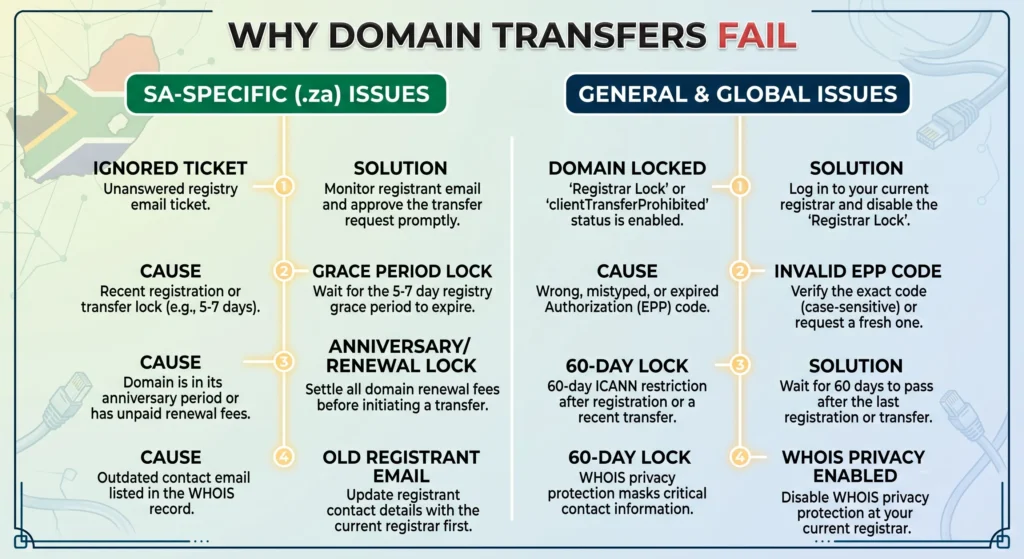
Domain transfer failures fall into two main categories. Some come from the registry or registrar side. Others come from the registrant simply not responding in time.
Registrar-side failures happen when a technical rule blocks the request outright.
A locked domain, an expired code, or a domain sitting inside a restricted renewal window can all trigger this.
Registrant-side failures happen when the actual domain owner never approves the transfer email, so the request quietly times out.
South Africa added a new layer to this picture in 2025. It followed a policy update from ZARC, the .za registry, announced on March 31, 2025.
The change covers .co.za, .org.za, .web.za, and .net.za domains. It brings South African transfer locking closer to how international domains like .com and .net already work.
Before this update, many .co.za transfers skipped the EPP code step entirely. That older behavior still shows up in plenty of guides today. So check first whether your domain now carries a lock under this newer policy.
One more number worth keeping in mind. Invalid or incorrect EPP codes cause roughly 30 to 40 percent of all domain transfer failures. That single issue accounts for more rejected transfers than anything else on this list. It makes sense to start there.
Error 1: Invalid or Incorrect EPP Code
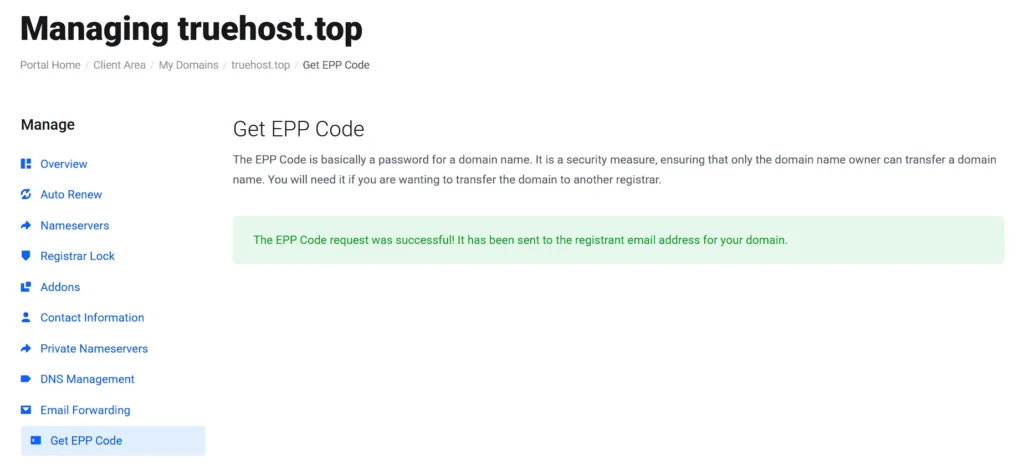
The EPP code, sometimes called an auth code, proves you own the domain. It permits the domain to move.
The new registrar checks this code against the registry’s records. If it does not match, the transfer gets rejected instantly.
A few small mistakes cause most of these mismatches:
- A trailing space at the end of the code is a common culprit.
- Mixed-up capitalization is another, since EPP codes are case sensitive. Copying the code from an old email instead of requesting a fresh one also causes failures.
- Codes can expire or reset after certain account changes.
The fix: Log in to your current registrar’s dashboard and request a new EPP code instead of reusing an old one.
Copy it into a plain text file first, then paste it into the transfer form. This avoids formatting issues that come from typing it out by hand or copying it straight from a formatted email.
Error 2: Domain Transfer Lock Enabled
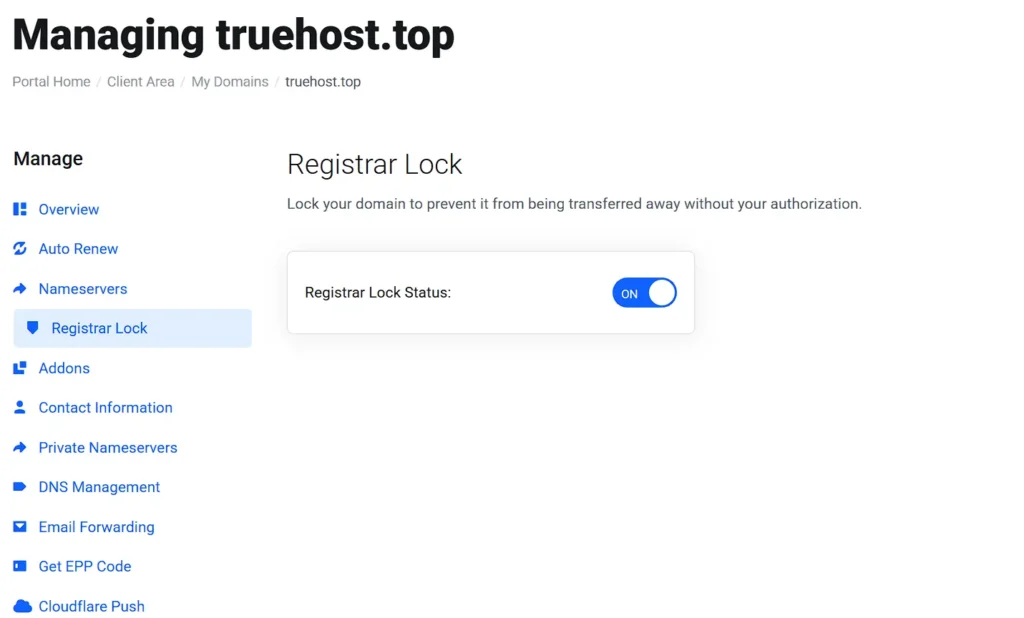
Most domains carry a status called clientTransferProhibited when a lock is active.
You can check this status through a WHOIS lookup on your domain name. If the lock shows up, the transfer will not proceed, no matter how correct your EPP code is.
This matters more for South African domain owners now than it used to. Since April 2025, .co.za, .org.za, .web.za, and .net.za domains can carry this same lock.
That is a real shift from the older local-domain exception. Many guides, including some still published today, continue to describe that old exception.
The fix: Log into your current registrar’s dashboard and disable the transfer lock. Give it 15 to 30 minutes to update across the system before resubmitting the transfer request.
Rushing this step and resubmitting immediately often results in the same rejection.
Error 3: Domain Within Its Anniversary or 60-Day Window
Timing trips up more transfers than people expect. South African .za domains follow a rule set by ZARC called the Anniversary Period. This window runs from three days before the domain’s expiry date through the sixth of the following month.
This differs from the rule most global guides mention, which covers gTLDs like .com and .net. Those extensions follow a straightforward 60-day lock after registration or a contact update, based on ICANN policy. Applying the .com rule to a .co.za domain, or the reverse, is a frequent source of confusion.
The fix: Check your domain’s creation date and last renewal date before starting the transfer. Time your request outside the restricted window for your specific extension, since .za and gTLD rules do not line up.
Error 4: Registrant Never Approved the Transfer Email
Not every failed transfer is due to a technical issue. Many stall since the registrant never approved the confirmation email. This is one of the most overlooked causes on this list. Nothing about it looks like an error at first glance.
A few things typically cause this. Spam filters catch the approval email before the registrant sees it. The registrant email on file is outdated or no longer monitored. Or the standard 5 to 7 day approval window passes quietly before anyone notices the request.
The fix: Check spam and junk folders for the approval email first. Confirm the registrant email address on file is current and actively monitored.
If the window has already closed, contact the losing registrar. Ask them to resend the request or approve it manually on your behalf.
Error 5: Domain Expiring or Already Expired
A domain sitting close to its expiry date creates its own set of problems. Most registrars reject transfer requests for domains expiring within about 15 days, since the registry restricts changes during that stretch.
If the domain lapses before a transfer completes, it may enter a redemption grace period.
Recovering a domain from redemption usually costs more and takes longer than a standard renewal, so this is worth avoiding.
The fix: Renew the domain with your current registrar first if it is close to expiry. Once it sits safely outside the restricted window, submit the transfer request. This small extra step prevents a much longer delay later.
Error 6: Registrar-Side Rejection (Holds, Disputes, or Unpaid Invoices)
Sometimes the losing registrar rejects a transfer directly. This rejection is not always a technical accident. A few legitimate reasons account for most of these cases.
- An unpaid invoice on the account is common.
- A fraud hold triggered by unusual account activity is another.
- An active ownership dispute can also block a transfer entirely.
Not every rejection is legitimate, though. Some registrars delay transfers as a retention tactic rather than for a genuine policy reason. They hope the customer gives up and stays.
The fix: Contact the losing registrar directly and ask for the specific reason behind the rejection. Resolve any outstanding invoices or disputes, then resubmit the transfer. If the denial seems unjustified, most registries have a formal complaint process worth pursuing.
Will I Lose My Website or Email During the Transfer?
This is one of the biggest concerns domain owners raise, and it deserves a direct answer.
A domain transfer moves registration from one registrar to another. It does not affect your hosting, website files, or email. That holds as long as your nameservers stay untouched during the process.
Leaving your DNS pointing to your current host keeps your website and email running continuously. Nothing goes offline while the registration is being transferred behind the scenes.
Most South African domain transfers take 5 to 7 days to complete fully. Plan around that window rather than expecting an instant switch. This helps avoid unnecessary panic if a transfer takes a few days to finish.
How to Avoid Domain Transfer Errors Before They Happen
A short checklist before starting a transfer saves a lot of back and forth later:
- Confirm the registrant email address on file is current and actively monitored.
- Remove the transfer lock at your current registrar before requesting the transfer.
- Request a fresh EPP code in advance. Copy it into a plain text file rather than typing it by hand.
- Check the domain’s creation and renewal dates to confirm it sits outside any restricted window.
Once these checks are clear, the transfer itself tends to move smoothly. If you are ready to move your domain to Truehost, sorting these details in advance will speed up the process.
Frequently Asked Questions
What happens if my domain expires during a transfer?
The domain can slip into a redemption grace period. This usually costs more and takes longer than a standard renewal. Renewing before starting a transfer avoids this entirely.
Why does my .co.za domain transfer keep failing?
The most common causes are an incorrect EPP code, an active transfer lock, or a domain inside its Anniversary Period. Since April 2025, .co.za domains can also be locked under the newer .za transfer lock policy. This catches many domain owners by surprise.
Do I need an EPP code to transfer a .co.za domain?
This depends on your current registrar and whether your domain has been transfer-locked under the 2025 .za policy update. Some registrars still process .co.za transfers without an EPP code. Others now require removing the transfer lock first. Check with your current registrar to confirm which process applies to your account.
How long does a domain transfer take in South Africa?
Most transfers are completed within 5 to 7 days. This applies once the registrant approves the confirmation request and there are no locks or restrictions in place.
Can I transfer a domain without losing my email and website?
Yes. Keep your nameservers pointed at your current host during the transfer. Your website and email will continue to run without interruption. Only the domain registration changes hands.
Transfer Your Domain to Truehost Today
Most domain transfer errors stem from a handful of causes. A wrong EPP code, an active lock, or a missed approval email causes almost every failed attempt in South Africa.
Now that the .za transfer lock applies more broadly, checking your domain status first saves time later.
Truehost handles domain transfers daily and knows exactly where South African transfers tend to stall. The team checks your EPP code and confirms your domain sits outside its Anniversary Period.
Start your transfer to Truehost today and skip the errors covered in this guide.