Web Hosting
 Windows HostingBuilt for Windows apps and websites – stability, speed and flexibility
 Reseller HostingLaunch a hosting business without technical skills or expensive infrastructure
 Affiliate ProgramRefer customers and earn commissions from sales across our platform
 Domain SearchFind and secure a domain name in seconds with our quick lookup tool
 CO ZA Domains
 All DomainsExplore domain names from over 324 TLDs globally – all in one place
 Free Whois Lookup Tool South Africa
 VPS
VPS Website Builder
 Online ShopSet up a sleek eCommerce store with zero coding knowledge
 SSLs
SSLs SupportAccess help articles, how-tos, and everything about our services
 Blog
Blog Contact UsReach our team instantly via live chat or drop us an email
Self-hosting n8n gives you something cloud tools can’t: full control.
But before you spin up a server, you need to know n8n VPS requirements. And the honest answer? It depends on your workflows, not n8n itself.
At idle, n8n is surprisingly light. But the moment you start running webhook-triggered workflows, Code nodes processing large JSON payloads, or scheduled automations firing every few minutes, RAM spikes fast.
A server that looked fine on day one can start choking within weeks.
Here’s a quick spec snapshot before we go deeper:
- Starter (testing / personal): 1 vCPU, 2GB RAM, 20–50GB SSD/NVMe
- Production (real business workflows): 2–4 vCPU, 4–8GB RAM, 40–100GB NVMe
For South African businesses, there’s also a cost angle worth naming early.
Zapier runs on USD billing with strict task limits. A 5-action Zap running 100 times a day burns through 15,000 tasks before the month ends. Self-hosted n8n on a flat ZAR rate sidesteps that entirely.
This guide matches your actual workload to the right Truehost plan so you don’t over-spend or under-provision.
Table of Contents
n8n VPS Requirements Comparison Table
| Usage Type | vCPU | RAM | Storage | Truehost Plan | ZAR Price |
|---|---|---|---|---|---|
| Testing / personal projects | 1 | 2GB | 50GB NVMe | N8N KVM1 | R265/mo |
| Business / production use | 2 | 4GB | 100GB NVMe | N8N KVM2 | R341/mo |
| High-volume automation | 4+ | 8GB+ | Custom | Contact sales | Custom |
What is the minimum requirement for n8n?
According to n8n’s official documentation, the minimum n8n VPS requirements are 1 vCPU, 2GB RAM, and 20GB SSD storage running a Linux OS.
Ubuntu 24.04 LTS is the recommended choice; it’s stable, actively maintained, and comes with five years of security updates.
For a full starter build, you’re looking at:
- 1 vCPU
- 2GB RAM
- 50GB NVMe storage
- Ubuntu 24.04 LTS
- 4TB bandwidth
- Docker (recommended deployment method)
That setup is functional. But it has real limits you should understand before committing to it.
Why 1GB RAM fail immediately
If you tried to cut costs further and drop to 1GB, your instance would struggle out of the box.
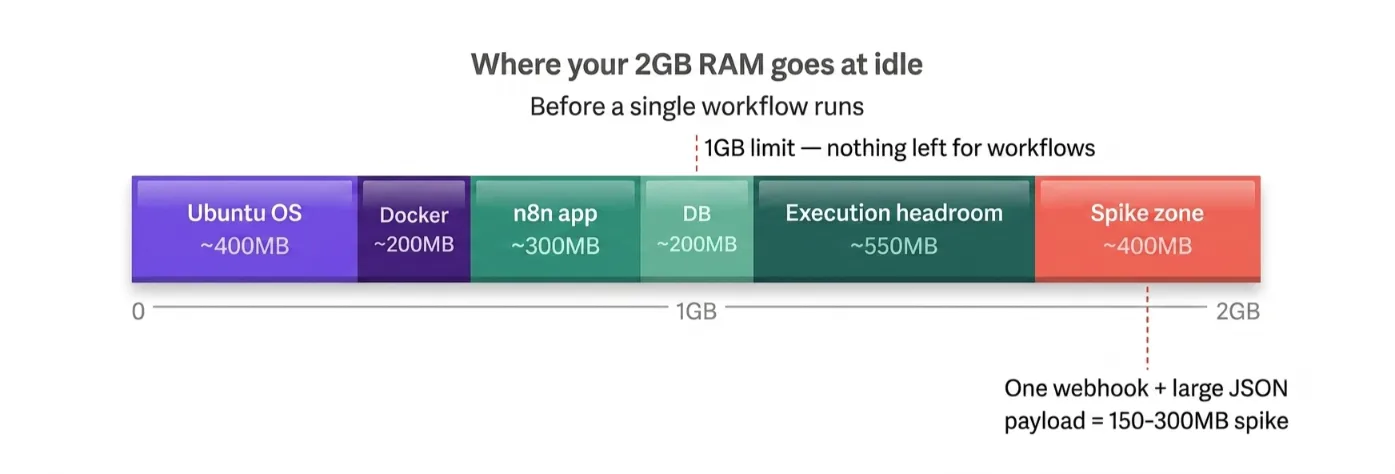
Before a single workflow runs, you’re already consuming memory across four layers: the operating system, Docker, the n8n application, and its database.
There’s simply no headroom left for execution.
Even at 2GB, things are tight. Real-world testing shows that workflows start failing or slowing under load on 2GB setups once you move beyond simple, infrequent automations.
One user reported smooth performance on a machine with 16GB RAM and an i7 processor, while tests consistently show 2GB is insufficient for even moderate workloads.
Read also: n8n Workflow for WhatsApp Automation
What 1 vCPU + 2GB handles well:
- Testing n8n for the first time
- Personal automations with simple logic (e.g. syncing a Google Sheet to a CRM once an hour)
- Low-frequency scheduled jobs
- Learning the interface and building your first workflows
What it won’t handle:
- Webhook-triggered workflows firing multiple times per minute
- Code nodes parsing large datasets
- Multiple workflows running at the same time
- Any setup where you can’t afford missed executions
Our N8N KVM1 plan at R265/mo comes pre-configured with n8n installed and ready to run. No setup friction. Good starting point if you’re testing before committing to production specs.
Check out our guide on Claude Skills for n8n
Recommended VPS Requirements for Production Use
This is where South African businesses running real workflows need to land.
The jump from 1 vCPU/2GB to 2 vCPU/4GB isn’t just a spec upgrade. It’s the difference between an automation tool and a reliable automation system.
The recommended n8n VPS requirements for production use are:
- 2 vCPU
- 4GB RAM
- 100GB NVMe storage
- 8TB bandwidth
- PostgreSQL (instead of the default SQLite)
- Docker with Queue Mode enabled
Why 2 vCPUs are important
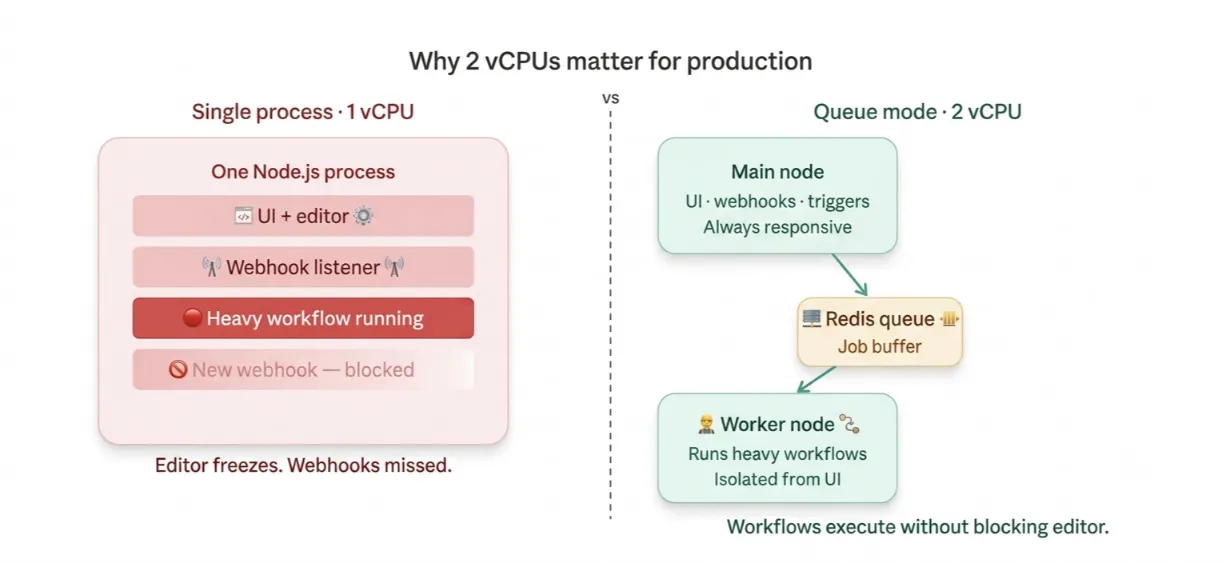
By default, n8n runs as a single process. That one process handles everything: the UI, incoming webhooks, scheduled triggers, and actual workflow execution.
In regular (non-queue) mode, one heavy workflow can freeze the entire editor.
A CPU-intensive operation, like processing a large JSON array or running a Code node, blocks n8n’s event loop.
While it’s crunching, it can’t acknowledge a new webhook or respond to manual triggers.
With 2 cores and Queue Mode enabled, you separate the main process (which handles the UI and incoming triggers) from execution.
Workflows run in parallel without blocking each other.
A 2 vCPU setup can comfortably handle 5–8 concurrent workflow executions, with most of the actual wait time coming from external API response times, not your server.
Why NVMe
Every workflow execution logs data to your database. The more workflows you run, the more frequently n8n is reading and writing to disk.
NVMe storage delivers significantly higher IOPS (input/output operations per second) compared to standard SSDs.
On a standard disk, those writes create a subtle but compounding bottleneck, especially once you switch to PostgreSQL for production.
For South African businesses specifically, this is important if you’re running automation on local hardware; a single round of load shedding can kill your workflow mid-execution.
A cloud VPS on stable infrastructure removes that entirely.
The ZAR vs USD billing argument
Zapier’s Professional plan starts at roughly R~312/month ($19.99/month) for just 750 tasks.
A single 5-action Zap running 100 times a day generates 15,000 tasks before the month ends, far beyond that tier.
To handle real business volume, you’re looking at the Team plan at R~1700/month ($103.50/month) (approximately R1,900+ at current rates), with task limits still in place.
With a self-hosted n8n on our N8N KVM2 plan at R341/mo, you get unlimited workflows, unlimited executions, and a flat rand-denominated bill.
N8N KVM2 at R341/mo Queue Mode pre-configured, PostgreSQL-ready, and running on our South African infrastructure.
n8n VPS Requirements FAQs
How much RAM does n8n need in South Africa?
For testing, 2GB RAM covers the basics. For production use, especially if you’re running webhook-triggered workflows, Code nodes, or processing data from multiple sources, plan for at least 4GB. The n8n docs themselves note that memory requirements consistently outpace CPU requirements. RAM is the primary bottleneck in almost every real-world n8n deployment. A single webhook workflow processing a large JSON body can consume 150–300MB on its own.
Will n8n run on a 1GB VPS?
Technically, it can start. Practically, it won’t stay stable. The OS, Docker, n8n, and its database together consume most of 1GB before a single workflow fires. You’ll see memory errors, crashed executions, and failed automations. The official n8n documentation explicitly advises against it. Start at 2GB minimum, and plan for 4GB if workflows will run regularly.
What’s the most affordable n8n VPS in South Africa?
Our N8N KVM1 plan at R265/mo is purpose-built for n8n self-hosting, pre-configured, ZAR-billed, and deployable in minutes. For production use, KVM2 at R341/mo is the more sensible choice. Both plans are hosted on our infrastructure, removing local hardware risks like load shedding disruptions.
Do I need Docker?
You don’t have to use Docker, but it’s the recommended approach for a reason. Docker containers keep n8n and all its dependencies isolated, make upgrades as simple as pulling a new image, and let you move your entire stack to another server without starting from scratch. For any setup you want to maintain reliably, Docker is the right call.
Where are Truehost’s servers located?
We at Truehost operate infrastructure serving South African businesses directly. Our n8n plans are specifically configured for the South African market, ZAR pricing, local support, and server setups optimized for business automation workloads.
KVM1 or KVM2 (Quick Decision Guide)
Not sure which plan to pick? Answer one question: Are these workflows running your business?
Choose KVM1 (R265/mo) if:
- You’re testing n8n for the first time
- You’re building personal automations
- Your workflows run on a schedule, not on continuous webhooks
- You’re a solo user with fewer than 10 active workflows
- You want to learn n8n before committing to production infrastructure
Choose KVM2 (R341/mo) if:
- You’re running workflows that support real business operations
- You use webhooks (workflows triggered by external events in real time)
- You process binary files, PDFs, images, CSVs
- You’re replacing a cloud automation tool like Zapier or Make
- You need the editor to stay responsive while workflows execute in the background
- You have multiple team members triggering workflows at the same time
Contact us for a custom plan if:
- You need 4+ vCPUs
- You’re running 1,000+ workflow executions per day
- You’re building a multi-worker Queue Mode setup at scale
- You need dedicated resources for a high-availability deployment
The gap between KVM1 and KVM2 is R76/month. For most South African businesses, that’s the most cost-effective infrastructure upgrade you can make, and it’s the difference between an n8n instance that occasionally struggles and one that runs reliably under real load.
Get Started with n8n Self-Hosting on Truehost
Self-hosting n8n is one of the most practical moves a South African business can make on automation.
You get unlimited workflows, full data control, no task-based billing, and a flat ZAR rate that doesn’t shift with the exchange rate.
The n8n VPS requirements aren’t complicated once you match them to your actual workload.
Start at 2GB RAM and 1 vCPU if you’re getting started.
Move to 4GB RAM and 2 vCPUs the moment automation becomes part of how your business runs.
Both plans are pre-configured, ready to deploy, and billed in rand.