Web Hosting
 Windows HostingBuilt for Windows apps and websites – stability, speed and flexibility
 Reseller HostingLaunch a hosting business without technical skills or expensive infrastructure
 Affiliate ProgramRefer customers and earn commissions from sales across our platform
 Domain SearchFind and secure a domain name in seconds with our quick lookup tool
 CO ZA Domains
 All DomainsExplore domain names from over 324 TLDs globally – all in one place
 Free Whois Lookup Tool South Africa
 VPS
VPS Website Builder
 Online ShopSet up a sleek eCommerce store with zero coding knowledge
 SSLs
SSLs SupportAccess help articles, how-tos, and everything about our services
 Blog
Blog Contact UsReach our team instantly via live chat or drop us an email
Load shedding does not check your open trades before it cuts the power. A trailing Expert Advisor with no stop-loss can remain unmanaged for hours during a Stage 4 outage.
That gap between London session volatility and a dead home router costs South African traders real money.
A Windows VPS fixes the uptime problem but adds a license fee to your hosting bill.
Most Linux guides skip the parts that actually break, like 32-bit support, mismatched Wine versions, and missing broker server lists.
This guide gives the exact commands for a working MetaTrader install on a Linux VPS. It builds around what actually differs for a South African trader.
That means load shedding resilience, latency to major broker servers, and real rand pricing.
Table of Contents
Why South African Traders Move MetaTrader to a Linux VPS
A home setup depends on your power, your router, and your fiber line staying up at the same time.
A VPS removes all three risks from the equation. Here is what changes once your terminal lives on a server instead of your desk.
- Load shedding hits hardest during the 14:00 to 17:00 SAST window. That window overlaps the London and New York sessions. A VPS keeps trading during an outage because it runs on a data center grid, not your local supply.
- A Linux VPS avoids the Windows Server license fee associated with Windows VPS plans. That difference alone often covers a full extra month of hosting.
- A VPS placed near London or New York cuts round-trip latency to single digits, down from over 100 milliseconds. Every scalping strategy and every EA benefits from that gap closing.
- Linux uses fewer system resources than Windows for the same VPS tier. That leaves more RAM and CPU room for MetaTrader and any additional Expert Advisors.
- Running your terminal on Linux does not change your standing with an FSCA-regulated broker. The broker sees a trading terminal connecting to its server, not an operating system.
What You Need Before You Start

Get these pieces ready before you touch a terminal window. Skipping this step is the most common reason an install stalls halfway through.
- A VPS with 1 to 2 vCPU cores, 2 to 4GB of RAM, and 20 to 30GB of SSD storage. Add more RAM for several charts or multiple EAs.
- Ubuntu 22.04 or 24.04 LTS. Stick with a Long Term Support release. It gets security patches for years and avoids driver quirks in newer releases.
- An SSH client. PuTTY works well on Windows, and Mac or Linux users can use the built-in Terminal app.
- Your VPS IP address, username, and password from your hosting provider’s welcome email.
- Your broker login, password, and server name. You will need these once MetaTrader launches.
You do not need a full desktop environment or RDP for the method below. The official install script runs entirely from the command line.
Method 1: Install MetaTrader Using the Official MetaQuotes Script
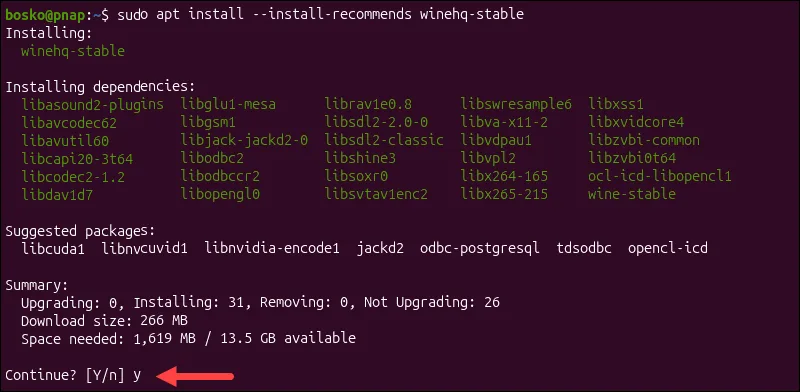
MetaQuotes ships a script that detects your Linux distribution, pulls the matching Wine build, and installs MetaTrader 5. This is the quickest and most current path, and it should be your first attempt.
Connect to your VPS over SSH, then run this command exactly as written:
<!-- wp:paragraph -->
<p>wget https://download.terminal.free/cdn/web/metaquotes.software.corp/mt5/mt5linux.sh</p>
<!-- /wp:paragraph -->

<!-- wp:paragraph -->
<p>chmod +x mt5linux.sh</p>
<!-- /wp:paragraph -->

<!-- wp:paragraph -->
<p>./mt5linux.sh</p>
<!-- /wp:paragraph -->
Do not run this with sudo. The script asks for your account password only when a specific step needs administrator rights.
Here is what happens after you run it.
- The script identifies whether your system is Ubuntu, Debian, Linux Mint, or Fedora and automatically installs the corresponding Wine package.
- You will be prompted to install Mono and Gecko packages partway through. Accept both, since MetaTrader needs them to render correctly and to load its browser components.
- The standard MetaTrader 5 installer launches next. Walk through it the same way you would on Windows.
- Restart your VPS once the install finishes. MetaTrader stores its files at
Home directory\.mt5\drive_c\Program Files\MetaTrader 5.
Keep Wine and your OS updated after the install completes. Run this periodically:
sudo apt update

sudo apt upgrade
Older Wine builds are where most of the rendering and login bugs covered later in this guide come from.
Method 2: Manual Wine Installation for MT4 or MT5
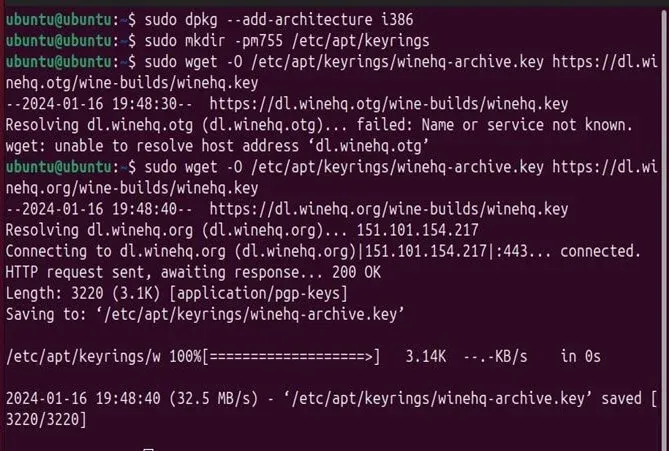
Use this method if the official script fails on your setup. It also helps if your broker only distributes MT4.
MT4 requires 32-bit support, and the script does not always configure it as you want.
- Enable 32-bit architecture first, since MT4 is a 32-bit application and will not install without it:
sudo dpkg --add-architecture i386

sudo apt update- Add the WineHQ repository so you control which Wine version installs. That beats relying on whatever ships in your distro’s default repos.
- Install Wine, then confirm the version with wine– version before moving on.
- Download the MT4 or MT5 installer directly from your broker’s site or from MetaQuotes.
- Right-click the downloaded .exe file and choose to open it with Wine. Walk through the setup wizard the same way you would on Windows.
- Wine stores everything inside a virtual drive at
~/.wine/drive_c/Program Files.Note this path, since you will need it for backups and troubleshooting.
The manual route takes longer. It gives you control over the exact Wine version. That control counts if a specific build fixes a bug you hit before.
Connecting MetaTrader to Your FSCA Regulated Broker Account
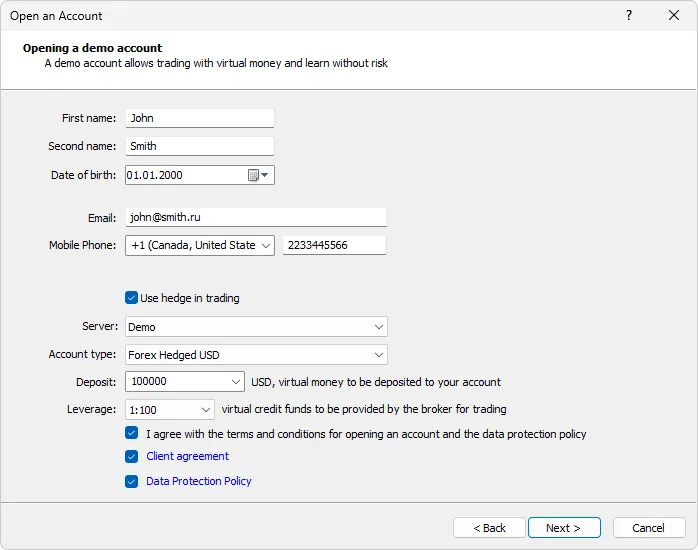
With MetaTrader open, log in as you would on any other machine.
- Enter your account number, password, and the broker’s server name in the login window.
- Find your server name inside the platform if your broker did not send it directly. Go to File, then Open an Account, and search by broker name.
- Confirm whether you landed on a live account or a demo account before placing a single trade.
- Check your ping to the broker server from inside MetaTrader. A response time under 50 milliseconds is a solid result for a VPS located near your broker’s data center.
Your FSCA-regulated broker treats this login exactly the same as a Windows login.
Nothing about running on Linux changes your account status or your protections under FSCA oversight.
Keeping MetaTrader Running Through Load Shedding and Disconnections
A VPS solves the power problem at the server end. Your terminal still needs to survive a reboot or a dropped connection without you babysitting it.
- Set up a systemd service that relaunches Wine and MetaTrader automatically after any VPS restart. This removes the need to manually reopen the terminal every time.
- Match your VPS provider’s uptime SLA against your trading hours. A 99.9 percent SLA still allows for roughly 45 minutes of downtime a month. Check what that provider actually guarantees.
- Add a cron job that checks every few minutes whether MetaTrader is still running. Have it relaunch the process if it has crashed.
- Turn on MetaTrader’s auto-login setting so it reconnects to your broker account automatically after any restart.
None of these steps takes more than a few minutes to configure. Together, they close the gap between an unattended VPS and a hands-off setup.
Fixing Common MetaTrader on Linux Problems
Wine is not a perfect match for MetaTrader, and a handful of issues show up often enough to plan for.
- The Market tab or the MQL5 login window sometimes fails to render on newer Wine builds. This usually traces back to a Wine Staging version mismatch, so rolling back to a stable release often clears it.
- Charts sometimes show broken or missing fonts. Installing the corefonts package through Wine’s configuration tool fixes this in most cases.
- Expert Advisor backtesting runs slower under Wine than it does natively on Windows. Budget extra time for any strategy testing you run on a Linux VPS.
- Sound alerts sometimes fail to trigger. This is usually an ALSA or PulseAudio configuration issue rather than a MetaTrader problem. Forums for your specific distro carry working fixes.
- Check MetaQuotes’ own release notes before troubleshooting for hours. Wine version bumps often resolve issues that previously required manual workarounds.
How Much Does a Linux VPS for MetaTrader Cost in South Africa
Pricing scales with the resources your trading setup actually needs, not with the brand name on the hosting page.
- A basic tier suits a single MT4 or MT5 instance running a few EAs. Expect R200-R450 per month for 1 vCPU and 2GB of RAM.
- A standard tier gives you 2 vCPU and 4GB of RAM. That covers two or three instances plus a chart-heavy setup and sits closer to R450-R800 a month.
- International providers near London or New York data centers often beat local and pricing. Factor in the latency advantage for scalping strategies.
- Extra cost comes from dedicated resources, running MT4 and MT5 side by side, or adding managed support. That support costs more than handling the setup yourself.
- Some brokers waive the VPS fee entirely once you hit a set monthly trading volume. Read the fine print, since these offers usually apply only to a specific account type.
FAQs
Can MetaTrader run natively on Linux without Wine?
No. MetaTrader is built for Windows, and Linux needs Wine or a similar compatibility layer to run it. There is no native Linux build from MetaQuotes.
Is Wine safe and stable enough for live trading?
Yes, for most traders. Thousands of traders run MT4 and MT5 through Wine daily without issue. Keep Wine updated and stick to a stable release, not a Staging build, for live accounts.
Can I run MT4 and MT5 on the same Linux VPS at once?
Yes, as long as your VPS has enough RAM. Each instance typically requires 512 MB to 1GB of RAM. Plan your tier around how many terminals you intend to run together.
Do I need RDP or a desktop environment for the script method?
No. The official MetaQuotes script installs entirely through SSH and the command line. RDP only becomes necessary if you want a full graphical desktop for other reasons.
Get Started with Forex on a Linux VPS
Start with the official MetaQuotes script, since it handles Wine detection and installation in one pass.
Fall back to the manual Wine method if you need a specific version or if your broker only supports MT4.
Either way, do not skip the uptime setup covered above, since South African power conditions make that step non-negotiable, not optional.
Once your terminal is live, the last piece is picking a VPS actually sized for this job.
Check Truehost South Africa’s VPS plans against the specs in this guide, and you can have MetaTrader running on a dedicated server within the hour.