Web Hosting
 Windows HostingBuilt for Windows apps and websites – stability, speed and flexibility
 Reseller HostingLaunch a hosting business without technical skills or expensive infrastructure
 Affiliate ProgramRefer customers and earn commissions from sales across our platform
 Domain SearchFind and secure a domain name in seconds with our quick lookup tool
 CO ZA Domains
 All DomainsExplore domain names from over 324 TLDs globally – all in one place
 Free Whois Lookup Tool South Africa
 VPS
VPS Website Builder
 Online ShopSet up a sleek eCommerce store with zero coding knowledge
 SSLs
SSLs SupportAccess help articles, how-tos, and everything about our services
 Blog
Blog Contact UsReach our team instantly via live chat or drop us an email
You click buy. Nothing happens. Two seconds later, the price moves against you.
That delay just cost you money.
South African forex traders face a hidden enemy. It is not the market. It is not your strategy.
It is latency.
Table of Contents
The Problem No One Talks About

Your home internet is too slow for serious trading.
I am not saying this to sell you something. I am saying it because it is true.
A standard fibre connection in Johannesburg to a broker in London takes 160 to 200 milliseconds. That is the best case. During peak hours or load-shedding, it gets much worse.
Every millisecond adds slippage. Every delay eats your profit.
We built Truehost to fix this for South African traders.
What is VPS Hosting for Forex?
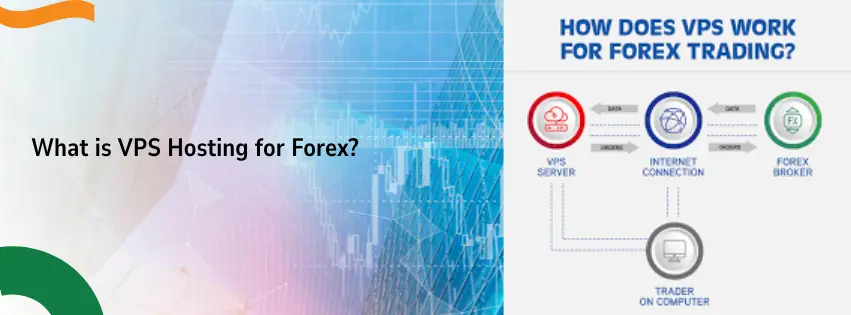
A VPS is a virtual computer that runs in a professional data center.
You do not keep it under your desk. You do not plug it into your router.
It lives somewhere else. You connect to it over the internet.
For forex traders, this changes everything.
You install MetaTrader 4 or MetaTrader 5 on the VPS. You attach your Expert Advisors. Then you close your laptop and go to sleep.
Your trades keep running.
| Feature | Your Home PC | Truehost Forex VPS |
| Runs during load-shedding | No | Yes |
| Internet speed | Shared with family | Dedicated enterprise |
| Location | South Africa | Europe (near brokers) |
| Latency to London | 160-200ms | 1-5ms |
| Stops when you sleep | Yes | No |
Why Europe? Let Me Explain
Most forex brokers put their servers in London or Frankfurt.
That is where the big money lives.
If your trading platform sits in South Africa, your orders have to travel thousands of kilometers under the ocean. Even at the speed of light, that takes time.
But if your VPS sits in a European data center, your platform is right next to the broker.
Your orders travel a few meters instead of thousands of kilometers.
That is the difference between winning and losing.
Here is the Data
| Connection Type | Latency to London |
| Home fibre (Johannesburg) | 160-200ms |
| Home fibre during load-shedding | 200-300ms+ |
| South African VPS (local) | 140-180ms |
| Truehost Europe VPS | 1-5ms |
We have seen latencies as low as 1.73ms with our setup.
You cannot get that from a local provider.
Load-Shedding Destroys Home Trading
Eskom cuts power. Your router dies. Your fibre goes offline.
Your open trades just lost their guardian.
You cannot close positions. You cannot move stop losses. You just wait and hope.
That is not trading. That is gambling.
Our VPS runs in a data center with backup generators and redundant power feeds. When your house goes dark, your VPS does not even blink.
Your EAs keep working. Your stops stay active.
Windows is the Only Choice for MT4/MT5
MetaTrader 4 and 5 were built for Windows.
You can try to run them on a Mac or Linux. But every compatibility layer adds delay and instability.
A native Windows VPS gives you three things:
- Full compatibility. Every EA and indicator works.
- No extra software. MT4 talks directly to the hardware.
- Remote Desktop. Log in from your phone, iPad, or any computer.
We provide Windows Server on all our forex VPS plans.
You get full administrator access. Install anything you need.
Truehost Windows VPS Plans for Forex Traders
You do not need a huge server. You need a fast, stable one.
| Plan | vCPU | RAM | SSD | Best For |
| Apps VPS Windows 1 | 1x 3.1GHz | 2GB | 40GB | 1-2 MT4 terminals |
| Apps VPS Windows 2 | 2x 3.1GHz | 4GB | 80GB | 3-5 terminals |
| Apps VPS Windows 3 | 4x 3.1GHz | 8GB | 160GB | Heavy EAs, multiple platforms |
Our Windows packages start at the Apps VPS Windows 1 with 40GB NVMe SSD and 2GB RAM.
Prices start from R155 per month.
You can pay monthly, yearly, or up to 36 months. Longer plans save you more money.
What You Get With Every Plan
- Full admin access
- NVMe SSD storage (very fast)
- 99.9% uptime guarantee
- 24/7 technical support
- Choice of control panels (CyberPanel, CWP, or cPanel)
How We Compare to Other South African Hosts
Let me be direct. I checked competitor websites personally to get the real numbers.
Most local hosts focus on websites. Not forex. And their Windows VPS prices are much higher than you think.
Here are the verified starting prices as of 2026:
| Provider | Starting Price (Verified) | Windows VPS? | Europe Location? | Forex Optimized? |
| Truehost | R155/mo | Yes | Yes | Yes |
| HOSTAFRICA | R130/mo (Linux) / R580/mo (Windows) | Yes (expensive) | No | No |
| Afrihost | R460/mo | Yes (expensive) | No | No |
| Xneelo | R73/mo (Linux only) | No | No | No |
What this table tells you:
- HOSTAFRICA’s R130 price is for Linux only. Their Windows VPS starts at R580 per month – almost four times our price.
- Afrihost’s VPS starts at R460 per month. That is three times what we charge.
- Xneelo has cheap Linux plans from R73, but they do not offer Windows VPS at all. You cannot run MT4 on Linux properly.
We are the only South African provider giving you a Windows VPS in Europe built specifically for forex at an affordable R155 per month.
The Gap We Fill
Other companies sell the same VPS to everyone. Web developers. Game hosts. Email marketers. Forex traders.
That is lazy.
We built our vps hosting for forex specifically for South African traders.
We understand load-shedding. We understand the distance to Europe. We understand that you cannot afford a frozen platform during a news announcement.
No other local provider focuses on this.
How to Set Up Your Truehost Forex VPS in 10 Minutes
Follow these steps. It is easy.
Step 1: Pick Your Plan
Go to our VPS page. Choose the Windows plan that fits your trading.
Start with Apps VPS Windows 1 if you run 1-2 terminals.
Step 2: Complete Your Order
Fill in your details. Pay with Visa, Mastercard, or PayPal.
Your VPS provisions instantly in most cases.
Step 3: Check Your Email
We send you your login details. You get an IP address, username, and password.
Step 4: Connect via Remote Desktop
On Windows: Search for “Remote Desktop Connection”. Enter your VPS IP. Log in.
On Mac: Download “Microsoft Remote Desktop” from the App Store.
On iPad or iPhone: Same app works great.
Step 5: Install MetaTrader
Download MT4 or MT5 from your broker. Install it like you would on your home PC.
Log into your trading account.
Step 6: Attach Your EAs and Go
Load your Expert Advisors onto your charts. Set your risk.
Close your laptop. Go to bed. Your VPS works all night.
Stop Losing to Technology
You have a good trading strategy. You follow your rules. You manage your risk.
But your technology is failing you.
Every delay. Every power cut. Every lag spike. That is money leaving your pocket.
You cannot change Eskom. You cannot move South Africa closer to London.
But you can move your trading platform.
Put it on a Truehost Windows VPS in Europe. Cut your latency from 200ms down to 5ms. Run 24/7 through any power outage.
South African traders deserve fair competition. We built Truehost to give you that chance.
Frequently Asked Questions
Do I need technical skills to set up a forex VPS?
No. You just need to follow six simple steps.
We give you login details. You connect through Remote Desktop. Then you install MetaTrader like on your own PC.
If you can install software on a laptop, you can use our VPS.
Can I use my phone to manage trades on the VPS?
Yes. Download Microsoft Remote Desktop from your app store.
Log into your VPS from anywhere. Your phone becomes a window into your trading desktop.
You can check positions, move stops, or attach new EAs while standing in a shop.
What happens during load-shedding?
Your VPS keeps running.
Our data center has backup generators and multiple power feeds. Your home can go dark for four hours. Your VPS never blinks.
Your EAs keep trading. Your stops stay active. You wake up to results, not disasters.
Is a Windows VPS better than a Linux VPS for forex?
Yes. MetaTrader 4 and 5 are Windows applications.
Linux does not run them natively. You need extra software like Wine. That software adds delay and can crash.
A native Windows VPS is faster, more stable, and fully compatible with every EA and indicator.
How low can my latency go with your Europe VPS?
As low as 1-5 milliseconds to major brokers in London or Frankfurt.
Your home connection gives you 160-200ms. That is a huge difference.
When the market moves fast, those milliseconds decide whether your trade gets filled at your price or a worse one.
Can I test the VPS before paying?
We do not offer free trials. But we have flexible monthly billing.
Pay for one month. Test it with a small demo account or a tiny live account.
If you are not happy, do not renew. No long-term contracts.
Which MetaTrader version works best?
Both MT4 and MT5 run perfectly on our Windows VPS.
MT4 is better for most retail EAs. MT5 is faster for backtesting and has more timeframes.
Choose the version your broker supports and your EAs are coded for.
Will my broker allow VPS trading?
Yes. Most brokers encourage it.
Some brokers even provide their own VPS service for high-volume traders. But those are expensive and lock you into one broker.
Our VPS works with any broker. You stay independent.
What if my VPS crashes?
Our uptime guarantee is 99.9%.
If something goes wrong, our support team is available 24/7. You open a ticket. We fix it.
We also take daily backups. Your data stays safe
Can I upgrade my plan later?
Yes. Start with Apps VPS Windows 1 for R155 per month.
If you add more EAs or terminals, upgrade to a bigger plan. We move your data for you.
You only pay the difference for the remaining billing period.
How do I pay?
We accept Visa, Mastercard, and PayPal.
You can pay monthly, yearly, or up to 36 months. Longer plans give you a bigger discount.
All prices are in South African Rand. No hidden fees.