 Web Hosting
 Windows HostingBuilt for Windows apps and websites – stability, speed and flexibility
 Reseller HostingLaunch a hosting business without technical skills or expensive infrastructure
 Affiliate ProgramRefer customers and earn commissions from sales across our platform
 Domain SearchFind and secure a domain name in seconds with our quick lookup tool
 CO ZA Domains
 All DomainsExplore domain names from over 324 TLDs globally – all in one place
 Free Whois Lookup Tool South Africa
 VPS
 Website Builder
 Online ShopSet up a sleek eCommerce store with zero coding knowledge
 SSLs
 SupportAccess help articles, how-tos, and everything about our services
 Blog
 Contact UsReach our team instantly via live chat or drop us an email

Looking for Truehost Black Friday promo codes?
Truehost is running Black Friday hosting discounts, and customers can save 20% on new hosting purchases or on eligible hosting upgrades.
The discount comes off through a code you enter at checkout, so there’s nothing to download or sign up for.
There are two promo codes, and they do different jobs. One is for customers buying web hosting.
The other is for existing customers upgrading from Starter to a higher hosting package.
The codes aren’t interchangeable, so picking the right one decides whether the discount applies.
If your site is already live with Truehost, look at the upgrade code first. If you’re starting fresh, look at the hosting code.
Black Friday falls on 27 November 2026, and both offers close within a few days of it.
This guide covers the available offers, how to redeem each code and what to check before you complete payment.
Prices and conditions can change, so confirm the final amount on your own checkout screen.
Table of Contents
Truehost Black Friday Promo Codes and Available Deals

Here are both offers in one place.
| Promo code | Offer | Regular price | Discounted price | Expiry |
| BLACKFRIDAYHOST20 | 20% off web hosting | R400/year | R320/year | 30 November 2026 |
| BF-UPGRADE-20 | 20% off eligible hosting upgrades | R720/year | R576/year | 1 December 2026 |
Both discounts are 20%, but the prices they apply to are different.
The first starts from R400 a year and the second from R720 a year, so the rand saving differs.
BLACKFRIDAYHOST20 saves R80 on the listed price. BF-UPGRADE-20 saves R144.
The expiry dates are close together.
The hosting code ends on 30 November 2026, and the upgrade code ends a day later, on 1 December 2026.
That gives you a few days after Black Friday itself, but don’t leave it to the last evening.
Codes can stop working early if a promotion ends. Check the expiry time as well as the date, since a cutoff can fall at midnight.
Which code should you use?
If you don’t have a Truehost plan yet, use BLACKFRIDAYHOST20. If you already have Starter and want more resources, use BF-UPGRADE-20.
If you’re on a different plan, ask support before you assume either code applies.
Don’t assume you can stack both codes on one order. Pick the one that matches what you’re buying.
a) BLACKFRIDAYHOST20: Get 20% Off Web Hosting
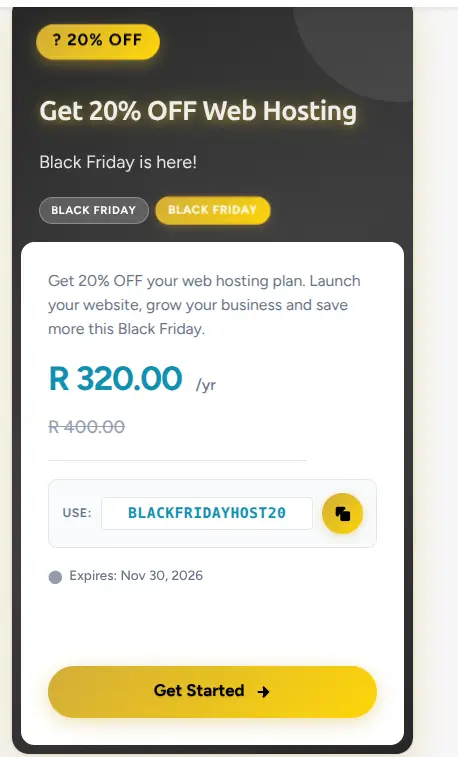
BLACKFRIDAYHOST20 gives customers 20% off web hosting.
The displayed price drops from R400 a year to R320 a year, which saves R80.
This offer suits customers looking to buy a web hosting plan.
That might be a new business owner launching a first website, a freelancer setting up a client site or someone moving a project from another host.
If you don’t have a Truehost hosting plan yet, this is the code to look at first.
The offer expires on 30 November 2026.
Apply the code during checkout, before you pay. A code entered after payment can’t lower a total that has already been charged.
One more point.
The R400 a year figure is the entry price shown for the offer.
Higher packages cost more, so check which plan your discount applies to and what the discounted price looks like for that plan.
b) BF-UPGRADE-20: Save 20% When Upgrading Your Hosting
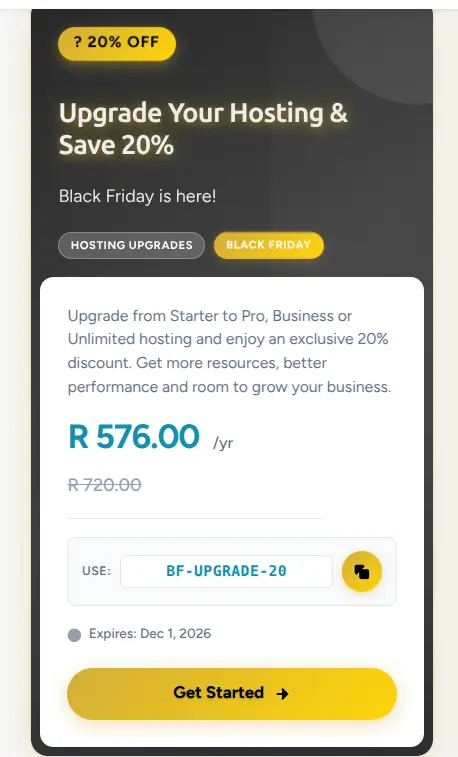
BF-UPGRADE-20 is for existing customers.
You can use it when upgrading from Starter to a higher package, such as Pro, Business or Unlimited.
The displayed price drops from R720 a year to R576 a year, which saves R144.
Why would you move up?
A higher package gives you access to more resources and more room for website growth.
Truehost’s Starter plan is listed with up to 10 websites and 30 GB of SSD storage.
Pro raises that to 30 websites and 50 GB, and Unlimited removes the website cap.
If your site is slowing down at busy times, or you’re running out of storage or website slots, an upgrade can fix that.
The offer expires on 1 December 2026.
If you’re thinking about upgrading, decide before then.
The discount applies to eligible upgrades, so check that your current service qualifies before you plan around it.
How to Use Truehost Black Friday Promo Codes
The general process is the same for both offers.
You choose the product, go to checkout, enter the code and check that the discount appears before you pay.
The steps differ a little depending on whether you’re buying a new hosting plan or upgrading an existing one.
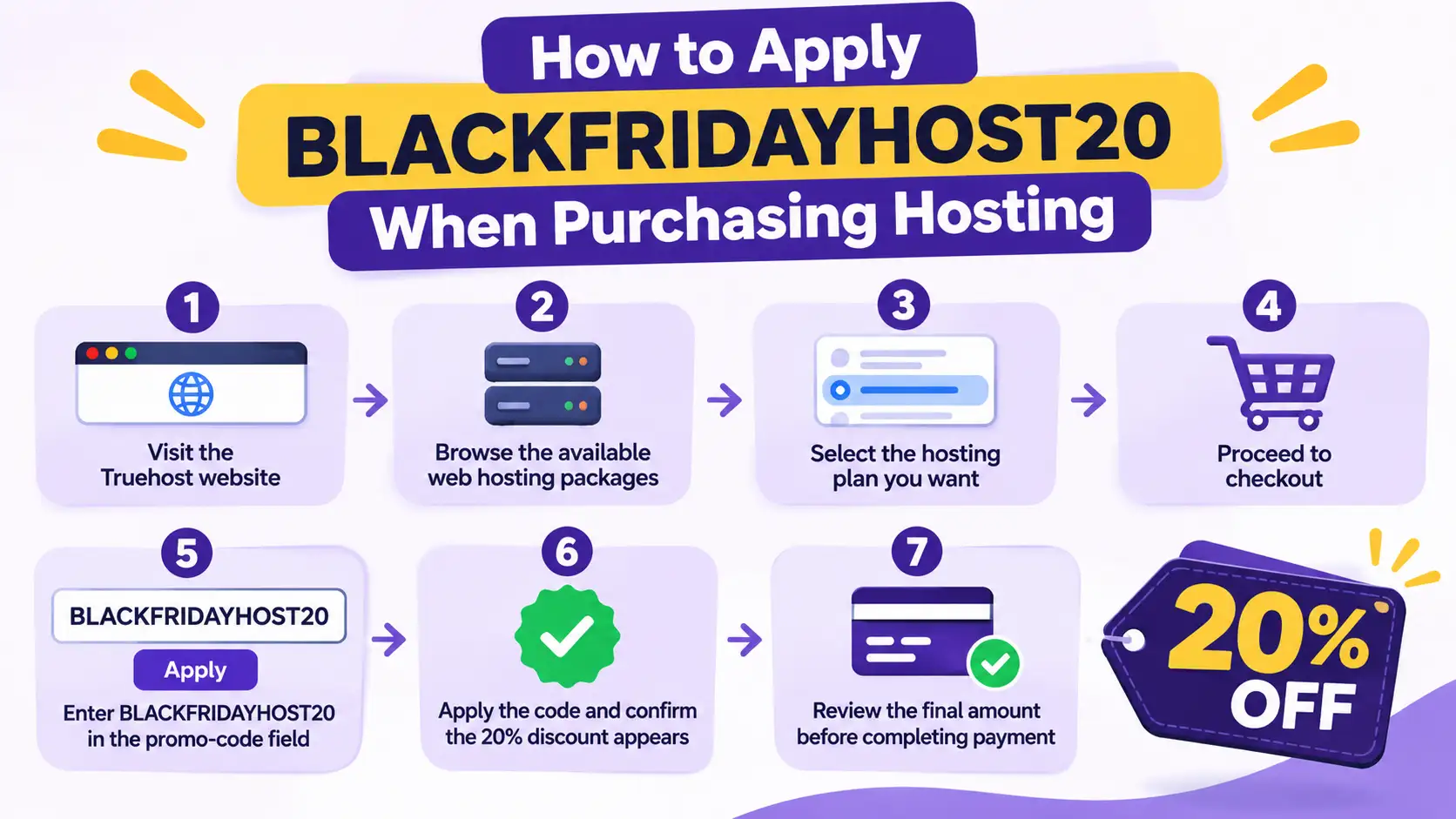
How to Apply BLACKFRIDAYHOST20 When Purchasing Hosting
Follow these steps to buy a new hosting plan with the code.
- Visit the Truehost website.
- Browse the available web hosting packages.
- Select the hosting plan you want.
- Proceed to checkout.
- Enter BLACKFRIDAYHOST20 in the promo-code field.
- Apply the code and confirm that the 20% discount appears.
- Review the final amount before completing payment.
A few tips make this smoother. Compare the plans before you choose, because the cheapest isn’t always the best fit.
Think about how many websites you’ll host and how much storage you need.
Pick an annual billing period if you want the annual price shown in the offer, and look at the order summary to see which billing period applies.
If the discount doesn’t show after you apply the code, don’t pay yet.
Go back and check the product, the billing period and the spelling of the code.
Save your order confirmation and the invoice that shows the discount once you do pay.
If you need to ask support anything later, you’ll have the details ready.
How to Use BF-UPGRADE-20 on an Existing Hosting Account
Use these steps if you already host with Truehost.
- Log in to your Truehost client account.
- Locate your existing Starter hosting service.
- Check the available upgrade options.
- Select Pro, Business or Unlimited.
- Apply BF-UPGRADE-20 where the promo-code option is available.
- Confirm that the discount has been applied before completing the upgrade.
This code is for upgrades, so you must be upgrading from Starter.
If you’re on a different plan, or you’re buying a brand new service, the code may be rejected. In that case, check whether BLACKFRIDAYHOST20 fits your order instead.
Run a quick checklist first.
Are you hitting your website limit? Is storage running low?
Do pages slow down when many visitors arrive? Do you plan to add email accounts or a new project?
If you answered yes to any of these, a higher package is worth a look.
Before you upgrade, back up your website.
Upgrades are usually smooth, but a backup gives you a way back if anything changes unexpectedly.
What to Check Before Using a Truehost Black Friday Promo Code
A few quick checks can save you from a surprise at payment. Use this table as a checklist.
| Detail | What to confirm |
| Eligible purchase | New web hosting or an eligible upgrade |
| Promo code | Enter the correct code for the offer |
| Hosting package | Confirm the selected plan qualifies |
| Promotional price | Check the discounted amount |
| Billing period | Confirm the price is for the stated annual period |
| Expiry date | Use the code before the offer ends |
| Renewal cost | Check the regular price after the promotional period |
Compare the promotional amount with the regular renewal price. The discounted first payment shouldn’t be confused with the cost of renewing the service.
A 20% saving on your first year doesn’t lower what you pay when the plan renews.
Ask what the renewal price is, and put the renewal date in your calendar. Also confirm whether VAT is included in the price you see at checkout.
It also helps to total the cost across two years.
If you buy at R320 for the first year and the plan renews at R400, your two-year cost is R720, compared with R800 at the regular price.
That’s still a saving, but a smaller one than the headline suggests. Plan your budget around the renewal figure, not only the discounted one.
What to Do If Your Truehost Promo Code Is Not Working
Codes can fail for simple reasons. Start with this table.
| Problem | What to check |
| Invalid promo code | Check spelling and extra spaces |
| Discount not appearing | Confirm you selected the eligible product |
| Upgrade code rejected | Confirm you’re upgrading from Starter to an eligible package |
| Offer has expired | Check the promotion’s expiry date |
| Wrong promotional price | Review the selected billing period and order summary |
The most common cause is a typing error.
A hyphen in BF-UPGRADE-20 is easy to miss or replace with the wrong character, and a trailing space can break the code.
Type the code again carefully, or copy and paste it without extra spaces.
If it still fails, clear the cart and try again in a private browser window, since a saved session can sometimes block a new code.
Also check that you’re using the right code for the right job.
BLACKFRIDAYHOST20 is for buying hosting.
BF-UPGRADE-20 is for upgrading from Starter. Using one on the other’s product is a common reason for a rejection.
If the code still fails after you’ve checked the offer conditions, contact Truehost support.
Tell them which code you used, what product was in your cart and what message appeared. That helps them check quickly whether the offer is still active.
Upgrade Your Hosting With Truehost
The Black Friday offers give you a chance to buy web hosting at a reduced price, or to move from Starter to a higher package.
Either way, you save 20% on an eligible purchase if you act before the codes expire.
If you’re an existing customer, review your hosting resources.
Look at your storage, the number of websites you run and how your site performs at busy times.
Then consider whether Pro, Business or Unlimited better suits your current needs.
Upgrading before a busy period, such as a sale or a product launch, gives your website room to handle the extra visitors.
If you’re a new customer, compare the available hosting packages before you choose one.
Check the websites allowed, the storage, the included features and the renewal price.
A plan that fits your site today, with room to grow, is better than the cheapest one you’ll outgrow in a few months.
Explore Truehost hosting plans, apply your Truehost Black Friday promo code and choose a package that gives your website room to grow.