Web Hosting
 Windows HostingBuilt for Windows apps and websites – stability, speed and flexibility
 Reseller HostingLaunch a hosting business without technical skills or expensive infrastructure
 Affiliate ProgramRefer customers and earn commissions from sales across our platform
 Domain SearchFind and secure a domain name in seconds with our quick lookup tool
 CO ZA Domains
 All DomainsExplore domain names from over 324 TLDs globally – all in one place
 Free Whois Lookup Tool South Africa
 VPS
VPS Website Builder
 Online ShopSet up a sleek eCommerce store with zero coding knowledge
 SSLs
SSLs SupportAccess help articles, how-tos, and everything about our services
 Blog
Blog Contact UsReach our team instantly via live chat or drop us an email
When you’re ready to self-host n8n for your workflow automation, you’ll quickly realize there are two main paths you can take.
You can go with an n8n VPS, which is a hosting solution built specifically for n8n. It comes with everything already installed and set up for you, so you can start building your automations right after you deploy.
Or you can choose a regular VPS, which is basically a blank server with just an operating system.
You get full root access and complete control, but you have to install and configure everything yourself: Node.js, npm, n8n, the database, and all the other dependencies.
So the real difference here is simple: convenience versus control.
An n8n VPS does all the technical work for you, while a regular VPS gives you total freedom but asks for your time and technical know-how in return.
Let’s take a glance at the difference:
| Feature | N8n VPS | Regular VPS |
| Purpose | Optimized for n8n automation workflows | General-purpose hosting for websites, apps and databases |
| Set up time | Less than 15 minutes | Up to 2 hours or more for manual setup |
| Technical Skill Required | Basic user skills, minimal server knowledge | Linux administration, SSH, command-line proficiency |
| Pre-installed Dependencies | Node.js, npm, n8n, PostgreSQL, SSL certificates | Only the operating system; you install everything |
| Security Hardening | Pre-configured with SSL, firewall, and security patches | Manual setup required for SSL, firewall, and updates |
| Update & Maintenance | One-click or automatic updates | Manual CLI updates and maintenance |
| Performance Optimization | Tuned for n8n workflows with queue mode support | You optimize based on your needs |
| Multi-App Hosting | Optimized for n8n only (other apps may conflict) | Can host multiple applications and sites |
| Pricing | Higher; includes setup and support costs | Lower; you pay only for server resources |
Table of Contents
N8n VPS vs Regular VPS: 9 Differences
1) Purpose
The main purpose of an n8n VPS is to run n8n workflow automation.
Everything about the server is designed to support n8n, the operating system, installed packages, database configuration, and resource allocation, all of which focus on making n8n run smoothly.
You use it specifically to build and execute automations.
A regular VPS is a general-purpose server. You can host websites, run applications, store files, manage email, or run databases. It’s flexible and can accommodate almost any workload you throw at it.
If you need to run n8n alongside a website, you’d use a regular VPS and install everything yourself.
2) Setup Time
An n8n VPS gets you up and running in about 15 minutes. You select a plan, deploy, and receive a login link. The provider has already installed Node.js, npm, and all the dependencies n8n needs.
You don’t have to figure out which Node.js version works best or troubleshoot compatibility issues.
With a regular VPS, you start with a clean operating system.
You need to establish an SSH connection, install Node.js and npm, set up PM2 to keep n8n running in the background, download and install n8n, and configure systemd services so n8n restarts automatically after server reboots.
This process typically takes up to two hours, especially if you’re not experienced with Linux servers
3) Technical Skill Required
To use an n8n VPS, you don’t need Linux administration knowledge. The server is ready to go with a visual interface, and you can start building workflows immediately.
Basic familiarity with web applications and APIs is helpful, but you won’t touch the command line.

A regular VPS requires comfort with Linux, SSH, and command-line operations. You need to know how to install packages, edit configuration files, set up web servers as reverse proxies, and troubleshoot permission errors.
If you encounter version conflicts or dependency issues, you could spend hours debugging.
4) Pre-installed Dependencies
Your n8n VPS comes with n8n, Node.js, npm, PostgreSQL, and often Redis already installed.
SSL certificates are automatically configured, and the server is ready to run workflows securely from day one. Queue mode is typically pre-configured for larger workloads.
A regular VPS has only the operating system installed. You install every dependency manually: Node.js, npm, n8n itself, a database (SQLite by default, or PostgreSQL if you set it up), and any additional tools you need. You also set up the reverse proxy and SSL yourself
5) Security Hardening
n8n VPS providers handle security for you. They configure firewalls, automatically install SSL certificates, set up auto-renewal, and apply security patches. Your workflows are accessible over HTTPS from day one.
On a regular VPS, you handle all security yourself. This means installing Certbot, configuring Nginx or Apache as a reverse proxy, setting up cron jobs for certificate renewal, and managing firewall rules.
One configuration mistake can leave your server vulnerable or make your workflows inaccessible.
6) Update & Maintenance
n8n VPS providers test updates before rolling them out. They make sure major version changes won’t break existing workflows. If an update has issues, they hold it back until it’s stable. You get updates without the risk.
On a regular VPS, you’re responsible for updating n8n yourself. You run commands like npm update -g n8n and restart the service.
If the new version introduces breaking changes, your workflows might stop working, and you have to debug the issue on your own
7) Performance Optimization
An n8n VPS is optimized specifically for workflow automation. It includes support for queue mode with Redis and PostgreSQL for concurrent execution.
Server resources are allocated to maximize n8n performance, and providers often include built-in monitoring dashboards.
With a regular VPS, performance optimization is your responsibility. You need to tune your database settings, configure workers, and monitor resource usage manually using tools like Netdata or Prometheus.
Without monitoring, you won’t know your server is running out of memory until workflows start failing.
8) Multi-App Hosting
n8n VPS is optimized specifically for n8n. While you can technically install other applications via SSH, the environment isn’t optimized for that and may cause conflicts. It’s best used as a dedicated automation server.
A regular VPS allows you to host multiple applications, websites, and databases simultaneously. You can run n8n alongside other services on the same server, giving you maximum flexibility for your infrastructure.
9) Pricing
Regular VPS plans are inexpensive. These are our regular VPS prices when you choose a 3-year billing period:
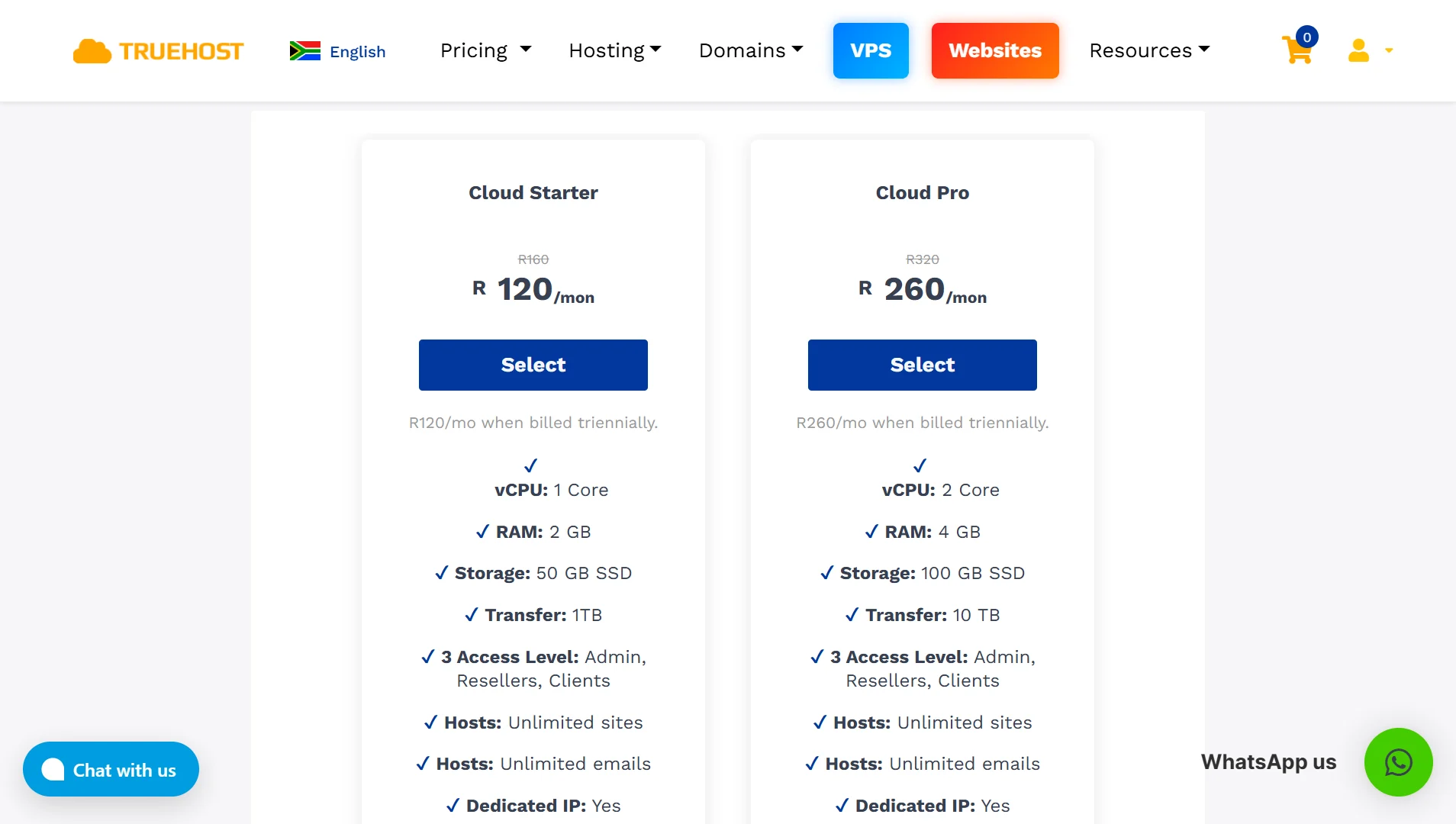
Cloud Starter, R120/mo: 1 vCPU Core, 2 GB RAM, 50 GB SSD Storage, 1TB Transfer, 3 Access Levels (Admin, Resellers, Clients), Unlimited Sites, Unlimited Emails, Dedicated IP, Custom Control Panel, Linux OS, Europe/USA Data Centers.
Cloud Pro, R260/mo: 2 vCPU Cores, 4 GB RAM, 100 GB SSD Storage, 10 TB Transfer, 3 Access Levels (Admin, Resellers, Clients), Unlimited Sites, Unlimited Emails, Dedicated IP, Custom Control Panel, Linux OS, Europe/USA Data Centers.
Cloud Business, R640/mo: 4 vCPU Cores, 8 GB RAM, 200 GB SSD Storage, 25 TB Transfer, 3 Access Levels (Admin, Resellers, Clients), Unlimited Sites, Unlimited Emails, Dedicated IP, Custom Control Panel, Linux OS, Europe/USA Data Centers.
n8n VPS prices at Truehost:
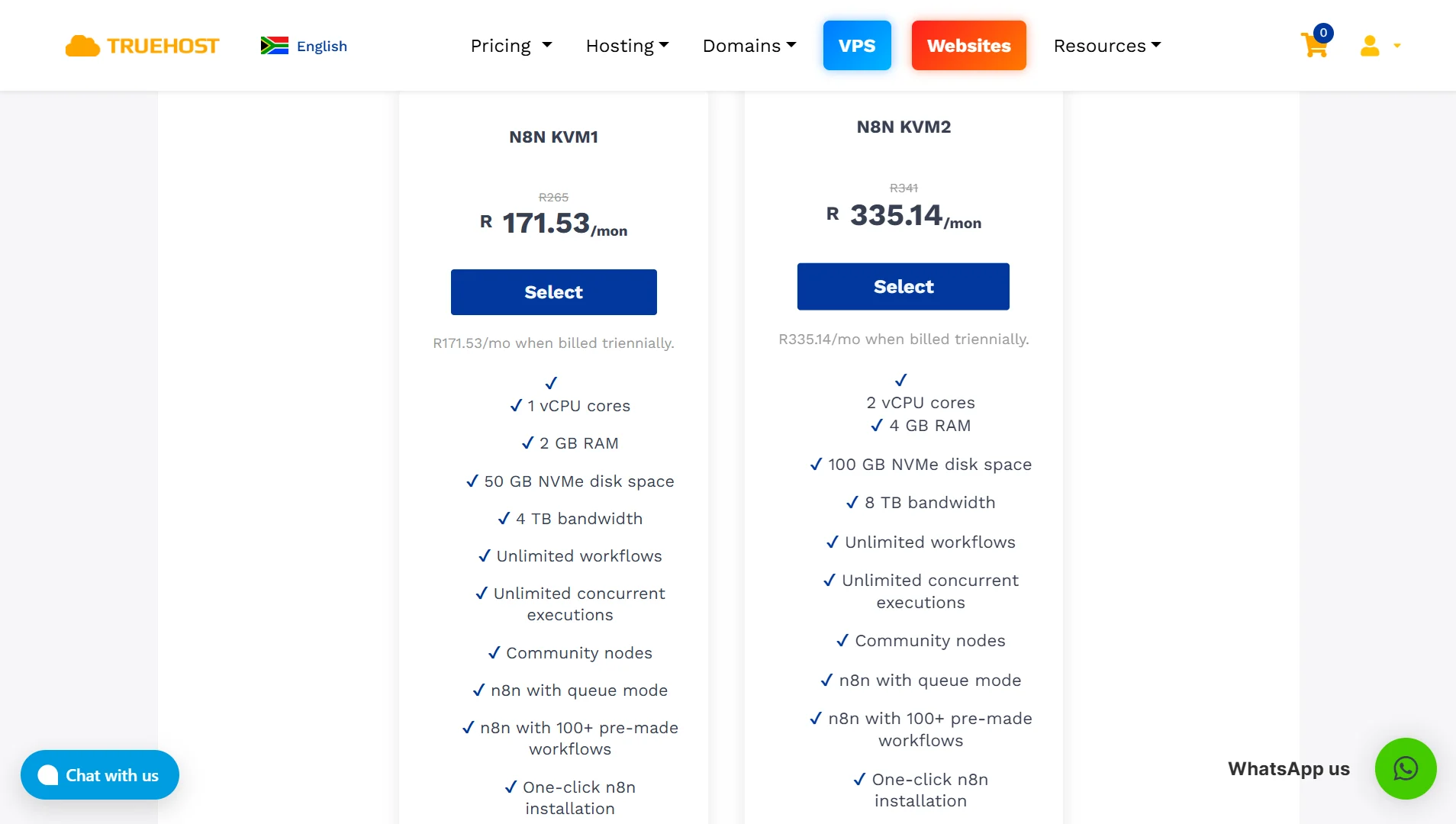
n8n KVM1, R171.53/mo: 1 vCPU Core, 2 GB RAM, 50 GB NVMe Disk Space, 4 TB Bandwidth, Unlimited Workflows, Unlimited Concurrent Executions, Community Nodes, n8n with Queue Mode, n8n with 100+ Pre-made Workflows, One-click n8n Installation.
n8n KVM2, R335.14/mo: 2 vCPU Cores, 4 GB RAM, 100 GB NVMe Disk Space, 8 TB Bandwidth, Unlimited Workflows, Unlimited Concurrent Executions, Community Nodes, n8n with Queue Mode, n8n with 100+ Pre-made Workflows, One-click n8n Installation.
The n8n VPS costs more because you’re paying for someone to handle the configuration, maintenance, and support.
Torn Between n8n VPS and Regular VPS?
Choose n8n VPS if:
- You’re not a sysadmin and don’t want to become one
- You need automation running today, not next week
- You want SSL and a production database without extra work
- You prefer one-click updates to terminal commands
- You need expert support for n8n-specific issues
- You’re willing to pay more for convenience
- You only run n8n on this server
Choose Regular VPS If:
- You’re comfortable with Linux and SSH
- You’re on a tight budget
- You want to run other software alongside n8n
- You don’t mind handling maintenance
- You need custom server configurations
- You’re fine with community support
- You want to understand how n8n works under the hood
FAQs n8n VPS vs VPS
What is the best VPS for n8n?
The best VPS for n8n depends on your technical skills and budget. If you prefer convenience, an n8n VPS with pre-installed and optimized n8n is your best option. If you’re technically proficient and want maximum control at a lower cost, choose a regular VPS and set up n8n yourself.
Does n8n need a VPS?
n8n does not absolutely require a VPS. You can run it locally on your computer, but this comes with reliability issues; your workflows stop when your computer shuts down, the internet drops, or power goes out. A VPS ensures your automations run 24/7 with guaranteed uptime.
Is n8n free if you self-host?
Yes, n8n is open-source, so you can self-host it for free. You only pay for the server where you run it. When you self-host on your own hardware, the software itself costs nothing.
Can you host n8n locally?
Yes, you can host n8n on your home computer. However, this means your workflows depend on your internet connection, power supply, and hardware reliability. Most people run n8n on a VPS to avoid these issues.
What is the cost of hosting n8n?
Self-hosted n8n costs the price of your server. A basic regular VPS can cost as little as R120 per month, while a specialized n8n VPS starts at R171.53 per month. Compare this to n8n Cloud, which starts at $20 per month and includes execution limits.
Ready to Host With the Most Reliable VPS for n8n?
If you’re ready to run n8n without the setup headaches, Truehost has you covered. Our dedicated KVM VPS servers come with n8n pre-installed and pre-configured, so you can start automating within minutes.
Your server comes with PostgreSQL already set up, reverse proxies configured, and free SSL certificates issued. You never have to touch the command line or worry about dependencies.
Build unlimited workflows with no usage caps or surprise fees, and scale your resources up or down whenever you need.
With full SSH root access, you can customize Docker files, run Python scripts, or add npm modules. Whether you’re automating simple tasks or scaling to millions of workflows, Truehost grows with you.
Getting started is simple. Pick your server size, and your environment is ready to go. Log in to your visual editor, add your API keys, and run your first workflow.
Check out our plans at Truehost and get your n8n VPS running today.