Web Hosting
 Windows HostingBuilt for Windows apps and websites – stability, speed and flexibility
 Reseller HostingLaunch a hosting business without technical skills or expensive infrastructure
 Affiliate ProgramRefer customers and earn commissions from sales across our platform
 Domain SearchFind and secure a domain name in seconds with our quick lookup tool
 CO ZA Domains
 All DomainsExplore domain names from over 324 TLDs globally – all in one place
 Free Whois Lookup Tool South Africa
 VPS
VPS Website Builder
 Online ShopSet up a sleek eCommerce store with zero coding knowledge
 SSLs
SSLs SupportAccess help articles, how-tos, and everything about our services
 Blog
Blog Contact UsReach our team instantly via live chat or drop us an email
A padlock icon in the browser bar is often taken as proof that a website is safe.
Your SSL certificate encrypts the connection, so your data stays private between your browser and the server.
But that padlock says nothing about whether your browser reached the right server in the first place.
That gap sits inside the Domain Name System, or DNS. Picture it as a phone book that maps domain names to IP addresses.
If someone tampers with that lookup, a visitor can land on a fake copy of your site. That fake copy can carry its own valid certificate and its own padlock.
This is called DNS cache poisoning or spoofing. Most South African site owners have never checked whether their domain is protected against it.
DNSSEC closes that specific gap. This article explains what it does and checks whether your South African domain supports it. Then we look at whether turning it on makes sense for your site.
Table of Contents
What Does DNSSEC Do?
DNS handles one job. It takes a name like yourbusiness.co.za and points a visitor’s browser to the correct server.
That lookup happens quietly, hundreds of times a day, without a single check on whether the answer is genuine.
DNSSEC, short for Domain Name System Security Extensions, adds a signature to that answer.
A digital signature gets attached to your DNS records. A resolver can then confirm the response has not been altered.
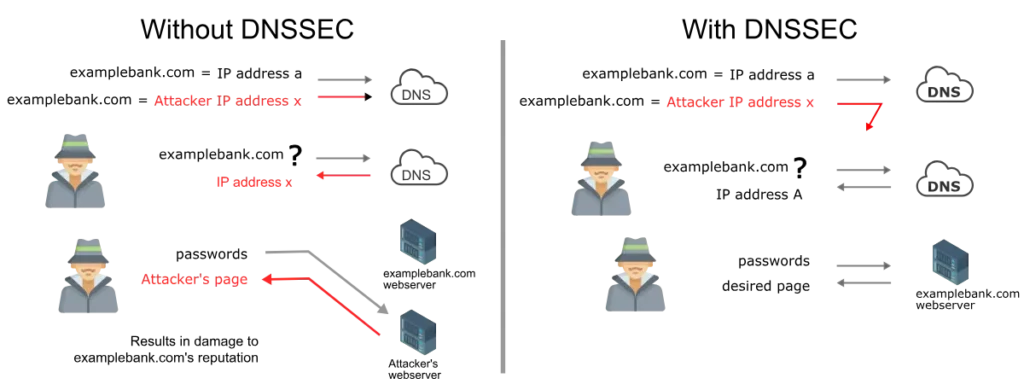
Here’s the specific attack this stops. In DNS cache poisoning, an attacker slips a false address into a DNS resolver’s memory.
Visitors are then sent to a server under the attacker’s control, and they may never notice the difference.
With DNSSEC signatures in place, a resolver can detect a forged answer and refuse to forward it.
The trust runs in a chain. Your domain’s signature gets checked against your registry’s signature.
The registry’s own signature gets checked against the root of the Internet. Break any link in that chain, and validation fails.
That failure tells the resolver that something is wrong before any visitor is redirected.
DNSSEC vs SSL: Clearing Up the Confusion
| DNSSEC | SSL/TLS | |
|---|---|---|
| Protects | The DNS lookup | The data connection |
| Confirms | You reached the right server | Your data stays private in transit |
| Padlock icon shown | No | Yes |
| Required for HTTPS | No | Yes |
People often mix these two up, and the confusion is understandable since both involve certificates and signatures. But they protect completely different parts of your site.
SSL, or more accurately TLS, encrypts the connection between a browser and a server after the connection is established. It stops anyone from reading or altering the data traveling across it.
DNSSEC comes earlier in the process. It confirms that the browser is even talking to the right server before any data gets exchanged.
A site with SSL but no DNSSEC can still send visitors to a fake server if its DNS gets poisoned.
The padlock will still appear on that fake server, as long as the attacker also has a certificate. That’s the exact scenario DNSSEC guards against.
Is DNSSEC Supported for South African Domains Right Now?
South African hosting providers currently support DNSSEC across .co.za, .org.za, .net.za, and .web.za domains.
ZACR manages these second-level domains and has invested in the hardware and software needed to sign the.ZA namespace.
That investment runs from the top level down through second- and third-level domains. ZADNA oversees .za policy, and it has published a DNSSEC Practice Statement.
The statement sets out how the extensions get managed for South African domains.
So if you registered your .co.za domain years back and read that DNSSEC wasn’t an option, check again. The situation has changed.
On adoption more broadly, South Africa leads several other African countries in the share of domains using DNSSEC.
That said, signing your domain is only half the picture. The other half depends on whether your visitor’s ISP resolver checks those signatures. Not every ISP does this yet.
Do You Actually Need DNSSEC? A Practical Answer
There isn’t one answer that fits every site. A short decision framework works better than a blanket yes or no.
DNSSEC matters more if your site handles logins, payments, or sensitive customer data.
Financial services, e-commerce stores, and anything tied to a login form fall into this category. A DNS spoofing attack against a site like this could send customers to a fake login page.
DNSSEC matters less for a small brochure site with no login form and no payment flow. The attack DNSSEC prevents is real, but it’s less common than phishing emails or weak passwords.
A static site with no sensitive input has less to lose if a lookup gets spoofed.
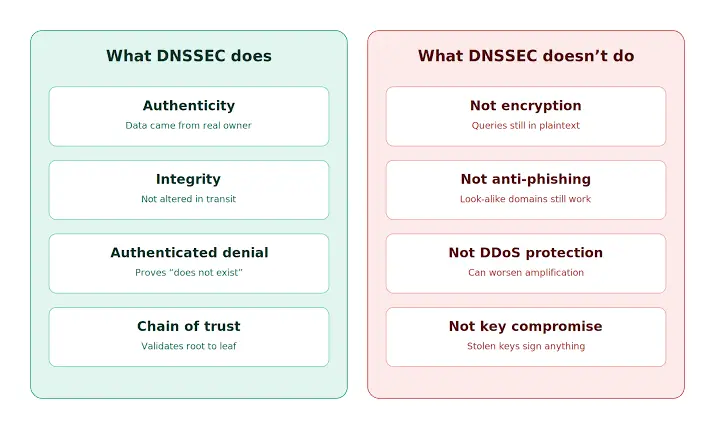
Be honest with yourself about what DNSSEC is and isn’t. It’s one layer in a broader security setup, not a fix for every threat your site faces.
It won’t stop malware on your server, nor will it stop someone from guessing a weak admin password.
How to Enable DNSSEC on a South African Domain
If you decide DNSSEC is worth setting up, the process has two separate steps, and both need to happen.
1) Enable DNSSEC at Your DNS Host
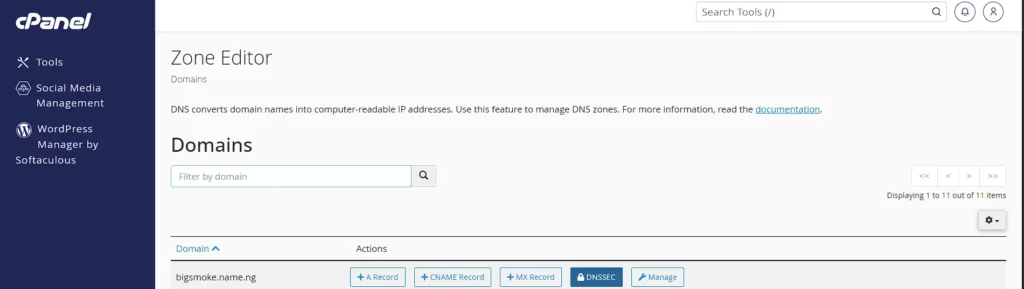
Start where your DNS zone actually lives, not at your registrar. That’s usually Cloudflare, cPanel, or whichever provider manages your DNS records day to day.
Log in to that dashboard and look for a DNSSEC or security section. Most modern hosts generate the required key pair automatically once you flip this on.
Cloudflare handles this with a single toggle. cPanel setups vary a bit depending on your hosting provider, so check their documentation if the option isn’t obvious.
2) Copy the DS Record Details Your Host Generates
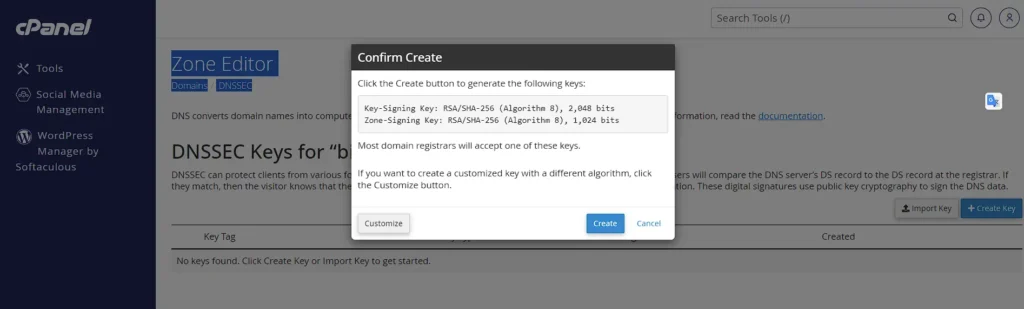
Once DNSSEC is active, your DNS host displays a DS record along with a few supporting details. These normally include the key tag, the algorithm number, and a digest value.
Keep this information handy, since your registrar needs it word-for-word in the next step. A single mismatched digit here breaks the whole chain later.
3) Publish the DS Record at Your Domain Registrar
Log in to your registrar account and find the DNSSEC or advanced DNS section for your domain.
Paste in the exact DS record details that your DNS host provided. This step is what tells the registry to trust the signature your host just created.
Not every South African registrar handles this the same way. Confirm they support DNSSEC submission for your specific domain extension first.
4) Wait for Propagation, Then Confirm the Chain Is Complete
Propagation across the DNS system usually takes anywhere from a few hours to two days. Once that window passes, run your domain through an online DNSSEC checker.
A clean result confirms the chain of trust from your registrar down to your DNS host. If the check returns an error, compare the DS record at your registrar against your DNS host again.
Skipping any of these steps leaves DNSSEC only half configured. A half-configured setup provides no real protection and can even cause DNS lookups to fail for some visitors.
Frequently Asked Questions
Does DNSSEC slow down my website?
No, not in a way visitors would notice. DNSSEC adds a small amount of extra data to DNS responses and a brief validation check on the resolver side. Page load speed for your actual content stays the same.
Is DNSSEC free to enable?
In most cases, yes. Most modern DNS hosts and South African registrars include DNSSEC support at no extra cost. Check with your specific provider, since a few older setups or niche registrars may charge or offer no support.
What happens if I skip DNSSEC?
Nothing changes day to day for most sites. Your domain works exactly as it does now. The risk only shows up if someone specifically targets your DNS with a spoofing or cache poisoning attack.
Does DNSSEC stop malware or hacking attempts on my site?
No. DNSSEC only protects the DNS lookup step. It does nothing to protect against malware, brute-force login attempts, weak passwords, or vulnerabilities in your website’s code. Those need their own separate protections.
How do I check if DNSSEC is already active on my domain?
Several free online DNSSEC checker tools will confirm this in seconds if you enter your domain name. Your DNS host’s dashboard usually shows the DNSSEC status too, often under a security or DNS settings tab.
Should You Turn On DNSSEC?
Your South African domain almost certainly supports DNSSEC now, contrary to what you may have read a few years ago.
Whether to switch it on depends on what your site actually does. If customers log in, pay, or share sensitive details on your site, DNSSEC closes a real gap.
That’s a gap SSL alone does not cover. If your site is a simple brochure with no login or payment flow, treat it as a smaller priority. It’s still worth having, just not urgent.
Log in to your cPanel or ask Truehost whether DNSSEC is active on your domain today. That single check tells you exactly where you stand, and whether it’s time to close this gap.