Web Hosting
 Windows HostingBuilt for Windows apps and websites – stability, speed and flexibility
 Reseller HostingLaunch a hosting business without technical skills or expensive infrastructure
 Affiliate ProgramRefer customers and earn commissions from sales across our platform
 Domain SearchFind and secure a domain name in seconds with our quick lookup tool
 CO ZA Domains
 All DomainsExplore domain names from over 324 TLDs globally – all in one place
 Free Whois Lookup Tool South Africa
 VPS
VPS Website Builder
 Online ShopSet up a sleek eCommerce store with zero coding knowledge
 SSLs
SSLs SupportAccess help articles, how-tos, and everything about our services
 Blog
Blog Contact UsReach our team instantly via live chat or drop us an email
A visitor opens your site, and the browser flags it as “Not Secure.” You bought the domain. You set up hosting. Something still does not add up.
That warning rarely points to a hosting problem. It usually points to a mismatch between your domain and your SSL certificate. The two need to line up exactly, or the browser stops trusting the connection.
This article breaks down how that link works, what can break it, and how you fix it. No developer required.
Table of Contents
What Ties an SSL Certificate to Your Domain
An SSL certificate is not a general safety badge you slap on any site. It names one exact domain inside the file itself, called the Common Name.
That name has to match the domain typed into the browser bar. If a visitor lands on yourdomain.co.za, the certificate loaded on that server must say yourdomain.co.za too.
This match is what stops a random certificate from working on any website it touches. Without it, anyone could claim to be your site with a stolen certificate.
A few points worth grasping here:
- The Common Name field holds the exact domain the certificate protects, spelled and formatted precisely.
- Browsers check this field on every connection attempt, not just once during setup.
- A certificate authority signs off on the pairing between your domain and your public key.
- Any gap between the certificate’s listed domain and the visited URL triggers a browser warning.
How a Certificate Authority Confirms You Own the Domain
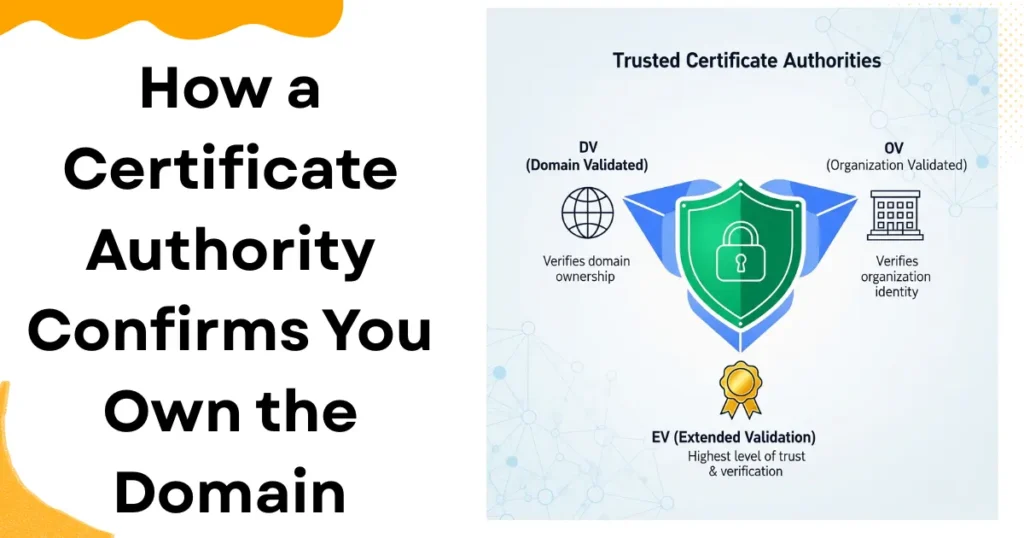
Before a certificate authority issues anything, it needs proof that you control the domain. This step is called domain validation, and it happens before the certificate goes live.
Proof usually comes through one of a few channels. You might confirm ownership by email, by adding a DNS record, or by uploading a small file to your site.
South African site owners rarely need anything beyond this basic level. Higher tiers exist, but most small businesses or personal sites do not require them.
Here is what to know about the validation levels:
- Domain Validation (DV) confirms control of the domain only, and takes minutes to hours to complete.
- Organization Validation (OV) checks the legal identity behind the domain, and adds a few business days.
- Extended Validation (EV) runs the deepest identity check, though browsers no longer display it differently from OV.
- Most standard hosting setups only need DV, so skip the paperwork-heavy tiers unless a client specifically asks for them.
For a typical South African hosting account, DV validation through email or DNS usually finishes within the same day.
What Happens When the Domain and Certificate Do Not Match
A mismatch shows up fast. The browser compares the Common Name against the domain in the address bar. It flags any difference right away.
Visitors see a warning screen before they even reach your content. Some leave right there, without reading past the alert.
A few situations trigger this problem often:
- Buying an SSL for the wrong subdomain, such as securing shop.yourdomain.com instead of the main domain.
- Moving to a new domain without reissuing the certificate under the new name.
- A simple typo in the domain field during the certificate request.
- Treating www.example.com and example.com as identical, when some certificates only cover one of them.
That last point trips up a lot of site owners. A certificate issued for the non-www version does not automatically cover the www version. Both need to be included in the purchase.
Leaving a mismatched certificate live also costs you more than trust. Search engines factor in security signals, so a broken SSL setup can quietly hurt your rankings, too.
Single Domain, Wildcard, and Multi-Domain Certificates Explained Simply
Not every certificate type protects the same scope. Picking the right one comes down to how many domains and subdomains your site actually uses.
A single domain certificate covers exactly one domain, and nothing beyond it. If your certificate is issued for yourdomain.co.za, subdomains like blog.yourdomain.co.za stay unprotected.
A wildcard certificate covers a domain along with every subdomain under it. One certificate marked *.yourdomain.co.za protects the shop, blog, mail, and any other subdomain you add later.
A multi-domain certificate covers several unrelated domains under a single certificate file. A business running yourbrand.co.za and yourbrand.co.tz could secure both with one purchase.
Here is how the choice usually plays out for South African site owners:
- A single small business site with no subdomains fits a single domain certificate.
- A growing business adding a blog, store, or client portal fits a wildcard certificate.
- An agency or company running several separate domains fits a multi-domain certificate.
- A site still deciding its structure often starts with a single domain, then upgrades once subdomains appear.
Does SSL Depend on Your Domain, Your Hosting, or Both
This question trips up a lot of people, so it deserves a direct answer. SSL depends on both, though each piece plays a different role.r
Your domain supplies the identity that the certificate checks against. It is the name written into the Common Name field, and the name the browser compares on every visit.
Your hosting server is where the actual certificate file lives. It gets installed there, and the server presents it to browsers during each connection.
Moving hosts without updating your domain’s DNS records can leave SSL looking broken, even though the domain itself is fine. The certificate is not reachable from the new location yet.
A few practical notes:
- Changing hosting providers usually means reinstalling or reissuing your SSL certificate on the new server.
- Pointing your domain’s DNS at the wrong server breaks the SSL chain, even with a valid certificate.
- Registering your domain and hosting your site through the same provider removes a lot of this friction.
- Truehost pairs domain and hosting management together, so the SSL setup follows the domain automatically once the DNS is pointed correctly.
Frequently Asked Questions
Can I use SSL without owning the domain?
No. Certificate authorities require proof of domain control before issuing any certificate. Someone else’s domain cannot receive a certificate in your name.
Do I need a new SSL certificate if I change my domain?
Yes. A certificate is tied to a specific domain name. A new domain always needs its own certificate, even on the same hosting account.
Does SSL work with subdomains automatically?
Only with a wildcard certificate. A standard single-domain certificate does not extend coverage to subdomains unless it was purchased specifically for that purpose.
Is SSL tied to my hosting or my domain?
Both. The domain provides the identity checked by the browser, while the hosting server stores and serves the actual certificate file.
How long does it take for a domain to get SSL after purchase?
Domain-validated certificates often finish within hours, sometimes minutes, once the ownership check clears. Higher validation tiers can take a few business days.
Keep Your Domain and SSL Certificate in Sync
SSL security comes down to one exact, ongoing match between your certificate and your domain. That match is not a one-time setup task.
Domains change owners, sites add subdomains, and hosting moves between providers. Each of those events can quietly break the SSL connection if nobody checks it.
Log in to your Truehost dashboard and check your current domain’s SSL status today. If a domain still shows no certificate, set one up before your next visitor sees that warning.