 Web Hosting
 Windows HostingBuilt for Windows apps and websites – stability, speed and flexibility
 Reseller HostingLaunch a hosting business without technical skills or expensive infrastructure
 Affiliate ProgramRefer customers and earn commissions from sales across our platform
 Domain SearchFind and secure a domain name in seconds with our quick lookup tool
 CO ZA Domains
 All DomainsExplore domain names from over 324 TLDs globally – all in one place
 Free Whois Lookup Tool South Africa
 VPS
VPS Website Builder
 Online ShopSet up a sleek eCommerce store with zero coding knowledge
 SSLs
SSLs SupportAccess help articles, how-tos, and everything about our services
 Blog
Blog Contact UsReach our team instantly via live chat or drop us an email
Is WordPress a web host?
Ask ten people and you’ll hear a mix of answers, because the name covers two different things. WordPress.com is a service that can host your site for you.
WordPress.org, on the other hand, is only software, and software can’t host anything by itself.
Here’s the setup. WordPress.org offers a free, open-source tool that you place on a server rented from a hosting company.
WordPress.com bundles that same tool with server space, so you can go live without shopping for hosting first.
This mix-up catches plenty of first-time site owners. They see one name and assume one product.
In reality, it’s two paths to a similar result. Below, we look at each path, explain how WordPress and hosting fit together, and spell out what you’d need to pay for along the way.
If you’re building a site, these details also help you budget sensibly before you commit to anything.
So, Is WordPress a Web Host? It Depends on the Product
The honest answer is that it depends on the product. Some people use the word WordPress for the free software.
Others mean the hosted service. Before you can say whether WordPress is a web host, you need to pin down which one you’re talking about.
One is a content management system, a tool for writing and organising your site. The other is a company that keeps servers running.
They share a name and plenty of code, yet they do very different jobs. Let’s go through them one by one.
1) WordPress.org Is Software, Not a Hosting Company
WordPress.org gives away a free, open-source content management system, usually shortened to CMS.
You use it to build pages, publish posts, upload media and organise the content on a site.
That is the full extent of what it does. It doesn’t run any servers, and it never delivers a page to a visitor on its own.
To put it to work, you download the software and install it on a compatible hosting account, which almost always comes from a different company.
The hosting provider supplies the server resources, the storage and the network infrastructure that make a site reachable.
Without that layer, your WordPress files simply have nowhere to sit.
A quick comparison helps here.
Think of WordPress as the shop fittings and the way you arrange the stock, while the hosting company provides the building, the electricity and the street address.
You can design the nicest layout in the world, but with no building to put it in, nobody can walk through the door.
Downloading WordPress doesn’t hand you a hosting account, and it doesn’t give you a domain name either. You get the software and nothing else.
2) WordPress.com Does Include Hosting
WordPress.com is a different animal.
It’s operated by Automattic as a hosted service, which means WordPress is already running on their servers by the time you arrive.
You sign up, choose an address for your site, pick a theme and start publishing, with no installation step in between.
Because hosting is built into the service, you can get a site online without buying a separate hosting plan.
Depending on the plan, the package includes things like storage, SSL and managed technical services, so the provider takes care of much of the server-side work on your behalf.
There is one catch worth knowing about.
Features and limits change from plan to plan. Storage, plugin installation and customization options can all depend on which tier you choose, and those details get updated over time.
Check the current plan pages on WordPress.com before you commit, rather than relying on something you read in an older blog post.
How WordPress and Web Hosting Work Together
Once you separate the two products, the relationship with hosting becomes easy to follow. There are two ways it can play out.
Either you bring the hosting yourself, or the platform supplies it for you.
Both routes end with a working website, but the steps involved, and who is responsible for what afterwards, are quite different.
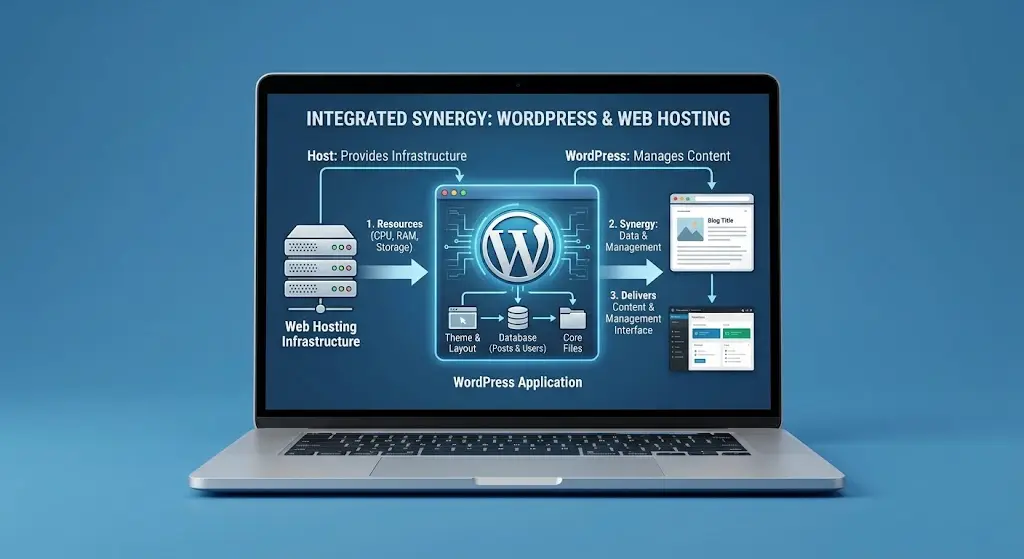
1) Self-Hosted WordPress: WordPress.org Needs a Hosting Provider
Most people who say they run their own WordPress site mean this route. Here’s the journey from download to launch.
Think of the process as a short chain of handovers. It begins when you grab the free CMS from WordPress.org.
That download is the engine of your site. It’s the tool you’ll use to create pages, posts, images and every other piece of content.
On its own, though, it’s just a folder of files with nowhere to run.
Next, you rent that somewhere. A hosting provider gives you an account on a server, or another compatible environment.
That server stores your site’s files and database, and it stays switched on at all hours so visitors can arrive whenever they like.
It also has to be up to the job. WordPress expects a supported PHP version, a supported database and HTTPS.
A plan that falls short may refuse to install WordPress, or misbehave later. Check the latest requirements on WordPress.org before you pay for anything.
Once you have the account, you put WordPress on it. Many hosts offer a one-click installer in their control panel, and that’s the easy path for beginners.
The harder path is manual. You upload the files yourself and create a database by hand.
After that comes the domain. Its DNS settings need to lead to your host, otherwise anyone typing your address ends up nowhere.
Plenty of providers will talk you through this step, and some sell domains as well.
The final stage never really ends. Once the site is live, you may be responsible for updates, plugins, themes, backups, security and speed, depending on your package.
Some hosts take on part of that list. Others hand you the whole thing, so it’s worth finding out which kind you’re buying from.
Here’s a simple scenario.
A shop owner in Nairobi downloads WordPress from WordPress.org. She buys a suitable hosting plan from Truehost, installs WordPress from the hosting control panel and connects her domain. WordPress runs the website.
Truehost provides the environment it runs in. Two separate products, two separate jobs, one working site.
A quick word on money.
The WordPress software costs nothing. Hosting, domain registration and some premium themes or plugins do cost money, though.
Plan for those expenses even though the software itself is free.
2) WordPress.com: Software and Hosting in a Single Service
WordPress.com takes a different approach. If your site lives on its platform, you don’t need to buy a separate hosting account. Here’s how that plays out.
In practice, the software is already installed the moment you sign up, so there’s nothing to download.
WordPress.com keeps your website on its own servers and delivers your pages to visitors.
It also handles most of the infrastructure behind the scenes. You rarely touch a web server or a database, which is a relief if server settings make your head spin.
You also get a site address from day one, usually a WordPress.com subdomain. Using your own custom domain depends on the plan you pick.
So do storage, plugin access, design options and other extras. Those details shift from one subscription to the next, so the plan page is the place to look.
Take a typical example.
A photographer signs up for WordPress.com, picks an address, chooses a theme and publishes her portfolio.
She doesn’t need a hosting plan from Truehost or any other company to get that site online.
Still, built-in hosting doesn’t mean everything is free. Some features sit behind paid plans.
So read the plan terms before you sign up, and compare the cost with what a separate hosting plan would run you.
Who Handles What: WordPress.org Software vs. a Hosting Company
If you go the self-hosted way, it helps to see exactly where the responsibilities split.
The table below sets the job of the WordPress.org software next to the job of a separate hosting company.
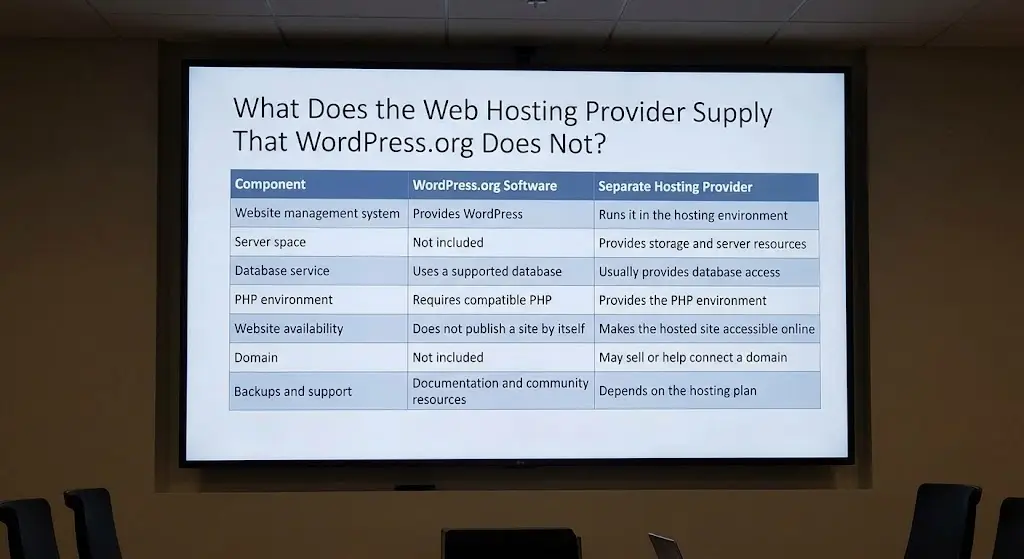
| Job to be done | WordPress.org software | Separate hosting company |
|---|---|---|
| Managing your content | Provides the CMS you log into | Runs that CMS inside its server environment |
| Storing your files | Nothing included | Supplies the storage and server resources |
| Holding your data | Works with a supported database | Usually provides database access |
| Running the code | Needs a compatible PHP version | Provides the PHP environment |
| Putting the site online | Cannot publish anything by itself | Makes the site reachable by visitors |
| Domain name | Not included | May sell a domain or help you connect one |
| Backups and help | Documentation and community forums | Varies by hosting plan |
The pattern is easy to spot.
WordPress.org supplies the software and the documentation, while the hosting company supplies nearly everything else that lets a site work in public.
Some hosts go further and include WordPress installers, SSL certificates, backups, caching and technical support.
Those are features of the hosting plan, not automatic features of every WordPress.org installation.
So if one host offers daily backups and another doesn’t, that’s a difference between the two hosts, and it has nothing to do with WordPress itself.
This distinction is also useful when you’re comparing plans.
A listing that says WordPress hosting tells you the server is set up to run WordPress comfortably.
It doesn’t tell you whether backups, security tools or expert help come bundled, so those are the details worth checking line by line before you pay.
Can You Run WordPress Without Paying for Hosting?
The accurate answer is yes and no. A site that the public can visit needs a hosting environment somewhere.
That doesn’t always mean paying a commercial provider, though, and three situations show how it plays out.
The first is local development. WordPress can run on your own computer using a local development tool such as Local or XAMPP.
It’s a great way to learn the dashboard, test themes or build a site before launch.
The catch is that other people can’t reach it by default, so it works as a private workspace rather than a public website.
The second is running your own server.
Someone with the right technical setup can install WordPress on a server they manage themselves, which means they also take on the infrastructure, the security and the job of keeping it reachable from the internet.
It’s possible, but it’s a lot of ongoing work, and it really suits people who already have solid server skills.
The third, and by far the most common, is commercial web hosting. Most beginners and businesses simply buy a plan.
The provider supplies the server environment and supporting services, so you can focus your time on content instead of infrastructure.
For most people, this is the simplest and safest route.
The common thread across all three is that WordPress.org doesn’t bundle hosting with its downloadable software.
Wherever you run it, you always need a place for it to live.
Running WordPress on Your Own Truehost Account
Let’s pull the threads together.
WordPress.org supplies the software, a hosting provider supplies the environment where it runs, and WordPress.com combines both into a single service.
Which route suits you depends on what you want. Some people prefer a managed, hosted platform where the technical side is handled for them.
Others want a separately hosted WordPress installation that they control from end to end.
Truehost fits the second group. It offers hosting for people who want to install WordPress on their own hosting account.
According to Truehost, its shared plans include cPanel, a one-click installer for WordPress, Joomla and Drupal, free SSL and free daily backups.
The Starter plan also lists 30 GB of SSD storage and hosting for up to 10 websites. Truehost says every plan comes with 24/7 support, and its servers are based in South Africa.
Prices start from R 33.33 per month on a three-year term, with other billing options available.
Plans and prices change, so check the current details on the Truehost site before you buy.
So, is WordPress a web host? The software isn’t, while WordPress.com can be.
If you’d rather have your own hosting account and full control over your site, pick a provider that fits what you’re building.
Explore Truehost’s web hosting plans if you want to run WordPress on a hosting account of your own.