Web Hosting
 Windows HostingBuilt for Windows apps and websites – stability, speed and flexibility
 Reseller HostingLaunch a hosting business without technical skills or expensive infrastructure
 Affiliate ProgramRefer customers and earn commissions from sales across our platform
 Domain SearchFind and secure a domain name in seconds with our quick lookup tool
 CO ZA Domains
 All DomainsExplore domain names from over 324 TLDs globally – all in one place
 Free Whois Lookup Tool South Africa
 VPS
VPS Website Builder
 Online ShopSet up a sleek eCommerce store with zero coding knowledge
 SSLs
SSLs SupportAccess help articles, how-tos, and everything about our services
 Blog
Blog Contact UsReach our team instantly via live chat or drop us an email
If you have searched for ways to build a website, you have probably seen the word “WordPress” everywhere. It powers more than 43% of every website on the internet today.
That number alone can feel scary. Many business owners assume WordPress is only for coders, developers, and big tech teams.
Good news first: that assumption is wrong. This guide on wordpress hosting for beginners breaks down exactly what WordPress is, what it costs, and how a small South African business can set one up in minutes.
You do not need to write a single line of code. You just need a plan built for people starting from zero.
Most guides on this topic jump straight into technical terms like hosting panels, databases, and file managers. This guide skips all of that and focuses on what a business owner actually needs to know: cost, simplicity, and getting your site live without stress.
By the end of this article, you will know exactly what WordPress hosting for beginners looks like in practice, what it costs in Rand, and the exact steps to get your own site running today.
Table of Contents
What Is WordPress? A Plain-English Answer
WordPress was built so ordinary people could publish content online without any coding skills. Think of it like a smartphone.
Your phone runs on an operating system you never have to touch directly. You just tap icons, open apps, and change your wallpaper whenever you feel like it.
WordPress works the same way. Here is how the three main parts break down.
| WordPress Part | Smartphone Comparison | What It Does |
|---|---|---|
| WordPress Core | The phone’s operating system | Where you type text, add photos, and manage your pages |
| Themes | Phone cases and wallpapers | Change the entire look of your site in one click |
| Plugins | Apps on your phone | Add features like a booking calendar or a contact form |
This is the reason WordPress hosting for beginners has become such a popular starting point. You get full control over your site without needing a computer science degree.
Is WordPress Right for Your Business Type?
Not every business needs the same website tools, so it helps to know where WordPress fits best. Here is a quick reference for common South African business types.
| Business Type | Does WordPress Suit It? | Why |
|---|---|---|
| Salon or spa | Yes | Booking plugins handle appointments automatically |
| Consultant or freelancer | Yes | Simple pages, portfolio, and contact forms cover most needs |
| Small retail shop | Yes | Basic shop plugins handle a small product catalogue well |
| Large multi-warehouse store | Sometimes | May outgrow basic plugins and need custom development later |
| Restaurant or café | Yes | Menu pages, maps, and booking tools install in minutes |
Anyone searching for what is WordPress SA guidance usually falls into one of the first four categories above. For the vast majority of small and medium South African businesses, WordPress covers every requirement without needing a developer.
The Three Building Blocks Explained
1. WordPress Core: Your Control Panel
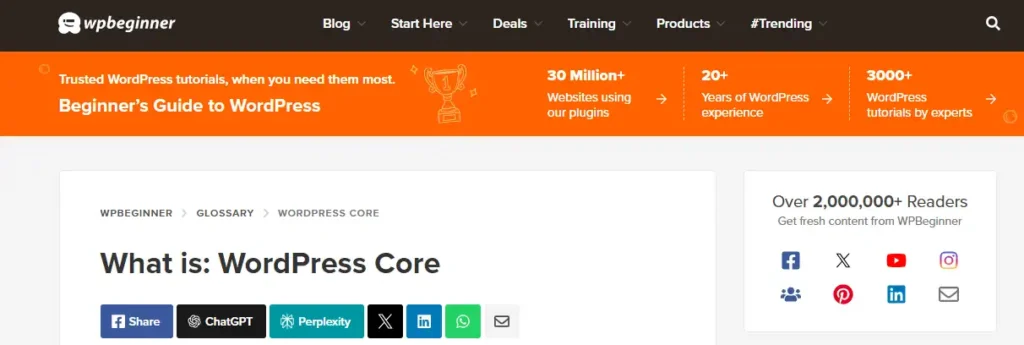
The core software is where all your work happens. You log in, click a button, and start typing your page content much like a Word document.
There is no code visible anywhere on the screen. Everything happens through simple buttons and menus.
2. Themes: Your Visual Look
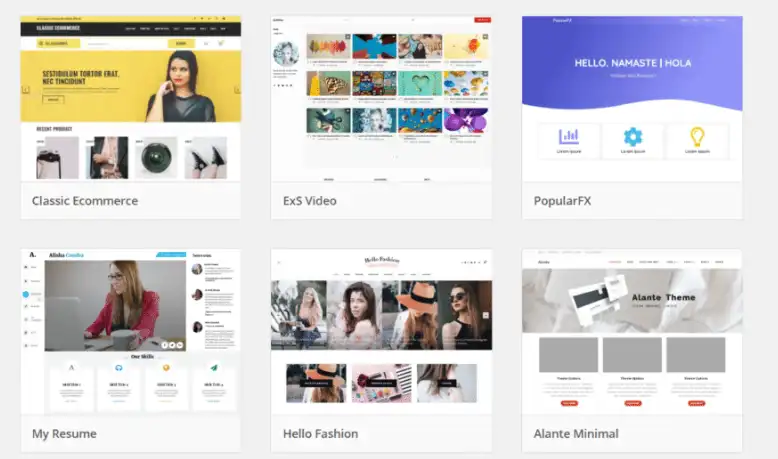
A theme decides how your site looks to a visitor. Colours, fonts, and layout all change the moment you activate a new one.
Thousands of free themes exist for specific business types. A few examples worth knowing about:
- Salon and beauty business themes with booking sections
- Consulting and professional service themes with clean layouts
- Retail and shop themes built for product listings
- Restaurant themes with menu pages and location maps
3. Plugins: Your Extra Features
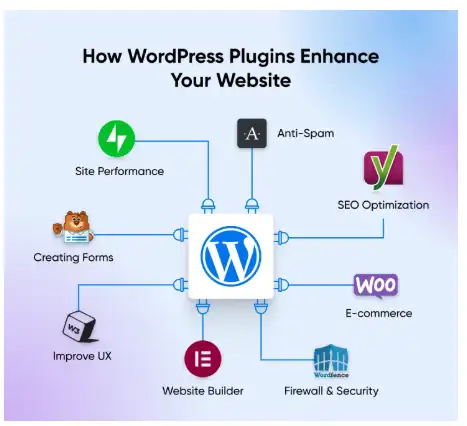
Plugins add powers to your site without touching any code. Popular options for South African small businesses include:
- A WhatsApp chat button for instant customer questions
- A booking calendar for salons, clinics, or consultants
- A contact form so customers can request a quote
- A basic online shop plugin for selling products directly
Each of these installs in a few clicks from inside your WordPress dashboard. That is the entire appeal of wordpress hosting for beginners: power without complexity.
Most plugins fall into one of two categories, free or premium. Free plugins cover the basics for almost every small business, while premium plugins add extra polish once your site starts earning revenue.
A sensible approach for a first-time WordPress owner is to start with only free plugins. Add one or two premium options later, once you know exactly which features your customers use the most.
Shopify vs WordPress Cost: Why the Difference Is Huge
Many business owners compare WordPress against closed platforms like Shopify before choosing a direction. The cost gap between the two is one of the biggest factors to weigh up.
Closed platforms often bill monthly in US Dollars and add extra charges for basic features. A small online shop on one of these platforms can cost R360 to R600 or more every single month just to stay online.
WordPress flips that model completely. The software itself is free and open-source, so hosting and your domain name become your only running costs.
| Cost Factor | Closed Platform (e.g. Shopify) | WordPress Hosting |
|---|---|---|
| Software licence | Included in monthly fee | Free forever |
| Monthly fee | R360 to R600+ | From around R33/month |
| Billing currency | Often US Dollars | South African Rand |
| Extra app fees | Common, added monthly | Most plugins are free |
| Ownership of your site | Locked to the platform | Fully yours, movable anytime |
That comparison shows why so many small businesses in South Africa are switching over. Cheap WordPress hosting South Africa options now cost a fraction of what closed platforms charge every month.
Over a full year, the gap becomes even clearer. A closed platform charging R450 a month adds up to R5,400 annually, while a WordPress hosting for beginners plan at R33 a month totals under R400 for the same period.
That difference, roughly R5,000 a year, could instead go toward stock, staff wages, or marketing. Choosing the right hosting model early on protects your cash flow for the parts of your business that actually generate income.
How to Install WordPress Without Any Tech Skills
This is the part that scares most beginners the most. The good news is that installing WordPress no longer needs a developer, a manual, or any waiting around.
Truehost South Africa built its hosting plans around this exact problem. Its Starter and Silver plans, priced from around R33 per month, run on fast LiteSpeed servers designed for WordPress sites.
Inside every Truehost hosting dashboard sits a tool called the 1-Click Softaculous Installer. Here is how simple the process is.
- Log in to your Truehost hosting dashboard.
- Find the Softaculous or WordPress icon in your control panel.
- Type in your business name and choose a password.
- Click “Install.”
- Wait under 60 seconds for WordPress to be fully set up.
There is no manual file uploading, no database setup screens, and no technical jargon at any step. This is exactly why so many first-time site owners search for how to install WordPress and land on a one-click answer.
If you have ever set up a new app on your phone, you already know most of this process. Type a few details, tap a button, and wait a short moment while everything sets up in the background.
The days of needing a developer just to answer the question of how to install WordPress are over. A dashboard button now does the entire job for you.
What Makes Truehost a Solid Fit for Beginners
Choosing wordpress hosting for beginners means choosing a host that removes friction at every stage. A few features make this easier for a non-technical business owner.
- LiteSpeed servers: These load WordPress sites faster than standard server setups, which keeps visitors from leaving out of frustration.
- Local South African data centres: Pages load quicker for local customers than sites hosted overseas.
- Free SSL certificates: Every plan includes automatic security, so your site shows the padlock icon customers trust.
- South African Rand billing: No surprise currency swings on your monthly invoice.
- A 30-day money-back guarantee: Enough time to test your new WordPress site before fully committing.
None of these features require you to touch a single setting manually. They come switched on from the moment you activate your hosting plan.
Common Questions About WordPress Hosting for Beginners
Do I need to know any code to use WordPress?
No. Every daily task, from writing a page to changing your layout, happens through simple menus and buttons.
Is WordPress actually free?
The core software is free and open-source. Your only costs are hosting, your domain name, and any optional premium themes or plugins you choose to add later.
Can I move my site later if I outgrow my current plan?
Yes. WordPress sites are fully portable, so you can upgrade your hosting plan or move providers without losing your content or your design.
How long does the whole setup take?
With a 1-click installer, WordPress itself is ready in under 60 seconds. Building out your pages and adding your content typically takes a few hours spread across a day or two.
Is WordPress better than Shopify for a small business?
For most small South African businesses, yes, mainly because of cost. A basic WordPress site can run for under R50 a month, while closed platforms often charge several times that amount before extra fees.
Is wordpress hosting for beginners actually secure?
Yes, as long as your hosting plan includes automatic updates and a free SSL certificate. Reputable South African hosts patch security issues in the background so you never have to manage this manually.
What happens if I get stuck during setup?
Most South African hosting providers offer local support through live chat or a help desk. Support teams are used to guiding first-time WordPress owners through every stage of the process.
Your Simple Checklist Before You Launch
Before you commit to any hosting plan, run through this short checklist.
- Does the plan include a free 1-click WordPress installer?
- Are the servers based in South Africa for faster load times?
- Is billing done fully in Rand, with no hidden currency charges?
- Does the plan include a free SSL certificate?
- Is there a money-back guarantee if the plan does not suit your business?
If a hosting provider ticks every box above, you have found a solid starting point for wordpress hosting for beginners.
Final Word: WordPress Is Built for You, Not Against You
WordPress was never designed to intimidate small business owners. It was built to give ordinary people, from bakers to consultants to salon owners, full control over their own website.
With wordpress hosting for beginners now priced from around R33 a month and a one-click setup process, there is no longer a technical excuse to stay offline. Secure your .co.za domain, click the WordPress install button inside your hosting dashboard, and start customising your new digital storefront today.
Whatever your business type, wordpress hosting for beginners gives you a starting point that grows alongside you, without locking you into expensive monthly platform fees.