Web Hosting
 Windows HostingBuilt for Windows apps and websites – stability, speed and flexibility
 Reseller HostingLaunch a hosting business without technical skills or expensive infrastructure
 Affiliate ProgramRefer customers and earn commissions from sales across our platform
 Domain SearchFind and secure a domain name in seconds with our quick lookup tool
 CO ZA Domains
 All DomainsExplore domain names from over 324 TLDs globally – all in one place
 Free Whois Lookup Tool South Africa
 VPS
VPS Website Builder
 Online ShopSet up a sleek eCommerce store with zero coding knowledge
 SSLs
SSLs SupportAccess help articles, how-tos, and everything about our services
 Blog
Blog Contact UsReach our team instantly via live chat or drop us an email
Most people use AI one prompt at a time. You open the app, ask a question, get a response, then move on with your work. When the next task comes up, you repeat the same process. Every interaction starts with you.
That approach works well for quick answers, brainstorming ideas, or generating content.
But it becomes limiting when you need an assistant to monitor ongoing tasks, send scheduled reports, follow up on conversations, or continue working while your attention is somewhere else.
At that point, you’re still managing the AI instead of the AI helping manage your work.
OpenClaw is built for that second role. It’s a free, open-source AI agent that runs inside the messaging apps your team already uses, including WhatsApp, Telegram, and Slack.
Rather than waiting for constant prompts, it can stay active, respond to conversations, automate routine tasks, and keep working in the background even when you’re away.
Now, let’s take a closer look at the key OpenClaw AI assistant features, see how they work together, and show you what you need to have in place to unlock OpenClaw’s full capabilities.
Table of Contents
The Top OpenClaw AI assistant Features
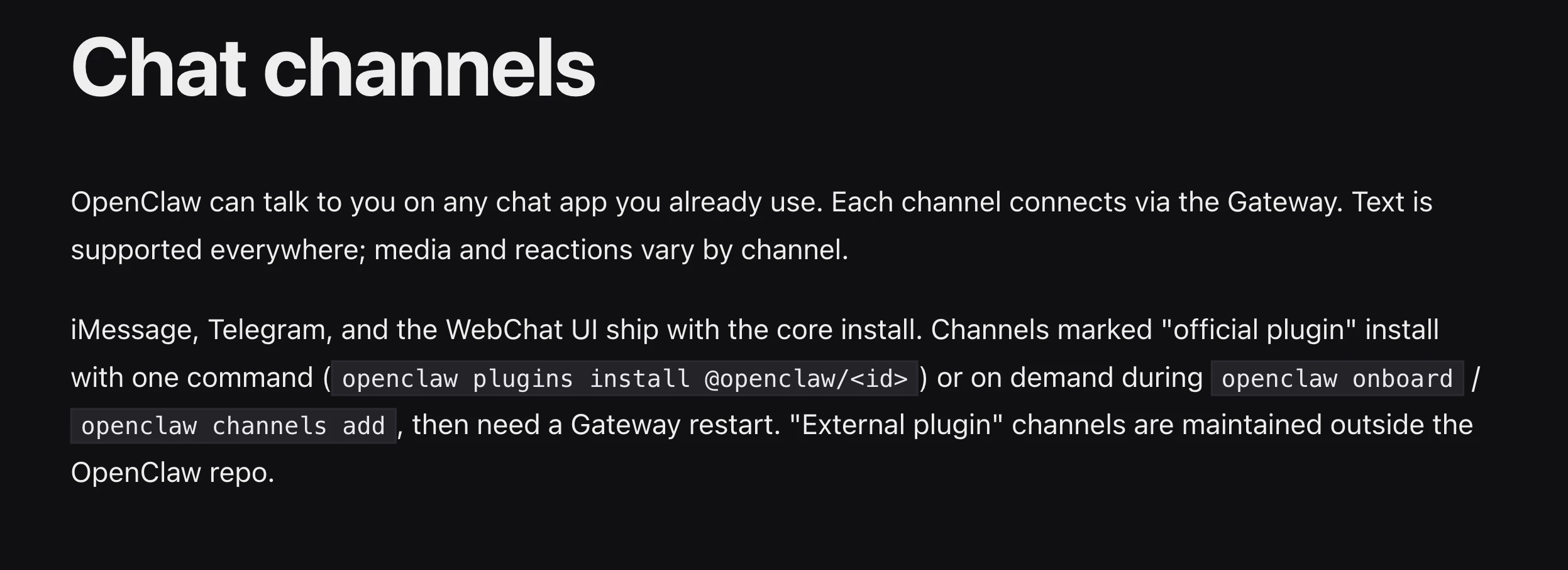
1) How OpenClaw Reaches You: The Multi-Channel Messaging Layer
One of the first things you’ll notice about OpenClaw is that there’s no new app to install or another account to create. Instead, it appears inside the messaging platforms you already use every day.
OpenClaw supports more than 20 channels, including WhatsApp, Telegram, Slack, Discord, Signal, iMessage, and Microsoft Teams.
That makes a real difference because work already happens inside these apps. Teams share updates, clients ask questions, projects move forward, and decisions are made through chat.
The last thing most people want is another platform they have to remember to open. By meeting you where you’re already communicating, OpenClaw becomes part of your existing workflow instead of adding another one.
The experience also stays consistent across devices.
Using a Mac, Windows PC, or Linux machine, you’re interacting with the same AI agent. There’s no need to configure separate versions or learn a different interface on each device.
Say you’re heading into a meeting and want a quick catch-up on your inbox. Send a WhatsApp voice note: “Summarise my unread emails.” OpenClaw picks it up, does the work, and replies in the thread.
You never have to switch apps or wait until you’re back at your desk.
2) You Can Use It Without Typing: Two-Way Voice Support
Typing on a phone for hours isn’t always practical. For many people, especially those who spend most of their day away from a desk, voice is often the fastest way to communicate.
OpenClaw lets you interact naturally using voice. Simply send a voice note through WhatsApp or Telegram, and it automatically transcribes your message, understands your request, and gets to work.
If you’d rather listen than read, it can also respond with a voice message instead of text.
This is especially useful when you’re on the move. You can ask OpenClaw to check your schedule while driving, summarize an email while walking between meetings, or answer a question while you’re busy with other tasks.
You stay productive without stopping to type or stare at a screen.
3) What It Can Do: Agentic Capabilities and File Processing
The biggest difference between OpenClaw and a traditional AI chatbot is that OpenClaw doesn’t just answer questions, it performs tasks.
Instead of responding with information alone, it can carry out multi-step actions on your behalf, helping you complete work instead of simply telling you how to do it.
Agentic capabilities (beyond chat):
- Run shell commands, execute scripts, and read or write files on your local machine or a VPS.
- Automate web browsers to fill in forms, collect information from websites, capture screenshots, or monitor pages for changes.
- Manage your email and calendar by organizing inboxes, drafting replies, scheduling meetings, and resolving calendar conflicts.
- Complete multi-step workflows by planning, executing, checking results, and making adjustments without requiring constant input from you.
File processing:
OpenClaw also makes working with files much easier. Rather than opening different applications, you can simply upload a file directly into your chat and tell the agent what you need.
For example, you can:
- Upload a PDF and ask, “Summarize this 40-page proposal.”
- Send a spreadsheet and request, “Find all line items over R5,000 in this CSV.”
- Share a screenshot of an error message and ask OpenClaw to explain what’s causing the problem.
It supports a wide range of file types, including PDFs, Microsoft Word documents, Excel spreadsheets, CSV files, images, screenshots, and source code files. Maximum file sizes depend on the messaging platform you’re using.
For example, Telegram supports files up to 50 MB, while Slack allows uploads as large as 1 GB.
If you regularly work with reports, contracts, spreadsheets, or technical documents, this feature can save a significant amount of time by reducing repetitive reading, copying, and switching between applications.
4) What It Remembers: Persistent Memory
Every conversation with a standard AI chat tool starts from a blank slate.
Tell it your preferences today, and tomorrow you’re explaining them again.
OpenClaw doesn’t work that way. It keeps context in a plain Markdown file, the MEMORY.md, that loads automatically at the start of every session.
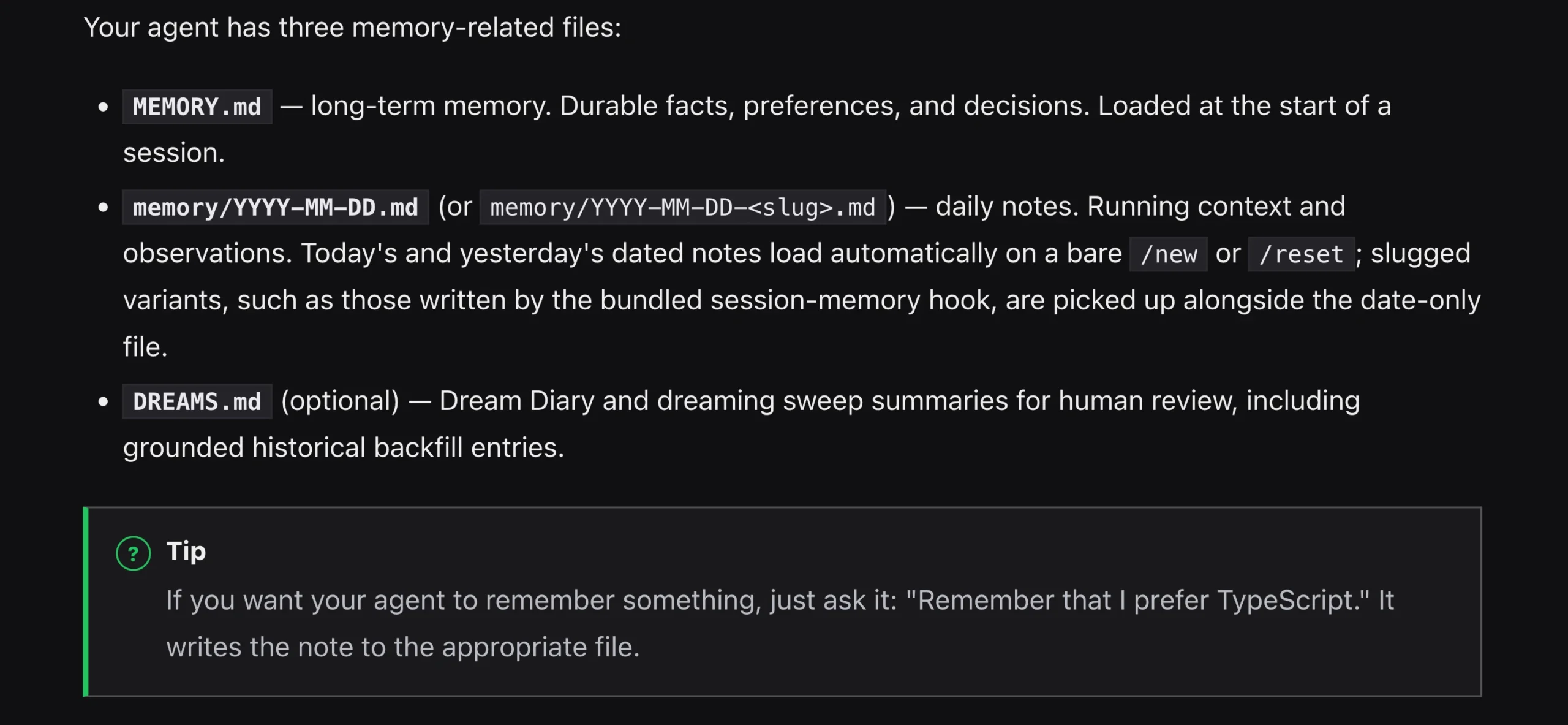
Tell it once that your reports should use bullet points instead of paragraphs, or that your email replies need a particular tone, and it sticks to that going forward without a reminder.
It also holds onto ongoing projects, recurring tasks, and team workflows. For a team sharing one OpenClaw instance, this means the agent already knows how things run, and nobody has to re-explain the setup every time someone new picks it up.
Because MEMORY.md is just readable Markdown, there’s nothing hidden in it. You can open it, check what it’s storing, and edit it directly if something needs to change.
5) What It Does Without You: Heartbeat and Automation
This is where OpenClaw stops being a tool you use and starts being an assistant that works on its own schedule.
HEARTBEAT.md is the file OpenClaw checks every 30 minutes. Whatever’s scheduled there runs quietly in the background. If nothing needs your attention, it stays silent, no notification spam, just results waiting when you need them.
A few things people actually set this up for:
- Every weekday at 7:30am, scan overnight emails and send a digest to Slack before the team logs on
- Watch a competitor’s pricing page and only speak up if something changes
- Track pending tasks and flag what’s overdue
Set it up once, and it runs every day after that.
There’s a catch worth being upfront about, though. Heartbeat only works while OpenClaw is actually running. Close the laptop lid, and the automation stops with it.
For scheduled tasks, round-the-clock monitoring, and anything proactive to actually behave the way it’s designed to, OpenClaw needs to live on something that stays on, a server, not a laptop that goes to sleep the second you step away.
That’s the exact gap our OpenClaw VPS Hosting fills. It runs on NVMe infrastructure, comes pre-configured, and deploys in minutes:
- KVM1 – R285/month: 1 vCPU, 2GB RAM, 50GB NVMe – solid for individuals and small teams
- KVM2 – R380/month: 2 vCPU, 4GB RAM, 75GB NVMe – built for teams running heavier automation
Your agent keeps working whether you’re in a meeting, on the road, or logged off entirely.
6) What It Can Extend: The Skills Marketplace
OpenClaw handles conversation, files, and basic scheduling right away. Skills are how you give it new abilities suited to your specific workflow, Markdown-based instruction packages you can think of as apps for your agent.
Browse and install them from ClawHub.ai, the community registry, which currently hosts more than 13,700 of them, across categories like coding, writing, data analytics, DevOps, productivity, email, social media, and customer support.
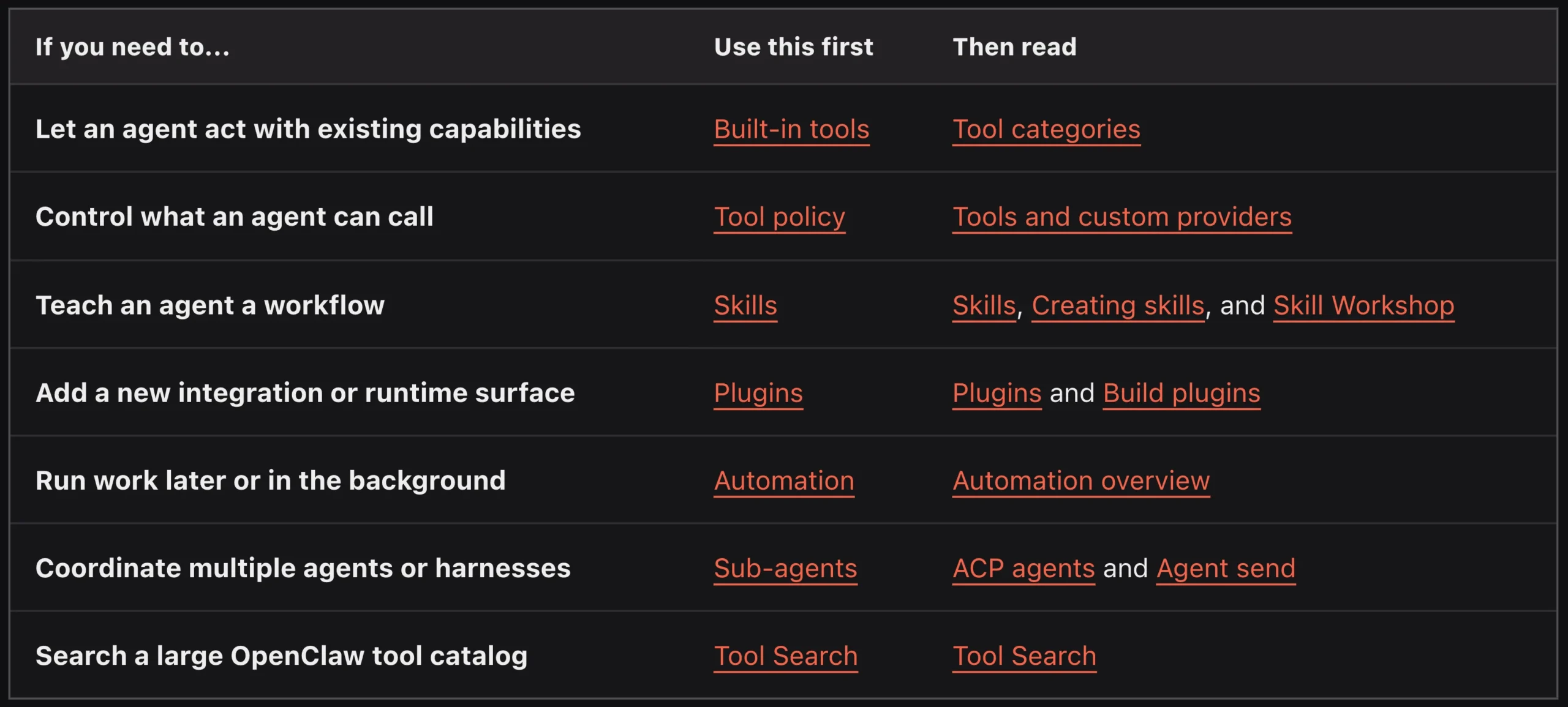
A few examples of what people build with Skills:
- Automated daily WhatsApp follow-ups for sales leads
- A weekly sales summary that lands in Slack every Friday, no prompting needed
- Moderation for a Discord community, welcoming new members, flagging spam
- Recurring email templates managed and sent without manual drafting
You install a Skill once, and invoke it by name or let a matching message trigger it.
If your workflow is unusual enough that nothing pre-built covers it, you write your own Skill in Markdown, and no special tooling required.
There’s also a community-maintained “Awesome OpenClaw Skills” list on GitHub if you’d rather start from something others have already built. For more complex jobs, OpenClaw also supports multiple agents working in parallel.
7) Which AI Brain It Uses: Multi-Model Support
Most AI tools lock you to one provider and one price. OpenClaw doesn’t.
It supports more than 50 models across Anthropic (Claude), OpenAI (GPT-4o), Google (Gemini), DeepSeek, xAI (Grok), Ollama, OpenRouter, and Together AI, and you decide which model handles which kind of task.
A workable split looks something like this: Claude for anything long-form where quality counts, GPT-4o mini for fast, low-stakes questions, and Llama running locally through Ollama for anything sensitive that shouldn’t leave your environment at all.
That flexibility is really cost control in disguise. You’re not paying premium rates for a task that never needed a premium model in the first place.
And if a provider raises prices or discontinues a model tomorrow, you edit a config file, not rebuilding your whole setup.
If your model budget is zero, Ollama lets you run open-source models locally at no cost at all.
8) Your Data, Your Server: Privacy, Security, and Local Control
Everything OpenClaw stores, from config, history, and memory, lives in plain Markdown files on your own machine or your own VPS. The only information that ever leaves that environment is whatever you send to the AI model provider you’ve chosen, over your own connection.
It works with Claude, GPT-4o, Gemini, DeepSeek, Grok, or entirely locally through Ollama, you just pick whichever fits your privacy needs.
The full codebase is MIT-licensed, so it’s open for inspection rather than something you have to take on faith.
For South African businesses handling customer records or financial data, this removes the “trust the vendor” question entirely, you control the environment it runs in. Hosting it on a Truehost OpenClaw VPS gives you that same level of local control, just on infrastructure that never sleeps.
9) OpenClaw vs. Standard AI Tools: What’s Actually Different
| OpenClaw | ChatGPT | Gemini | Copilot | |
|---|---|---|---|---|
| Works in WhatsApp / Slack | Yes (20+ channels) | Own app only | Own app only | Teams, Outlook only |
| Choose your AI model | 50+ models | GPT only | Gemini only | GPT, Claude, Gemini |
| Runs tasks automatically | Yes (Heartbeat + cron) | No | No | Power Automate only |
| Remembers across sessions | Yes (Markdown files) | No | No | Limited |
| File processing | Yes | Yes | Yes | Yes |
| Open source / self-hosted | Yes | No | No | No |
| Monthly cost | Free + model API costs | $8–$200/month | $8–$250/month | $10–$30/month |
OpenClaw AI Assistant Features: FAQs
Do I need a VPS to run OpenClaw, or can I use my own PC?
You can run it on a local machine without any problem. The catch is that Heartbeat and scheduled tasks only work while that machine is switched on and OpenClaw is running. A VPS keeps everything active around the clock without depending on your laptop staying open.
How much does the Heartbeat feature cost to run in terms of API tokens?
It depends on how often it checks in and what tasks are scheduled, but a 30-minute check interval with light tasks (email scans, monitoring checks) stays modest — usually a small fraction of the cost of a full conversation, since it’s only doing work when there’s something to do.
Can OpenClaw handle multiple users or is it single-user only?
It supports multi-agent setups. Teams can share one instance with defined workflows, or run separate agents for different roles, with Skills and memory scoped per workflow.
Does OpenClaw remember things between sessions?
Yes. That’s the whole point of MEMORY.md. Preferences, ongoing projects, and prior context all carry forward automatically without you repeating yourself.
What happens to my data if I host OpenClaw on Truehost?
Your data stays on your own VPS instance – we don’t access or process it. The only data leaving your server is whatever you route to your chosen AI model’s API, governed by that provider’s own terms.
How long does it take to set up OpenClaw on Truehost’s VPS hosting?
Our plans come pre-configured for OpenClaw, so most people are up and running within minutes of deployment – no manual server configuration involved.
Getting Started With OpenClaw AI Assistant
OpenClaw handles the work. Truehost keeps it running.
OpenClaw is designed to stay available whenever you need it, and those features deliver the best experience when your AI agent is running continuously instead of shutting down with your computer.
That’s exactly what a VPS provides.
Your OpenClaw instance stays online 24/7, ready to respond to messages, automate tasks, execute workflows, and monitor events in the background, even when your laptop is turned off.
With Truehost OpenClaw VPS Hosting, you can get started from R285/month. It comes with high-performance NVMe storage, a pre-configured OpenClaw environment, and deployment in just a few minutes.
There’s no hardware to maintain, no complicated setup, and no interruptions when you step away from your computer.
If you’re ready to move beyond prompt-by-prompt AI and start using an assistant that works around the clock, Truehost OpenClaw VPS Hosting gives you everything you need to get started.