Web Hosting
 Windows HostingBuilt for Windows apps and websites – stability, speed and flexibility
 Reseller HostingLaunch a hosting business without technical skills or expensive infrastructure
 Affiliate ProgramRefer customers and earn commissions from sales across our platform
 Domain SearchFind and secure a domain name in seconds with our quick lookup tool
 CO ZA Domains
 All DomainsExplore domain names from over 324 TLDs globally – all in one place
 Free Whois Lookup Tool South Africa
 VPS
VPS Website Builder
 Online ShopSet up a sleek eCommerce store with zero coding knowledge
 SSLs
SSLs SupportAccess help articles, how-tos, and everything about our services
 Blog
Blog Contact UsReach our team instantly via live chat or drop us an email
Finding a VPS host that works well in South Africa can turn into a frustrating search.
Between servers priced in US dollars and support tickets that take a day to answer, that frustration builds quickly. Add infrastructure that was never built for local traffic, and many site owners end up paying more for less speed.
Truehost entered the VPS hosting market in 2016 and was founded by David Murimi, a Kenyan entrepreneur. He had already built two other software companies before starting Truehost. His goal was simple: build hosting that actually serves African businesses, with stronger support and fairer pricing.
The company later expanded south, launching a dedicated South African arm with local billing and infrastructure. Truehost has grown into a recognized name across the continent. Its catalog now spans shared hosting, VPS, dedicated servers, domains, and business email.
Billed in rand, with support available through WhatsApp and live chat, Truehost keeps things local. It positions its VPS plans as the practical choice for South African businesses and developers.
But does the VPS product hold up once you look past the marketing? This review breaks down Truehost’s VPS plans, features, and pricing. It also weighs real user feedback, so you can decide if it fits your site.
Table of Contents
Truehost VPS Hosting at a Glance
| Detail | Truehost VPS |
|---|---|
| Starting price | From R120/month (triennial billing) |
| Top managed tier | R720/month |
| Storage | Fast SSD |
| Managed option | Yes, both managed and unmanaged plans are available |
| Uptime | 99.9% SLA |
Truehost VPS is ideal for growing South African stores, agencies, and developers who need dedicated resources. It also suits buyers who want local pricing in rand. It also suits people new to server management, thanks to the managed plan option.
Score breakdown: Pricing sits strong in the local market, performance data remains thin beyond marketing claims, and ease of use benefits from the managed panel on managed plans.
Truehost VPS Plans and Pricing in South Africa
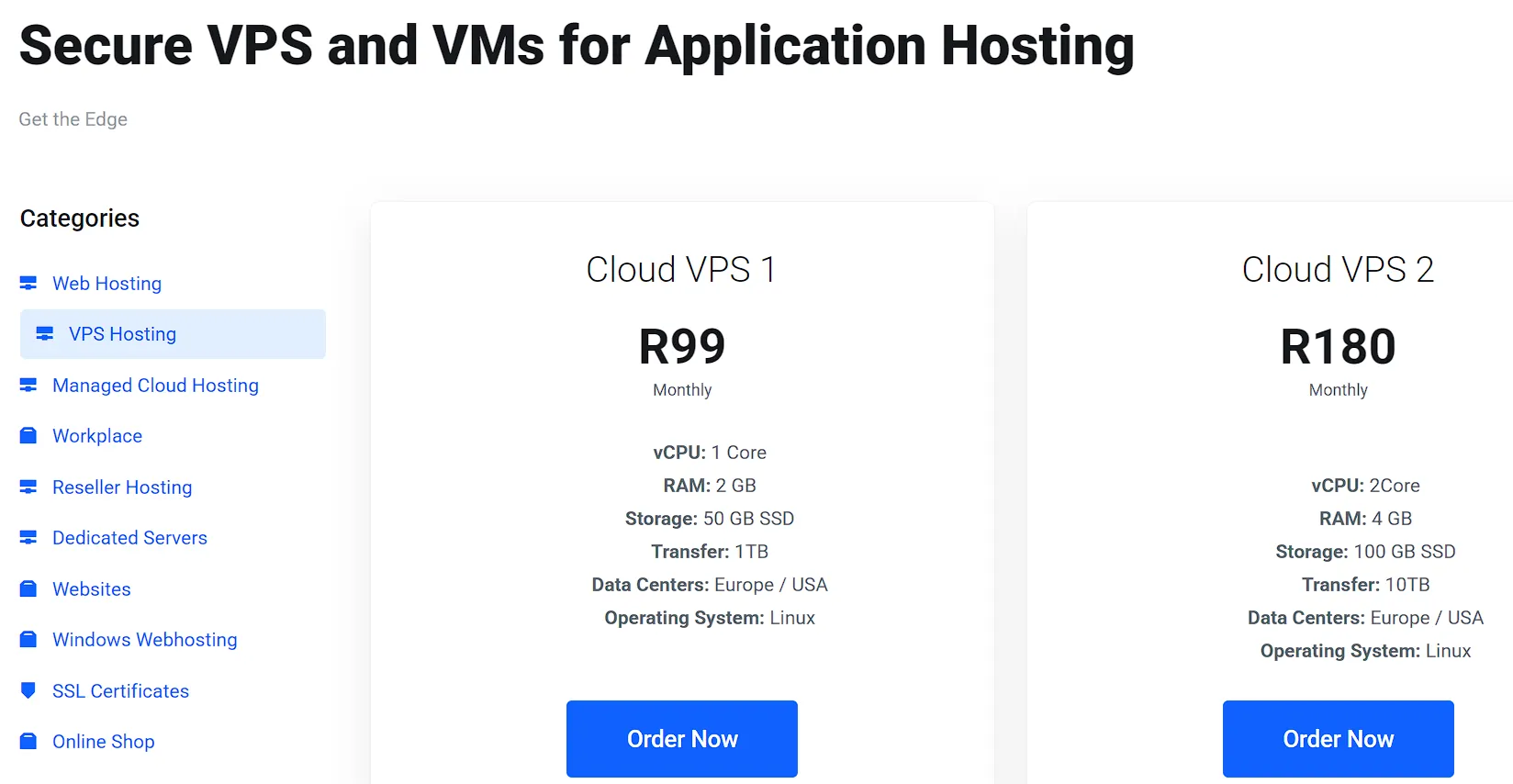
Truehost lists three main Cloud VPS tiers for South Africa.
| Plan | Price | vCPU | RAM | Storage | Bandwidth | Management |
|---|---|---|---|---|---|---|
| Cloud VPS 1 | R99/month | 1 | 2 GB | 50 GB SSD | 1 TB | unmanaged |
| Cloud VPS 2 | R180/month | 2 | 4 GB | 100 GB SSD | 10 TB | unmanaged |
| Cloud VPS 3 | R600/month | 4 | 8 GB | 200 GB SSD | 25 TB | unmanaged |
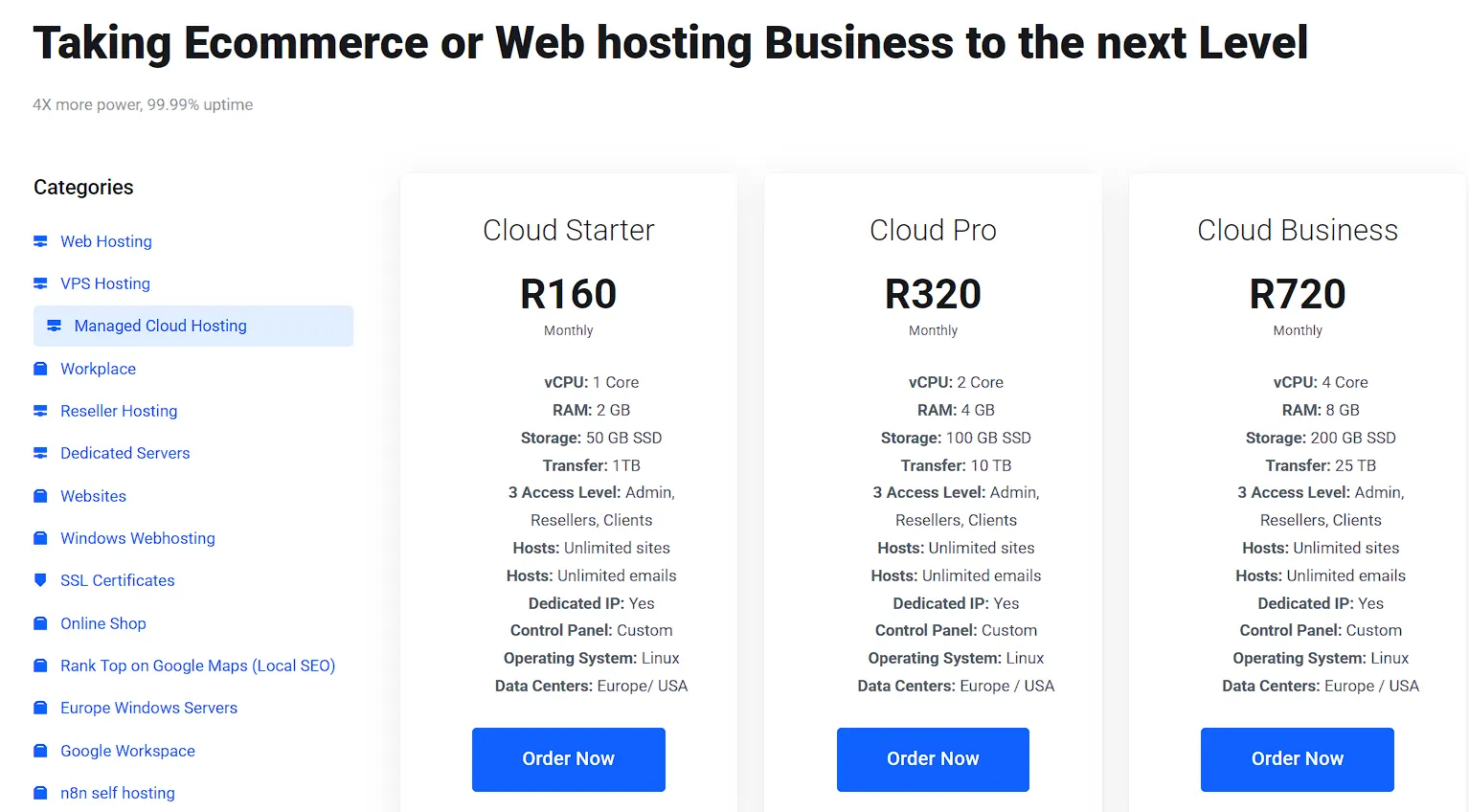
| Cloud Starter | R160/month | 1 | 2 GB | 50 GB SSD | 1 TB | fully managed |
| Cloud Pro | R320/month | 2 | 4 GB | 100 GB SSD | 10 TB | fully managed |
| Cloud Business | R720/month | 4 | 8 GB | 200 GB SSD | 25 TB | fully managed |
These prices apply to monthly billing, which is more expensive. Triennial billing, meaning you pay for three years upfront, is available, often pushing entry pricing down to R80. That gap catches many buyers off guard, so check the billing terms before you compare prices across providers.
Fully managed plans start at R160/month and climb to R720/month for higher resource tiers. Managed pricing covers setup, security patching, and support that unmanaged plans leave to you.
Truehost bills in Rand, which protects you from currency swings that hit hosts billing in dollars. Truehost also runs regular promo codes, with reports of 20-50% discounts on VPS and dedicated server tiers. Check the current offer before you check out, since these deals shift often.
Managed vs Unmanaged Truehost VPS: Which One Fits You
| Factor | Managed VPS | Unmanaged VPS |
|---|---|---|
| Starting price (SA) | R160/month | R99/month |
| Control panel | Bundled by default | Extra cost, self-install |
| Security patches | Handled by Truehost | Your responsibility |
| Backups | Included by default | Optional add-on, self-managed |
| Support scope | Performance, security, optimization | Hardware and network only |
| Best for | Beginners, business owners, teams without a sysadmin | Developers, sysadmins, agencies with server experience |
Managed VPS plans in South Africa start around R199 to R300 a month. Unmanaged plans start much lower, often between R87 and R120 a month for similar specs. That gap looks big on paper, but it only tells half the story.
With managed VPS, Truehost’s team handles the technical load. Setup, security patches, monitoring, and troubleshooting all fall on their side. Managed plans also bundle cPanel or WHM by default, so you skip that license cost too.
Support scope differs sharply between the two options. Managed support covers performance issues, security concerns, and general optimization around the clock. Unmanaged support mostly covers hardware and network problems, things like confirming the server is online. Anything above that layer, from a broken plugin to a misconfigured firewall, falls on you.
With an unmanaged VPS, you take on setup, security, backups, and every fix yourself. That control appeals to developers and sysadmins who already know Linux. It comes at a real cost if you lack that skill. A mistake in production can cost more than the plan saves.
Factor in what unmanaged really costs before you pick it. Hiring a freelancer or sysadmin to cover the gaps can easily exceed the monthly savings. A single security incident or extended downtime often costs more than a year of managed hosting fees.
Here is a simple rule. Choose managed if you have never run a Linux server. Pick it, too, if your time is worth more than the price difference. Choose unmanaged only if you already have the skills or the budget to hire someone who does.
Truehost VPS Features and Technical Specs
Dedicated resources. Every plan reserves guaranteed vCPUs and RAM for your server alone. No other customer’s traffic spike slows you down, so performance stays predictable at any hour.
SSD storage. Every plan runs on SSDs, which are rated up to 7 times faster than standard HDDs. Databases, checkout pages, and API calls all benefit from the faster I/O.
KVM virtualization. TrueHost builds its VPS range on Kernel-based Virtual Machine technology. KVM gives each server its own isolated kernel, so it behaves like a true standalone machine rather than a shared slice.
Full root access. You get complete control over your environment. Install any software stack, configure custom security rules, or run a fully bespoke setup without asking permission.
Free dedicated IP address, included with every plan at no extra charge. An optional IPv4 address is also available, useful for modern applications and future-proofing your network setup.
Redundant network uptime of 99.999%. Every server connects through a redundant network link, so a single point of failure won’t take your site offline.
99.97% platform uptime, backed by TrueHost’s infrastructure commitments and reflected in their SLA for managed plans.
DDoS protection and firewall controls. TrueHost’s network has mitigation capacity for volumetric attacks. A configurable firewall adds a further layer of control on top.
Backup on demand, scheduled backups, and live snapshots. Beyond the daily automated backup, you can trigger a manual backup before a risky deployment or roll back to a live snapshot in seconds.
With daily automated backups on a managed VPS, you get up to 30 days of retention and one-click restore, so a bad update or a corrupted file never means starting from scratch.
24/7 expert support, staffed by real engineers rather than bots, with an average first response under 3 minutes across live chat, WhatsApp, phone, and ticket.
Flexible billing, with the biggest discounts on 3-year terms and shorter cycles available for anyone who wants more flexibility upfront.
Truehost VPS Control Panels, Backups, and Security Add-Ons
This is the part most reviews skip, and it changes the real cost of a VPS plan.
Control Panel Options and Costs
Truehost VPS supports multiple control panels, including cPanel, Plesk, DirectAdmin, CyberPanel, aaPanel, and CloudPanel. CyberPanel and aaPanel run free and use fewer server resources, which suits smaller VPS tiers.
cPanel charges a separate license fee for VPS plans, typically around $27 per month, depending on the number of accounts. Plesk pricing follows a similar pattern.
Managed plans usually bundle a control panel license into the price. Unmanaged customers need to add and pay for their own panel, so read the plan details closely before you buy.
Backups and Data Protection
Truehost’s Cloud VPS infrastructure supports three backup types: on-demand, scheduled, and live snapshots.
On most entry plans, backups are an optional add-on rather than standard. Managed plans fold backup handling into the service, so this is less of a concern there.
If backups are not enabled and paid for, a server failure results in real data loss. Confirm your backup setup before you go live.
Additional IP Addresses
Every VPS plan includes one dedicated IPv4 address at no extra cost. That covers most single-site setups without any change needed.
Extra IPv4 addresses cost around R160 per IP per month. This helps in a few real cases. You might run multiple SSL certificates on older systems. You could also isolate a mail server or switch a domain’s IP quickly during a DDoS attack.
SSL Certificates on Truehost VPS
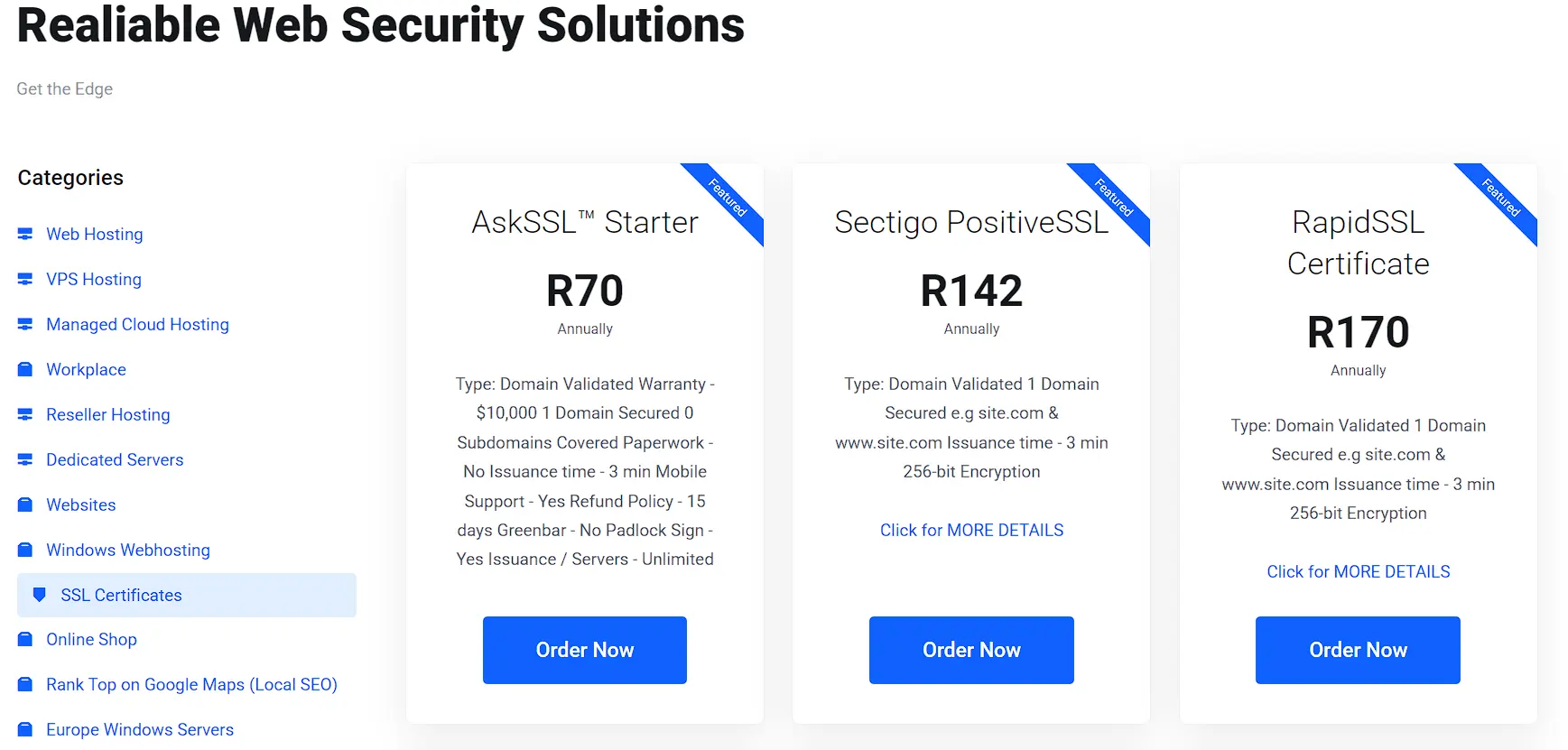
Free Let’s Encrypt SSL comes with every Truehost plan, VPS included. It renews automatically every 90 days, so you never manage certificate expiry by hand.
Premium SSL certificates start at R70 per year and scale up through the Domain Validated, Organization Validated, and Extended Validation tiers. Higher tiers add warranty coverage up to $10,000.
For most checkout pages and contact forms, free SSL covers everything you need. Premium SSL only pays off if you need the visible trust warranty or multi-domain coverage for a larger business.
Truehost VPS Pros and Cons
Pros
- Rand billing protects you from currency swings
- Fast SSD storage across every VPS tier
- Competitive entry pricing on triennial plans
- Local support hours that match South African time zones
- Managed panel option simplifies day-to-day admin
- Free SSL and one dedicated IP included on every plan
Cons
- Backups and cPanel licensing often cost extra on lower tiers
How Easy Is It to Setup Vps on Truehost?
Truehost VPS provisioning takes about 10 minutes after payment is processed. You get login details and IP information by email right after.
Billing options include monthly and multi-year terms, with triennial billing giving the lowest monthly rate. Pick the term that matches your budget and how long you plan to stay.
Once your VPS is live, point your domain’s DNS to the new server and migrate your website files. Truehost also offers migration support if you are moving from another host.
This step should stay simple. The real decision happens above, not here.
FAQs
Is Truehost good for VPS hosting in South Africa?
Truehost works well for budget-conscious buyers who want Rand billing and SSD storage.
Is Truehost VPS good for WooCommerce or Magento stores?
Yes, the Cloud Pro and Cloud Business tiers carry enough RAM and vCPU for most WooCommerce and Magento stores. Larger stores with heavy traffic should size up and test performance before launch.
How does Truehost VPS compare to Xneelo or Afrihost?
Truehost costs less at the entry level, making it the best VPS hosting option for budget-focused users in South Africa.
Is Truehost reliable for hosting business websites in South Africa?
Yes, Truehost South Africa offers reliable VPS hosting services, making it the best option for hosting business websites in South Africa.
Can I switch from unmanaged to managed later?
Yes. You can request a change through your Truehost client area. The support team will walk you through the process, which may include a short reconfiguration window. Expect some downtime during the switch, so plan the change outside your peak traffic hours.
Is Truehost VPS suitable for hosting multiple client sites?
Yes, particularly on the Cloud Pro and Cloud Business tiers. With sufficient RAM and storage, agencies can host multiple client websites on a single server using cPanel’s multi-account tools. Just keep an eye on your resource usage as you add more sites, so performance stays steady for every client.
Can I install custom software on a Truehost VPS?
On unmanaged plans, yes. Root access lets you install any software your project needs, from custom apps to development tools such as Docker and n8n. Managed plans allow custom installs, too, though you may need support’s help for anything outside standard configurations.
Choose Truehost VPS in South Africa
Truehost VPS earns its place for South African buyers who want rand billing and NVMe storage. A managed option keeps the monthly cost low, too.
If the pricing and features above fit your site, compare the unmanaged VPS Starter and managed Cloud Pro plans side by side. If your setup is bigger or more specific, request a free callback from Truehost’s solution architect. We can build a sizing recommendation around your traffic and budget.