Web Hosting
 Windows HostingBuilt for Windows apps and websites – stability, speed and flexibility
 Reseller HostingLaunch a hosting business without technical skills or expensive infrastructure
 Affiliate ProgramRefer customers and earn commissions from sales across our platform
 Domain SearchFind and secure a domain name in seconds with our quick lookup tool
 CO ZA Domains
 All DomainsExplore domain names from over 324 TLDs globally – all in one place
 Free Whois Lookup Tool South Africa
 VPS
VPS Website Builder
 Online ShopSet up a sleek eCommerce store with zero coding knowledge
 SSLs
SSLs SupportAccess help articles, how-tos, and everything about our services
 Blog
Blog Contact UsReach our team instantly via live chat or drop us an email
Chatbots are excellent at answering questions. But when you ask them to actually do something, you quickly reach their limits.
They can explain how to send an email, check your calendar, track a Takealot price, or find an ITA34 notice in SARS eFiling, but they can’t complete those tasks for you.
OpenClaw changes all that.
Instead of stopping at the answer, it uses OpenAI’s language models to complete real work.
OpenAI provides the reasoning through models like GPT-5.5, while OpenClaw gives those models the ability to interact with your browser, files, email, APIs, messaging apps, and other tools, then carry out tasks on your behalf.
You can run it locally or on a VPS and control everything from messaging apps you already use, such as WhatsApp or Telegram.
That means there’s no separate dashboard to learn or switch between. You simply send a message, and your AI agent gets to work.
So, what does that look like in everyday use?
The examples below show how an OpenClaw agent powered by OpenAI can automate everyday tasks across personal productivity, software development, business operations, and e-commerce.
Many of these examples also reflect everyday South African needs, including load shedding updates, SARS eFiling tasks, and Takealot price tracking.
Running OpenClaw on a Truehost VPS keeps the agent online, responsive, and ready whenever you need them.
Table of Contents
1) Daily Admin and Personal Productivity OpenClaw OpenAI Examples
Daily admin is one of the first places where an AI agent starts paying for itself.
Instead of spending the first hour of your day checking emails, updating tasks, planning errands, or managing your calendar, the agent handles much of that routine work in the background so you can focus on what actually needs your attention.
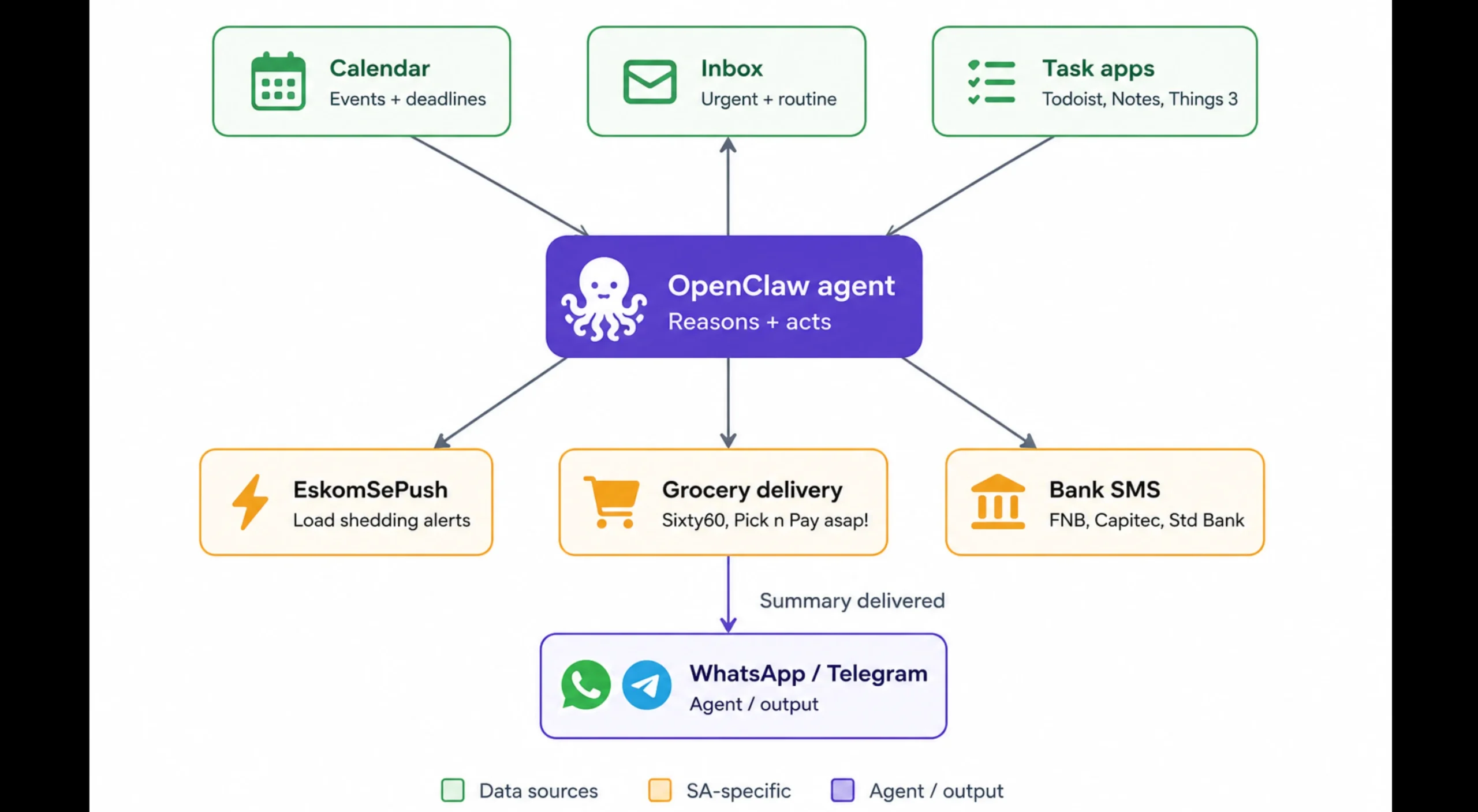
a) Morning Briefings
Every morning, the agent pulls your calendar, recent emails, reminders, and other updates from your connected services, then sends a concise summary of what deserves your attention first.
It arrives in WhatsApp or Telegram before you’ve even started your day.
b) Inbox and calendar triage
Instead of working through a crowded inbox, the agent reads incoming emails, identifies urgent requests, drafts replies for routine messages, and spots meetings or deadlines that belong on your calendar.
It updates your connected apps automatically, leaving you with a short list to review instead of dozens of emails to process.
c) Cross-app task management
Add a task from the chat app you’re already using, and the agent organises, prioritises, and synchronises it across Todoist, Apple Notes, Things 3, or other connected apps.
Everything stays up to date without switching between platforms.
d) Smart home and load shedding automation
This is one of the most practical OpenClaw examples for South African households.
By connecting the EskomSePush API, Home Assistant, and a SunSynk or similar inverter, the agent monitors upcoming load shedding schedules, calculates available battery reserve, adjusts inverter settings where appropriate, and sends an alert before the power goes off.
Since the Home Assistant integration for Eskom already exists, it fits naturally into this workflow.
e) Grocery planning and bank reconciliation
Weekly errands can also take care of themselves.
The agent creates meal plans and shopping lists based on your preferences, then checks Checkers Sixty60 and Pick n Pay asap! to compare prices or delivery times.
On the finance side, it reads SMS or email notifications from banks such as FNB, Capitec, or Standard Bank, matches transactions against your records, and flags anything that still needs your attention.
Instead of reviewing every transaction, you only need to check the exceptions.
2) Software Development and Coding OpenClaw OpenAI Examples
Developers tend to get the most dramatic return here.
Instead of helping with a single coding task, the agent can monitor projects, respond to failures, review code, and keep development work moving even when you’re away from your desk.
a) Autonomous bug fixing and PR generation
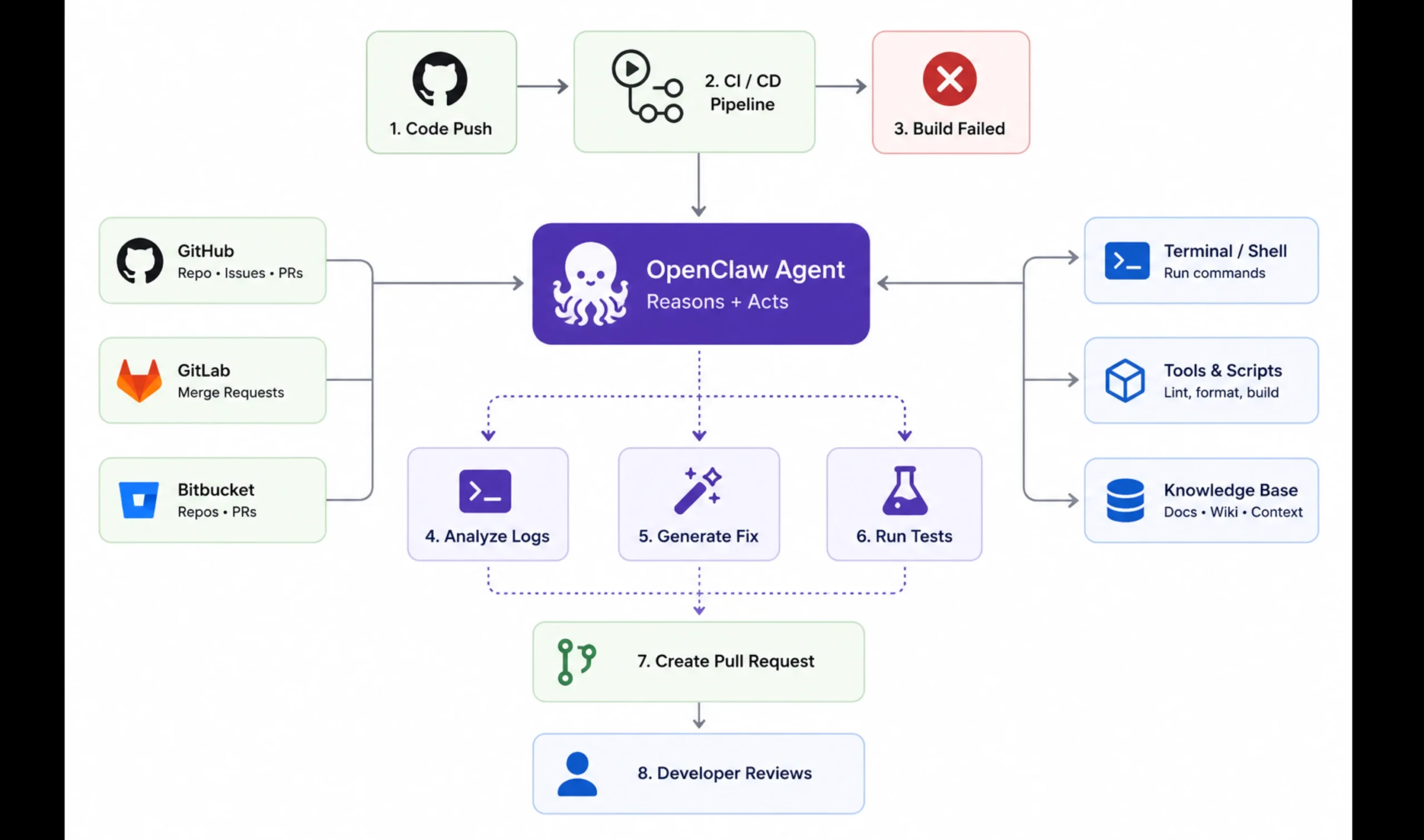
The agent monitors your codebase, analyses failing code, identifies likely fixes, and generates updated code where appropriate.
It can then run tests, commit the changes, and open a pull request for review using your connected development tools.
Rather than starting your day by investigating bugs, you begin by reviewing proposed fixes.
b) CI/CD monitoring and failure alerts
Build failures don’t have to wait until someone notices them.
The agent watches your CI/CD pipeline, reviews build logs when something breaks, identifies the likely cause, and can generate a relevant unit test or code fix.
It then sends a summary to WhatsApp or Telegram, so you know what’s happened before you even open your laptop.
c) Code review and documentation
Keeping code quality high takes time, especially on busy projects.
The agent reviews pull requests for common issues, suggests improvements, and generates documentation as changes are merged.
That keeps technical documentation aligned with the codebase instead of falling several releases behind.
d) Multi-agent dev teams
Large projects often involve several specialised agents working together.
One agent researches the best approach, another writes the implementation, while another reviews or tests the result.
Each agent passes its output to the next automatically, creating a structured development workflow with minimal manual coordination.
This approach allows complex tasks to be broken into smaller, focused steps while maintaining a clear flow from planning to implementation and testing.
3) Business and Professional Workflow OpenClaw OpenAI Examples
Running a business often means juggling dozens of small but important tasks every day. Following up with customers, keeping records up to date, monitoring payments, and researching competitors can quickly eat into time that could be spent growing the business.
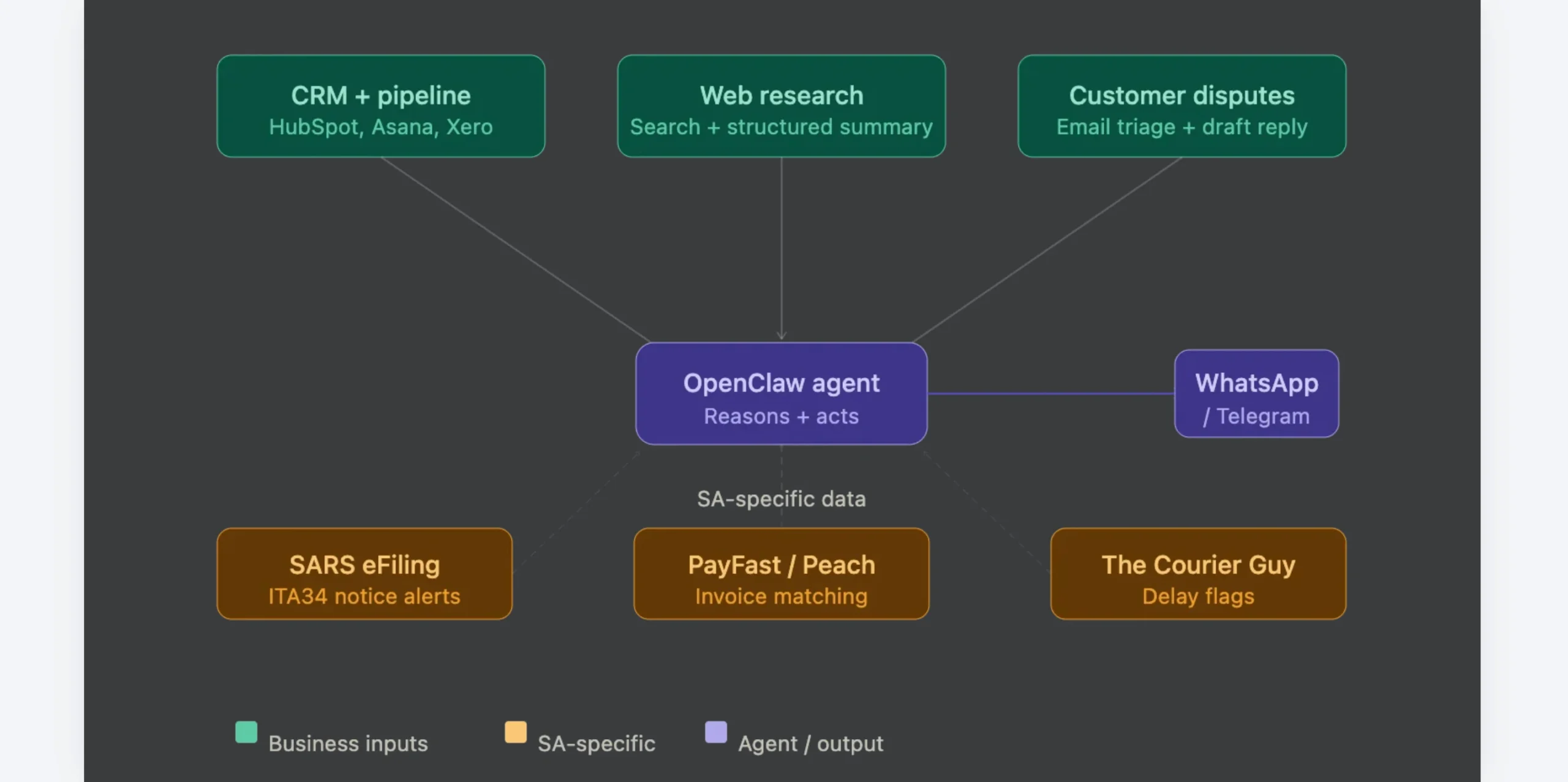
An AI agent helps by handling much of that routine work in the background while keeping you informed when your attention is actually needed.
a) CRM and pipeline hygiene
The agent connects with platforms such as HubSpot, Asana, or Xero to keep your sales pipeline organised.
It tracks deal progress, identifies opportunities that have stalled, reminds you when follow-ups are due, and helps ensure potential customers don’t slip through the cracks during busy periods.
b) Web research and competitor monitoring
Keeping up with competitors doesn’t have to mean spending hours searching the web.
The agent monitors the topics or companies you specify, reviews relevant information as it becomes available, and prepares a structured summary that is ready before your next strategy meeting.
c) Customer support and dispute drafting
The agent monitors incoming emails, identifies disputes, rejected claims, or customer complaints, and prepares clear, evidence-based responses for your review.
It can also keep track of outstanding quotations, negotiations, or follow-up conversations, making sure important opportunities don’t go quiet simply because everyone is busy.
d) South Africa-specific: SARS alerts, payment matching, and courier triage.
For South African businesses, the agent can automate several everyday administrative tasks.
It monitors your SARS eFiling account and sends a private notification only when important documents, such as a Notice of Assessment (ITA34), become available, helping you avoid constantly checking your account.
If your business uses PayFast or Peach Payments, the agent can monitor payment confirmations and match them against outstanding invoices automatically.
For businesses shipping products, it also tracks courier updates from providers such as The Courier Guy, compares tracking numbers with open orders, and flags delivery delays before customers need to follow up.
4) E-Commerce, Logistics, and Real Estate OpenClaw OpenAI Examples
Keeping track of products, property listings, inventory, and deliveries can quickly become a full-time job.
Instead of checking multiple websites throughout the day, the agent monitors them continuously and lets you know when something important happens.
a) Takealot and Bob Shop price-drop hunting
Waiting for the right deal no longer means refreshing product pages every few hours. The agent monitors selected items in the background and compares prices against the limits you set.
When a product drops below your target price, it sends an alert through WhatsApp or Telegram and can even add the item to your cart automatically.
b) Property24 and Private Property lead aggregation
Finding the right property often means checking the same listings repeatedly.
The agent runs scheduled searches using your preferred criteria, such as a three-bedroom home below R1.5 million in a specific suburb.
It removes duplicate listings, highlights new matches, and can even draft an enquiry to the estate agent as soon as a suitable property appears.
c) Inventory and sales reporting
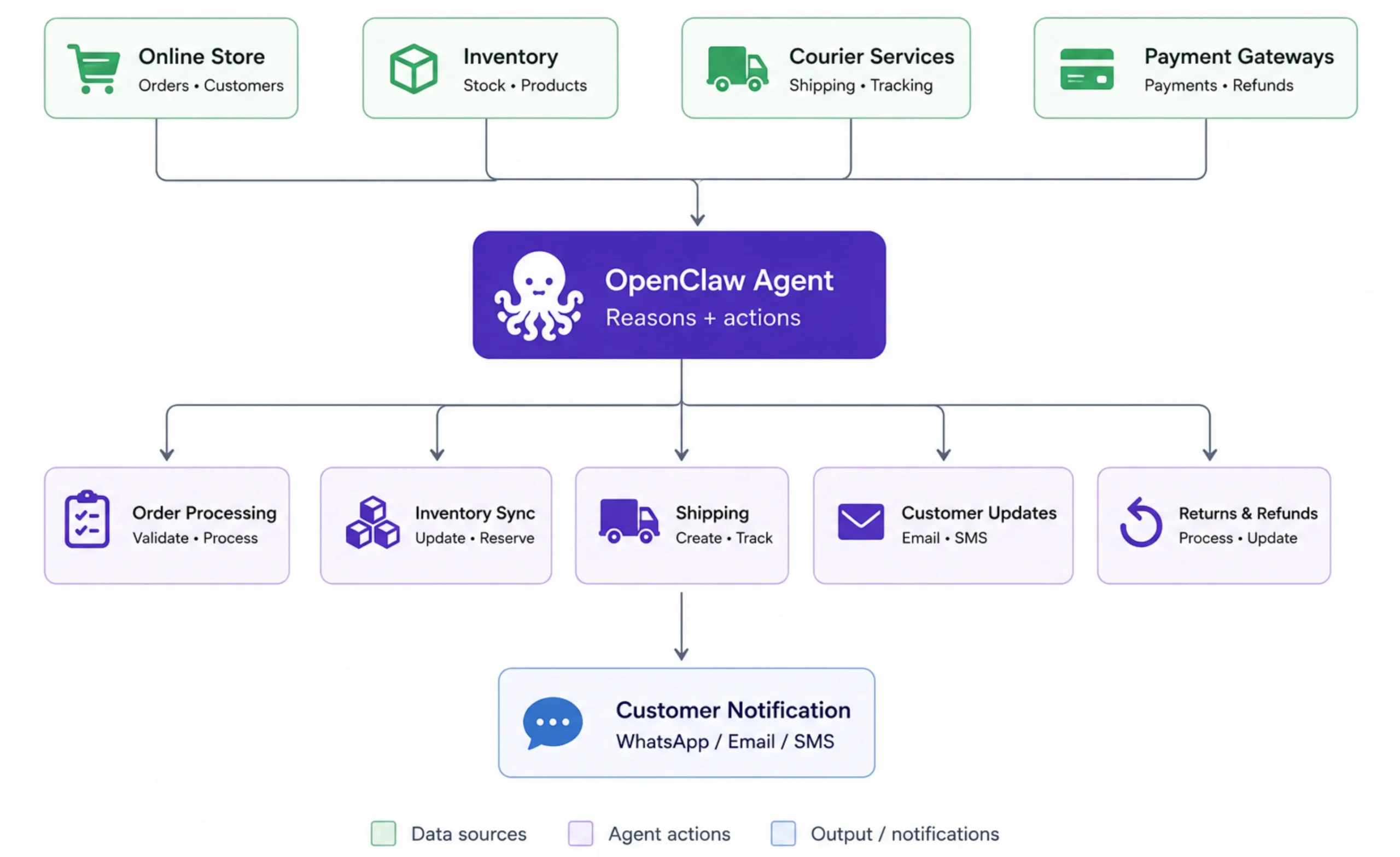
For online retailers and growing businesses, the agent keeps an eye on stock levels and sales activity throughout the day.
It can generate regular inventory updates and sales summaries automatically, giving you timely insights without anyone having to log in and compile reports manually.
d) Waybill tracking for SMEs
Managing deliveries becomes much easier when shipment tracking is automated.
The agent monitors incoming waybill numbers from your courier services, matches them against open customer orders, and flags delayed deliveries before customers need to ask for an update.
That gives your team more time to respond proactively instead of reacting to support requests.
5) Advanced and Multi-Agent OpenClaw OpenAI Examples
As your workflows become more complex, a single agent doesn’t have to handle everything.
OpenClaw can coordinate multiple specialised agents, each focused on a specific role, while keeping the entire workflow moving from one task to the next.
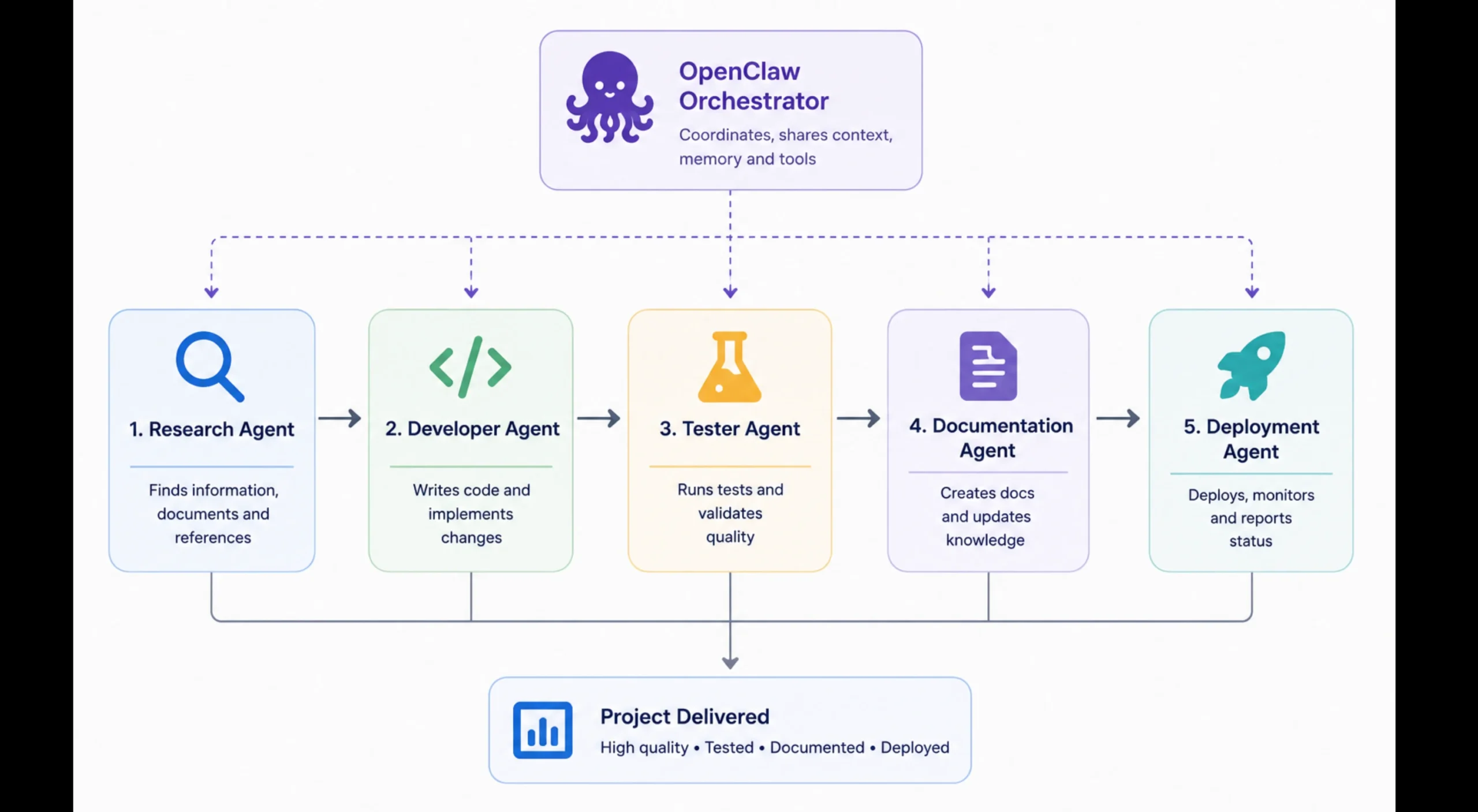
This makes it possible to automate processes that would normally require several people or a combination of different tools.
a) Consumer negotiation
The agent can help with purchases that involve research and negotiation.
Point it to car dealership listings or an insurance claim, and it can compare available options, send enquiries, respond to follow-up questions, and manage much of the back-and-forth before you step in to make the final decision.
b) Multi-agent orchestration
Some projects are better handled by a team of AI agents instead of just one.
You might have a Marketing agent creating campaign ideas, a Developer agent writing code, and a Sysadmin agent managing deployments and infrastructure.
Each agent takes work from a shared backlog, completes its assigned task, and passes the results to the next stage automatically, while OpenClaw coordinates the workflow behind the scenes.
c) Smart home, media, and errands
The same Home Assistant integration can automate much more than load shedding.
The agent can check security cameras, adjust your thermostat, control smart devices, or queue content on a Plex server, all through a simple message on WhatsApp or Telegram.
d) Grid management at SME level
Businesses can also use the agent to prepare for scheduled power outages.
By monitoring Eskom grid updates, it can notify staff before load shedding begins, reminding them to safely power down sensitive equipment.
Once electricity is restored, it can send another notification so operations resume as quickly as possible.
e) Emerging workflows
The OpenClaw ecosystem continues to expand through new skills and integrations.
Recent workflows include voice-controlled agents, AI-generated images for reports or product listings, and searchable internal knowledge bases built from scattered documents.
As new integrations become available, the same agent can take on even more tasks without changing how you interact with it.
Getting Started With Truehost: Why Self-Host?
After seeing what the OpenClaw OpenAI agent can do, the next question is where it should run.
While it’s possible to run OpenClaw on your own computer, many people choose to self-host it on a VPS so the agent stays available around the clock.
Why self host?
1. Privacy and data control
An AI agent often works with sensitive information, including emails, calendars, documents, banking notifications, or SARS eFiling updates.
Self-hosting gives you greater control over where your agent runs and how your data is handled, making it a practical choice for personal and business workflows that involve confidential information.
2. Always available
Your laptop isn’t designed to stay online all the time.
It gets shut down, loses power, disconnects from the internet, or goes to sleep.
A VPS keeps your OpenClaw agent running continuously, so it can monitor events, respond to messages, and complete scheduled tasks even when your computer is turned off.
Why choose a Truehost OpenClaw VPS?
Well, if you’re hosting in South Africa, Truehost provides VPS plans that are well suited for running OpenClaw agents.
- KVM1 – From R285/month, with 2 GB RAM and 50 GB NVMe SSD storage.
- KVM2 – From R380/month, with 4 GB RAM and 100 GB NVMe SSD storage.
The servers are pre-configured for OpenClaw, making deployment much simpler, while local infrastructure helps deliver low latency for South African users.
Now, to set up your first agent, you don’t need to build everything at once. Start with a single workflow and expand as you become more comfortable.
- Order a Truehost OpenClaw VPS.
- Connect your preferred messaging platform, such as WhatsApp or Telegram.
- Configure the skills, APIs, and services your workflow needs.
- Test one automation at a time before adding more.
The best place to begin is with a workflow that solves a real problem you face every day.
Once you’ve seen your first automation working reliably, you can gradually add more skills and build an AI agent that takes on an increasing share of your routine work.