Web Hosting
 Windows HostingBuilt for Windows apps and websites – stability, speed and flexibility
 Reseller HostingLaunch a hosting business without technical skills or expensive infrastructure
 Affiliate ProgramRefer customers and earn commissions from sales across our platform
 Domain SearchFind and secure a domain name in seconds with our quick lookup tool
 CO ZA Domains
 All DomainsExplore domain names from over 324 TLDs globally – all in one place
 Free Whois Lookup Tool South Africa
 VPS
VPS Website Builder
 Online ShopSet up a sleek eCommerce store with zero coding knowledge
 SSLs
SSLs SupportAccess help articles, how-tos, and everything about our services
 Blog
Blog Contact UsReach our team instantly via live chat or drop us an email
Think about the last time you needed an emergency plumber, a fast pizza delivery, or a locksmith on a Sunday night. You almost certainly did the same thing everyone else does: you grabbed your phone and typed “locksmith near me” into Google.
The businesses that appeared at the top of that map got your call. The ones that weren’t there simply didn’t exist as far as you were concerned.
How to List My Business on Google Maps is the question we will be answering today.
This is happening tens of thousands of times a day across every South African city and town. Someone in Alberton is searching for a mechanic. Someone in Mossel Bay is looking for a catering company. Someone on the road in Midrand needs a tyre fitment centre right now.
If your business isn’t showing up in those results, you’re giving away paying customers to competitors who may not even be better than you. They just did one thing you haven’t done yet.
Knowing how to list my business on Google Maps is one of the highest-return things a local South African business owner can do this weekend. It’s completely free, it takes a few hours the first time, and it keeps working for your business long after you’ve moved on to other things.
Here’s the exact blueprint, step by step.
Table of Contents
Section 1: How to Set Up Your Google Business Profile
Google calls this tool a Google Business Profile, and it’s what powers those map listings and the information panel that appears when someone searches for your business by name. Setting one up correctly from the start saves you from having to fix avoidable problems later.
Step 1: Go to the Right Place and Sign In
Open a browser and go to google.com/business. Sign in using a Google account connected to your business, not a personal Gmail account you also use for streaming subscriptions and online shopping.
If you don’t have a separate business Gmail yet, create one before you start. Something like [email protected] is cleaner than your personal address and keeps your business communications separated from the start.
Step 2: Enter Your Business Name Exactly as It Appears Everywhere Else
Type your business name as it appears on your signage, your invoices, and your other online accounts. No additions, no keywords stuffed in for SEO benefit.
A common beginner mistake is naming the profile something like “Sipho’s Plumbing Best Plumber Johannesburg.” Google considers this a violation of their guidelines and can suspend the listing without warning. Just “Sipho’s Plumbing” or whatever your real trading name is will do.
Consistency here is also important for a reason we’ll come back to shortly: your name on Google Maps must match your name everywhere else your business appears online.
Step 3: Choose the Right Business Category
This step carries more weight than most people realise. Google uses your primary category to decide which searches your listing should appear in, so getting this right directly affects how many customers can find you.
Search for the most specific, accurate description of what your business does. “Hair Salon” and “Hairdresser” are not the same category on Google, and they don’t always show up for the same searches. Spend a few minutes testing which category your ideal customer would actually use when searching, rather than choosing the broadest option that technically fits.
You can add secondary categories later to cover additional services you offer, but your primary category should describe your core business with no ambiguity.
Step 4: Set Your Location or Your Service Area
If your business has a physical shop or office that customers visit, add your street address here. Google will show it on the map and display it on your profile.
If you run a mobile business, like a car detailer operating across the Boksburg and Benoni area or a home cleaning service covering a thirty-kilometre radius, you can hide your home address and set a service area instead. You define the suburbs or towns you cover, and Google shows your listing to customers searching within that area.
You don’t have to choose only one option. Many businesses with a fixed location also set a service area to show they travel to clients too.
Section 2: Getting Verified in South Africa
Getting your profile set up is only the first half of the process. Google won’t show your listing to the public until you’ve verified that your business is real and that you’re the legitimate owner.
South African business owners have historically had a frustrating time with this step, because Google’s default verification method used to be a physical postcard sent through the postal system. Many of those postcards never arrived at all.
How Verification Works in 2026
Google has moved most South African accounts to faster digital verification options, which is a genuine improvement. Depending on your business type and the information already on file with Google, you may be offered one or more of the following:
Video verification is the most common option for new business listings right now. You record a short video that shows your business location, your signage or branded vehicle, and your tools or workspace. Google reviews the footage within a few days and approves the listing if everything checks out.
A few practical tips for passing video verification on the first attempt: film it in good natural lighting, make sure your business name is clearly visible on your signage, building, or a professional letterhead, and include footage of yourself actively working in the space. Shaky, dark, or confusing footage causes delays.
Phone or SMS verification is offered to some accounts and is the fastest option when available. Google sends a code to the phone number on your profile, you enter it in the dashboard, and you’re verified immediately.
Email verification works similarly, with Google sending a code to the email address on your account for you to confirm.
If you’re offered the video option and it feels intimidating, a steady phone camera and a few minutes of preparation are genuinely all you need.
Section 3: How to Rank Higher Than Competitors on Google Maps
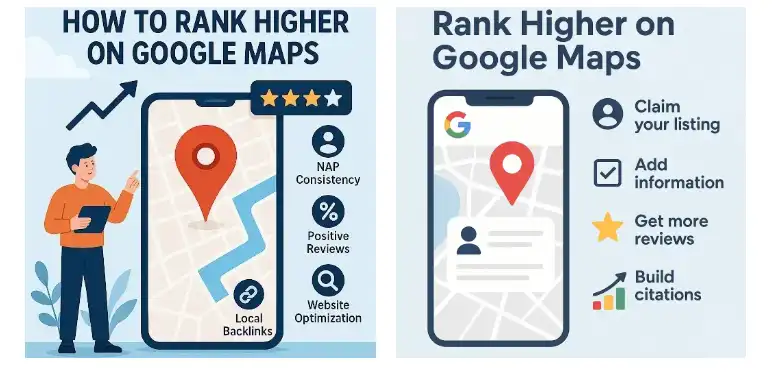
Being listed on the map is just the starting line. The real goal is landing in what SEO professionals call the Local 3-Pack, the three business listings that appear prominently at the top of Google’s map results on mobile.
Those three positions get the overwhelming majority of clicks. Everyone below them is largely invisible to a customer who’s already made up their mind to call someone.
Here’s how to push your listing upward over time.
Rule 1: Collect Reviews Consistently
Reviews are the single most powerful ranking factor for local Google Business profiles. The more genuine, recent, positive reviews your listing has compared to your competitors, the more confidence Google has in placing you above them.
The simplest system for this is a short WhatsApp message to a happy customer right after you’ve completed a job. Something like: “Hi [name], thanks for your business today. If you were happy with the work, a quick Google review would mean a lot to us, here’s the link.”
One review a week compounding over six months adds up faster than most business owners expect.
Rule 2: Add Real Photos Regularly
Google rewards active, updated profiles. A profile that was set up once three years ago and never touched again ranks lower than one that receives new photos and updates regularly.
Add photos of your actual premises, your team at work, finished jobs, and your products. A hair salon in Roodepoort that adds five new photos every month consistently outperforms a competitor with a static profile, all else being equal.
Avoid stock images. Google can detect them, and customers skip past them anyway.
Rule 3: Keep Your NAP Consistent Everywhere Online
NAP stands for Name, Address, and Phone number. Google cross-references these three pieces of information across every directory, website, and listing it can find online.
If your phone number appears as 011 followed by seven digits on your own website, but a different format on a local directory, or if your street address is abbreviated differently in two places, Google’s systems treat this as a trust signal problem. Inconsistency in your NAP details is one of the quietest reasons a Google Maps listing stays stuck and won’t rank higher despite the owner doing everything else correctly.
Go through every place your business appears online and make sure your name, address, and phone number are identical in format and spelling everywhere.
Section 4: Why Your Website and Hosting Strengthen Your Map Ranking
There’s a piece of the local SEO puzzle that most guides skip over. Google doesn’t just look at your Business Profile in isolation. It crawls the wider internet to assess how consistently and credibly your business appears across the web.
A business with its own active website, local directory listings, and a professional branded email address sends stronger trust signals to Google than a business that exists only on the map with no other footprint.
This is where your Truehost hosting and domain setup connects directly to your Google Maps visibility. A live website at yourbusiness.co.za with your correct NAP details in the footer, and a professional email address like [email protected] that matches your domain, confirms your local presence in a way that a free platform or social media page simply cannot replicate.
Local SEO for small business in South Africa doesn’t require a complicated strategy. It requires consistency across a small number of things: your Google profile, your website, your directory listings, and your contact information. When those pieces align, Google’s local algorithm rewards you with higher placement.
A motor trimmer in Welkom set up his Google profile correctly, added his business address to a simple one-page Truehost-hosted website, and collected twelve customer reviews over two months. Within ninety days he had moved from the eighth position on local map results to the top three, without spending anything on paid advertising.
Quick Questions About Google Business Profile in SA
What if someone has already claimed my business on Google Maps?
This happens occasionally, especially if your business has been operating for some time. Google has a process for requesting ownership transfer that involves verifying your identity as the legitimate owner. Start by clicking “Claim this business” on the existing listing and follow the prompts.
How long does it take to rank in the Local 3-Pack?
There’s no fixed timeline, because it depends on your category, your location, and your competition. Some businesses in lower-competition areas see results within weeks. Others in competitive urban markets take several months of consistent effort. Reviews, photos, and NAP consistency are the three levers that move it fastest.
Does a Google Business Profile replace a website?
No, and Google says so explicitly in its own documentation. A Business Profile is designed to drive discovery and calls. A website is where customers learn, trust, and convert. The two work together, not instead of each other.
Start Today, Not Next Month
Setting up your Google Business Profile is the single highest-return marketing activity available to a local South African business owner right now, and it costs nothing but a few hours of your weekend.
Every day your listing doesn’t exist is a day those “near me” searches go to someone else. The process is straightforward, the verification options have improved significantly, and the upside is a steady stream of local customers who find you precisely when they need exactly what you offer.
Open a new browser tab, go to google.com/business, and put your business on the map today. Then make sure your website and business directory details match what you’ve listed there, so Google sees a consistent, credible local brand every time it looks.