Web Hosting
 Windows HostingBuilt for Windows apps and websites – stability, speed and flexibility
 Reseller HostingLaunch a hosting business without technical skills or expensive infrastructure
 Affiliate ProgramRefer customers and earn commissions from sales across our platform
 Domain SearchFind and secure a domain name in seconds with our quick lookup tool
 CO ZA Domains
 All DomainsExplore domain names from over 324 TLDs globally – all in one place
 Free Whois Lookup Tool South Africa
 VPS
VPS Website Builder
 Online ShopSet up a sleek eCommerce store with zero coding knowledge
 SSLs
SSLs SupportAccess help articles, how-tos, and everything about our services
 Blog
Blog Contact UsReach our team instantly via live chat or drop us an email
If you have a business idea, a side hustle, or even a personal brand you want to put online, the very first thing you need is a domain name.
Your domain name is your website’s address. It’s what people type into their browser to find you online.
It also does much more than point visitors to your website. A custom domain gives your business credibility. When customers see a professional web address instead of just a social media page, they’re more likely to trust your brand.
A domain name also protects your brand identity. Once it’s registered in your name, nobody else can claim it. And if you’re targeting customers in South Africa, a .co.za domain helps show that you’re a local business, making it easier to earn trust and connect with the right audience.
There’s another benefit too. A relevant domain can support your online visibility, helping people find your business when they’re searching for products or services like yours.
The best part is that buying a domain in South Africa is fast and affordable. Pair it with web hosting, and you can have everything set up in less than ten minutes.
Let me share with you the exact steps I used to buy mine.
Table of Contents
Steps to Buy a Domain in South Africa
Step 1: Choose a Reputable Registrar
A domain registrar is the company that registers and manages your domain name. Picking the right one now can save you money, time, and plenty of frustration later.
Before you register your domain, compare these key factors:
- Registration price vs. renewal price. Some registrars advertise very low first-year prices, then charge R300-R400 when it’s time to renew. Always check the renewal cost before you buy.
- Included features. DNS management, nameserver control, and WHOIS/ID protection should be included or clearly explained. These are essential tools for managing your domain.
- Hosting bundles. Registering your domain and hosting with the same provider makes setup much easier. Your DNS is usually configured automatically, so you can get your website online faster.
- Payment options. Choose a registrar that charges in South African Rand (ZAR), accepts convenient payment methods such as Mastercard, Visa, and PayPal, and doesn’t surprise you with foreign transaction fees.
- Customer support. If you need help, responsive support can make all the difference. Check that assistance is available when you need it, not just during business hours.
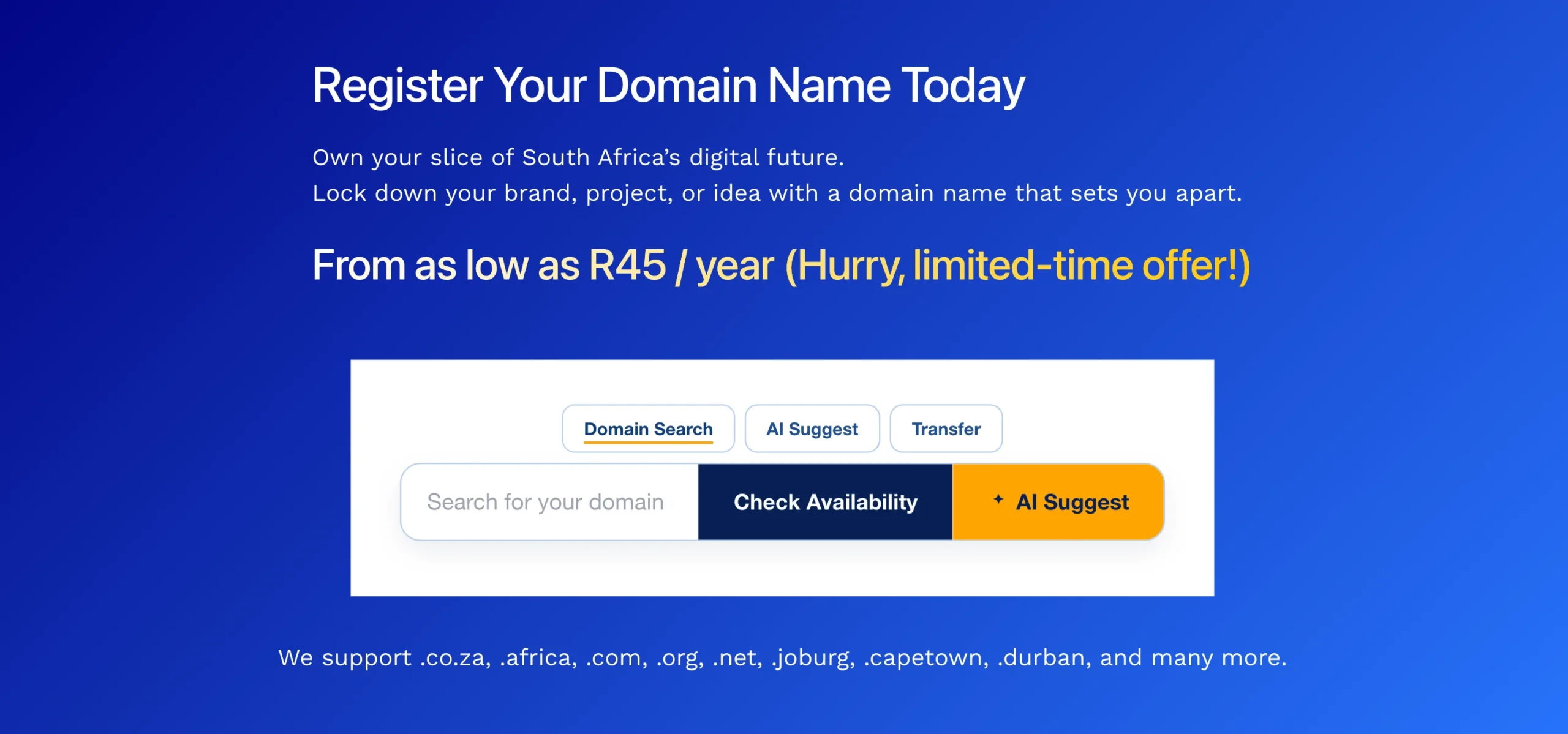
At Truehost, .co.za domains start from R45 and renew at R85 per year, with transparent pricing from the start. You also get free DNS configuration, 24/7 support, hosting bundles, and AI-powered tools designed for businesses in South Africa.
Pro tip: Choose a registrar accredited by ZARC, consider registering your domain for multiple years to lock in your name, and bundle your domain with hosting from the start for a smoother setup.
Step 2: Search for Domain Availability
Now it’s time to find out if the domain name you want is available. It’s worth spending a few extra minutes on this step because the right domain can serve your business for years without needing a costly rebrand later.
Here are a few simple guidelines for choosing a strong domain name:
- Keep it short. Around 15 characters or fewer is usually easier to remember and type.
- Make it match your brand name as closely as possible. A clear, straightforward name is easier for customers to find.
- Avoid hyphens and numbers where possible. They increase the chances of typing mistakes.
- If you’re registering a business name, do a quick search on the CIPC website to make sure it doesn’t conflict with an existing registered trademark.
Once you’ve settled on a few ideas, head to the Truehost domain search page. Enter your preferred domain, for example, mybusiness.co.za, and click “Search.”
If your first choice is available, you can register it straight away. If it’s already taken, you’ll also see other domain extensions for the same name listed, giving you more options without having to start over.
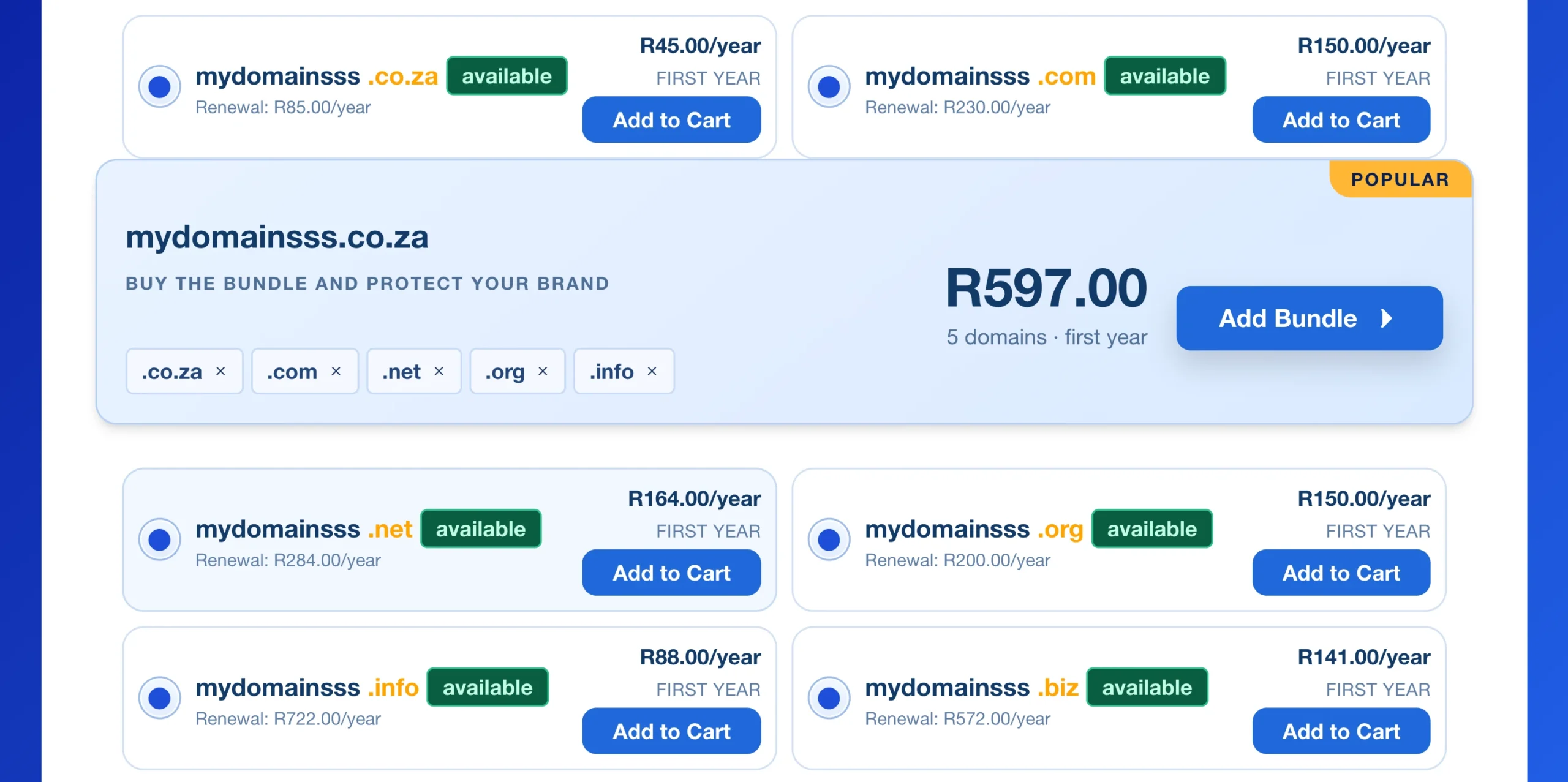
Still deciding on a name? Try the AI Suggest feature. Simply describe your business and the audience you want to reach, and it will generate domain name ideas that fit your brand while checking their availability.
It’s a quick way to spark ideas if you’re starting with a blank page or narrowing down several options.
Some of the most popular domain extensions in South Africa include:
- .co.za – The top choice for South African businesses, trusted by local customers and well suited for local search results.
- .africa – A great option for businesses building a presence across the African continent.
- .com – A globally recognised extension that’s ideal if you plan to reach customers beyond South Africa.
Once you’ve found an available domain you like, click “Add to Cart”. Review the total price in the pop-up window, then select “Proceed to Checkout” to continue.
Step 3: Domain Configuration
Before you complete your purchase, you’ll see the domain configuration page. This is where you choose a few settings for your new domain.
These are the ones worth checking:
1. ID Protection / Privacy.
Enable this option – it’s included at no extra cost. It keeps your personal contact information out of public WHOIS records, helping reduce spam and protect your privacy.
2. Nameservers.
Your domain will automatically use Truehost’s nameservers. If you’re hosting your website with Truehost, you don’t need to change anything. If you’re using another hosting provider, simply enter the custom nameservers they have provided.
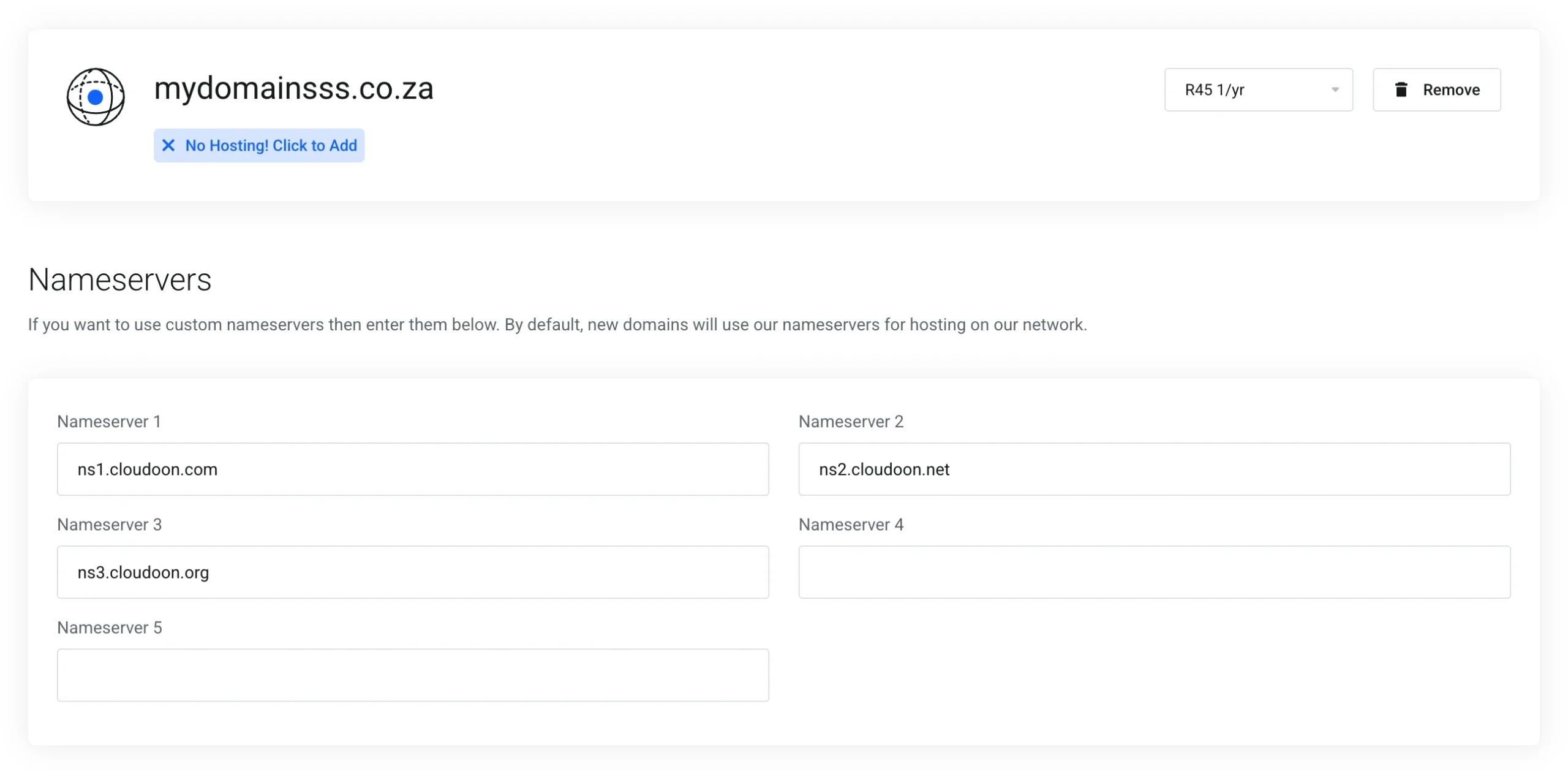
You can also choose how long you’d like to register your domain.
Registering for multiple years means fewer renewals to remember and can help you save over time. Before moving on, take a moment to review any optional add-ons.
Once everything looks good, click “Continue”.
Step 4: Review & Checkout
This is your final chance to confirm everything before completing your purchase.
Go through the following details:
1. Review your order. Check that you’ve selected the correct domain name, any add-ons you want, and that the total price matches what you expect.
2. Promo code. If you have a discount code, enter it here and apply it before making your payment so the savings are reflected in your total.
3. Billing details. Fill in your full name, billing address, email address, and create a password. You’ll use these details to access your Truehost client area, where you can manage your domain after registration.
If you’re purchasing the domain for another person or business, use the alternative registrant section to enter their contact details.
4. Payment method. Choose the option that works best for you:
- Stripe – Supports Mastercard, Visa, ATM, debit, and credit cards.
- PayPal
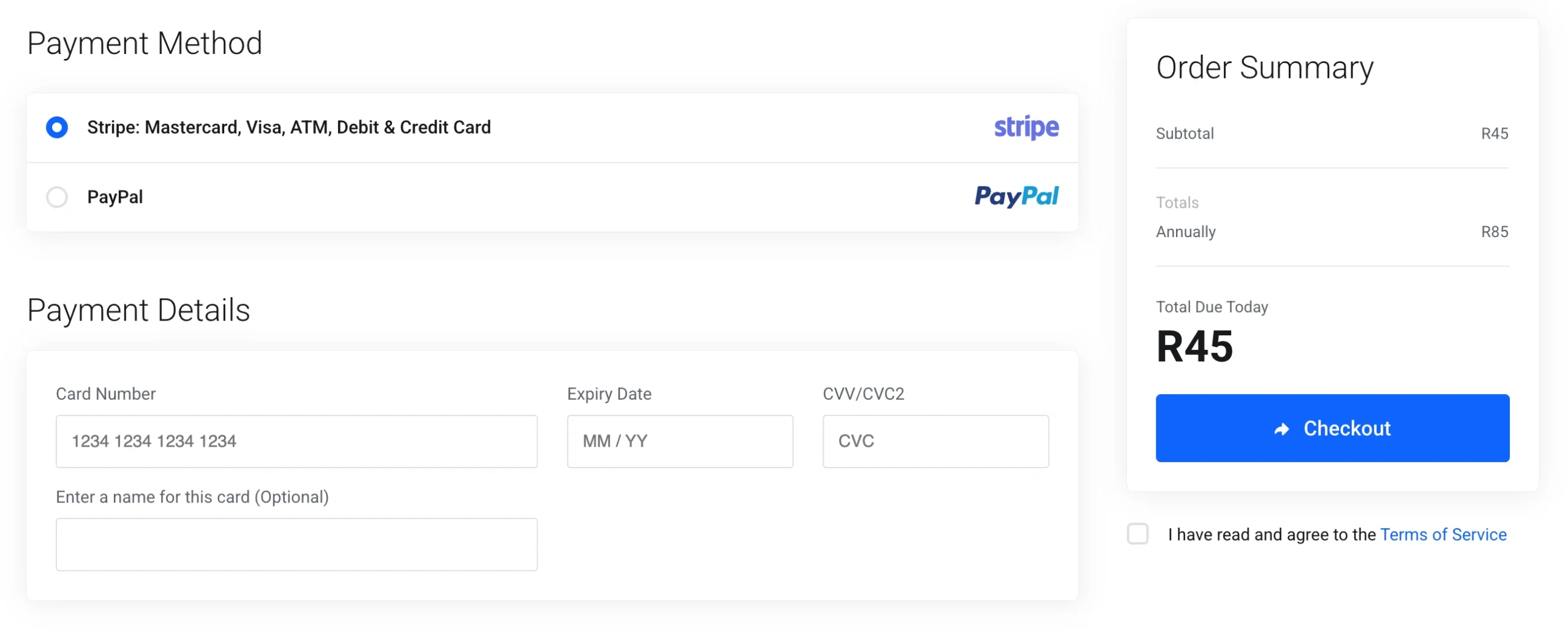
After entering your payment details, read the Terms of Service, tick the box to confirm your agreement, and click “Checkout” to complete your order.
Step 5: Complete Payment and Activation
After your payment is successful, we’ll send a confirmation email with your registration details.
Next, log in to your Truehost client area using the password you created during checkout. From there, you can manage your domain, check its status, and connect it to your website or professional email whenever you’re ready.
Your domain will usually become active within 24 to 48 hours.
This waiting period is known as DNS propagation, which is simply the time it takes for your domain to update across internet networks worldwide.
During this period, it’s normal for your website to become accessible at different times depending on your location.
The good news is that Truehost configures your DNS settings at no extra cost, so there’s nothing technical you need to set up yourself.
Best Practices and Common Pitfalls
Once your domain is registered, a few smart decisions can help protect your brand and save you trouble later.
1. If your preferred .co.za domain is available, consider registering the .com and .africa versions as well. Securing multiple extensions helps protect your brand and reduces the chance of someone else registering a similar domain.
2. Another good idea is to register your domain for multiple years.
It locks in your registration, reduces the number of renewals you need to remember, and lowers the risk of accidentally letting your domain expire.
3. It’s also worth pairing your domain with web hosting from the beginning. A domain points visitors to your website, while hosting stores the website itself. Getting both together makes setup much smoother because your DNS is already configured.
Here are a few common mistakes to avoid:
- Ignoring renewal reminders. Enable auto-renew so your domain stays active.
- Choosing a domain name that’s difficult to spell, pronounce, or remember.
- Registering with a provider that isn’t clear about renewal pricing.
- Leaving ID Protection disabled when it’s available at no extra cost.
For business owners: You don’t need to register with the CIPC to buy a domain name. Domain registration is handled directly by accredited registrars such as Truehost.
However, it’s still a good idea to search the CIPC database before registering your domain to make sure your business name doesn’t conflict with an existing registered company or trademark.
Buy Domain in South Africa: FAQs
How much does it cost to buy a domain in South Africa?
The cost depends on the domain extension you choose and the registrar you buy from. At Truehost, .co.za domains start from R45 and renew at R85 per year, while .com domains start from R150. Prices for more than 300 domain extensions are listed in South African Rand (ZAR), so you always know exactly what you’ll pay.
Can I get a free domain?
Yes. Some hosting providers include a free domain for the first year when you purchase an eligible hosting plan. At Truehost, selected hosting packages come with a free first-year domain. Once the first year ends, the standard renewal fee applies.
How long does it take to buy a domain?
The registration process usually takes less than ten minutes. Once your payment is confirmed, your domain is registered and ready for activation. It can take 24 to 48 hours for DNS changes to fully propagate across the internet, which is completely normal.
Can I buy a domain without hosting?
Yes. You can register a domain name without purchasing web hosting. Until you connect it to a hosting account or another online service, the domain will remain parked. If you plan to build a website, buying your domain and hosting together makes setup much easier because the DNS is configured automatically.
Which is better: .com or .co.za?
If your audience is mainly in South Africa, .co.za is usually the better choice. It signals that you’re a local business, builds trust with South African customers, and can support your visibility in local search results. If you also serve customers outside South Africa, or your preferred .co.za is already taken, .com is an excellent alternative. Many businesses register both to protect their brand.
Next Steps After Buying Your Domain
Once your domain is active, log in to your client area and complete these final steps.
1. Connect your domain to web hosting. Your domain is your online address, but your website needs hosting to be accessible. Truehost web hosting plans start from R400 per year, and if you host with us, your DNS is already configured for a faster setup.
2. Create a professional email address. An email like [email protected] looks far more professional than a free Gmail or Yahoo address and helps build confidence with customers.
3. Enable an SSL certificate. SSL encrypts your website, displays the padlock icon in visitors’ browsers, and helps improve your site’s security. Most Truehost hosting plans include an SSL certificate at no extra cost.
To keep your domain secure over the long term, remember to:
- Turn on auto-renew so your domain doesn’t expire unexpectedly.
- Enable domain locking to prevent unauthorized transfers.
- Keep your registrant contact details up to date so you receive renewal notices and important account notifications.