Web Hosting
 Windows HostingBuilt for Windows apps and websites – stability, speed and flexibility
 Reseller HostingLaunch a hosting business without technical skills or expensive infrastructure
 Affiliate ProgramRefer customers and earn commissions from sales across our platform
 Domain SearchFind and secure a domain name in seconds with our quick lookup tool
 CO ZA Domains
 All DomainsExplore domain names from over 324 TLDs globally – all in one place
 Free Whois Lookup Tool South Africa
 VPS
VPS Website Builder
 Online ShopSet up a sleek eCommerce store with zero coding knowledge
 SSLs
SSLs SupportAccess help articles, how-tos, and everything about our services
 Blog
Blog Contact UsReach our team instantly via live chat or drop us an email
OpenClaw has become one of the fastest-growing open-source AI agent projects in recent memory, and ClawHub, its public skills registry, has grown just as quickly alongside it, now hosting well over 5,400 skills.
That growth is also the catch. Anyone with a GitHub account can publish to ClawHub, and the registry’s own security history shows that a meaningful share of what’s listed there is untested, poorly documented, or outright malicious. Picking the right dozen skills counts more than browsing all 5,400.
A good starting point is identifying the skill categories that deliver the most value, what each one is designed to do, and the security precautions you should take before installing any of them.
Quick Reference
| Skill Category | Example Skills | What It Does | Best For |
| Google Workspace | Gog, Google Workspace CLI | Gmail, Calendar, Drive, Docs, Sheets, Contacts in one connection | Email triage, scheduling, meeting prep |
| Documents & Knowledge | Obsidian, Notion, Apple Notes | Reads/writes notes, links ideas across your vault | Journaling, research, project notes |
| Web Automation | Agent Browser | Browses sites, fills forms, extracts data, takes screenshots | Lead gen, monitoring, repetitive web tasks |
| Code & Files | GitHub | Monitors PRs, triages issues, summarizes activity | Engineering teams, release notes |
| Team Chat | Slack, Discord | Sends messages, monitors channels, posts alerts | Standups, escalations, notifications |
| Summarize | Summarize | Condenses URLs, videos, podcasts, and files into summaries | Research, news digests, meeting prep |
| Project Management | Linear, Trello, Asana, Todoist, ClickUp | Reads/updates tickets and boards across tools | Task tracking, sprint status, standups |
| Health & Fitness | WHOOP, Apple Health, Fitbit | Pulls recovery, sleep, and activity data | Schedule optimization, wellness tracking |
| Payments & Business | Stripe, PayPal + CRM | Monitors revenue activity, triggers workflows | Ops teams, revenue reporting |
| Security & Observability | Security Auditor | Runs checks on other skills, logs agent actions | Anyone installing third-party skills |
| Self-Improving Agent | Capability Evolver and similar | Builds and refines new skills based on usage patterns | Long-term agent customization |
| Email Marketing | Kit, Klaviyo, Mailchimp | Monitors campaigns, triggers sequences | Marketing teams |
| Social Media | LinkedIn, Reddit, X, Instagram Search | Tracks mentions, drafts, and schedules posts | Brand monitoring, content teams |
| Smart Home | OpenHue, Sonos | Controls lights and speakers, builds routines | Home automation |
| News & Media | News Summary | Filters and delivers relevant headlines | Industry/competitor tracking |
Table of Contents
Essential Skills to Install First
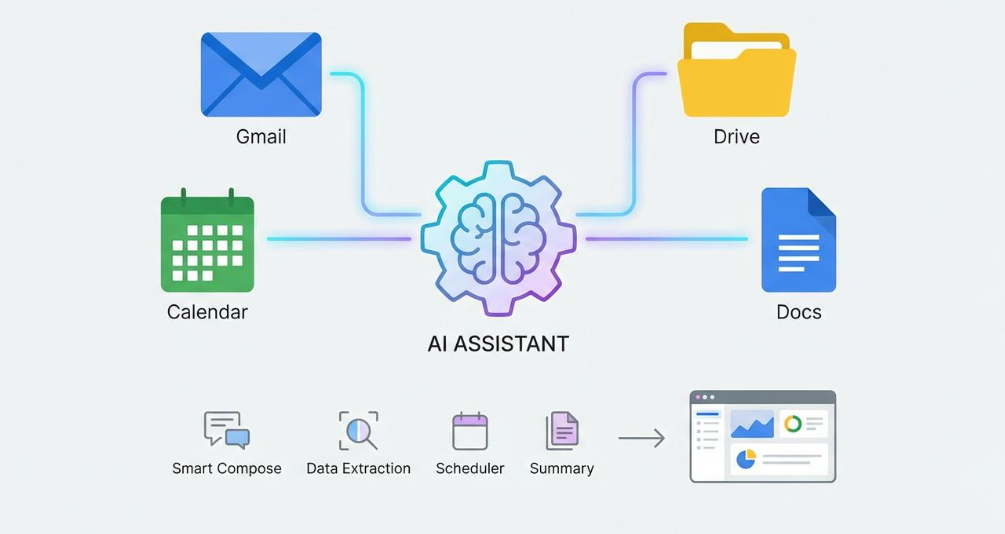
a) Google Workspace (Gog)
Gog remains the most established way to wire an OpenClaw agent into Gmail, Calendar, Drive, Docs, and Sheets through a single connection, and it’s one of the more heavily downloaded productivity skills on the registry.
Google has since put out its own community-supported Workspace CLI as an alternative, which is worth trying if you need deeper Workspace coverage than Gog provides.
What you can build:
- Weekly status summaries pulled from email and Docs
- A meeting scheduler that checks your calendar and drafts invites
- Automatic email triage that flags priorities and archives the rest
- A morning briefing combining calendar events, unread mail, and flagged tasks
b) Documents and Knowledge (Notion, Obsidian, Apple Notes)
If you keep a personal knowledge base, this category connects it directly to your agent so it can read, add, and link notes from a chat message rather than a separate app.
Useful for:
- Daily journal prompts drawn from recent notes
- Research summaries that connect ideas across your vault
- Automatic capture, anything you tell your agent gets filed to the right note
A connected knowledge base is what stops you from re-explaining context every session, which is easy to underrate next to flashier search-and-alert skills.
c) Web Automation (Agent Browser)
If you only add one skill for interacting with websites, this is it. It gives the agent a headless browser to fill out forms, extract data, capture screenshots, and complete tasks on its own, making it useful for lead generation, website monitoring, and any repetitive work that would otherwise require clicking through the same pages manually.
Productivity Skills
a) Team Chat (Slack, Discord)
Let the agent post updates, monitor channels for keywords, and escalate issues back to you. Common uses include scheduled reminders to specific teammates, automated standup updates, and cross-channel summaries such as pulling together what a team discussed over the week.
b) Project Management (Linear, Trello, Asana, Todoist, ClickUp)
Rather than checking five different boards, you ask your agent, and it pulls status, updates tickets, or creates new ones. It can send a weekly digest of open and blocked items, auto-create a ticket when it spots a bug in logs or a complaint in email, and sync status changes across tools, closed in Linear, updated in Notion, and posted to Slack.
c) Summarize

A general-purpose skill that condenses URLs, YouTube videos, podcasts, and local files into clean summaries. Its broad applicability compared to single-purpose skills is reflected in download counts well above 10,000, making it one of the most widely adopted skills on ClawHub.
It’s a natural fit for researchers, students, and anyone triaging long content before deciding whether it’s worth a full read or watch.
Research & Data Skills
a) GitHub
Connects your agent to your repositories so it can monitor pull requests, triage issues, and send updates when something needs attention, notifying you when CI/CD pipelines fail, creating or triaging issues from a chat message, and posting a daily digest of open PRs across projects.
b) News & Media (News Summary)
Turns your agent into a passive monitoring layer for a topic, industry, or competitor, filtering out noise and delivering only what’s relevant on a schedule you set.
Communication & Notification Skills
a) Payments & Business Systems (Stripe, PayPal + CRM)
Turns your agent into a lightweight ops tool by monitoring revenue activity and triggering downstream workflows instead of requiring someone to check a dashboard, triggering onboarding the moment a purchase logs into Stripe, posting a daily revenue snapshot before standup, and alerting on failed charges.
b) Email Marketing (Kit, Klaviyo, Mailchimp)
Connects your agent to your campaign platform so it can monitor performance and trigger sequences without opening a dashboard. Because this category touches customer data directly, stick to skills from established publishers and check the publisher profile and scan report before installing.
c) Social Media (LinkedIn, Reddit, X, Instagram Search)
Handles mention tracking and competitor monitoring, and for some skills, scheduling posts in your brand voice.
Developer & Security Skills
a) Security Auditor
Installing a skill is functionally the same as installing arbitrary code on your machine, which makes a monitoring skill like this the foundation that makes everything else on this list safer to run. It can run static checks on any third-party skill before installation, keep an audit log of every action your agent takes, restrict which external servers your agent can contact, and flag skills that change their requested permissions after installation.
b) Self-Improving Agent
Analyzes how you use your agent, identifies capability gaps, and builds new skills for you to review and activate.
It can improve recurring workflows, recognize repeated weekly requests and automate them, and draft a new skill mid-conversation when it encounters a capability it doesn’t already have.
c) Health & Fitness Tracking (WHOOP, Apple Health, Fitbit)
Rather than just displaying data, a connected agent can cross-reference recovery and sleep metrics with your calendar and actually adjust your schedule, flagging patterns like low recovery on days with late meetings, including HRV and sleep score in a morning briefing, and clearing gym blocks when recovery drops below a threshold you set.
d) Smart Home (OpenHue, Sonos)
Gives your agent one interface for lights and speakers instead of separate apps, and lets you combine them into routines tied to your calendar or health data, controlling your home from one chat message while traveling, starting a focus playlist and dimming lights during deep-work blocks, or alerting you if a device is left on overnight.
Security Best Practices for OpenClaw Skills
Installing an OpenClaw skill is more like installing software than adding a browser extension. Once installed, a skill can access the tools, files, and services your agent has permission to use. A poorly designed or malicious skill could misuse those permissions, which is why it’s important to review every installation carefully.
Before installing any third-party skill, follow these best practices:
- Run OpenClaw in an isolated environment. If possible, install it on a dedicated machine, virtual machine, container, or VPS rather than on your primary work computer. This limits the impact if something goes wrong.
- Require approval for sensitive actions. Configure your agent to request confirmation before performing irreversible actions, such as deleting files, sending emails, or making system changes. When possible, prefer safer actions like archiving instead of deleting.
- Start with the minimum permissions. Grant read-only access where available and only expand permissions after you’ve verified that the skill behaves as expected.
- Avoid running as the root or administrator user. Use a dedicated account with limited permissions so a compromised skill cannot gain unrestricted access to your system.
- Review every skill before installing it. Check who published it, whether it’s actively maintained, its community ratings or download history, and any available scan or security reports.
Be especially cautious of simple utilities, such as a weather or calculator skill, that request powerful permissions like shell or command execution, as those requests may not be justified.
A few extra minutes spent reviewing a skill before installation can significantly reduce the risk of exposing your data, accounts, or system to unnecessary security threats.
The Right Skills Need the Right Platform
Installing more skills doesn’t automatically make OpenClaw better. The best results come from choosing integrations that solve real problems, keeping your setup secure, and adding new skills only when they provide clear value.
Once you’ve decided which skills you want to use, the next step is making sure OpenClaw runs on a reliable platform. A stable hosting environment gives your AI agent the resources it needs to handle automations, integrations, and everyday tasks without unnecessary interruptions.
If you’re ready to deploy OpenClaw, get started with Truehost OpenClaw hosting and launch your AI agent on infrastructure that’s built for reliability, performance, and easy deployment.