Web Hosting
 Windows HostingBuilt for Windows apps and websites – stability, speed and flexibility
 Reseller HostingLaunch a hosting business without technical skills or expensive infrastructure
 Affiliate ProgramRefer customers and earn commissions from sales across our platform
 Domain SearchFind and secure a domain name in seconds with our quick lookup tool
 CO ZA Domains
 All DomainsExplore domain names from over 324 TLDs globally – all in one place
 Free Whois Lookup Tool South Africa
 VPS
VPS Website Builder
 Online ShopSet up a sleek eCommerce store with zero coding knowledge
 SSLs
SSLs SupportAccess help articles, how-tos, and everything about our services
 Blog
Blog Contact UsReach our team instantly via live chat or drop us an email
You wake up at 2 AM for the London session. Coffee ready, charts open,everything looks good. You spot a clean entry and move in.
Then the power goes out.
Load shedding. Router off. You’re disconnected, and just like that, the opportunity is gone.
so, why Windows VPS South Africa Forex?

If you trade from South Africa, this kind of thing happens more often than it should.
That’s why many traders are turning to Windows VPS setups. And interestingly, a lot of them aren’t even hosting locally—they’re using Europe-based servers instead.
In this guide, I’ll show you why that works better, and how you can set it up without any hassle.
Table of Contents
What Even Is a Windows VPS?
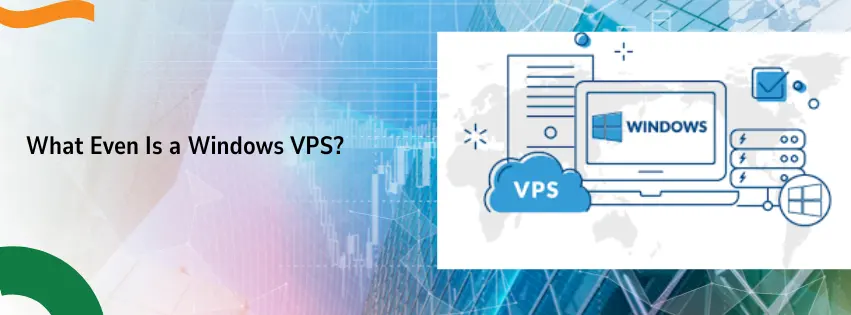
A VPS is just a remote computer. It lives in a big data centre. You rent it monthly.
You can leave it on 24/7. It does not care about Eskom. It does not care about your fibre dropping.
Why Windows?
Most of us grew up on Windows. It is comfortable.

Trading platforms like MT4, MT5, and cTrader run best on Windows. They were built for it.
A Windows VPS gives you that same Start menu. Same desktop. Same feel. No learning curve.
What Do Traders Actually Do With It?
- Run automated robots while you sleep.
- Keep 20 charts open without slowing down.
- Access your workspace from your phone or office PC.
- Never miss a trade because of a power cut.
It is like having a second PC that lives in a bunker. Always on. Always ready.
Why South African Traders Struggle (And Why a VPS Helps)
Let me list the pain points. See if any of these hit home.
1. Load Shedding Is a Nightmare
Eskom gives us a schedule. But the market does not care.
If your power dies at 10 AM, your home PC dies. Your open trades? Unprotected. Your bots? Dead.
A VPS runs in a data centre with backup generators and batteries. Load shedding means nothing to it.
2. Internet Drops at the Worst Time
Telkom. Rain. Vodacom. Even fibre can fail.
A VPS uses enterprise internet. Multiple lines. Redundant connections. It stays online when yours drops.
3. You Cannot Stay Awake 24 Hours
You have a life. A job. A family.
But the Forex market never sleeps.
A VPS runs your bots while you braai, sleep, or drive your kids to school. It works around the clock so you do not have to.
4. Your Home PC Is Too Slow
Trading platforms eat RAM. Open 10 charts with a few indicators, and your laptop starts crying.
A VPS gives you dedicated CPU and RAM. No lag. No freezing.
Why Europe Servers? Not Local?
This is the part that surprises most people.
You would think a server in Johannesburg is best. But for trading? Europe often wins.
a) Your Broker Is Probably in Europe
Most top brokers are in London, Cyprus, or the UK.
A VPS in Europe sits right next to them. Data travels fast. Really fast.
b) Lower Latency = More Money
Latency is just a fancy word for delay.
From South Africa, your trade might take 180 milliseconds to reach a London broker.
From a Europe VPS? Maybe 5 milliseconds.
That difference matters. Especially if you scalp or trade news events.
c) Better Infrastructure
European data centres are world class. Think Amsterdam, Frankfurt, London.
They have multiple power grids. Redundant fibre lines. 24/7 engineers.
Local hosting is good. But Europe is the big league.
d) Avoid Local Cable Congestion
The undersea cables connecting SA to the world (like WACS and SAT-3) get busy.
By hosting your VPS in Europe, your trades start on the same continent as your broker. You skip the cable jams.
What to Look For in a Windows VPS (Checklist)
Not all VPS plans are the same. Here is what actually matters for trading.
- RAM: 4GB minimum. 8GB is better if you run many EAs.
- CPU: 2 cores at least. Faster is better.
- Storage: SSD only. NVMe is even faster. No old spinning drives.
- Windows Version: Server 2019 or 2022. Stable and light.
- RDP Access: Full admin rights. Install anything you want.
- Low Latency: Ask for ping times under 10ms to London.
- Uptime: 99.9% or higher. No excuses.
- DDoS Protection: Stops attacks that could freeze your platform.
The Benefits of a Windows VPS for Trading
Let me give you the honest, day-to-day benefits.
1) Faster Trade Execution
You click buy. It buys. No spinning wheel. No “reconnecting” message.
That means you get the price you actually saw. Not a worse one.
2) Less Slippage
Slippage is when you click at R20.00 but it fills at R20.15.
That R0.15 adds up. Over 100 trades, that is R1,500 gone.
A fast VPS cuts slippage hard.
3) Your Bots Run Non-Stop
You install your EA once. It runs forever. Even if your laptop is in a cupboard.
Your bot trades while you sleep. While you work. While you watch the rugby.
4) Safe and Secure
Your home PC has kids downloading games. Spouses clicking weird links. Viruses happen.
A VPS is locked down. Only you log in. Your strategies stay yours.
5) Work From Anywhere
At the office? Log in from your work PC.
At a coffee shop? Log in from your phone.
On holiday? Log in from your tablet.
Your trading desk follows you everywhere.

Europe VPS vs South Africa VPS: The Simple Table
Here is a straight comparison. No hiding anything.
| Feature | Europe VPS (Truehost) | South Africa VPS |
| Latency to Forex Brokers | 1-10ms (blazing fast) | 150-200ms (slow) |
| Uptime | 99.99% (almost perfect) | 99.9% (very good) |
| Load Shedding Impact | Zero (not in SA) | Zero for VPS, but local net lags |
| Monthly Cost | R300 – R600 | R400 – R800 |
| Best For | Scalping, day trading, EAs | Long-term positions, backtesting |
| Broker Connection | Direct and close | Far and congested |
If you trade actively or use bots, Europe wins. If you hold trades for days, local might be fine. But speed always helps.
How to Set Up Your Windows VPS With Truehost (5 Simple Steps)
You do not need to be a tech person. Follow these steps.
Step 1: Go to Truehost
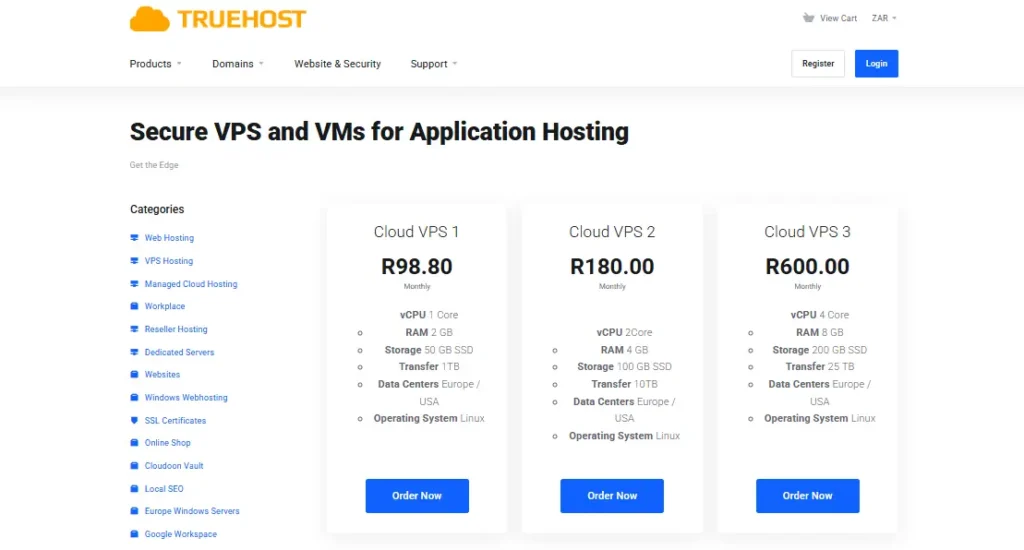
Open your browser. Search for Truehost Windows VPS.
Pick a plan with at least 4GB RAM and 2 CPUs. Do not overthink it. Start small.
Step 2: Complete Your Order
Enter your email. Pay with card or bank transfer.
Truehost sets everything up in minutes. Not hours. Not days.
Step 3: Check Your Email
They will send you:
- An IP address (looks like 123.45.67.89)
- A username (usually Administrator)
- A secure password
Keep this email safe.
Step 4: Connect Using Remote Desktop
On your Windows PC, type “Remote Desktop” in the search bar.
Open the app. Enter the IP address. Then your username and password.
Click connect. You are now on your Europe server.
Step 5: Install MT4 or MT5
Download your trading platform like normal.
Copy your EAs into the Experts folder. Set your charts.
Done. Your VPS is now a trading machine.
Why Truehost? (Honest Opinion)
I have tested many VPS providers. Here is why Truehost stands out for South Africans.
i) Local Support
You do not want to email a foreign company and wait three days.
Truehost has real support. They answer fast. They speak your language.
ii) Fair Pricing
No hidden fees. No “setup costs”. No fine print.
What you see is what you pay.
iii) Europe Servers Done Right
Truehost uses top-tier data centres in Europe. Low latency. High uptime.
Your trades reach London brokers in milliseconds.
iv) Easy for Beginners
You do not need to know Linux commands or server management.
Truehost gives you a ready-to-use Windows desktop. Just log in and trade.
v) Trusted by SA Traders
I am not the only one saying this. Many local traders use Truehost. They stay because it works.
Frequently Asked Questions
Q: Do I really need a Windows VPS for trading?
Not if you trade once a week manually. But if you use EAs or trade news, yes. It changes everything.
Q: How much RAM do I need for MT4?
4GB is fine for 10–20 charts with a few EAs. 8GB is better for heavy use.
Q: Is a Europe VPS actually faster from South Africa?
Yes. Ping to London from a Europe VPS is 1–10ms. From your home in SA, it is 150–200ms. Huge difference.
Q: Can load shedding affect my VPS?
No. The VPS is in Europe. Eskom has no power there. Your VPS runs 24/7.
Q: I am not technical. Can I do this?
Yes. If you can install MT4 on your home PC, you can use a VPS. Remote Desktop is that simple.
Q: What if something goes wrong?
Truehost support helps you. They fix issues fast. No stress.
Q: Can I use my VPS from my phone?
Yes. Download the Microsoft Remote Desktop app on Android or iPhone. Log in anywhere.
Final Word: Stop Letting Power Cuts Kill Your Trades
You have a choice.
Keep trading from your home PC. Pray load shedding does not hit at the wrong time. Hope your internet stays up.
Or get a Windows VPS South Africa solution from Truehost. Hosted in Europe. Built for speed. Designed for traders.
Your bots will run non-stop. Your trades will execute faster. Your slippage will drop.
And you will finally sleep through the night without worrying about Eskom.
Ready to Trade Like a Pro?
Do not wait for another power cut to ruin your week.
Truehost makes it easy. Affordable plans. Europe servers. Local support.