Web Hosting
 Windows HostingBuilt for Windows apps and websites – stability, speed and flexibility
 Reseller HostingLaunch a hosting business without technical skills or expensive infrastructure
 Affiliate ProgramRefer customers and earn commissions from sales across our platform
 Domain SearchFind and secure a domain name in seconds with our quick lookup tool
 CO ZA Domains
 All DomainsExplore domain names from over 324 TLDs globally – all in one place
 Free Whois Lookup Tool South Africa
 VPS
VPS Website Builder
 Online ShopSet up a sleek eCommerce store with zero coding knowledge
 SSLs
SSLs SupportAccess help articles, how-tos, and everything about our services
 Blog
Blog Contact UsReach our team instantly via live chat or drop us an email
Which one actually saves you money and stress in 2026?
You are a developer in Joburg, Durban, or Cape Town. Your shared hosting keeps crashing. Or maybe you need to host a bot, an API, or a custom app for a client.
You know you need a VPS hosting server. But now you face the old question. Windows or Linux?
Do not just pick the popular one. Pick the one that actually works for your code.

We at Truehost have helped thousands of South African developers make this choice. This guide compares Windows and Linux VPS side-by-side.
We will look at speed, cost, and the loadshedding factor. By the end, you will know exactly which virtual machine fits your project.
Let us get straight to it.
Table of Contents
The Quick Answer For Busy Developers
Before we go deep, here is the short version. Save this for later.

| Your Main Tool | Your Best Choice | The Simple Reason |
|---|---|---|
| .NET, MSSQL, or Pastel | Windows VPS | It just works. No compatibility hacks needed. |
| Python, Node.js, PHP | Linux VPS | Lighter and faster for open source tools. |
| You hate the command line | Windows VPS | You get a full desktop screen via Remote Desktop. |
| You love the terminal | Linux VPS | You get full root control via SSH. |
At Truehost, we offer both options. We do not force you into one box. You pick the weapon you fight best with.
The Loadshedding Reality Check
For sure, you cannot control Eskom. Nobody can. But you can control where your server lives.
If you host a server in your office, it dies when the lights go out. That is bad for business. Your clients get angry. You lose money.
A VPS hosting server lives in a data center.
These data centers, like our Joburg facility, have industrial generators and big battery banks. Your code stays online 24 hours a day, 7 days a week, even during Stage 6.
So moving to a VPS is not just about speed. It is about keeping your money coming in when the grid goes down. It is about sleeping better at night.
What Is A Windows VPS Actually Like?
Think of a Windows VPS as your own office PC, but hosted in the cloud. You access it using “Remote Desktop Connection.” It looks exactly like your Windows 11 desktop at home.
You see the start menu. You see the taskbar. You can click around with your mouse. Nothing scary.
When Should You Buy A Windows VPS?
You should buy one if you are building on Microsoft technology. Here are the specific cases.
You use .NET or ASP.NET.
Linux does not run these tools natively. You could try workarounds, but they break often. Save yourself the headache.
You need MSSQL.
The Microsoft database needs a Microsoft home. That is just how it works.
You run Accounting Software.
Apps like Sage or Pastel need Windows. They will not even install on Linux.
You hate typing commands.
That is fine. Many developers feel the same way. You can click icons instead of memorizing syntax. No shame in that.
The Cost Side Of Windows
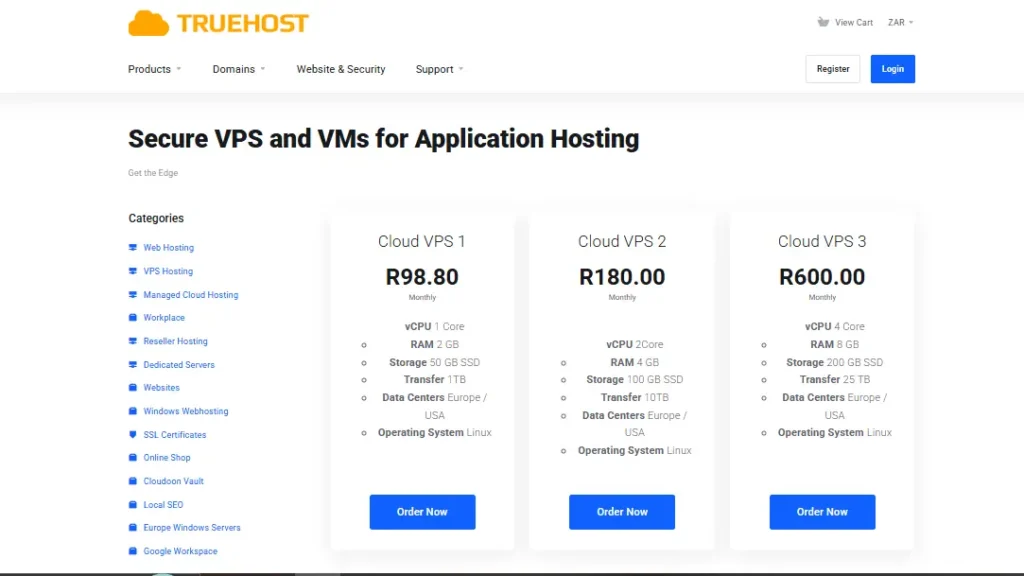
Here is the truth nobody tells you. Windows requires a license fee. Microsoft charges for that privilege.
Because of this, a Windows VPS hosting server usually costs a bit more than Linux. That is just the market.
But, at Truehost, we bundle that license into the monthly price. You do not see a surprise bill at the end of the month. You just pay one low rate in Rands. No hidden fees. No fine print.
What Is A Linux VPS Actually Like?
Linux is the engine of the internet. It is open source. That means it is free. It runs on distributions like Ubuntu, CentOS, or Debian.
You manage a Linux VPS using a black and white window called the Terminal. You connect using a tool called SSH.
There is no start menu. There are no icons. You type commands to do everything. It sounds hard, but it becomes second nature after a week.
When Should You Buy A Linux VPS?
You should buy it if you want speed and control without extra monthly fees.
You code in Python, Node.js, or PHP.
Linux runs these languages perfectly. Most online tutorials assume you are using Linux anyway.
You use MySQL or PostgreSQL.
These are the standard databases for the web. They were built on Linux first.
You want max power for cheap.
No license fees means more RAM and CPU for your money. A cheap Linux VPS often beats an expensive Windows VPS in raw speed.
You use Docker.
Containers run best on Linux. If you use Docker in your workflow, you want Linux as your host.
The Performance Edge Of Linux
Because Linux does not have a heavy “Start Menu” or visual animations, it uses less RAM. Much less.
A fresh Windows server might use 1.5GB of RAM just to sit there doing nothing. A fresh Linux server might use 150MB. That leftover RAM goes straight to your applications.
Your code runs faster on a cheaper machine. That is the Linux advantage.
Side By Side: Windows vs Linux
Here is how they stack up for a South African developer. Look at this table carefully.
| Feature | Windows VPS | Linux VPS |
|---|---|---|
| Interface | Graphical (GUI) – Point and Click | Command Line (Terminal) – Type to win |
| Best For | .NET, MSSQL, C#, Accounting | Python, Node.js, PHP, Ruby, Go |
| Learning Curve | Low – feels like home | Medium – need to learn a few commands |
| Resource Use | Higher – uses 1-2GB just for the OS | Very Low – lean and mean |
| License Cost | Extra – but we include it in our price | Free – always free |
| Control Panel Options | Plesk (optional) | cPanel / DirectAdmin (optional) |
The Developer Workflow Difference
For Windows:
You RDP into your server. You open Visual Studio. You hit the Run button. You deploy using IIS. It feels like you are working on your own laptop.
For Linux:
You SSH into your server. You type git pull to get your latest code. You run npm start or python app.py. You use Nano or Vim to edit files. It feels fast and powerful.

The South African Special: Local Latency
You do not want your server in New York or London. When data travels under the ocean, you get lag. Slow loading times. Frustrated users.
Local is truly lekker.
At Truehost, our VPS hosting server hardware sits in Johannesburg. Your ping time is around 5 to 20 milliseconds.
If you host in Europe, your ping is 150 to 200 milliseconds. That is ten times slower. Every click has a delay.
For a developer, low latency means:
- SSH connections feel snappy and responsive.
- Database imports finish much faster.
- No spinning wheel of death when you run tests.
- Your clients in SA get a fast website.
You can read more about data center locations and how they affect performance at this external guide on server latency in emerging markets. It explains why local hosting beats international hosting for local audiences.
Which One Should You Actually Pick?
We cannot decide for you. But we can help you choose based on your situation.
Pick Windows VPS if any of these fit you:
- You are building a corporate tool for a company that uses Outlook and Office every day.
- You are a freelancer who needs to host a client’s ASP.NET site.
- You want to run a Forex trading bot or an AutoCad license server.
- You just want to use Remote Desktop and avoid the terminal completely.
- You are more comfortable clicking than typing commands.
Pick Linux VPS if any of these fit you:
- You are building a WordPress site (PHP and MySQL stack).
- You are hosting a Discord bot or a Telegram bot for your community.
- You use Docker and Kubernetes in your daily workflow.
- You want to save every possible cent of your budget for coffee or data bundles.
- You are willing to learn basic commands like
ls,cd, andnano.
Why Truehost Is The Right Home For Your VPS
You have many choices in South Africa. We know that. But we at Truehost build our servers specifically for local developers like you.
We use NVMe SSDs exclusively.
Old hosts use old spinning hard drives or slow SATA SSDs. We use NVMe. It is the fastest storage on the market right now. Your code compiles faster. Your databases query faster. Your websites load instantly.
We price everything in Rands.
No US Dollar exchange rate surprises at the end of the month. You budget in Rands. You pay in Rands. What you see is what you pay.
We offer both operating systems.
You can start a Linux VPS today. Next month, if you realize you need Windows, you can deploy a new one. We support both with zero stress and zero judgment.
We are POPIA compliant.
Keeping your data inside our Joburg servers helps you follow South African privacy laws. You do not have to worry about data crossing borders illegally.
We understand loadshedding.
Our team lives here too. We know what it is like to work by candlelight. That is why our data center has multiple backup layers. Generators. Batteries. Redundant links. Your server stays up even when your suburb goes dark.
Stop Overthinking. Start Deploying.
You do not need a long emotional story to know what you need.
- If you need Microsoft tools, get Windows.
- If you use open source tools, get Linux.
Both will stop your loadshedding headaches. Both will make your app faster than shared hosting. Both will give you full root control.
The only wrong choice is doing nothing while your current host keeps crashing.
Ready to move your project?
Get a VPS hosting server at Truehost today. Spin up a Windows or Linux VM in a few minutes. Start coding like a pro.
Frequently Asked Questions
Can I switch from Linux to Windows later?
Not directly. You would need to back up all your data and deploy a brand new VPS. Choose wisely based on your coding language from the start.
Do I need to be a hacker to use a Linux VPS?
No. But you should know basic commands like cd to change folders, ls to list files, and sudo to run admin tasks. If those three words look scary to you, pick Windows instead.
Does loadshedding affect Truehost servers?
No. Our Joburg data center has backup generators and battery systems. Your server stays online even if your office is completely dark.
Which one is cheaper overall?
Linux is cheaper because there are no license fees. But at Truehost, our Windows plans are very competitive because we manage the Microsoft licenses for you behind the scenes.
Can I host a game server on a VPS?
Yes. Many South African gamers use our VPS for low latency Minecraft, CS2, or Rust servers. Linux is usually better for game hosting because it uses less RAM for the operating system.
Do you offer backups?
Yes. We offer automated backups for an small extra fee. You can also set up your own backup script if you prefer. Never lose your work again.
What control panels do you support?
For Linux, we support cPanel, DirectAdmin, and CyberPanel. For Windows, we support Plesk. You can install these yourself or ask our support team to help.
Final Word From The Truehost Team
We have been hosting South African developers for years. We have seen every mistake and every success.
The best developers are not the ones who pick the “cool” operating system. They are the ones who pick the tool that lets them ship code faster.
So be honest with yourself. Do you want to click or type? Do you need Microsoft or open source? Answer those two questions, and your choice becomes clear.
Now go build something great. We will keep the lights on for you.